ToolMage
Sign in

Best 1 Server Management AI tools for Devops

Popular Server Management AI tools in Devops include VPS Commander, helping you work more efficiently.

VPS Commander
Paid

VPS Commander

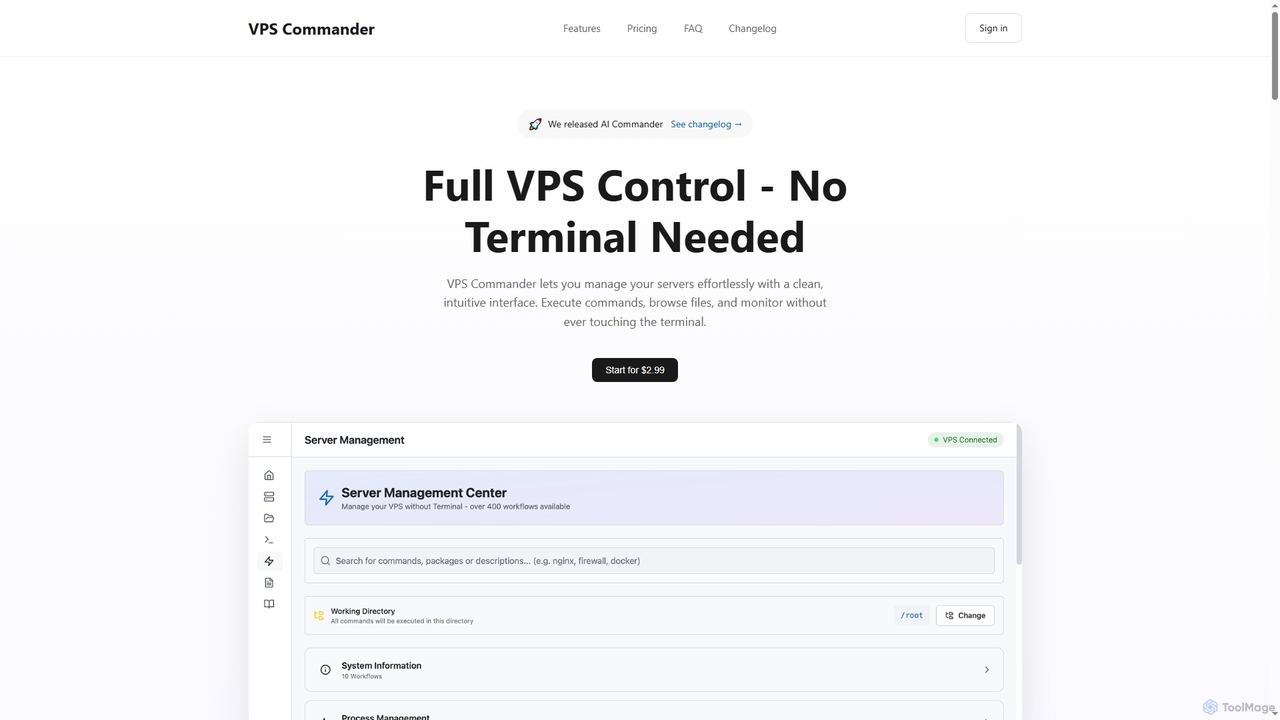
VPS Commander simplifies complex server management, transforming intricate terminal commands into intuitive clicks. It offers a modern interface for managing workflows, files, and processes, empowering anyone to control their Virtual Private Servers without needing command-line expertise.

Cloud Management
Visits 6.5KFavorites 137Likes 124

About Server Management

AI Server Management tools are a specialized category within DevOps that use artificial intelligence to automate the monitoring, maintenance, and optimization of server infrastructure. These tools leverage machine learning algorithms to analyze performance metrics, predict potential failures, and automate routine tasks like patching and configuration. Their primary value is in enhancing system reliability, improving security posture, and freeing up operations teams from manual, repetitive work. Unlike traditional monitoring systems, AI-driven solutions can identify anomalous patterns and root causes that are often invisible to human operators.

Core Features

  • Predictive Monitoring: Analyzes historical data and real-time metrics to forecast potential issues like disk failures or performance degradation before they occur.
  • Automated Root Cause Analysis: Automatically correlates logs, metrics, and events to pinpoint the source of a problem, drastically reducing troubleshooting time.
  • Intelligent Resource Optimization: Dynamically allocates or suggests adjustments for CPU, memory, and storage based on workload predictions to balance performance and cost.
  • Automated Remediation & Self-Healing: Executes predefined actions, such as restarting services or scaling resources, to resolve detected issues without human intervention.
  • Security & Compliance Automation: Continuously scans for vulnerabilities and automates the application of security patches to maintain compliance and system integrity.

Use Cases

These tools are essential for managing large-scale cloud environments (AWS, Azure, GCP), complex microservice architectures, and on-premise data centers. They are primarily used by Site Reliability Engineers (SREs), DevOps teams, and IT administrators in sectors like e-commerce, finance, and SaaS, where system uptime and performance are critical business requirements.

How to Choose

When selecting an AI Server Management tool, evaluate its integration capabilities with your existing stack (e.g., Kubernetes, Prometheus). Assess the scope of its automation—does it only provide alerts or can it perform corrective actions? Consider the transparency of its AI models and ensure it can scale to meet the demands of your entire infrastructure. Finally, review its support for hybrid and multi-cloud environments if applicable.

Server Management use cases

1

Proactive Failure Prediction for E-commerce Platforms

A Site Reliability Engineer (SRE) for a high-traffic online retailer uses an AI server management tool to prevent downtime during peak shopping seasons. The tool continuously analyzes server performance metrics like CPU, memory, and network latency. It identifies a subtle memory leak pattern that historically precedes application crashes. By alerting the team before a failure occurs and providing a root cause analysis, it allows them to patch the application proactively, ensuring a smooth customer experience during critical sales events.

2

Automated Resource Scaling for SaaS Applications

A DevOps engineer at a SaaS company faces fluctuating user traffic, leading to either costly over-provisioning or poor performance. The AI server management tool monitors real-time usage and predicts upcoming traffic spikes. It automatically scales up server instances before the load increases and scales them down during quiet periods. This intelligent, just-in-time resource allocation ensures optimal performance during peak hours while reducing cloud infrastructure costs by dynamically matching capacity to demand.

3

Intelligent Root Cause Analysis in Microservices

An IT Operations Manager for a fintech firm needs to resolve a transaction processing slowdown. With hundreds of microservices, manually identifying the faulty service is extremely difficult. The AI tool ingests and correlates logs and traces from all services. It quickly identifies that a performance degradation in the database is linked to an unusual query pattern from a specific authentication service, pinpointing it as the root cause. This reduces the Mean Time to Resolution (MTTR) from hours to minutes, enabling a rapid fix.

4

Automated Security Vulnerability Patching

A system administrator in a regulated industry like healthcare must ensure all servers are patched against vulnerabilities. Manually tracking and applying patches is time-consuming and error-prone. The AI server management tool continuously scans the server fleet for known vulnerabilities (CVEs). When a critical vulnerability is found, it automatically schedules and applies the patch during a maintenance window, following a predefined rollout policy to minimize disruption. This ensures compliance and closes security holes rapidly.

5

Optimizing Hybrid Cloud Workload Placement

A cloud architect for a large enterprise manages workloads across both on-premise data centers and public clouds. Deciding where to run a new application for optimal cost and performance is complex. The AI tool analyzes the application's resource requirements and historical performance data. It then recommends the best placement—on-premise for data-sensitive workloads or in the cloud for burstable tasks—based on cost, latency, and compliance constraints. This enables data-driven infrastructure decisions that optimize the total cost of ownership (TCO).

6

Self-Healing for Unstable Application Services

A DevOps team lead for a media streaming service notices that a specific video transcoding service occasionally freezes under heavy load, requiring a manual restart. The AI monitoring system is configured to detect this 'frozen' state by analyzing response times and error logs. Upon detection, it automatically triggers a predefined workflow: restart the service, drain traffic to a healthy instance, and log the incident for later analysis. This automates recovery from common failures, improving service availability without requiring 24/7 manual intervention.

Server Management FAQ

What are AI Server Management tools?

AI Server Management tools are advanced software solutions that use machine learning to automate and optimize the administration of server infrastructure. Unlike traditional tools, they proactively analyze data to predict failures, identify the root cause of issues automatically, and can even perform self-healing actions. Their main goal is to increase system reliability, enhance security, and reduce the manual workload for DevOps and IT operations teams.

How do AI Server Management tools differ from traditional monitoring tools?

Traditional monitoring tools are typically reactive, alerting you when a predefined threshold is breached (e.g., CPU usage exceeds 90%). AI Server Management tools are proactive. They analyze complex patterns across thousands of metrics to predict issues before they happen, identify unknown anomalies, and often suggest or automate the remediation steps. In short, traditional tools tell you what happened, while AI tools can tell you why it happened and what might happen next.

Who should use AI Server Management tools?

These tools are most beneficial for organizations managing complex, large-scale, or mission-critical infrastructure. Key users include:

  • Site Reliability Engineers (SREs): To automate toil and improve system reliability.
  • DevOps Teams: To integrate intelligent monitoring and remediation into CI/CD pipelines.
  • IT Operations (ITOps) Staff: To manage large server fleets more efficiently and proactively.
  • System Administrators: To reduce manual intervention for tasks like patching and troubleshooting.

They are particularly valuable for e-commerce, SaaS, finance, and online gaming industries where uptime is crucial.

What are the key features to look for in an AI Server Management tool?

When choosing a tool, focus on these critical features:

  • Predictive Analytics: The ability to forecast potential issues based on historical trends and real-time data.
  • Automated Root Cause Analysis: To quickly identify the source of problems without manual log diving.
  • Self-Healing & Automation: The capacity to automatically resolve issues by restarting services, scaling resources, etc.
  • Broad Integrations: Compatibility with your cloud providers (AWS, Azure, GCP), container platforms (Kubernetes), and existing monitoring tools.
  • Scalability: The ability to handle your infrastructure's current and future size and complexity.
Is AI Server Management only for cloud environments?

No, while highly effective for dynamic cloud environments like AWS, Azure, and GCP, AI Server Management tools are also extremely valuable for on-premise data centers and hybrid cloud setups. The core principles of predictive monitoring, automated remediation, and resource optimization apply to any server infrastructure, whether physical or virtual. These tools help improve the reliability and efficiency of both traditional and modern IT environments.