
ToolMage
Sign in

Best 1 Printing AI tools for E Commerce

Popular Printing AI tools in E Commerce include MyPrint.ai, helping you work more efficiently.

MyPrint.ai
Paid

MyPrint.ai

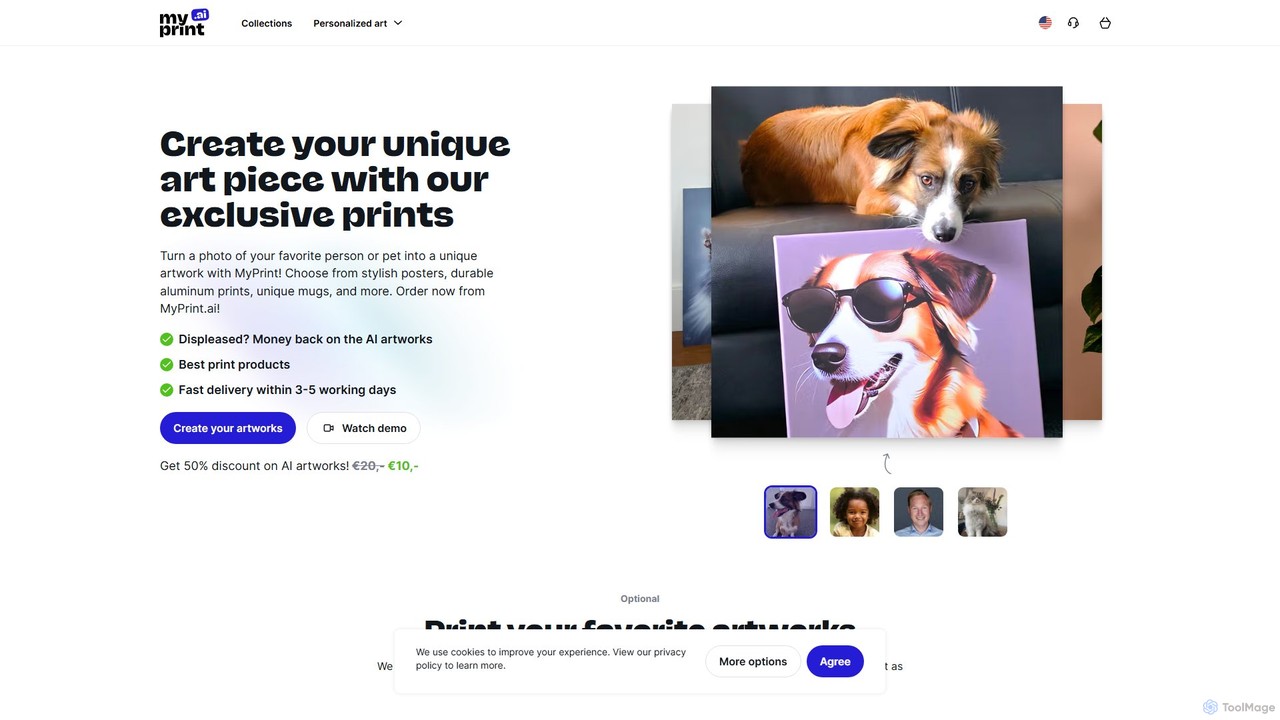
MyPrint.ai is an AI-powered service that transforms your personal photos of people and pets into over 100 unique artworks. Choose from various artistic styles, download your creations, and order high-quality custom prints on products like canvas, posters, and mugs for personalized decor or unique gifts.

Personalized Art
Visits 10.4KFavorites 133Likes 128

About Printing

AI Printing tools are a class of software that uses artificial intelligence to automate the design and preparation of graphics for physical products, primarily within e-commerce. These tools leverage generative algorithms to create unique designs, patterns, and text effects, and can automatically generate print-ready files. Their main value lies in enabling businesses, especially in the print-on-demand (POD) sector, to scale product creation and offer mass personalization. They significantly reduce the manual effort required in graphic design and pre-press processes.

Core Features

  • Generative Design Creation: Automatically produces unique images, patterns, and typographic designs based on text prompts or style parameters.
  • Automated Mockup Generation: Instantly places generated designs onto various product templates like t-shirts, mugs, and posters to create realistic previews.
  • Print File Optimization: Automatically checks and adjusts files for resolution, color profiles (CMYK/RGB), and bleed requirements to ensure print quality.
  • Personalization at Scale: Enables the creation of thousands of unique design variations for personalized products without manual intervention.
  • E-commerce Integration: Connects directly with platforms like Shopify or WooCommerce to streamline the process of creating and publishing new products.

Use Cases

These tools are ideal for print-on-demand (POD) store owners, custom merchandise businesses, and marketing teams. For example, a POD entrepreneur can generate hundreds of niche t-shirt designs in a day, while a corporate marketing department can create personalized promotional items for an entire event with minimal design work.

How to Choose

When selecting an AI Printing tool, consider the quality and style of the AI-generated designs. Evaluate its integration capabilities with your e-commerce platform and printing partners. Also, check the range of supported products for mockups and the level of control you have over the final print-ready files, including resolution and color management options.

Printing use cases

1

Automate T-shirt Designs for a POD Store

A print-on-demand (POD) store owner wants to quickly expand their catalog with designs targeting niche hobbies like vintage car collecting. Using an AI printing tool, they input prompts like 'classic muscle car illustration, retro sunset style, for t-shirt'. The AI generates dozens of unique, print-ready designs in minutes. The tool then automatically creates mockups on different t-shirt colors and pushes the new products directly to their Shopify store, saving hours of manual design and data entry work per day.

2

Create Personalized Corporate Merchandise

A marketing manager needs to create branded notebooks for 200 event attendees, each with the attendee's name. Instead of manually editing a template 200 times, they use an AI printing tool. They upload the company logo and a list of names. The AI tool automatically generates a unique, print-ready PDF file for each notebook, correctly placing the logo and each individual's name in the designated design area. This reduces a multi-day task to under an hour and eliminates the risk of manual errors.

3

Generate Seamless Patterns for Fabric Printing

A textile designer for a fashion brand needs to develop a new collection of unique patterns. They use an AI printing tool specialized in pattern generation. By providing themes like 'botanical art deco' or 'geometric tribal motifs', the AI produces hundreds of high-resolution, seamless patterns. The designer can then fine-tune colors and scale before exporting the final files directly to their fabric printing manufacturer. This process accelerates creative exploration and reduces the design cycle from weeks to days.

4

Design Custom Book Covers for Self-Publishing

A self-publishing author needs a compelling cover for their new sci-fi novel but lacks a design budget. They use an AI printing tool for book covers. They input the book title, author name, and a brief synopsis. The AI analyzes the text for key themes and generates several cover concepts in different styles, complete with appropriate typography and imagery. The author selects the best option, makes minor text adjustments, and downloads a print-ready cover file formatted for both paperback and ebook platforms.

5

Automate Print File Preflight Checks

A commercial print shop receives hundreds of files from clients daily, many with technical issues like low resolution, incorrect color modes, or missing fonts. They integrate an AI printing tool into their workflow. The tool automatically scans every incoming file, flags potential printing problems, and in many cases, automatically corrects them (e.g., converting RGB to CMYK). It then generates a report for the operator, highlighting files that still need manual review. This automates a critical quality control step, reducing misprints and saving hours of technician time.

6

Generate Localized Marketing Materials

A global retail brand needs to create promotional posters for a sale event across 15 different countries. Each poster requires localized text, currency, and culturally relevant imagery. A marketing team uses an AI printing tool with localization features. They create a master template and provide the AI with a spreadsheet of regional data. The AI automatically generates 15 print-ready poster variations, swapping text, prices, and even selecting appropriate stock images based on regional tags. This ensures brand consistency while achieving local relevance efficiently.

Printing FAQ

What are AI Printing tools?

AI Printing tools are software applications that use artificial intelligence to automate the creation and preparation of designs for printed materials, especially for e-commerce products. They can generate unique graphics from text prompts, automatically place designs on product mockups, and optimize files for professional printing. Their primary goal is to help users, particularly those in the print-on-demand industry, to create a large volume of personalized products quickly and efficiently, often without needing advanced design skills.

How to choose the right AI Printing tool for a POD business?

When choosing an AI Printing tool for a print-on-demand (POD) business, consider these key factors:

  • E-commerce Integration: Ensure it seamlessly connects with your store platform (e.g., Shopify, Etsy, WooCommerce) to automate product creation and order fulfillment.
  • Design Quality and Variety: Evaluate the style and uniqueness of the AI-generated art. Does it match your brand's aesthetic and niche?
  • Mockup Generator Quality: Check the realism and variety of the product mockups. High-quality mockups are crucial for sales.
  • Print File Output: Verify that the tool exports high-resolution files (300 DPI is standard) in the correct color space (usually CMYK) required by your print provider.
  • Pricing Model: Understand the cost structure. Is it a monthly subscription, per-design fee, or a combination? Ensure it aligns with your business model.
What's the difference between AI Printing tools and traditional design software?

The main difference lies in automation and generation versus manual creation. Traditional software like Adobe Photoshop or Illustrator gives designers precise, manual control over every element of a design. They are powerful tools for creating complex, bespoke artwork from scratch. In contrast, AI Printing tools are designed for speed and scale. They automate the design process by generating new concepts, applying them to products, and preparing files in bulk. They lower the barrier to entry for design creation but typically offer less granular control than traditional software.

Do I need design skills to use AI Printing tools?

Generally, no. One of the primary advantages of AI Printing tools is that they are designed to be accessible to users without a formal background in graphic design. Users can typically generate complex and aesthetically pleasing designs by writing simple text descriptions (prompts). However, having a good eye for composition, color theory, and understanding basic design principles can help you create more effective prompts and refine the AI's output to achieve better, more professional-looking results.

What types of products can be designed with AI Printing tools?

AI Printing tools can be used to design a wide variety of products commonly found in e-commerce and print-on-demand catalogs. The most common categories include:

  • Apparel: T-shirts, hoodies, sweatshirts, and leggings.
  • Accessories: Tote bags, phone cases, hats, and socks.
  • Home & Living: Mugs, posters, canvas prints, pillows, and blankets.
  • Stationery: Greeting cards, stickers, notebooks, and invitations.
  • Publishing: Book covers for both print and digital formats.

The specific range of products depends on the tool's mockup library and its integration with print providers.