ToolMage
Sign in

Best 1 Headshot Generator for Image Generation

Popular Headshot Generator in Image Generation include MeinBewerbungsfoto, helping you work more efficiently.

MeinBewerbungsfoto
Paid

MeinBewerbungsfoto

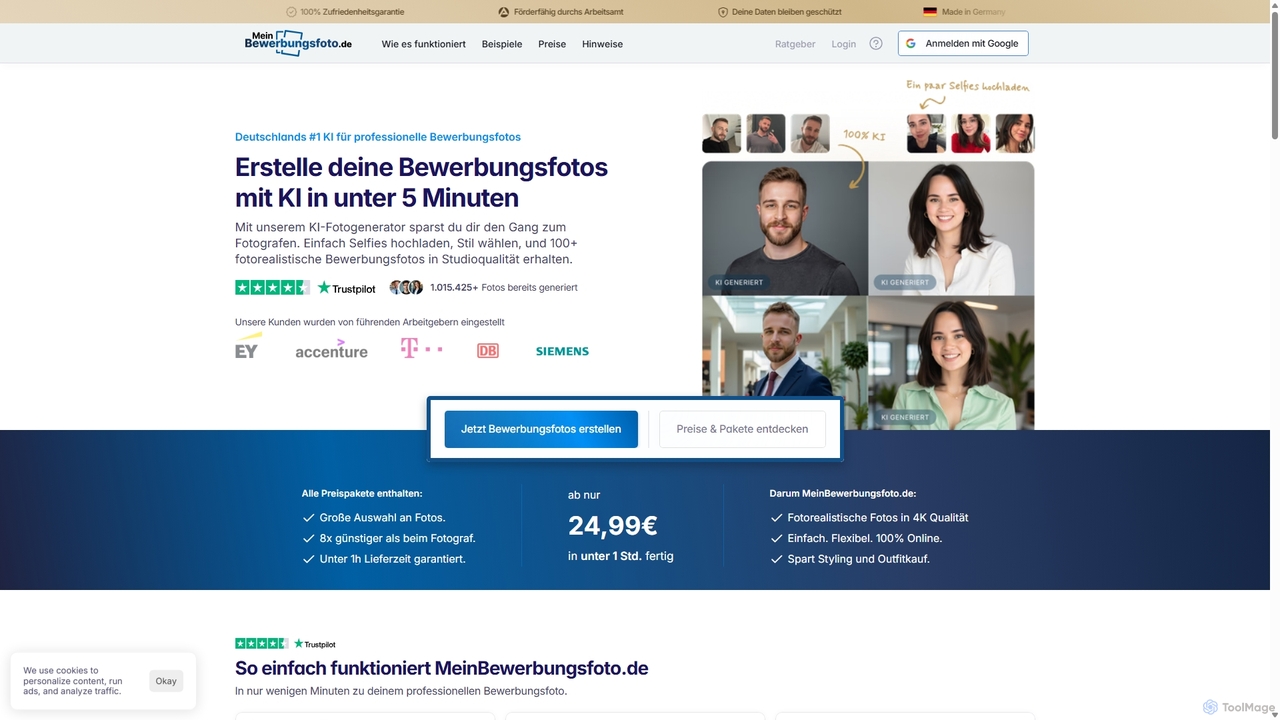
MeinBewerbungsfoto is an AI-powered tool that transforms your selfies into professional, studio-quality application photos. Simply upload your photos, choose from hundreds of outfits and backgrounds, and receive over 100 photorealistic headshots in under an hour. It's a fast, affordable, and convenient alternative to traditional photoshoots, perfect for job applications, LinkedIn profiles, and corporate branding.

Resume Builder
Visits 5.2KFavorites 122Likes 135

About Headshot Generator

AI Headshot Generators are specialized tools that transform your existing photos into professional, studio-quality portraits. Using advanced generative AI models, these platforms analyze your facial features from uploaded selfies and create a variety of new headshots in different styles, outfits, and backgrounds. This allows individuals and teams to obtain high-quality professional images for corporate profiles, social media, or personal branding without the need for a physical photoshoot. The technology focuses specifically on creating realistic and flattering human portraits, distinguishing it from general-purpose image generators.

Core Features

  • Style & Outfit Customization: Virtually change clothing to professional attire like suits or blazers and select from various styles (e.g., corporate, casual, creative).
  • Background Replacement: Automatically replace your original background with a clean studio backdrop, office setting, or solid color.
  • Lighting & Expression Enhancement: Adjust lighting to create a studio-like effect and subtly refine facial expressions for a more confident and approachable look.
  • High-Resolution Output: Generate images in high resolution suitable for printing, websites, and professional platforms like LinkedIn.
  • Variety Generation: Produce dozens or even hundreds of unique headshot variations from a single set of uploaded photos.

Use Cases

These tools are widely used by job seekers and freelancers to create polished LinkedIn profiles and resumes. Companies utilize them to ensure consistent, professional headshots for all employees on their websites and internal directories, especially for remote teams. Marketing and PR professionals also use them to generate consistent imagery for speakers at events or for press releases.

How to Choose

When selecting an AI Headshot Generator, evaluate the realism and quality of the output images—they should not look overly artificial. Consider the variety of styles, clothing, and backgrounds offered. Review the platform's privacy policy regarding how your uploaded photos are handled and stored. Finally, compare pricing models, which may be based on credits, a one-time purchase, or a subscription, to find one that fits your needs.

Headshot Generator use cases

1

Enhancing Professional LinkedIn Profiles

Job seekers, freelancers, and consultants often need a professional headshot to make a strong first impression on platforms like LinkedIn. Instead of arranging an expensive photoshoot, they can upload 10-15 casual photos of themselves to an AI Headshot Generator. The tool analyzes their facial features and generates over 100 headshots in various professional settings, wearing different outfits like suits and blazers, and with different lighting. This allows them to select the perfect, high-quality image that enhances their personal brand and credibility, potentially increasing their visibility to recruiters and clients.

2

Creating Consistent Corporate Team Photos

A company, especially one with a remote or distributed workforce, struggles to maintain a consistent look for employee photos on their website's 'About Us' page or internal directory. An HR or marketing manager can use an AI Headshot Generator to solve this. They can purchase a team plan and invite employees to upload their own photos. The manager can then select a uniform style (e.g., grey background, business casual attire) to be applied to everyone. The AI generates professional, consistent headshots for the entire team, ensuring a polished and unified brand image without the logistical challenge of coordinating a company-wide photoshoot.

3

Generating Speaker Photos for Events

Event organizers need high-quality, uniform headshots of all speakers for marketing materials like brochures, websites, and social media posts. Collecting photos from dozens of speakers often results in a mix of qualities, styles, and backgrounds, which looks unprofessional. An organizer can ask each speaker for a few clear photos and use an AI Headshot Generator to process them. By applying a single template (e.g., dark background, formal attire), they can produce a full set of cohesive speaker portraits. This elevates the event's branding and saves significant time compared to manually editing each photo or hiring a photographer for every speaker.

4

Quickly Creating Dating Profile Pictures

An individual looking to improve their online dating profile wants a variety of attractive, high-quality photos but lacks recent ones. They can use an AI Headshot Generator to refresh their image. By uploading a selection of their best selfies, the AI can generate a diverse portfolio of pictures. This includes photos with different backgrounds (e.g., outdoor, cafe), various casual but stylish outfits, and improved lighting that makes them look their best. This provides them with a range of new, appealing photos to use across different dating apps, helping them present a more polished and versatile persona without needing a professional photographer.

5

Author Headshots for Book Covers and Bios

An author preparing to publish a book needs a professional headshot for the book jacket, website, and promotional materials. Instead of a time-consuming photoshoot, they can use an AI Headshot Generator. By uploading a few well-lit photos, the author can generate a wide range of headshots that match the tone of their book. For example, a thriller writer might choose a dramatic, low-key lighting style, while a non-fiction author might opt for a friendly, approachable look with a library background. This provides a cost-effective and fast way to get a variety of high-quality, genre-appropriate author photos.

6

Updating Social Media and Personal Branding

A content creator or industry professional wants to maintain a consistent and high-quality visual identity across all their social media platforms (Twitter, Instagram, etc.). They can use an AI Headshot Generator to create a 'brand pack' of images. After uploading their photos, they can generate headshots in various styles—some professional for LinkedIn, some creative for Instagram, and some friendly for Twitter. This allows them to have a cohesive set of profile pictures that are all high-resolution and clearly feature them, strengthening their personal brand recognition and presenting a polished image to their audience across all channels.

Headshot Generator FAQ

What is an AI Headshot Generator?

An AI Headshot Generator is a specialized software tool that uses artificial intelligence to create professional-quality portraits from your everyday photos. You upload a series of your existing pictures (like selfies), and the AI model learns your facial features. It then generates a wide variety of new, high-resolution headshots with different backgrounds, lighting, and professional attire, eliminating the need for a traditional photoshoot.

How do AI Headshot Generators differ from general AI Image Generators?

The key difference is specialization. A general AI Image Generator (like Midjourney or DALL-E) can create any image from a text prompt but may struggle with creating a realistic and consistent likeness of a specific person. An AI Headshot Generator is specifically trained on vast datasets of portraits. It is fine-tuned to:

  • Preserve Identity: It focuses on maintaining your unique facial features accurately across all generated images.
  • Optimize for Portraits: It excels at creating professional lighting, realistic skin textures, and appropriate corporate attire.
  • Guided Process: It uses your photos as a direct input rather than a text prompt, ensuring the output is based on your actual appearance.

How can I get the best results from an AI Headshot Generator?

To achieve the best results, providing high-quality input photos is crucial. Follow these guidelines:

  • Upload Variety: Use 10-20 recent photos showing your face from different angles, with various expressions, and in different lighting conditions.
  • High Resolution: Ensure your photos are clear and not blurry. The AI needs detail to learn your features accurately.
  • Avoid Obstructions: Do not use photos where your face is covered by sunglasses, hats, or heavy shadows. Simple backgrounds are also preferable.
  • Be Consistent: Use photos that reflect your current appearance (e.g., hairstyle, facial hair) to ensure the generated headshots are accurate.

Are AI-generated headshots suitable for professional use like on LinkedIn?

Yes, modern AI Headshot Generators produce images that are high-resolution and realistic enough for most professional purposes, including LinkedIn profiles, company websites, and resumes. The technology has advanced to a point where the outputs are often indistinguishable from real photographs. They provide a consistent, polished look that can significantly enhance a professional online presence. However, for highly specific or regulated uses (like passport photos), you should always check the official requirements, as AI-generated images may not be accepted.

What about privacy and data security when using these tools?

Privacy is a valid concern. Reputable AI Headshot Generators have clear privacy policies. Generally, they use your uploaded photos solely to train a temporary AI model of your face and then generate the headshots. Key things to look for in a provider's policy include:

  • Data Deletion: Confirmation that your uploaded photos and the trained AI model are deleted from their servers after a short period (e.g., 24 hours to 30 days).
  • No Data Sharing: A statement that they will not sell or share your photos with third parties for advertising or other purposes.
  • Secure Processing: Information about the use of encryption and secure servers to protect your data during upload and processing.
Always review the privacy policy and terms of service before uploading your photos.