ToolMage
Sign in

Best 1 Stable Diffusion AI tools for Image Generation

Popular Stable Diffusion AI tools in Image Generation include Runexo, helping you work more efficiently.

Runexo
Freemium

Runexo

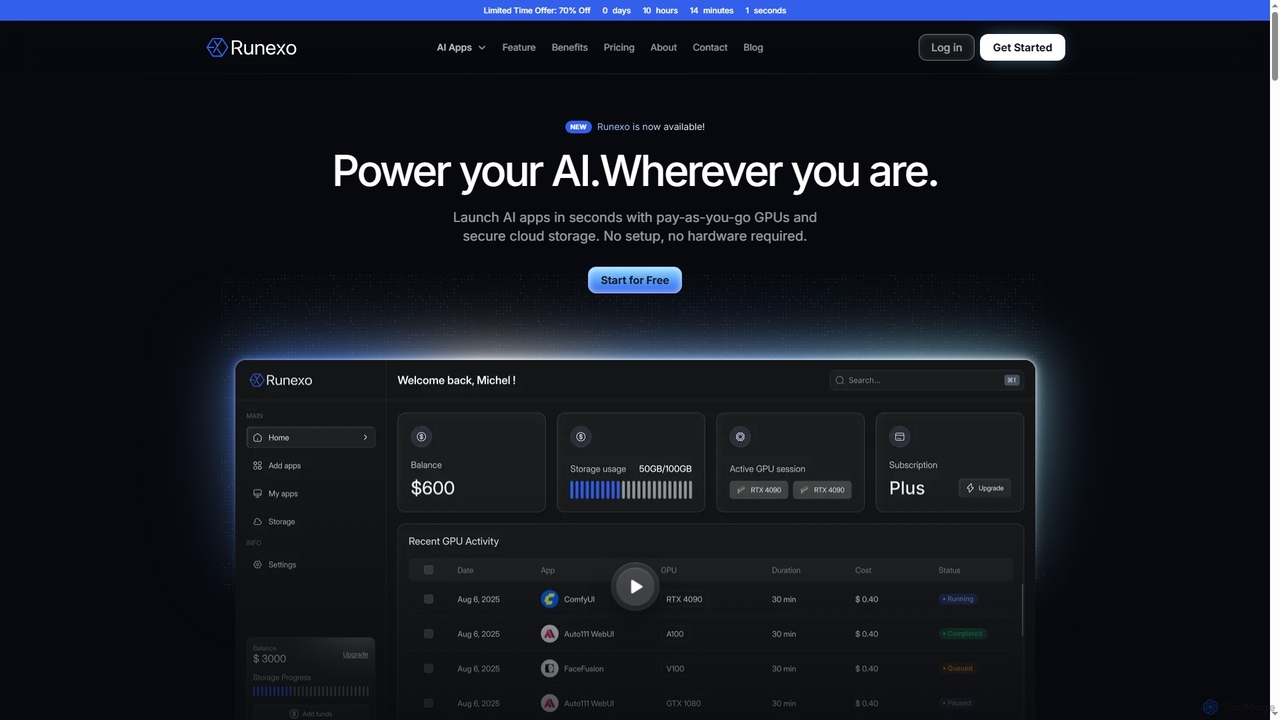
Runexo is a cloud GPU platform designed to empower AI development, training, and inference. It offers instant access to high-performance, pay-as-you-go GPUs and secure cloud storage, enabling developers, researchers, and enterprises to launch AI applications like Stable Diffusion, ComfyUI, and Fooocus in seconds without setup or hardware requirements.

Gpu As A Service
Visits 4.2KFavorites 115Likes 116

About Stable Diffusion

Stable Diffusion is a powerful open-source latent diffusion model designed for AI image generation, a sub-category of broader image generation tools. It excels at transforming text prompts into high-quality images and modifying existing ones, offering unparalleled creative freedom and customization. This technology empowers artists, designers, and developers to rapidly prototype visuals, explore diverse styles, and generate unique content with remarkable efficiency.

Core Features

  • Text-to-Image Generation: Create detailed images from descriptive text prompts.
  • Image-to-Image Transformation: Modify existing images based on new prompts or style transfers.
  • Inpainting & Outpainting: Seamlessly fill missing parts of an image or extend its boundaries.
  • Model Fine-tuning (LoRA/Checkpoints): Customize models with specific styles or subjects for highly specialized outputs.
  • ControlNet Integration: Guide image generation with precise control over pose, depth, and edges.

Use Cases

Stable Diffusion is widely adopted across creative industries. Artists use it for concept art and style exploration, while marketers generate diverse visual assets for campaigns. Game developers leverage it for rapid prototyping of environments and characters, and architects visualize designs. Its flexibility makes it a go-to for personalized content creation and digital art.

How to Choose

When selecting a Stable Diffusion implementation or model, consider the version (e.g., SDXL for higher quality), community support and available resources, hardware requirements for local execution, and the user interface (CLI vs. web UI). Evaluate the ease of fine-tuning, the availability of specific LoRA models, and integration capabilities with other creative software.

Featured tool rankings

Stable Diffusion use cases

1

Generate Concept Art for Games and Films

Game developers and film concept artists use Stable Diffusion to rapidly prototype visual ideas. By inputting text descriptions of characters, environments, or props, they can generate hundreds of unique variations in minutes, significantly accelerating the ideation phase and providing diverse options for design iteration.

2

Generating Unique Concept Art for Games and Films

Game and film concept artists utilize Stable Diffusion to rapidly visualize character designs, environmental settings, and prop ideas. By inputting descriptive text prompts, they can generate hundreds of stylistic variations in minutes, significantly accelerating the initial ideation phase and allowing for quick iteration on visual themes before committing to detailed production.

3

Creating Diverse Marketing Visuals for Campaigns

Marketing professionals and content creators employ Stable Diffusion to produce a wide array of visual assets for social media, advertisements, and blog posts. This allows them to quickly generate images tailored to specific campaign themes, target audiences, and aesthetic requirements, ensuring fresh and engaging content without relying solely on stock photography or extensive manual design.

4

Create Marketing and Advertising Visuals

Marketing professionals leverage Stable Diffusion to produce eye-catching visuals for campaigns. They can generate product mockups, social media graphics, or ad banners tailored to specific themes and demographics, allowing for rapid A/B testing and personalized content creation without relying on extensive photography or graphic design resources.

5

Personalized Digital Art and Illustrations

Individual artists and hobbyists use Stable Diffusion to bring their unique visions to life. They can experiment with various artistic styles, generate custom characters, or create intricate backgrounds for their digital paintings and illustrations, pushing the boundaries of their creativity and producing highly personalized artworks.

6

Personalizing Avatars and Digital Art

Individual users and digital artists use Stable Diffusion to create highly personalized avatars, profile pictures, and unique digital artworks. Through fine-tuning models with their own images or specific artistic styles, they can generate bespoke visuals that reflect personal preferences, fictional characters, or distinct artistic visions, fostering a new level of creative self-expression.

7

Fashion Design and Textile Pattern Generation

Fashion designers leverage Stable Diffusion to explore new garment styles, fabric textures, and pattern designs. By inputting descriptions of desired aesthetics or uploading initial sketches, they can generate numerous design iterations, visualize how different materials might look, and quickly prototype innovative fashion concepts, streamlining the design process from ideation to visualization.

8

Architectural Visualization and Interior Design

Architects and interior designers utilize Stable Diffusion to quickly visualize design concepts. By inputting basic layouts or mood boards, they can generate realistic renderings of buildings, rooms, or furniture arrangements in various styles and lighting conditions, aiding in client presentations and design iterations with significant time savings.

9

Architectural Visualization and Interior Design

Architects and interior designers use Stable Diffusion to quickly generate realistic or stylized renderings of building exteriors, room layouts, and furniture arrangements. They can transform basic wireframes or simple sketches into detailed visual concepts, experimenting with lighting, materials, and design elements to present diverse options to clients and refine their visions efficiently.

10

Fashion Design and Textile Pattern Generation

Fashion designers and textile artists employ Stable Diffusion to innovate their creative process. They can generate unique fabric patterns, visualize clothing designs on virtual models, or explore new aesthetic directions for collections, enabling rapid prototyping and reducing the need for physical samples in the early stages of design.

11

Storyboarding and Comic Book Creation

Comic artists and animators utilize Stable Diffusion for rapid storyboarding and panel generation. By providing scene descriptions and character poses, they can generate sequential images that help visualize narrative flow, camera angles, and character expressions. This significantly speeds up the pre-production phase, allowing for more dynamic and visually consistent storytelling.

12

Image Editing and Enhancement

Photographers and graphic editors utilize Stable Diffusion for advanced image manipulation. They can perform tasks like removing unwanted objects (inpainting), extending backgrounds (outpainting), or applying stylistic transfers to photos, achieving complex edits that would otherwise require extensive manual work or specialized software skills.

Stable Diffusion FAQ

What is Stable Diffusion?

Stable Diffusion is an open-source latent diffusion model that generates high-quality images from text or other images. It operates by iteratively refining a noisy image into a coherent one based on a given prompt, making it a powerful tool for creative content generation. Its core strength lies in its flexibility, customizability, and ability to run on consumer-grade hardware, distinguishing it within the broader AI image generation landscape.

What is Stable Diffusion?

Stable Diffusion is an open-source latent diffusion model capable of generating high-quality images from text descriptions. It operates by iteratively refining a noisy image in a compressed latent space, making the process efficient. Its core features include text-to-image, image-to-image, inpainting, and outpainting, offering extensive creative control to users.

How does Stable Diffusion differ from other AI image generators like Midjourney or DALL-E?

Stable Diffusion is primarily open-source and highly customizable, allowing users to fine-tune models with their own data and run it locally. In contrast, Midjourney and DALL-E are typically proprietary, cloud-based services with more curated interfaces and less direct control over the underlying models. Stable Diffusion offers greater flexibility for advanced users and developers, while Midjourney and DALL-E often provide a more streamlined, user-friendly experience for quick results.

How does Stable Diffusion compare to other AI image generators like Midjourney or DALL-E?

Stable Diffusion is unique due to its open-source nature and local execution capabilities, offering unparalleled customization and privacy. While Midjourney and DALL-E are typically proprietary, cloud-based services known for their ease of use and specific aesthetic styles, Stable Diffusion provides users with full control over models, fine-tuning, and integration into custom workflows, often requiring more technical setup but yielding greater flexibility.

What are the hardware requirements for running Stable Diffusion locally?

Running Stable Diffusion locally typically requires a dedicated GPU with at least 8GB of VRAM, though 12GB or more is recommended for optimal performance and larger image generation. A powerful CPU and sufficient RAM (16GB+) are also beneficial. While some versions can run on less powerful hardware, performance and feature access may be limited. Cloud-based options are available for those without suitable local hardware.

What are LoRA models in Stable Diffusion and why are they important?

LoRA (Low-Rank Adaptation) models are small, lightweight add-ons for Stable Diffusion that allow users to fine-tune a base model for specific styles, characters, or objects without retraining the entire model. They are crucial because they enable highly specialized image generation with minimal computational resources, making it easy to achieve consistent aesthetics or generate specific subjects repeatedly, greatly enhancing customization and efficiency.

Can Stable Diffusion be used for commercial purposes?

Yes, Stable Diffusion can be used for commercial purposes, as its core model is released under a permissive license (e.g., CreativeML Open RAIL-M License). However, users must be mindful of the specific licenses of any custom models (checkpoints, LoRAs) or extensions they use, as these may have different terms. Always verify the licensing of all components in your workflow to ensure compliance.

What are the key factors to consider when choosing a Stable Diffusion tool or interface?

When choosing a Stable Diffusion tool, consider its user interface (e.g., Automatic1111, ComfyUI, or cloud services) for ease of use, the available model versions (e.g., SD 1.5, SDXL) for quality and features, and your hardware capabilities if running locally. Also, evaluate community support, the availability of extensions and plugins, and the learning curve associated with advanced features like ControlNet or custom scripting.

Can Stable Diffusion be used for commercial purposes?

Yes, Stable Diffusion can generally be used for commercial purposes, as its license (CreativeML Open RAIL-M) permits commercial use. However, users should always verify the specific license of the particular model checkpoint or LoRA they are using, as some community-contributed models might have different restrictions. Additionally, users are responsible for ensuring their generated content complies with copyright laws and ethical guidelines.

What are ControlNets in Stable Diffusion and how do they work?

ControlNets are neural network structures that allow users to exert fine-grained spatial control over the image generation process in Stable Diffusion. They work by taking an additional input, such as a depth map, Canny edge map, or pose estimation (OpenPose), and guiding the diffusion model to adhere to these structural or compositional cues. This enables precise control over generated images, ensuring specific poses, layouts, or object placements are maintained.