ToolMage
Sign in

Best 1 Infrastructure AI tools for It Operations

Popular Infrastructure AI tools in It Operations include Lumlax, helping you work more efficiently.

Lumlax
Freemium

Lumlax

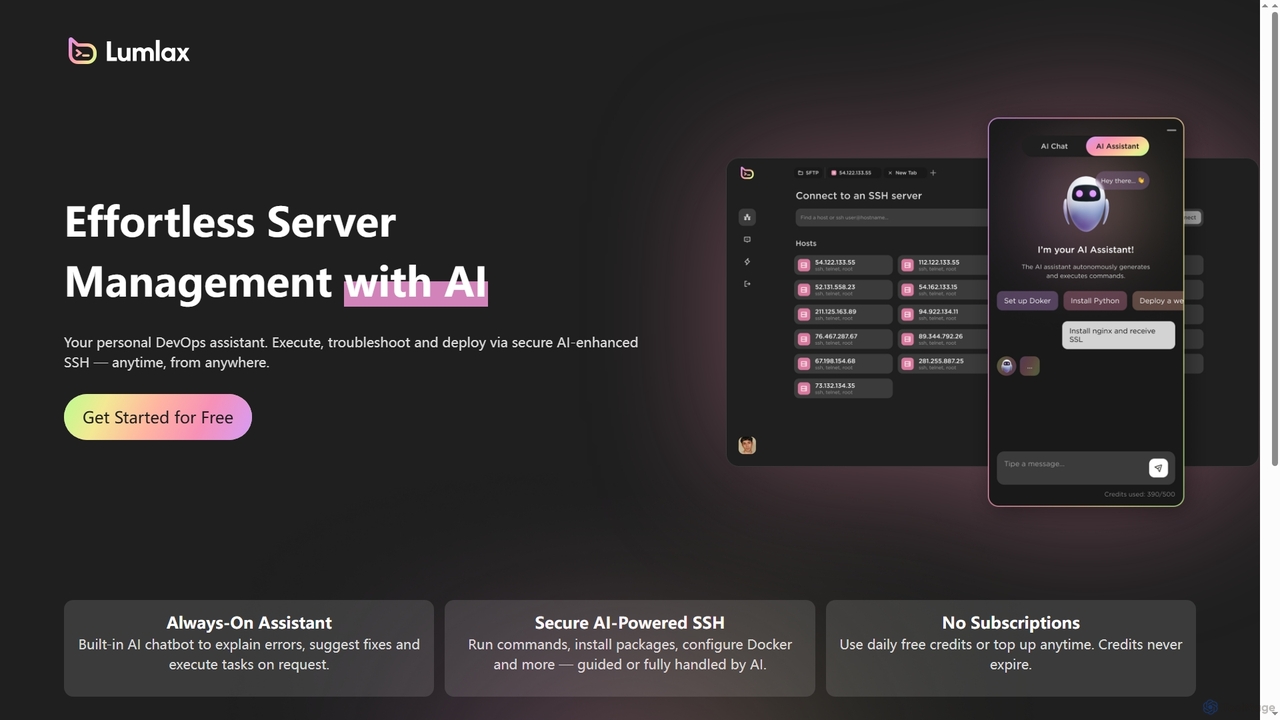
Lumlax is an AI-enhanced SSH application designed for effortless server management. It acts as a personal DevOps assistant, enabling developers to execute commands, troubleshoot issues, and deploy applications securely from anywhere. With its built-in AI chatbot, Lumlax explains errors, suggests fixes, and automates tasks, streamlining operations and boosting productivity.

Devops
Visits 4.1KFavorites 110Likes 110

About Infrastructure

AI Infrastructure tools are specialized platforms for managing the computing resources, software environments, and workflows required to build, train, and deploy machine learning models. As a core component of IT Operations for AI, these tools automate the provisioning and scaling of GPUs and other hardware. They streamline the entire MLOps lifecycle, from data management and experiment tracking to model serving and monitoring. This enables teams to accelerate development cycles, optimize resource costs, and ensure the reliable performance of AI applications at scale.

Core Features

  • Compute Resource Management: Automate the allocation, scheduling, and scaling of GPUs, CPUs, and other accelerators.
  • Model Deployment & Serving: Simplify the process of deploying trained models as scalable, low-latency API endpoints.
  • MLOps Automation: Orchestrate complex workflows for continuous integration, delivery, and training (CI/CD/CT) of models.
  • Experiment Tracking & Reproducibility: Log parameters, metrics, and artifacts for every training run to ensure results are reproducible.
  • Environment Management: Manage dependencies and create consistent, containerized environments for development and production.

Use Cases

These tools are essential for MLOps engineers, data scientists, and AI researchers. They are widely used in technology companies, financial services, and research institutions to manage large-scale model training, deploy real-time inference services for applications, and build centralized platforms for enterprise-wide AI development.

How to Choose

When selecting an AI Infrastructure tool, consider its compatibility with your cloud provider (e.g., AWS, GCP, Azure) or on-premise hardware. Evaluate its support for your preferred machine learning frameworks, its scalability to handle future workloads, and its integration capabilities with your existing data and CI/CD pipelines. Also, assess the balance between ease of use for data scientists and control for DevOps teams.

Featured tool rankings

Infrastructure use cases

1

Automating GPU Cluster Management for Research Teams

A university research lab needs to provide on-demand access to a shared cluster of GPUs for multiple students and projects. Using an AI Infrastructure tool, the IT administrator sets up a centralized platform that automates resource scheduling. Researchers can submit training jobs without manual configuration, and the platform automatically allocates available GPUs, queues jobs, and scales resources based on demand. This eliminates resource conflicts and maximizes the utilization of expensive hardware.

2

Streamlining Model Deployment for an AI Startup

An AI startup has developed a new recommendation engine and needs to deploy it as a highly available API for their web application. The MLOps team uses an AI Infrastructure platform to package the model into a container and deploy it with a single command. The platform handles auto-scaling to manage traffic spikes, provides real-time performance monitoring, and enables seamless model updates with zero downtime, reducing the deployment time from weeks to hours.

3

Optimizing Cloud Costs for Large-Scale Model Training

A data science team at a large enterprise frequently runs long, expensive model training jobs on the cloud. They adopt an AI Infrastructure tool that supports spot instances. The tool automatically provisions cheaper spot instances for training, manages interruptions by checkpointing and resuming jobs, and scales the cluster down to zero when idle. This strategy can reduce their cloud computing costs for model training by up to 80% without sacrificing performance.

4

Establishing a Centralized Enterprise MLOps Platform

A financial services company wants to standardize its machine learning development process across different departments. They implement an AI Infrastructure platform to create a unified environment for all data science teams. This platform provides standardized tools for experiment tracking, model versioning, and security compliance. It allows teams to collaborate effectively, reuse components, and ensure that all models deployed to production meet the company's governance and security standards.

5

Accelerating AI Product Development with Serverless Inference

A mobile app developer wants to add a new AI-powered feature, like image recognition, without managing complex server infrastructure. They use a serverless AI Infrastructure tool to deploy their model. They simply upload the trained model, and the platform provides an API endpoint. The platform automatically manages all the underlying compute resources, scaling from zero to handle thousands of requests per second. This allows the developer to focus on the application logic instead of infrastructure management.

6

Ensuring Reproducibility in Scientific Computing

A computational biology team is working on a complex project where reproducing experimental results is critical for publication. They use an AI Infrastructure tool to track every aspect of their workflow. The tool automatically logs the code version, dataset, hyperparameters, and software environment for each experiment. This creates an immutable record, allowing any team member to perfectly replicate a previous result months later, ensuring scientific validity and collaboration.

Infrastructure FAQ

What are AI Infrastructure tools?

AI Infrastructure tools are specialized platforms designed to manage the complete lifecycle of machine learning models. They provide the foundational layer for MLOps, automating tasks like compute resource management (especially GPUs), model deployment, workflow orchestration, and experiment tracking. Unlike general-purpose IT tools, they are built to handle the unique demands of AI workloads, such as large datasets and intensive computation.

How do AI Infrastructure tools differ from cloud platforms like AWS SageMaker or Azure ML?

Cloud ML platforms like AWS SageMaker are comprehensive, often proprietary ecosystems offered by a single cloud provider. AI Infrastructure tools are frequently more flexible and cloud-agnostic, allowing you to run them on any cloud (AWS, GCP, Azure) or even on-premise hardware. They often focus on providing best-in-class components for specific MLOps tasks (e.g., experiment tracking, serving) that can be integrated into a custom stack, offering more control and avoiding vendor lock-in.

Who are the primary users of AI Infrastructure tools?

The primary users are typically MLOps engineers, DevOps specialists, data scientists, and machine learning engineers. MLOps and DevOps teams use these tools to build and maintain robust, scalable AI systems. Data scientists and ML engineers use them to accelerate their workflow, easily train models on powerful hardware, track experiments, and deploy their models into production without needing deep infrastructure expertise.

What are the key benefits of using AI Infrastructure tools?

The main benefits include:

  • Increased Productivity: Automating repetitive tasks allows data scientists to focus on building models, not managing servers.
  • Cost Optimization: Efficiently managing expensive resources like GPUs and leveraging features like auto-scaling and spot instances significantly reduce cloud bills.
  • Faster Time-to-Market: Streamlining the path from model development to production deployment accelerates the launch of AI-powered features.
  • Reliability and Scalability: Providing robust, production-grade infrastructure ensures AI applications are stable and can handle real-world traffic.
How do I choose the right AI Infrastructure tool for my team?

To choose the right tool, evaluate the following:

  • Deployment Environment: Does it support your target environment (multi-cloud, hybrid, on-premise)?
  • Scalability Needs: Can it scale from a single user to a large enterprise team?
  • User Experience: Is it designed for data scientists (UI-driven) or MLOps engineers (code-driven)?
  • Integration: How well does it connect with your existing tools for data storage, CI/CD, and monitoring?
  • Open Source vs. Commercial: Consider the trade-offs between the flexibility of open-source solutions and the support offered by commercial products.