
Jector
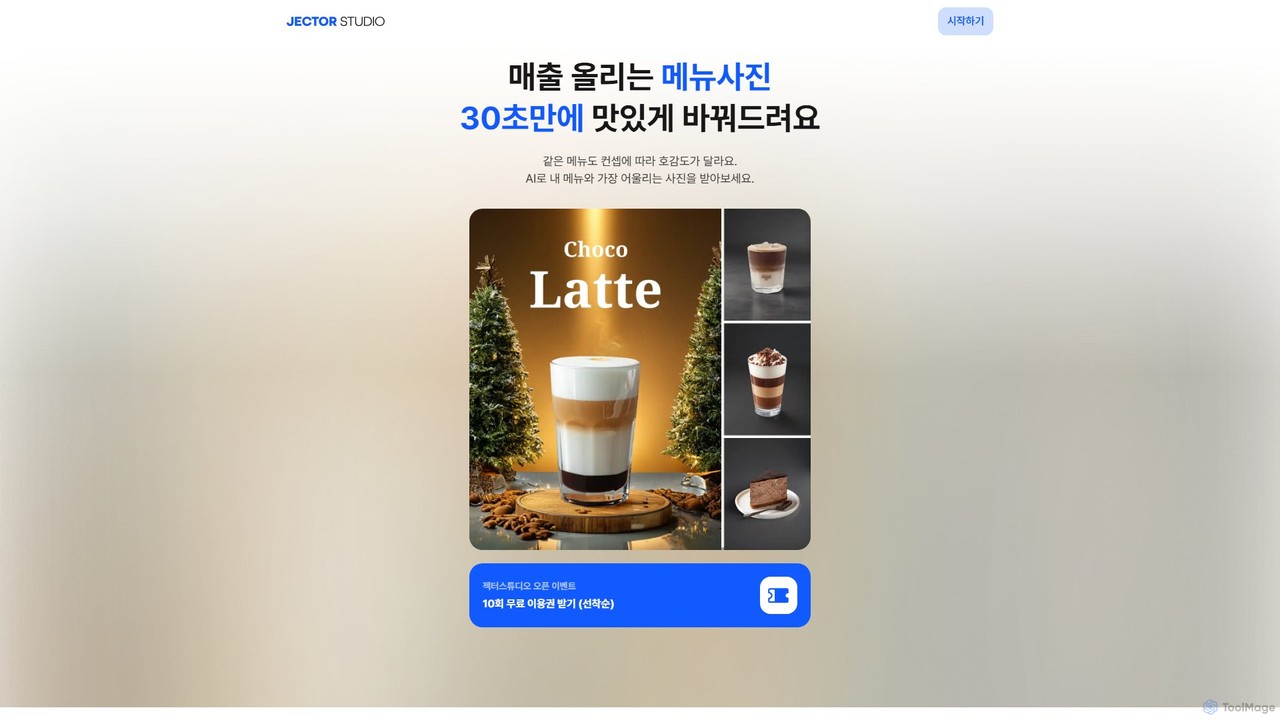
Jector is an AI-powered food styling studio that transforms simple menu photos into professional, appetizing images in seconds. …
Jector is an AI-powered food styling studio that transforms simple menu photos into professional, appetizing images in seconds. Designed for restaurant owners and food businesses, it automatically replaces backgrounds, suggests concepts, and optimizes photos for delivery apps, social media, and marketing materials, helping to boost sales and engagement.
About Food Photography
AI Food Photography tools are a specialized category of software that uses artificial intelligence to generate, enhance, and style images of food. These tools leverage generative models and computer vision to automatically replace backgrounds, adjust lighting, apply stylistic filters, and even create photorealistic dishes from text descriptions. They are designed to help restaurants, food bloggers, and marketers produce high-quality, appetizing culinary visuals without the need for expensive equipment or professional photoshoots. This enables users to create a consistent and appealing visual identity across marketing channels.
Core Features
- AI Background Generation: Instantly replace or create contextual backgrounds, such as a rustic table, a modern cafe, or a simple studio backdrop.
- Virtual Staging & Prop Addition: Add or change plates, cutlery, garnishes, and other props to enhance the composition of the image.
- Lighting & Shadow Adjustment: Automatically correct lighting, add realistic shadows, and enhance food textures to make dishes look more appealing.
- Style Transfer: Apply specific artistic styles (e.g., dark and moody, bright and airy) to an image with a single click to maintain brand consistency.
- Text-to-Dish Generation: Create entirely new, photorealistic images of food items based on descriptive text prompts.
Use Cases
These tools are primarily used by the food and beverage industry. Restaurants and cafes use them to create professional-looking images for menus and delivery platforms. Food bloggers and social media influencers generate a variety of content from a single dish. Consumer packaged goods (CPG) brands create product mockups and advertising visuals quickly and cost-effectively.
How to Choose
When selecting an AI Food Photography tool, consider the level of realism in the generated images and the variety of available styles. Evaluate the user interface—whether it's prompt-based or uses a graphical editor. Check the output resolution to ensure it meets your needs for print or digital use. Finally, compare pricing models, such as per-image credits versus monthly subscriptions, to find one that fits your budget and usage volume.
Food PhotographyUse Cases
Create Professional Menu & Delivery App Photos
A restaurant owner needs to update their online menu and delivery platform listings with high-quality, consistent images but lacks the budget for a professional photoshoot. Using an AI Food Photography tool, they upload smartphone photos of their dishes. The AI automatically removes distracting backgrounds, standardizes the lighting across all images, and places each dish on a clean, branded backdrop. The result is a full set of professional, appetizing photos ready in under an hour, significantly improving their online presence and potentially increasing orders.
Generate Diverse Social Media Content for Food Bloggers
A food blogger wants to create a week's worth of engaging Instagram posts from a single recipe photo. They upload their hero shot to an AI tool. Using style transfer, they create a bright and airy version for a morning post and a dark, moody version for an evening post. With virtual staging, they generate variations with different plates, seasonal props like autumn leaves or spring flowers, and various tabletop surfaces. This allows them to post unique, high-quality content daily, keeping their audience engaged without needing multiple photoshoots.
A/B Test Ad Creatives for CPG Brands
A marketing manager for a new snack brand needs to create ad visuals for different target audiences. Instead of costly photoshoots for each scenario, they use an AI tool. They upload a single product image and use text prompts to generate various backgrounds: a college dorm room, an office pantry, and a family picnic. The tool also adjusts the lighting to match each scene. This process generates a dozen ad variations in minutes, allowing the team to A/B test which visual resonates most with each demographic, optimizing their ad spend and increasing campaign effectiveness.
Standardize E-commerce Product Listings
An online grocery store sources products from hundreds of different suppliers, resulting in inconsistent and low-quality product images. An e-commerce manager uses an AI food photography tool to batch-process all incoming images. The tool automatically centers each product, replaces varied backgrounds with a uniform light gray, and corrects color balance to ensure all products look vibrant and true-to-life. This creates a clean, professional, and trustworthy shopping experience for customers, which can lead to higher conversion rates and fewer product returns.
Conceptualize Dishes for Cookbooks and Magazines
A food stylist and a chef are developing a new cookbook and need to visualize recipe concepts before committing to cooking and shooting them. Using a text-to-dish AI tool, they input detailed descriptions like "a rustic apple pie with a lattice crust, dusted with powdered sugar, on a wooden table with autumn lighting." The AI generates several photorealistic options. This allows them to experiment with plating, composition, and moodboard ideas digitally, saving significant time, food costs, and creative energy in the early stages of production.
Create Personalized Marketing for Food Delivery Services
A digital marketer for a food delivery service wants to run hyper-targeted ad campaigns. They use an AI food photography tool to create variations of a single pizza image. For a campaign targeting families, they generate an image of the pizza on a dinner table with a family-friendly setting. For a campaign targeting sports fans, the background is changed to a living room with a game on TV. This ability to quickly create contextually relevant visuals for different audience segments allows for more effective, personalized marketing without the overhead of multiple photoshoots.