ToolMage
Sign in

Best 1 Photo Management AI tools for Personal

Popular Photo Management AI tools in Personal include Festive, helping you work more efficiently.

Festive
Freemium

Festive

Festive is an AI-powered mobile app that transforms your photos into stunning cinematic slideshows. With over 50 professionally designed templates, a vast music library, and intuitive editing tools, you can easily create beautiful video stories for any occasion. AI-generated quotes add a unique creative touch to your memories, making every slideshow a masterpiece.

Photo Management
Visits 6.3KFavorites 158Likes 154

About Photo Management

AI Photo Management tools are applications that use artificial intelligence to automatically organize, search, and curate large digital photo libraries. They employ computer vision to recognize faces, objects, and scenes, and analyze metadata to intelligently categorize images without manual input. This transforms vast, unstructured collections into searchable archives, allowing users to instantly find specific moments or themes. These tools excel at surfacing forgotten memories and streamlining the management of thousands of photos.

Core Features

  • Intelligent Search: Find photos using natural language queries like "dogs on a beach at sunset" instead of relying on filenames or folders.
  • Automatic Tagging & Categorization: Automatically identifies and tags people, places, objects, and events, creating smart albums.
  • Duplicate & Similar Photo Detection: Scans libraries to find and help remove visually identical or similar images, freeing up storage space.
  • Smart Curation: Suggests the best shots from a series of photos by analyzing factors like focus, composition, and smiles.
  • Metadata Management: Reads, writes, and organizes EXIF data, including location, date, and camera settings, for advanced sorting.

Use Cases

These tools are ideal for individuals with extensive personal photo collections, families looking to create a shared, searchable archive, and professional photographers managing client work. Marketing teams also use them for digital asset management, quickly locating specific brand imagery from large repositories.

How to Choose

When selecting a tool, consider its privacy policy (local vs. cloud-based processing), support for file formats (e.g., RAW), the accuracy of its recognition engine, and its integration with other platforms or cloud storage services. Also, evaluate the user interface and the speed of library scanning and indexing.

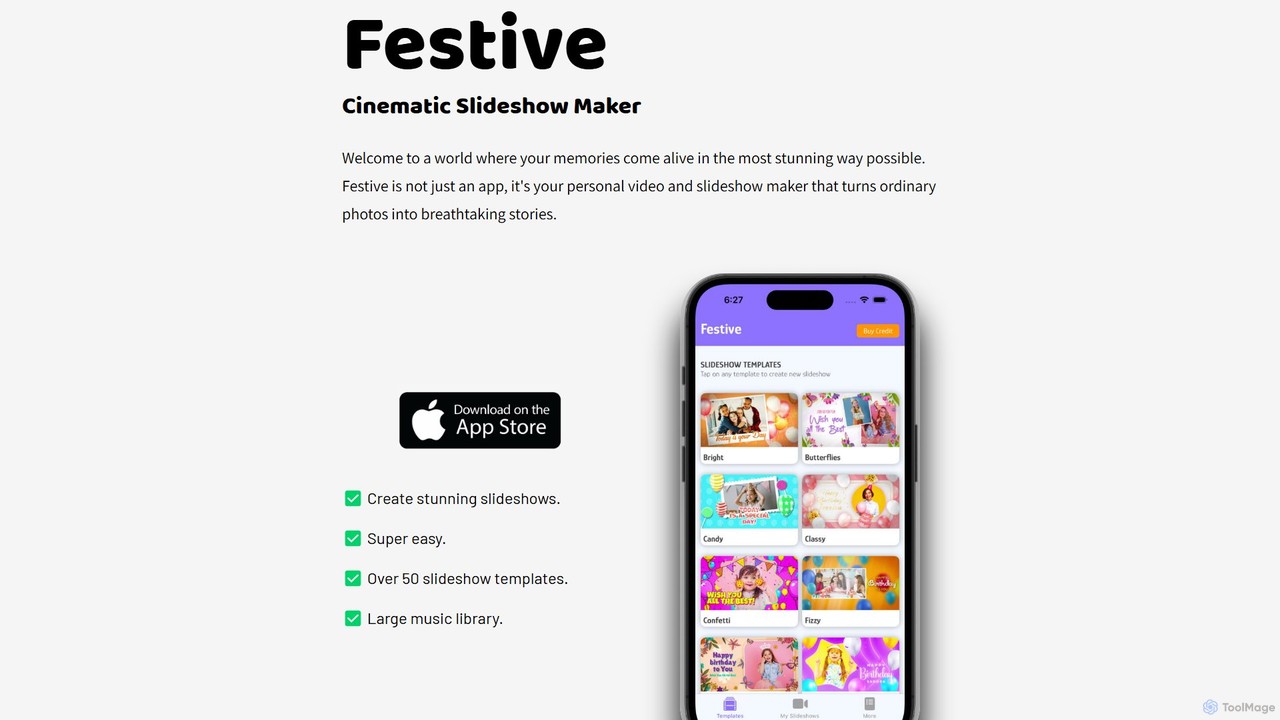
Photo Management use cases

1

Organize Decades of Family Photos

For individuals tasked with managing a family's digital legacy, AI photo management tools are transformative. A user can import tens of thousands of photos from various devices and old hard drives. The AI automatically scans the entire collection, identifies recurring faces, and groups them by person. It also recognizes locations and events like birthdays or holidays, creating smart albums. This allows family members to easily search for 'Grandma's 80th birthday' or 'all photos of Dad in the 90s', turning a chaotic archive into a cherished, accessible history without weeks of manual sorting.

2

Streamline a Professional Photographer's Workflow

A professional event photographer returns from a shoot with over 3,000 RAW images. Using an AI photo management tool, they can rapidly cull the collection. The software identifies and groups similar shots, highlights images with poor focus or closed eyes, and suggests the best photo from a burst sequence. This reduces the initial selection time by over 70%. Furthermore, they can use AI-powered search to quickly find all photos featuring the 'bride and groom' or 'group shots outdoors' to organize their deliverables, significantly speeding up the post-production process.

3

Manage Digital Assets for a Marketing Team

A corporate marketing team manages a vast library of product photos, ad campaign visuals, and stock imagery. Using an AI management tool, they can avoid manual folder structures. A social media manager can simply search for 'woman smiling while using a laptop outdoors' and get relevant results in seconds. The AI can also identify images containing the company logo or specific products. This ensures brand consistency and saves hours previously spent manually searching through folders or relying on inconsistent filename conventions, improving overall team efficiency.

4

Reclaim Storage by Finding Duplicate Photos

A user's smartphone and cloud storage are nearly full, largely due to years of accumulated photos. They use an AI photo management tool's duplicate finder feature. The tool scans their entire library and identifies not only exact duplicates but also visually similar photos, such as multiple takes of the same selfie or landscape. It presents these groups for review, allowing the user to keep the best one and delete the rest with a single click. This process can easily free up several gigabytes of storage, resolving low-space warnings without the risk of accidentally deleting important memories.

5

Create Themed Albums for Events or Trips

After returning from a vacation, a user wants to create a shareable album. Instead of manually scrolling through hundreds of photos, they use an AI tool to search for 'photos from Italy in May 2023'. The tool gathers all relevant images. They can then refine the search with terms like 'food' or 'museums' to create specific themed collections. The smart curation feature can also automatically create a 'Best of Trip' album by selecting the most visually appealing and technically sound photos, creating a high-quality summary of their experience in minutes.

6

Ensure Privacy with Local, On-Device Processing

A user is concerned about uploading their personal photos to a cloud service for privacy reasons. They choose an AI photo management tool that operates entirely on their local machine. All the AI processing, including facial recognition and object tagging, happens on their computer without any data being sent to external servers. This allows them to benefit from powerful organizational features like smart search and automatic categorization while maintaining complete control and privacy over their entire photo library. They can organize sensitive family or work photos with confidence.

Photo Management FAQ

What are AI Photo Management tools?

AI Photo Management tools are software applications designed to intelligently organize, search, and manage digital photo libraries. Unlike simple storage folders, they use artificial intelligence, particularly computer vision, to analyze the content of your photos. This allows them to automatically tag people, objects, and scenes, making your entire collection searchable using natural language. Key features often include facial recognition, duplicate detection, and smart curation to highlight your best shots.

How to choose the right AI Photo Management tool?

Choosing the right tool depends on your specific needs. Consider the following factors:

  • Privacy: Do you prefer a tool that processes photos locally on your device, or are you comfortable with a cloud-based service?
  • Platform: Ensure the tool is available for your operating system (Windows, macOS, Linux) and mobile devices (iOS, Android).
  • Features: Do you need advanced features like RAW file support for professional photography, or are basic tagging and search sufficient?
  • Pricing Model: Compare one-time purchase options versus subscription-based services and see which fits your budget.
  • User Interface: Look for a tool with an intuitive and easy-to-navigate interface to ensure a smooth user experience.
What's the difference between AI Photo Management and cloud storage like Google Drive?

The primary difference is intelligence. Standard cloud storage services like Google Drive or Dropbox are essentially digital filing cabinets; they store your files but don't understand their content. You can organize photos into folders, but searching relies on filenames. AI Photo Management tools, on the other hand, act as intelligent librarians. They analyze the visual content of each photo, allowing you to search for 'sunsets' or 'my dog' and find relevant images regardless of their filename or folder location. They focus on discoverability and organization, not just storage.

Can AI Photo Management tools edit my photos?

While some AI Photo Management tools include basic editing features like cropping, rotating, or applying simple filters, their primary function is organization and search, not advanced editing. For professional-grade editing, color correction, or complex manipulations, you would still use dedicated photo editing software. The main purpose of a management tool is to help you find and sort your photos efficiently, acting as a powerful catalog for your entire collection before you decide to edit them.

Who can benefit from using AI Photo Management tools?

A wide range of users can benefit from these tools. This includes:

  • Casual Users: Anyone with thousands of photos on their phone or computer who wants an easy way to find specific memories.
  • Families: People looking to create a centralized, searchable archive of family history across generations.
  • Professional Photographers: For quickly culling, rating, and organizing thousands of images from client shoots.
  • Small Businesses & Marketers: Teams that need to manage a library of brand assets, product shots, and marketing materials for quick access.

Essentially, if you have a photo library that has become too large to manage manually, an AI tool can provide significant value.