ToolMage
Sign in

Best 1 Video To Audio AI tools for Video

Popular Video To Audio AI tools in Video include Online Audio Converter, helping you work more efficiently.

Online Audio Converter
Freemium

Online Audio Converter

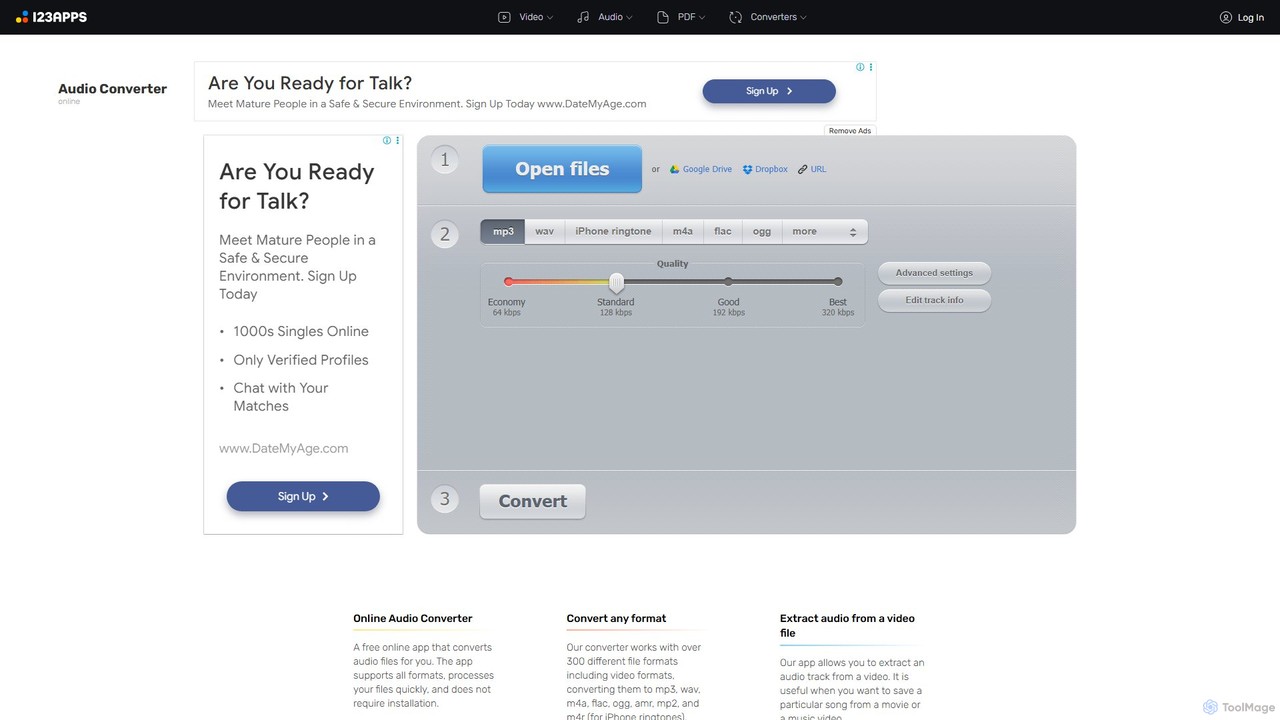
A versatile and free web-based tool for converting audio files. It supports over 300 formats, extracts audio from videos, and allows for advanced customization of quality, bitrate, and channels. Features include batch conversion, ID3 tag editing, and cloud integration, all within a secure, browser-based interface.

Audio Editing
Visits 4.1MFavorites 131Likes 124

About Video To Audio

Video To Audio tools are AI-powered solutions designed to accurately extract audio content from video files. Leveraging advanced artificial intelligence, these tools can isolate speech, music, or sound effects, converting them into various audio formats. They are invaluable for content creators, researchers, and anyone needing to repurpose or analyze sound from visual media, streamlining workflows and enhancing accessibility.

Core Features

  • High-Precision Audio Extraction: Accurately separates and extracts audio tracks, including dialogue, music, and ambient sounds, from video files.
  • Multiple Output Formats: Supports conversion to popular audio formats such as MP3, WAV, AAC, FLAC, and more, ensuring compatibility across devices and platforms.
  • AI-Powered Speech Recognition: Some advanced tools can automatically transcribe spoken content from video into text, facilitating content analysis and subtitle generation.
  • Background Noise Reduction: Intelligently identifies and minimizes unwanted background noise during extraction, delivering cleaner and clearer audio.
  • Batch Processing: Enables users to process multiple video files simultaneously, significantly saving time for large projects.

Applicable Scenarios

These tools are widely adopted by podcasters for converting video interviews into audio episodes, by content marketers for repurposing video testimonials into audio snippets, and by educators for extracting lecture audio for accessibility purposes. They also serve researchers needing to analyze spoken content from recorded presentations or interviews.

How to Choose

When selecting a Video To Audio tool, consider the accuracy of audio extraction, the range of supported input and output formats, and the presence of AI features like speech recognition or noise reduction. Evaluate batch processing capabilities for efficiency, ease of use, and integration options with other editing software. Finally, assess the pricing model and customer support.

Video To Audio use cases

1

Podcast Creation from Video Interviews

Podcasters often conduct interviews via video conferencing. Using Video To Audio tools, they can effortlessly extract the audio track from these recordings, clean it up, and prepare it for their podcast episodes. This eliminates the need for separate audio recording setups, saving significant time and ensuring high-quality sound for listeners.

2

Generating Transcripts for Video Content

Content creators and journalists frequently need text versions of their video content for accessibility, SEO, or archival purposes. AI-powered Video To Audio tools can not only extract the audio but also automatically transcribe spoken dialogue into text, providing a quick and accurate foundation for subtitles, captions, or written articles.

3

Extracting Music or Sound Effects for Remixes

DJs, music producers, and video editors often find specific music pieces or unique sound effects embedded within video clips. Video To Audio tools allow them to precisely isolate and extract these audio elements, making them available for remixing, sampling, or integrating into new creative projects without quality loss.

4

Repurposing Video Testimonials for Audio Marketing

Marketing teams can maximize the value of video testimonials by converting them into audio snippets. These audio clips can then be used in podcasts, radio ads, or as voiceovers for other marketing materials. This extends the reach of valuable customer feedback across different platforms and engagement channels.

5

Archiving and Analyzing Spoken Content

Researchers, legal professionals, and educators frequently work with recorded lectures, court proceedings, or interviews. Video To Audio tools enable them to extract just the spoken audio, reducing file sizes for easier storage and facilitating faster analysis of verbal content, especially when combined with transcription features.

6

Creating Audiobooks from Video Lectures

Educational institutions and online course providers can enhance learning accessibility by converting video lectures into audio-only formats. Students can then listen to lessons on the go, during commutes, or while performing other tasks, offering a flexible and convenient way to consume educational content.

Video To Audio FAQ

What are Video To Audio tools?

Video To Audio tools are specialized software or online platforms that extract the sound component from a video file, converting it into a standalone audio file. They are essential for separating dialogue, music, or sound effects from visual media, enabling users to repurpose or analyze the audio independently. These tools often support various video input and audio output formats.

How do Video To Audio tools work?

These tools typically work by processing the video file's data stream. They identify and isolate the audio track embedded within the video container, then re-encode it into a chosen audio format (like MP3 or WAV). Advanced AI tools might also employ signal processing for noise reduction or natural language processing for speech transcription during this extraction process.

What's the difference between Video To Audio tools and general video editing software?

While general video editing software can often extract audio, Video To Audio tools are specifically optimized for this single task, often offering more streamlined workflows, higher accuracy in audio isolation, and specialized features like AI-powered noise reduction or transcription. Video editing software focuses on manipulating visual elements and combining multiple tracks, whereas Video To Audio tools prioritize efficient and high-quality audio extraction.

What are the main benefits of using AI-powered Video To Audio tools?

AI-powered Video To Audio tools offer several key benefits, including enhanced accuracy in separating audio from video, intelligent background noise reduction for cleaner sound, and automatic speech recognition for generating transcripts. They can also handle batch processing more efficiently and often support a wider range of complex audio processing tasks, significantly improving productivity and audio quality.

Who can benefit most from using Video To Audio tools?

A wide range of users can benefit, including podcasters and content creators who repurpose video content, journalists and researchers needing to transcribe interviews, and educators creating accessible learning materials. Musicians and DJs can extract specific sounds, while marketing teams can convert video testimonials into audio snippets for broader campaign reach. Essentially, anyone needing to isolate, analyze, or reuse audio from video will find these tools invaluable.

How to choose the right Video To Audio tool?

When selecting a Video To Audio tool, consider the accuracy of audio extraction, the range of supported input and output formats, and the presence of AI features like speech recognition or noise reduction. Evaluate batch processing capabilities for efficiency, ease of use, and integration options with other editing software. Finally, assess the pricing model and customer support.