ToolMage
Sign in

Best 1 Vfx AI tools for Animation

Popular Vfx AI tools in Animation include PrometheanAI, helping you work more efficiently.

PrometheanAI
Paid

PrometheanAI

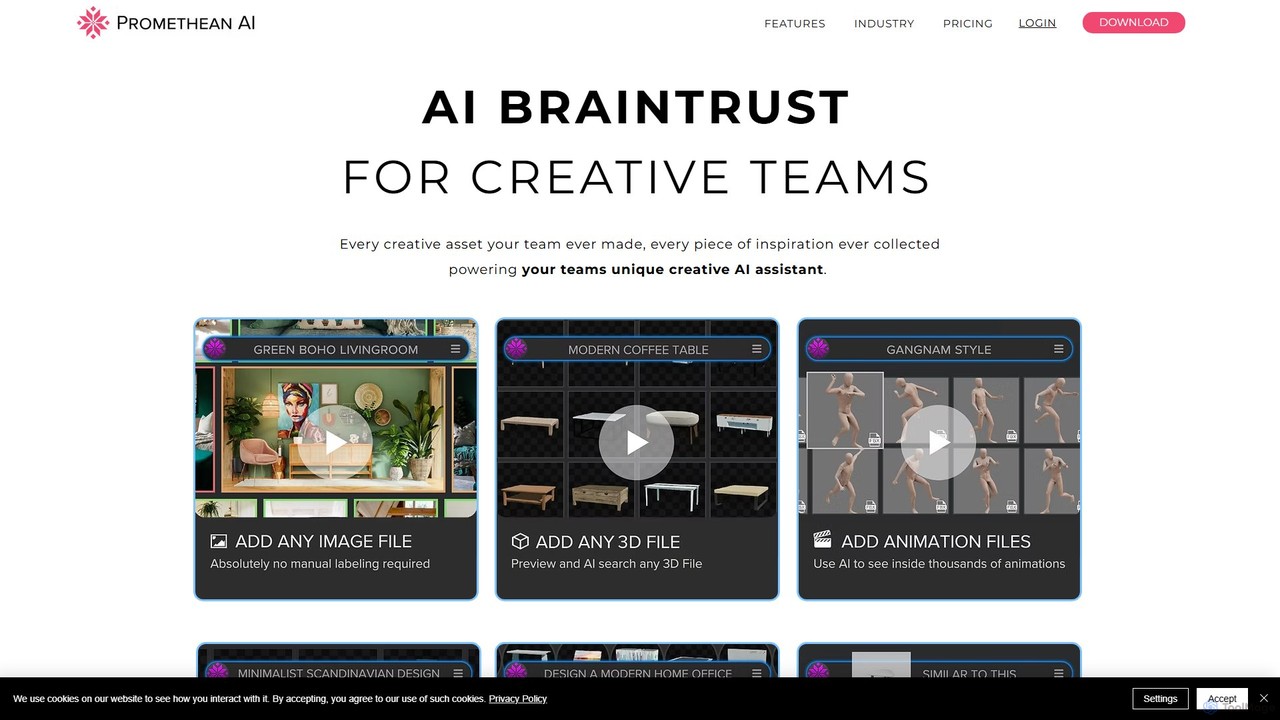
PrometheanAI is an enterprise-level AI assistant for creative teams, designed to accelerate digital art production and world-building. It integrates into existing workflows and editors, using a team's own assets to automate mundane tasks and enhance creativity without requiring cloud uploads.

Asset Management
Visits 15.4KFavorites 110Likes 114

About Vfx

AI VFX tools are specialized applications that leverage artificial intelligence to create, enhance, or automate visual effects in video and film production. These tools utilize machine learning algorithms for tasks like object tracking, background generation, and stylistic transformations, significantly streamlining post-production workflows. They enable artists and filmmakers to achieve complex visual effects with greater speed and precision, pushing creative boundaries within the broader field of animation.

Core Features

  • AI-Powered Rotoscoping: Automatically isolates foreground elements from backgrounds with high accuracy, saving manual frame-by-frame work.
  • Smart Object Removal: Intelligently identifies and removes unwanted objects or elements from footage, seamlessly filling in the background.
  • Automated Compositing: Simplifies the integration of multiple visual elements into a single, cohesive scene, adjusting lighting and perspective.
  • Style Transfer & Enhancement: Applies artistic styles or enhances visual quality, such as upscaling resolution or de-noising footage.
  • Generative Backgrounds: Creates realistic or stylized backgrounds based on textual prompts or existing scene elements.

Use Cases

Film and television studios use AI VFX for complex scene enhancements, character de-aging, and environmental extensions. Independent filmmakers leverage these tools to achieve high-budget visual effects on limited resources. Marketing agencies apply AI VFX for dynamic product visualizations and engaging promotional content.

How to Choose

When selecting AI VFX tools, consider the specific effects needed (e.g., rotoscoping, object removal, generative AI). Evaluate the tool's integration capabilities with existing editing software, its processing speed, and the quality of its AI-generated output. Assess the learning curve and available support, as well as the pricing model based on project scale and usage frequency.

Featured tool rankings

Vfx use cases

1

Automated Rotoscoping for Character Isolation

A visual effects artist needs to isolate a main character from a complex background across hundreds of frames for compositing. AI VFX tools can automatically detect and mask the character, significantly reducing the manual effort and time required for frame-by-frame rotoscoping, allowing the artist to focus on creative refinements.

2

Seamless Object Removal in Film Footage

A filmmaker discovers an unwanted microphone boom or crew member visible in a critical shot. AI VFX software can intelligently analyze the surrounding pixels and remove the object, seamlessly filling the void with generated content that matches the scene's texture and lighting, saving costly reshoots.

3

Generating Realistic Backgrounds for Green Screen

A content creator shoots a scene against a green screen and needs a dynamic, realistic city skyline or a fantastical landscape. AI VFX tools can generate high-quality, contextually appropriate backgrounds based on simple text prompts or reference images, providing diverse options for virtual sets without extensive 3D modeling.

4

De-aging or Age Progression of Actors

For historical dramas or flashback sequences, a director needs to make an actor appear younger or older. AI VFX algorithms can analyze facial features and apply subtle, realistic modifications to achieve de-aging or age progression, maintaining the actor's performance while altering their appearance convincingly.

5

Enhancing Low-Light or Noisy Footage

A videographer has footage shot in challenging low-light conditions, resulting in significant visual noise. AI VFX tools can intelligently analyze and clean up the footage, reducing grain and enhancing detail without blurring, improving the overall visual quality for broadcast or cinematic release.

6

Stylistic Video Transformation for Music Videos

A music video director wants to apply a unique artistic style, like a painterly or comic book aesthetic, to their entire video. AI VFX tools can perform style transfer across all frames, maintaining temporal consistency and transforming the video's visual language to match the artistic vision, creating a distinctive look.

Vfx FAQ

What are AI VFX tools?

AI VFX tools are software applications that use artificial intelligence, particularly machine learning, to automate and enhance visual effects tasks in video and film production. They streamline complex processes like rotoscoping, object removal, and background generation, making high-quality visual effects more accessible and efficient.

How do AI VFX tools differ from traditional VFX software?

Traditional VFX software relies heavily on manual input and artist skill for tasks like masking, tracking, and compositing. AI VFX tools, while often integrated into traditional workflows, leverage AI to automate these labor-intensive processes, offering faster results, reducing human error, and enabling artists to focus more on creative direction rather than repetitive tasks.

What are the main benefits of using AI in visual effects?

The primary benefits include significant time and cost savings by automating repetitive tasks, increased precision in complex operations like rotoscoping and tracking, and the ability to achieve sophisticated effects that might otherwise be too resource-intensive. AI also opens new creative possibilities, such as advanced style transfer and generative content.

Can AI VFX tools create entirely new visual elements?

Yes, many AI VFX tools incorporate generative AI capabilities. They can create entirely new visual elements, such as realistic or stylized backgrounds from text prompts, generate missing frames, or even synthesize new textures and objects, expanding the creative possibilities beyond traditional asset libraries.

What should I consider when choosing an AI VFX tool for my project?

When choosing an AI VFX tool, evaluate its specific capabilities against your project's needs (e.g., rotoscoping accuracy, object removal quality, generative features). Consider its compatibility with your existing software pipeline, the learning curve, pricing structure, and the quality of its output. Also, assess the community support and ongoing development.