
ToolMage
Sign in

Best 1 Image & Pdf Tools for Design

Popular Image & Pdf Tools in Design include FreeToolz, helping you work more efficiently.

FreeToolz
Free

FreeToolz

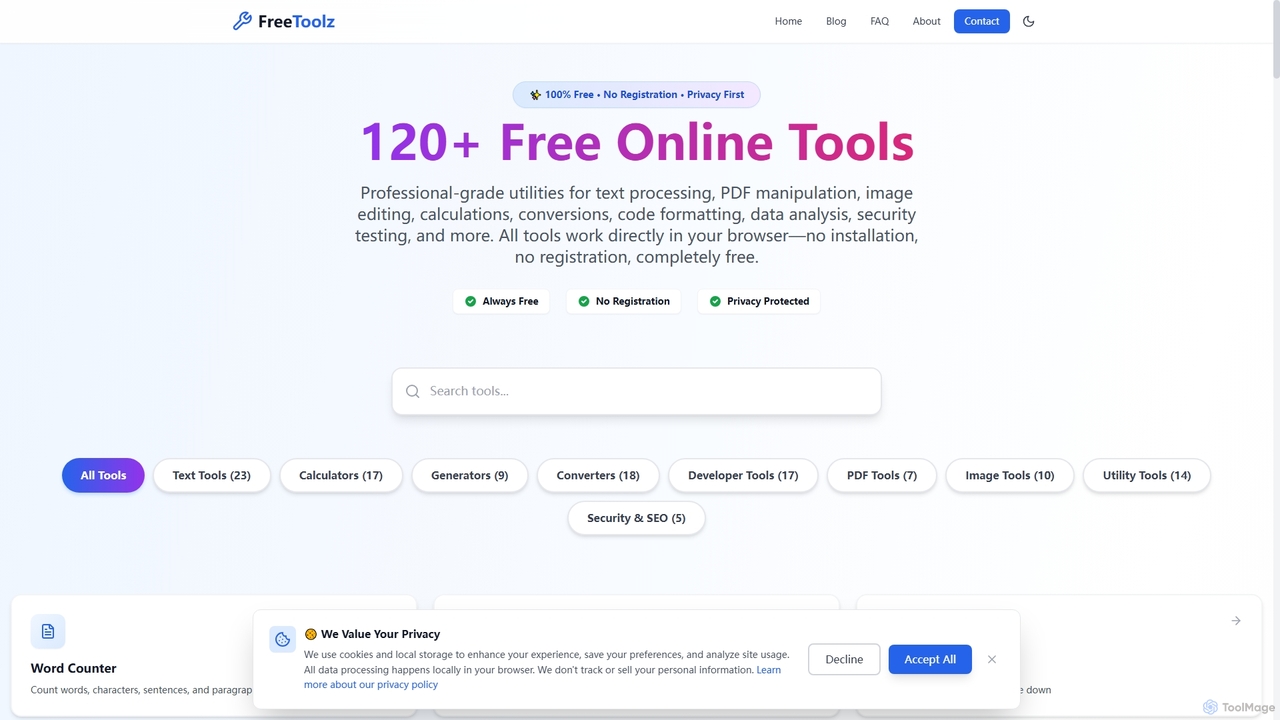
FreeToolz offers a comprehensive suite of over 120 professional-grade online tools for various tasks, including text processing, PDF manipulation, image editing, calculations, conversions, and web development utilities. It's 100% free, requires no registration, and prioritizes user privacy by processing all data locally in your browser. Access a wide array of tools instantly without any installation.

Text Processing
Visits 5.7KFavorites 131Likes 126

About Image & Pdf Tools

Image & Pdf Tools are AI-powered solutions designed to automate and enhance the creation, editing, and management of visual content and documents. Leveraging advanced artificial intelligence, these tools streamline complex tasks such as image manipulation, intelligent PDF processing, and efficient file conversion. They empower designers, marketers, and office professionals to achieve high-quality results with unprecedented speed and precision, serving as a vital component within the broader design and content workflow.

Core Features

  • AI Image Enhancement: Automatically upscale, denoise, color correct, and remove backgrounds from images with intelligent algorithms.
  • Smart PDF Processing: Efficiently extract data, summarize content, convert formats, and perform OCR on PDF documents.
  • Automated Content Generation: Generate image variations, design elements, or document templates based on prompts or existing data.
  • Efficient Compression & Conversion: Optimize file sizes without quality loss and seamlessly convert between various image and PDF formats.

Use Cases

These tools are indispensable for professionals across various sectors. Graphic designers utilize them for rapid image background removal and upscaling. Marketing teams employ AI for generating diverse ad creatives and optimizing product images. Office workers benefit from automated PDF data extraction and summarization, while researchers can quickly convert scanned documents into editable text via advanced OCR.

How to Choose

When selecting AI Image & Pdf Tools, consider the specific functionalities required, such as advanced image editing or robust PDF data handling. Evaluate integration capabilities with existing workflows and platforms. Assess the accuracy and quality of AI output, especially for critical tasks like OCR or image enhancement. Finally, compare pricing models and ensure the tool offers a user-friendly interface suitable for your team's technical proficiency.

Image & Pdf Tools use cases

1

Automating E-commerce Product Image Optimization

E-commerce businesses often deal with thousands of product images that require consistent quality, background removal, and resizing. AI Image & Pdf Tools allow marketing teams to automatically remove backgrounds, enhance lighting, and standardize image dimensions across an entire product catalog. This significantly reduces the manual effort and time spent by graphic designers, ensuring a professional and uniform look for all product listings and improving conversion rates.

2

Automated Product Image Optimization

E-commerce businesses use AI tools to automatically remove backgrounds, enhance lighting, and resize hundreds of product images, ensuring consistency and quality across their online stores while saving significant manual editing time.

3

Efficient Data Extraction from Legal Documents

Legal professionals frequently need to extract specific information from contracts, agreements, and case files, often in PDF format. AI-powered PDF tools can automatically identify and extract key data points like names, dates, clauses, and monetary values, even from scanned documents using advanced OCR. This capability drastically speeds up due diligence, contract review, and evidence gathering processes, minimizing human error and ensuring compliance.

4

Intelligent PDF Data Extraction

Financial analysts or legal professionals leverage AI PDF tools to automatically extract specific data points (e.g., names, dates, amounts) from large volumes of contracts or reports, drastically reducing manual data entry and potential errors.

5

Transforming Marketing Content Creation

Content creators and marketing teams can leverage AI Image & Pdf Tools to rapidly generate diverse visual assets for campaigns. From creating unique social media graphics based on text descriptions to converting blog posts into engaging PDF infographics, these tools accelerate the content pipeline. They enable marketers to experiment with various visual styles and formats without extensive design skills, ensuring a constant flow of fresh and appealing content across all platforms.

6

Creative Asset Generation for Marketing

Marketing teams utilize AI image tools to generate multiple variations of ad banners, social media graphics, or promotional materials from a single prompt, accelerating campaign launches and A/B testing efforts.

7

Document Digitization and Summarization

Researchers and educators employ AI PDF tools to convert scanned historical documents or academic papers into editable text via OCR, then use AI summarization to quickly grasp key insights without reading entire texts.

8

Streamlining Academic Research and Document Management

Researchers and students often handle numerous academic papers, journals, and textbooks, many of which are in PDF format. AI PDF tools can summarize lengthy articles, extract key findings, and convert complex tables or figures into editable formats. This capability significantly reduces the time spent on literature review and data organization, allowing academics to focus more on analysis and writing, thereby enhancing productivity and research quality.

9

Batch Image Upscaling and Denoising

Photographers and digital artists use AI image tools to upscale low-resolution images for print or high-definition displays, simultaneously removing noise and artifacts to improve overall image quality without pixelation.

10

Creating Accessible Content for Diverse Audiences

Organizations need to ensure their digital content is accessible to individuals with disabilities. AI Image & Pdf Tools can automatically generate descriptive alt text for images, convert PDFs into screen-reader-friendly formats, and adjust color contrasts for better readability. This helps businesses and educational institutions comply with accessibility standards (e.g., WCAG) and reach a broader audience, fostering inclusivity and improving user experience for everyone.

11

Streamlined Report Generation from Data

Business analysts combine AI image and PDF tools to automatically generate visual charts and graphs from raw data, then compile these into professional, formatted PDF reports, simplifying data visualization and sharing.

12

Automating Document Conversion and Archiving

Businesses often need to convert documents between various formats (e.g., Word to PDF, PDF to Excel) for different purposes, and efficiently archive them. AI Image & Pdf Tools can automate these conversions, ensuring format integrity and data accuracy. They can also categorize and tag documents based on content, facilitating easier retrieval and long-term digital archiving. This saves administrative time and improves organizational efficiency in document management.

Image & Pdf Tools FAQ

What are AI Image & Pdf Tools?

AI Image & Pdf Tools are software solutions that use artificial intelligence to automate and enhance tasks related to image and PDF file processing. They go beyond traditional editing by employing machine learning for intelligent content recognition, generation, and manipulation, offering features like smart background removal, advanced OCR, and automated content summarization.

What are AI Image & Pdf Tools?

AI Image & Pdf Tools are software solutions that use artificial intelligence to automate and enhance tasks related to visual content and PDF documents. They leverage AI models for advanced image editing (like background removal, upscaling), intelligent PDF processing (data extraction, summarization), and even content generation. These tools go beyond traditional software by offering smart, context-aware functionalities that significantly boost efficiency and accuracy in handling digital media and documents.

How do AI Image & Pdf Tools differ from traditional software?

The primary difference lies in their intelligence and automation capabilities. Traditional image and PDF software relies heavily on manual input and rule-based operations. AI tools, however, use machine learning algorithms to understand context, recognize patterns, and perform complex tasks autonomously. For example, an AI tool can automatically remove a background with high precision, whereas traditional software requires manual selection. This leads to greater efficiency, accuracy, and the ability to handle tasks that would be impossible or extremely time-consuming for humans.

How do AI Image & Pdf Tools differ from traditional software?

Traditional image and PDF software rely on manual user input and rule-based operations. AI Image & Pdf Tools, however, leverage machine learning to understand content context, predict user intent, and perform complex tasks autonomously. This results in significantly faster processing, higher accuracy for repetitive tasks, and the ability to generate new content or insights that manual methods cannot.

What are the key benefits of using AI for image and PDF processing?

The primary benefits include massive time savings through automation of repetitive tasks (e.g., batch editing, data extraction), improved accuracy in tasks like OCR and image enhancement, and the ability to achieve results that would be difficult or impossible manually (e.g., AI-driven content generation, intelligent summarization). They also ensure consistency and reduce human error.

What are the key benefits of using AI Image & Pdf Tools?

The key benefits include significant time savings through automation of repetitive tasks, enhanced accuracy in complex operations like data extraction or image refinement, and improved scalability for handling large volumes of files. These tools also enable users without specialized design or technical skills to achieve professional-grade results, fostering creativity and productivity across various roles. Furthermore, they can reduce operational costs by minimizing the need for extensive manual labor.

Who can benefit most from AI Image & Pdf Tools?

A wide range of professionals and businesses can benefit. This includes graphic designers and marketers who need to quickly create and optimize visual content, e-commerce businesses managing vast product catalogs, legal and administrative professionals requiring efficient document processing and data extraction, and educators or researchers dealing with large volumes of academic papers. Essentially, anyone who regularly works with images or PDF documents and seeks to enhance efficiency, accuracy, and creative output will find these tools invaluable.

Who can benefit most from AI Image & Pdf Tools?

A wide range of professionals can benefit. Graphic designers and marketers use them for creative asset generation and optimization. E-commerce businesses streamline product image processing. Office workers and administrative staff automate document management and data extraction. Researchers and educators find value in advanced OCR and content summarization for large text volumes.

What should I consider when choosing an AI Image & Pdf Tool?

When selecting an AI Image & Pdf Tool, prioritize your specific needs: do you require advanced image editing, robust PDF data extraction, or content generation? Evaluate the tool's AI model accuracy, especially for critical tasks like OCR or background removal. Consider its integration capabilities with your existing software, user-friendliness, and scalability for future growth. Finally, compare pricing models (subscription, pay-per-use) and customer support to ensure it aligns with your budget and operational requirements.

What should I consider when choosing an AI Image & Pdf Tool?

When choosing, evaluate the specific AI capabilities you need (e.g., advanced image generation vs. robust PDF data extraction). Consider the tool's integration with your existing software ecosystem and its scalability for future needs. Assess the quality and accuracy of its AI output, especially for critical tasks. Finally, review pricing models, user interface, and customer support to ensure it aligns with your budget and team's technical comfort.