ToolMage
Sign in

Best 1 Photo Restoration AI tools for Design

Popular Photo Restoration AI tools in Design include Colorize, helping you work more efficiently.

Colorize
Free

Colorize

Colorize is a free AI-powered online tool that transforms black and white photos into vibrant color. It leverages advanced artificial intelligence to restore historical and vintage images quickly, bringing them to life with realistic hues in seconds.

Image Enhancement
Visits 5.9KFavorites 150Likes 148

About Photo Restoration

Photo Restoration tools are AI-powered solutions designed to revive old, damaged, or faded photographs. Leveraging advanced artificial intelligence algorithms, these tools can automatically detect and repair various imperfections, bringing clarity and vibrancy back to cherished memories. They offer an efficient and accessible way to preserve historical images and personal archives, making complex restoration tasks manageable for everyone.

Core Features

  • Scratch and Tear Removal: Automatically identifies and eliminates physical damage like scratches, creases, and tears from photos.
  • Colorization: Transforms black and white or sepia-toned images into vibrant, full-color photographs, often with naturalistic hues.
  • Noise and Grain Reduction: Cleans up visual artifacts, digital noise, and film grain, resulting in smoother and clearer images.
  • Facial Enhancement: Improves clarity and detail in faces, sharpening features and correcting blur without distorting likeness.
  • Fading and Discoloration Correction: Restores faded colors and corrects yellowing or other discoloration caused by age and environmental factors.

Use Cases

These tools are invaluable for individuals and professionals alike. Family historians can digitize and restore ancestral photos, ensuring their legacy endures. Professional photographers and archivists utilize them to repair damaged client photos or preserve historical collections. Even casual users can easily breathe new life into old smartphone pictures or printed albums, making them suitable for sharing or display.

How to Choose

When selecting an AI photo restoration tool, consider the quality of its AI algorithms for different types of damage, such as scratch removal or color accuracy. Evaluate its ease of use and user interface, especially for batch processing capabilities if you have many photos. Look into supported image formats, output resolution, and pricing models, including subscription costs or one-time purchases. Finally, check for features like facial recognition enhancement and cloud integration for seamless workflows.

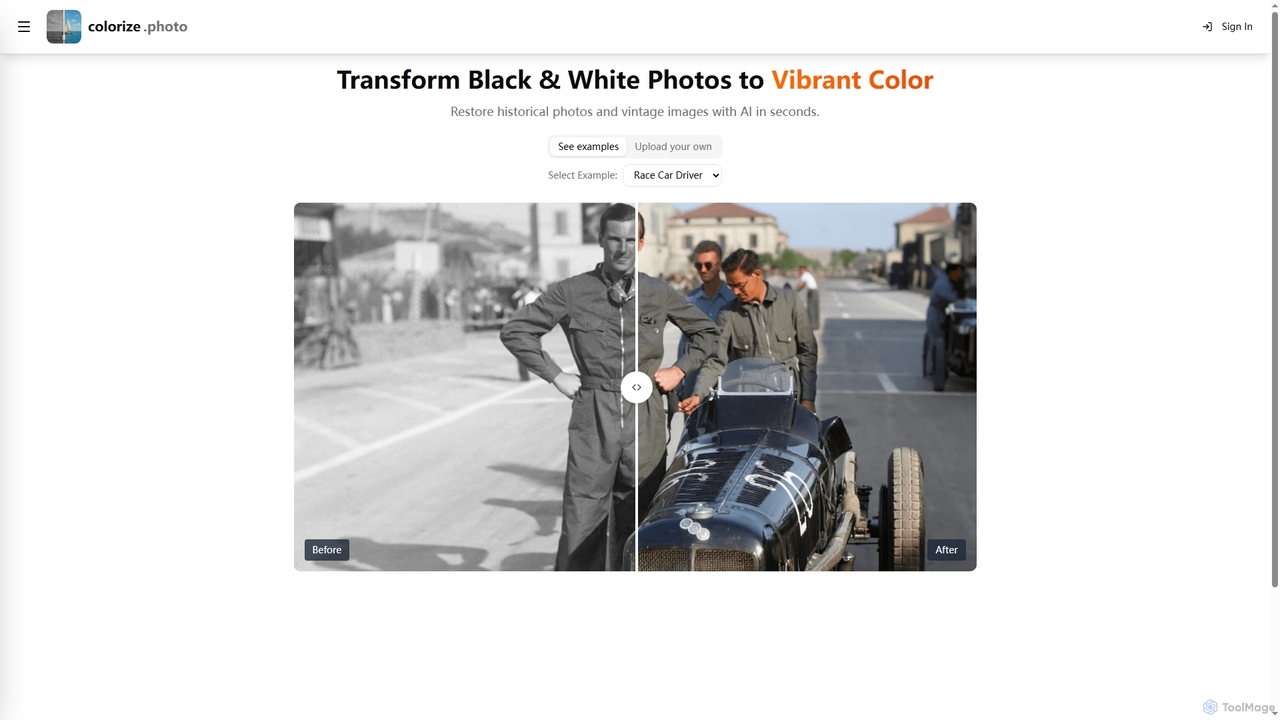
Photo Restoration use cases

1

Restoring Faded Family Heirlooms

Family historians and individuals can use AI photo restoration tools to revive old, faded, and discolored family photographs. By simply uploading a scanned image, the AI automatically corrects color shifts, enhances contrast, and removes age-related imperfections, transforming a barely visible relic into a vibrant memory suitable for digital archives or printing, preserving the family legacy for future generations.

2

Colorizing Black and White Historical Photos

Archivists, content creators, and history enthusiasts can utilize AI photo restoration tools to add realistic color to black and white historical photographs. This process not only makes the images more engaging for modern audiences but also helps in visualizing past eras with greater immersion. The AI analyzes grayscale values and applies contextually appropriate colors, bringing a new dimension to historical documentation and storytelling.

3

Repairing Scratched and Torn Professional Photos

Professional photographers or photo studios often encounter client photos that are physically damaged from years of storage. AI photo restoration tools enable them to quickly and effectively remove scratches, tears, and creases from these valuable images. This saves significant manual editing time, allowing them to deliver high-quality restored prints or digital files to clients, enhancing customer satisfaction and service offerings.

4

Enhancing Old Portraits and Group Photos

Individuals and portrait photographers can use AI photo restoration to enhance the clarity and detail of faces in old portraits or group photos. The AI can sharpen blurry features, correct red-eye, and even subtly improve skin texture without making the subjects look artificial. This is particularly useful for school yearbooks, wedding albums, or any collection where facial recognition and clear expressions are paramount, making old photos look crisp and vibrant.

5

Digitizing and Archiving Old Photo Albums

For anyone looking to preserve their physical photo albums digitally, AI photo restoration tools are essential. After scanning entire albums, these tools can batch process images to correct common issues like dust, minor scratches, and color shifts that occur over time. This streamlines the digitization process, ensuring that entire collections are preserved in high-quality digital formats, making them easy to share, back up, and enjoy for years to come.

6

Preparing Photos for Historical Exhibitions

Museums, galleries, and historical societies often need to prepare old photographs for exhibitions, which requires them to be in pristine condition. AI photo restoration tools can be used to clean up visual noise, enhance details, and correct any damage that might detract from the historical context. This ensures that the displayed images are of the highest possible quality, providing visitors with a clear and engaging view of the past without extensive manual retouching.

Photo Restoration FAQ

What are AI Photo Restoration tools?

AI Photo Restoration tools are specialized software or online services that use artificial intelligence to automatically repair and enhance old, damaged, or faded photographs. They analyze image data to identify imperfections like scratches, tears, discoloration, and blur, then intelligently reconstruct missing or degraded parts, bringing photos back to their original or even improved state without extensive manual editing.

How do AI Photo Restoration tools work?

AI Photo Restoration tools typically employ deep learning models, often trained on vast datasets of both damaged and pristine images. When you upload a photo, the AI analyzes it to detect specific types of damage (e.g., scratches, color shifts, blur). It then applies learned patterns to intelligently fill in missing information, correct colors, sharpen details, and remove artifacts, effectively 'guessing' what the original image should look like.

What types of damage can AI Photo Restoration fix?

AI Photo Restoration tools are capable of fixing a wide range of damage. This includes removing scratches, creases, and tears; correcting fading, yellowing, and color shifts; reducing image noise and grain; sharpening blurry areas; and even enhancing facial details. Some advanced tools can also reconstruct severely degraded areas or add realistic color to black and white photos.

How do AI Photo Restoration tools differ from manual photo editing?

AI Photo Restoration tools automate much of the complex and time-consuming work involved in restoring photos, using algorithms to intelligently repair damage. Manual photo editing, on the other hand, requires a skilled human editor to painstakingly correct imperfections using software like Photoshop. While manual editing offers precise control, AI tools provide speed, accessibility, and often impressive results for common damage types, making professional-grade restoration accessible to non-experts.

Who benefits most from using AI Photo Restoration tools?

Individuals looking to preserve family heirlooms, genealogists digitizing historical records, and photographers needing to revive old client work benefit greatly. Additionally, archivists and museums can use these tools for large-scale digitization projects. Anyone with a collection of old or damaged photos who lacks advanced editing skills or time for manual restoration will find these AI tools incredibly valuable for bringing memories back to life.