
ToolMage
Sign in

Best 1 Image Enhancement AI tools for Ai Tools

Popular Image Enhancement AI tools in Ai Tools include Colorize, helping you work more efficiently.

Colorize
Free

Colorize

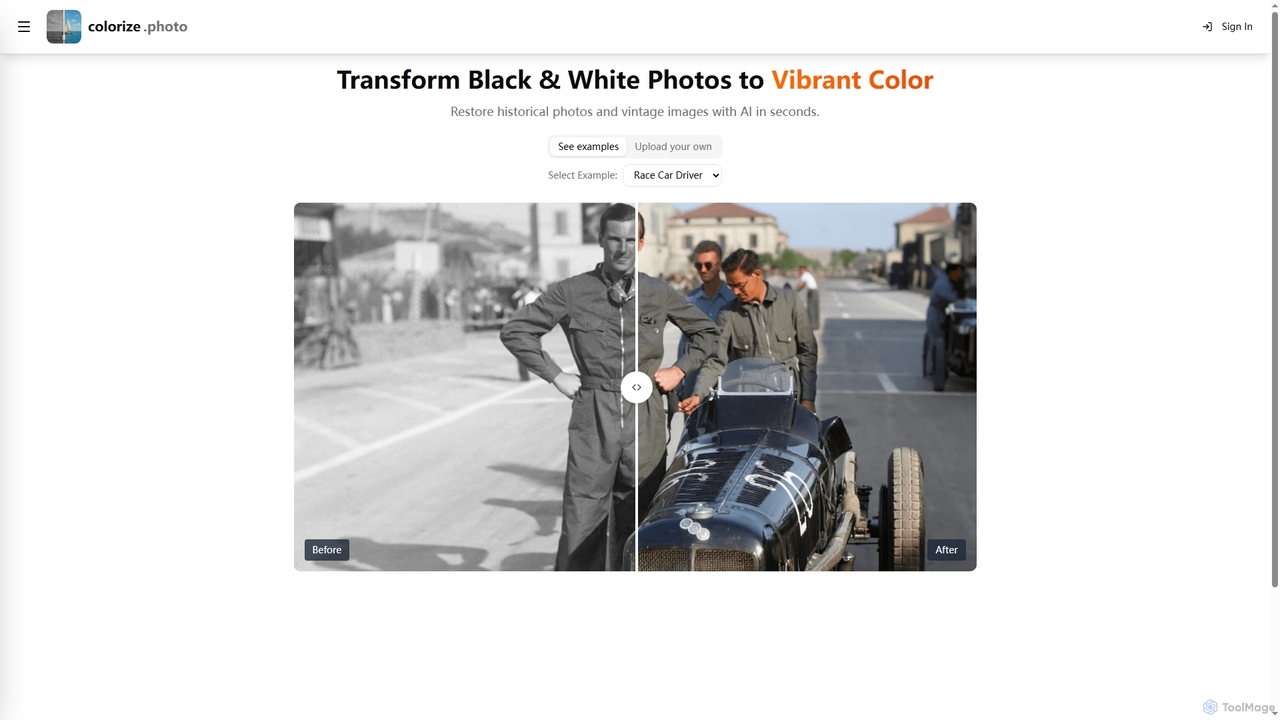
Colorize is a free AI-powered online tool that transforms black and white photos into vibrant color. It leverages advanced artificial intelligence to restore historical and vintage images quickly, bringing them to life with realistic hues in seconds.

Image Enhancement
Visits 5.6KFavorites 147Likes 147

About Image Enhancement

Image Enhancement tools are a class of AI-powered software designed to automatically improve the quality of digital images. They utilize advanced algorithms like Generative Adversarial Networks (GANs) and deep learning models to analyze and intelligently reconstruct image data. This process can significantly increase resolution, reduce noise, sharpen details, and correct colors without manual intervention. The primary value of these tools lies in their ability to salvage low-quality photos, restore old pictures, and prepare images for professional use, such as printing or high-definition displays.

Core Features

  • Resolution Upscaling: Intelligently increases image size and pixel count while preserving and adding realistic details.
  • Noise and Artifact Reduction: Automatically removes digital noise, grain, and compression artifacts (e.g., JPEG blocking).
  • Detail & Sharpness Restoration: Enhances fine textures and sharpens blurry edges to improve overall clarity.
  • Automated Color Correction: Balances colors, adjusts brightness and contrast for a more vibrant and natural look.
  • Face Restoration: Specifically trained to repair and enhance details in old or blurry portraits.

Applicable Scenarios

These tools are widely used by photographers to restore old prints, e-commerce businesses to improve product photos, and real estate agents to make property images more appealing. They are also valuable for graphic designers upscaling assets for print and social media managers enhancing user-generated content for marketing campaigns.

Selection Criteria

When choosing an Image Enhancement tool, consider the specific features you need (e.g., face restoration vs. general upscaling). Evaluate its batch processing capabilities for handling multiple images, the maximum output resolution, processing speed, and the pricing model (per-image credits vs. a monthly subscription).

Image Enhancement use cases

1

Restoring Old Family Photographs

An individual or genealogist working on a family history project has a collection of scanned photos from the early 20th century. The images are faded, scratched, and have low resolution. Using an AI Image Enhancement tool, they upload these scans. The tool automatically corrects the color fading, removes scratches and dust marks, and uses its face restoration feature to bring clarity to the portraits. Finally, it upscales the images to 4K resolution, making them suitable for high-quality printing in a family album. This process digitally preserves precious memories without requiring professional photo editing skills.

2

Enhancing E-commerce Product Images

An e-commerce store manager receives product photos from a supplier that are too small and slightly blurry for their website's high-resolution display standards. Instead of arranging a new photoshoot, they use an AI Image Enhancement tool with batch processing. They upload hundreds of images at once. The AI upscales each photo to twice its original size, sharpens the product details, and corrects the white balance for a clean, professional look. This results in crisp, clear product listings that improve customer trust and can lead to higher conversion rates, all accomplished in a fraction of the time and cost of a professional reshoot.

3

Upscaling Digital Art for Large-Format Printing

A digital artist created a piece on a tablet with a canvas size of 2000x2000 pixels. A client wants to purchase a large physical print of the artwork, which requires a much higher resolution to avoid pixelation. The artist uses an AI Image Enhancement tool specifically designed for artwork and illustrations. The tool upscales the image to 8000x8000 pixels, intelligently interpreting the brush strokes and color blends to add detail rather than just stretching the pixels. The result is a high-resolution file ready for professional printing, allowing the artist to sell physical merchandise without re-drawing the entire piece.

4

Improving Real Estate Photography

A real estate agent takes photos of a property on an overcast day, resulting in images that are dark and lack vibrancy. To make the listings more appealing online, they use an AI Image Enhancement tool. The software automatically brightens the photos, enhances the colors to make the lawn look greener and the sky bluer, and sharpens details like wood grain and countertops. This quick, automated process transforms mediocre photos into bright, inviting images that attract more potential buyers and increase engagement with the online listing, without needing expensive photo editing software or a professional photographer.

5

Clarifying Forensic or Security Footage

A security analyst needs to identify a license plate from a blurry still frame captured by a low-resolution surveillance camera. The characters are illegible due to motion blur and digital noise. They process the image through an AI Image Enhancement tool. The AI model, trained on vast datasets of similar images, reduces the noise, sharpens the edges of the characters, and deblurs the image. While not always perfect, this enhancement can often make the critical details, like the license plate numbers, significantly more readable, providing valuable information for an investigation that would otherwise be lost.

6

Optimizing User-Generated Content for Marketing

A marketing team for a fashion brand runs a campaign encouraging customers to post photos with their products. While the content is authentic, the image quality varies greatly. A social media manager uses an AI Image Enhancement tool to standardize the look of these photos before featuring them on the brand's official channels. The tool automatically adjusts lighting, enhances colors to match the brand's aesthetic, and slightly upscales lower-quality images. This allows the brand to leverage authentic user-generated content while maintaining a high-quality, professional-looking social media feed, strengthening brand image and community engagement.

Image Enhancement FAQ

What is AI Image Enhancement?

AI Image Enhancement refers to the process of using artificial intelligence algorithms to automatically improve the quality of a digital image. Unlike manual editing, these tools analyze the image and apply complex adjustments to increase resolution (upscaling), remove noise and blur, correct colors, and restore fine details. They are trained on millions of image pairs to learn how to transform low-quality images into high-quality versions, making professional-level restoration accessible to everyone.

How to choose the right AI Image Enhancement tool?

To choose the right tool, consider these factors:

  • Primary Use Case: Do you need to restore old photos with faces, upscale digital art, or clean up product images? Some tools specialize in specific areas.
  • Batch Processing: If you have many images to process, look for a tool that offers efficient batch uploading and processing to save time.
  • Output Quality and Resolution: Check the maximum resolution the tool can output and review sample images to ensure the quality meets your standards.
  • Pricing Model: Compare whether a pay-per-image credit system or a monthly/annual subscription is more cost-effective for your usage volume.
  • Ease of Use: Most tools are user-friendly, but it's wise to try a free version or trial to see if the interface suits your workflow.
What's the difference between Image Enhancement and an Image Editor?

The key difference lies in automation and purpose. AI Image Enhancement tools are automated and focus specifically on improving technical quality like resolution, clarity, and color balance with a single click. Their goal is to restore or perfect an existing image. An Image Editor (like Photoshop) is a manual, comprehensive toolset that provides creative control. It allows for enhancement but also includes cropping, adding text, combining images, and applying artistic filters. Enhancement is one possible function of an editor, whereas it is the core and often only function of an AI enhancement tool.

Can AI Image Enhancement fix any blurry photo?

AI can significantly improve many blurry photos, but it has limits. It works best on images that are slightly out of focus, suffer from motion blur, or are blurry due to low resolution. The AI reconstructs details based on patterns it has learned. However, if a photo is extremely blurry to the point where the core subjects are unrecognizable, the AI has very little data to work with and may produce unnatural or inaccurate results. It cannot recover details that were never captured by the camera in the first place.

Who can benefit from using AI Image Enhancement tools?

A wide range of users can benefit from these tools. This includes:

  • Photographers: For restoring old client photos or improving shots taken in challenging conditions.
  • E-commerce Businesses: To create clean, high-resolution product images for online stores.
  • Marketers and Social Media Managers: For enhancing campaign visuals and standardizing user-generated content.
  • Graphic Designers: To upscale low-resolution assets for use in larger designs or for printing.
  • Individuals: For restoring old family photos, improving personal snapshots, and preserving digital memories.
  • Real Estate Agents: To make property photos brighter and more appealing to potential buyers.