ToolMage
Sign in

Best 1 Ai Design Assistant for Ai Tools

Popular Ai Design Assistant in Ai Tools include JsDesign, helping you work more efficiently.

JsDesign
Freemium

JsDesign

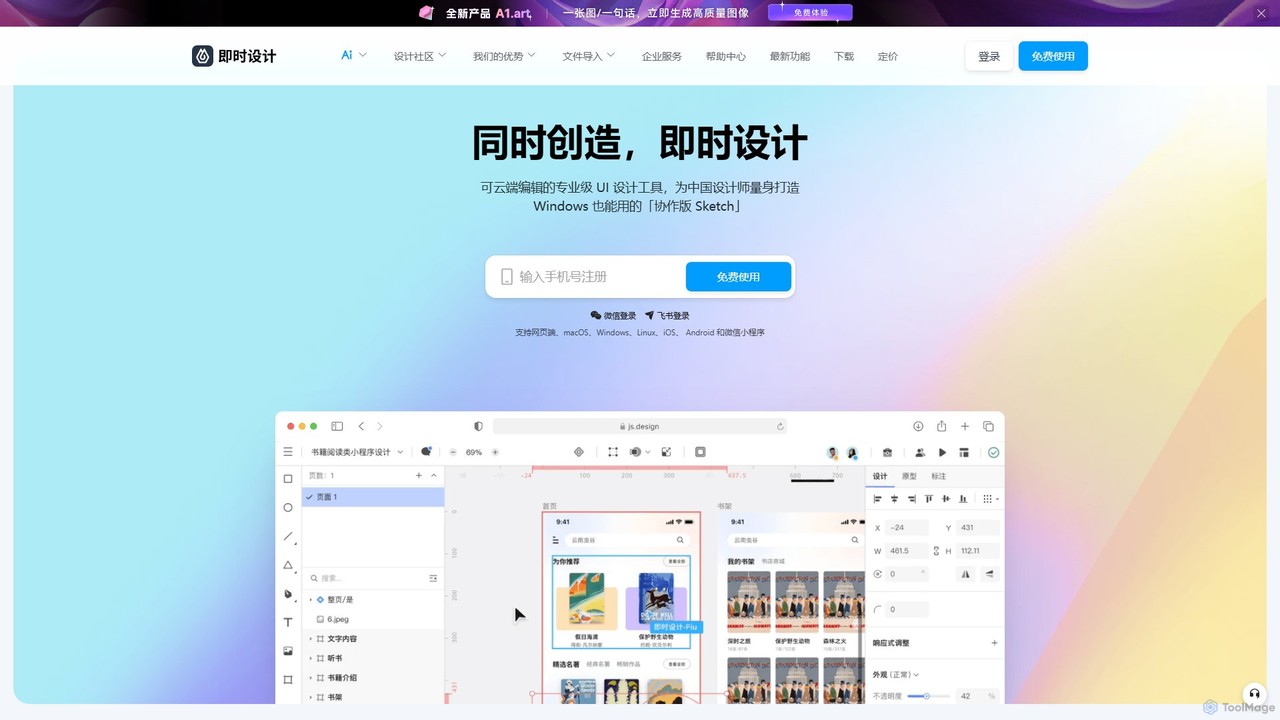
JsDesign is a professional, cloud-based UI/UX design tool that enables real-time collaboration. It offers a cross-platform experience with powerful AI features to accelerate the design workflow, from ideation and prototyping to developer handoff. It's positioned as a strong alternative to Figma and Sketch.

Ai Design Assistant
Visits 464.9KFavorites 106Likes 121

About Ai Design Assistant

AI Design Assistants are tools that use artificial intelligence to automate, accelerate, and enhance the creative design process. They analyze design principles and user input to generate layouts, suggest color palettes and fonts, and even create entire UI mockups from simple text prompts. This empowers designers and non-designers alike to produce high-quality, consistent visuals more efficiently, allowing for rapid prototyping and exploration of creative ideas. Unlike basic template editors, these assistants provide intelligent, context-aware suggestions that adapt to specific project needs.

Core Features

  • Automated Layout Generation: Intelligently arranges text, images, and other elements into balanced and aesthetically pleasing compositions for web, print, or social media.
  • Intelligent Style Suggestions: Recommends harmonious color palettes, font pairings, and visual styles based on brand guidelines, content mood, or design trends.
  • Text-to-Design Conversion: Transforms simple text descriptions or raw content into fully realized design mockups, such as app screens, websites, or presentations.
  • Brand Consistency Automation: Applies and maintains brand assets (logos, colors, fonts) across multiple designs to ensure a cohesive visual identity.
  • Multi-format Adaptation: Automatically resizes and reformats a single design for various platforms and dimensions, such as social media posts, web banners, and mobile screens.

Use Cases

AI Design Assistants are widely used by UI/UX designers for rapid wireframing and prototyping, marketing teams for creating scalable campaign assets, and content creators for producing consistent social media graphics. They are also valuable for entrepreneurs and small businesses needing to create professional marketing materials without extensive design expertise.

How to Choose

When selecting an AI Design Assistant, consider its integration capabilities with your existing workflow tools like Figma or Adobe Creative Suite. Evaluate its specialization—whether it excels in UI/UX design, marketing visuals, or presentation creation. Assess the level of customization and control it offers over AI-generated suggestions. Finally, consider the learning curve and ease of use to ensure it aligns with your team's skill level.

Ai Design Assistant use cases

1

Rapid UI/UX Prototyping for Apps

A UI/UX designer is tasked with creating three distinct concepts for a new mobile banking app's home screen. Instead of manually building each wireframe, they use an AI Design Assistant. By providing a text prompt like 'Create a clean, modern home screen for a banking app showing account balance, recent transactions, and quick access buttons for transfers and payments,' the tool generates multiple layout options in minutes. The designer can then refine the best option, saving hours of initial setup work and allowing more time for user experience optimization.

2

Scaling Marketing Campaign Visuals

A marketing team is launching a new product and needs visuals for various channels: Instagram posts (square), Facebook ads (vertical), and web banners (horizontal). They create a single core design concept. Using an AI Design Assistant, they upload this concept, and the tool automatically adapts and resizes it for all required formats. It intelligently repositions text and images to fit each dimension while maintaining brand consistency. This process reduces the design workload from days to under an hour, ensuring a cohesive campaign launch across all platforms.

3

Generating Presentation Slides from Text

A business consultant needs to create a compelling 20-slide presentation for a client meeting tomorrow. They have all the text content written in a document but lack the time to design each slide. They paste the entire text into an AI Design Assistant. The tool automatically parses the content, identifies headings and key points, and generates a full presentation. It suggests appropriate layouts for title slides, bullet points, and data visualization, and applies a professional, consistent theme throughout. The consultant only needs to make minor adjustments, saving over 80% of the time typically spent on slide design.

4

Creating A/B Test Variations for Ads

A digital marketer wants to optimize a Facebook ad campaign by testing different visuals. They provide an AI Design Assistant with the core ad copy, a product image, and the brand's logo. The tool then generates 10 different ad variations. It experiments with various background colors, font styles for the headline, call-to-action button designs, and image placements. This allows the marketer to quickly deploy a comprehensive A/B test without needing to brief a designer for each minor change, leading to faster campaign optimization and better performance data.

5

Automating Social Media Content Graphics

A social media manager for a tech blog needs to create daily graphics for Twitter, LinkedIn, and Instagram to promote new articles. This repetitive task is time-consuming. By integrating an AI Design Assistant into their workflow, they can simply input the article's title and a key quote. The assistant, pre-configured with the blog's brand templates, automatically generates a set of graphics for each platform. It selects appropriate icons, formats the text elegantly, and ensures the logo is correctly placed, turning a 30-minute task into a 2-minute one.

6

Enhancing E-commerce Product Listings

An owner of a small online store wants to make their product listings more appealing but lacks professional photography skills. They use an AI Design Assistant to improve their product images. After uploading a simple photo of their product on a plain background, the tool can automatically generate lifestyle mockups, placing the product in realistic scenes (e.g., a skincare bottle on a marble bathroom counter). It can also suggest and create promotional banners for sales events, incorporating the product image into an eye-catching design, thereby increasing click-through rates and sales.

Ai Design Assistant FAQ

What is an AI Design Assistant?

An AI Design Assistant is a software tool that uses artificial intelligence to help automate and streamline the design process. Instead of starting from scratch, you can provide it with content or text prompts, and it will generate layouts, suggest color schemes, and create design elements. It acts as a creative partner, helping designers work faster, explore more options, and maintain brand consistency across different materials.

How is an AI Design Assistant different from an AI Image Generator?

The key difference lies in their purpose. An AI Image Generator creates entirely new, often photorealistic or artistic, images from text prompts (e.g., 'a cat in a spacesuit'). An AI Design Assistant, on the other hand, focuses on composition and structure. It arranges existing elements like text and photos, suggests layouts, and applies brand styles. It's a tool for building a complete design, not just for creating a single visual asset.

Who should use an AI Design Assistant?

AI Design Assistants are beneficial for a wide range of users:

  • Professional Designers: To accelerate their workflow, automate repetitive tasks like resizing, and quickly generate initial concepts.
  • Marketing Teams: To create consistent, on-brand campaign materials at scale without relying entirely on a design team.
  • Content Creators & Solopreneurs: To produce professional-looking social media graphics, presentations, and marketing assets without needing deep design skills.
  • Businesses: To empower non-designers in various departments to create well-designed documents and presentations that adhere to brand guidelines.

How do I choose the right AI Design Assistant?

To choose the best tool for your needs, consider these factors:

  • Primary Use Case: Do you need it for UI/UX design, social media graphics, or presentations? Different tools specialize in different areas.
  • Integrations: Check if it connects with your existing software, such as Figma, Sketch, or Adobe Creative Suite, for a seamless workflow.
  • Level of Control: Evaluate how much you can customize the AI's suggestions. Some tools offer more flexibility than others.
  • Ease of Use: Consider the learning curve. A good tool should be intuitive and enhance your productivity, not complicate it.

Can AI Design Assistants replace human designers?

No, AI Design Assistants are designed to augment, not replace, human designers. They excel at handling repetitive, time-consuming tasks and generating initial ideas, which frees up designers to focus on higher-level strategic thinking, creativity, and problem-solving. The best results come from a collaboration where the designer guides the AI, using it as a powerful tool to enhance their own skills and efficiency.