ToolMage
Sign in

Best 1 Workshop Facilitation AI tools for Education

Popular Workshop Facilitation AI tools in Education include Stormz, helping you work more efficiently.

Stormz
Freemium

Stormz

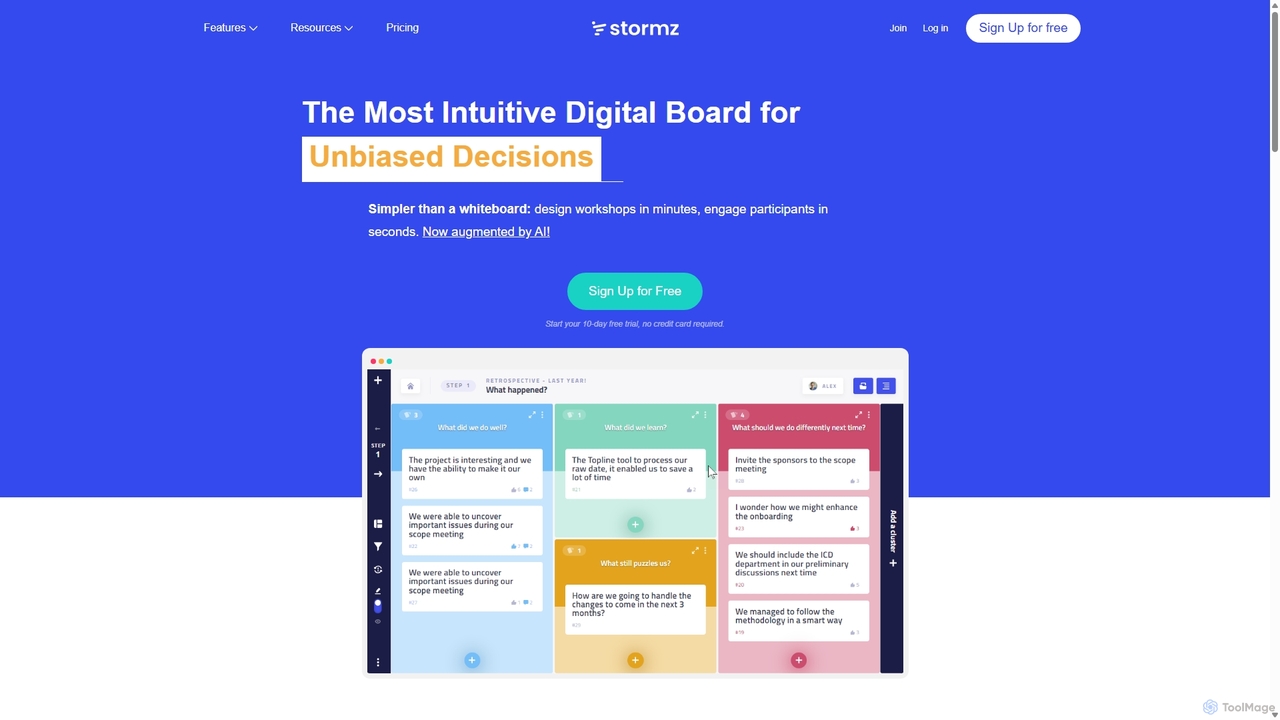
Stormz is an AI-augmented digital platform designed for facilitators to run highly engaging and productive collaborative workshops. It simplifies brainstorming, decision-making, and retrospectives for in-person, remote, or hybrid teams. With its intuitive interface and powerful features, Stormz ensures full participation and helps groups achieve unbiased, high-quality outcomes efficiently.

Meeting Management
Visits 7.1KFavorites 93Likes 114

About Workshop Facilitation

AI Workshop Facilitation tools are specialized platforms designed to structure, guide, and enhance collaborative sessions using artificial intelligence. These tools leverage AI to automate tasks like idea clustering, sentiment analysis, and generating summaries from discussions. They provide an interactive digital environment that makes workshops, whether remote, hybrid, or in-person, more engaging, inclusive, and productive. By automating logistical aspects of facilitation, these platforms allow leaders to focus on the quality of conversation and decision-making.

Core Features

  • AI-Powered Idea Clustering: Automatically groups similar sticky notes or text inputs into thematic clusters, revealing patterns in brainstorming sessions.
  • Automated Summaries & Action Items: Generates concise summaries of discussions, decisions, and key takeaways, often identifying and assigning action items.
  • Real-time Sentiment Analysis: Analyzes participant comments and feedback to gauge the overall mood and engagement level during a session.
  • Interactive Templates: Offers pre-built frameworks for common workshop activities like SWOT analysis, customer journey mapping, and agile retrospectives.
  • Anonymous Participation Modes: Allows participants to contribute ideas and vote on topics anonymously, fostering more honest and open feedback.

Use Cases

These tools are widely used in corporate environments for strategic planning, innovation workshops, and design thinking sprints. Agile teams utilize them for effective retrospectives and backlog grooming. Consultants and trainers also rely on them to facilitate client discovery sessions and interactive training programs, ensuring active participation and clear outcomes regardless of participant location.

How to Choose

When selecting an AI Workshop Facilitation tool, consider its integration capabilities with your existing project management and communication software (e.g., Jira, Slack, Microsoft Teams). Evaluate the sophistication of its AI features—does it offer simple grouping or advanced thematic analysis? Also, assess the library of available templates to ensure it matches your typical workshop needs, and consider the tool's scalability to support both small team meetings and large-scale events.

Workshop Facilitation use cases

1

Streamlining Agile Team Retrospectives

An Agile Coach for a distributed software development team uses an AI facilitation tool to run their bi-weekly sprint retrospective. Team members anonymously post what went well, what could be improved, and any new ideas on a digital board. The AI instantly clusters dozens of sticky notes into key themes like 'Deployment Process' or 'Communication Gaps'. This saves the coach over 20 minutes of manual sorting and allows the team to immediately focus on discussing the most critical topics and creating actionable improvement items.

2

Facilitating a Large-Scale Strategy Workshop

A strategy consultant facilitates a full-day virtual workshop for a company with 100+ participants from different departments. Using an AI facilitation tool, they can run multiple parallel breakout sessions with structured templates for SWOT analysis. The AI aggregates insights from all groups in real-time, presenting a consolidated view of top strengths and critical threats on a central dashboard. This allows the lead facilitator to synthesize company-wide patterns instantly, a task that would typically require several hours of post-workshop analysis.

3

Enhancing a Design Thinking Ideation Session

A UX/UI design team conducts a remote ideation session to brainstorm features for a new mobile app. Participants use a digital canvas to post ideas as virtual sticky notes, images, and sketches. The AI facilitation tool's 'divergent thinking' mode helps spark creativity by suggesting related concepts. Later, the AI clusters hundreds of raw ideas into functional categories like 'Onboarding', 'Gamification', and 'Social Sharing'. This structured output provides a clear foundation for the product manager to prioritize features for the development roadmap.

4

Conducting Interactive Client Discovery Workshops

A consulting firm uses an AI facilitation platform to run discovery workshops with new clients. Instead of a passive presentation, the consultant uses interactive templates like 'Customer Journey Mapping' and 'Pain Point Prioritization'. Clients actively contribute their insights directly onto the shared canvas. The tool's AI generates a professional, detailed summary of the session, including key decisions and identified risks, which can be shared with all stakeholders immediately after the meeting, ensuring alignment and accelerating the project kickoff.

5

Gathering Anonymous Employee Feedback

An HR manager wants to gather honest feedback on a new company policy. They organize a virtual town hall using an AI facilitation tool with an anonymous Q&A feature. Employees can submit questions and upvote others' submissions without revealing their identity. The AI analyzes the sentiment of the submitted questions, highlighting areas of major concern or confusion for the HR team to address. This process fosters psychological safety and provides leadership with a more accurate, unfiltered view of employee sentiment than a traditional open-mic session.

6

Automating Post-Workshop Reporting and Follow-up

A project manager concludes a multi-day project kickoff workshop. Instead of spending hours manually transcribing notes and compiling a report, they use the AI tool's one-click summary feature. The AI generates a comprehensive document that includes a list of all participants, a summary of key decisions made each day, clustered brainstorming outputs, and a clear list of action items with assigned owners and due dates. This automated report is ready to be distributed within minutes of the workshop's end, ensuring momentum is maintained and everyone is clear on the next steps.

Workshop Facilitation FAQ

What are AI Workshop Facilitation tools?

AI Workshop Facilitation tools are digital platforms that use artificial intelligence to enhance and streamline collaborative meetings. Unlike simple digital whiteboards, they actively assist the facilitator by automating tasks such as grouping ideas, summarizing discussions, and analyzing participant sentiment. Their primary goal is to make workshops more structured, engaging, and productive by handling the logistical overhead, allowing humans to focus on creative thinking and strategic decision-making.

How do these tools differ from video conferencing software like Zoom?

Video conferencing tools like Zoom or Microsoft Teams provide the communication channel for a meeting, focusing on audio, video, and screen sharing. AI Workshop Facilitation tools are a layer on top of that, providing the structure for interaction. While Zoom has basic features like polls, facilitation tools offer advanced, purpose-built functionalities:

  • Structured Activities: They provide dedicated templates for complex processes like design thinking or agile retrospectives.
  • AI-Powered Analysis: They use AI to synthesize large amounts of qualitative data (like ideas on sticky notes) into actionable insights.
  • Persistent Collaboration Space: The digital canvas often remains accessible after the meeting, serving as a living document.

In essence, video conferencing lets you talk; facilitation tools help you collaborate effectively and achieve a specific outcome.

How should I choose the right AI Workshop Facilitation tool?

Choosing the right tool depends on your specific needs. Consider the following factors:

  • Workshop Complexity: Do you need simple brainstorming and voting, or complex, multi-stage templates for methodologies like Design Sprints?
  • Group Size: Check the tool's capacity. Some are optimized for small teams, while others can handle hundreds of participants.
  • Integrations: Does it connect with your existing ecosystem (e.g., Slack for notifications, Jira for creating tickets from action items)?
  • AI Features: Evaluate the sophistication of the AI. Does it just group keywords, or can it perform deeper thematic analysis and generate insightful summaries?
  • User Experience: The tool should be intuitive for all participants, not just the facilitator, to ensure smooth adoption and active engagement.
Who benefits most from using AI Workshop Facilitation tools?

While many roles can benefit, these tools are particularly valuable for individuals responsible for leading collaborative sessions. This includes:

  • Agile Coaches & Scrum Masters: For running effective retrospectives, sprint planning, and backlog refinement.
  • Project & Product Managers: For stakeholder alignment meetings, feature prioritization, and roadmapping workshops.
  • UX/UI Designers & Researchers: For conducting ideation sessions, user journey mapping, and synthesizing research findings.
  • Consultants & Trainers: For engaging clients in discovery workshops and delivering interactive training modules.
  • Team Leaders & Managers: For any strategic planning, problem-solving, or team-building session, especially with remote or hybrid teams.
Can these tools replace a human facilitator?

AI Workshop Facilitation tools are designed to augment, not replace, a human facilitator. They act as a powerful assistant, handling the mechanical and data-processing aspects of facilitation. This frees up the human facilitator to focus on higher-level tasks that require emotional intelligence and nuanced understanding, such as:

  • Reading the room and managing group dynamics.
  • Asking insightful, probing questions to deepen the conversation.
  • Navigating conflicts and building consensus among participants.
  • Adapting the workshop agenda in real-time based on the flow of discussion.

The most effective workshops combine the organizational power of an AI tool with the skilled guidance of a human facilitator.