ToolMage
Sign in

Best 1 Image & Video AI tools for Generative Ai

Popular Image & Video AI tools in Generative Ai include Insider Memes, helping you work more efficiently.

Insider Memes
Freemium

Insider Memes

Insider Memes is an AI-powered viral meme generator that helps users create engaging and humorous memes in seconds. It offers instant edits, viral taglines, and access to thousands of fresh, daily-updated meme templates for both image and video formats.

Meme Generation
Visits 73.6KFavorites 99Likes 124

About Image & Video

Image & Video AI tools are a powerful category of generative AI that leverage advanced algorithms to create, modify, and enhance visual content. These tools utilize deep learning models, such as GANs and diffusion models, to understand complex visual patterns and generate high-quality images and videos from textual prompts, existing media, or other data inputs. They empower creators, marketers, and businesses to rapidly produce unique visual assets, automate tedious editing tasks, and explore new creative possibilities with unprecedented efficiency.

Core Features

  • Generative Creation: Generate entirely new images, videos, or specific elements from text descriptions or sketches.
  • Style Transfer: Apply artistic styles from one image or video to another, maintaining content while transforming aesthetics.
  • Content Editing & Enhancement: Automatically remove backgrounds, upscale resolution, colorize old photos, or fill in missing parts of an image.
  • Video Manipulation: Generate video clips, perform object removal, change backgrounds, or create slow-motion effects with AI assistance.
  • Image-to-Image Translation: Transform images from one domain to another, such as converting sketches to realistic photos or day scenes to night scenes.

Use Cases

These tools are widely adopted across various industries, from digital marketing and content creation to game development and e-commerce. They enable graphic designers to quickly iterate on concepts, marketers to produce diverse ad creatives at scale, and filmmakers to automate visual effects. Businesses leverage them for personalized content generation, product visualization, and efficient media asset management.

How to Choose

When selecting an Image & Video AI tool, consider its specific generative capabilities (e.g., text-to-image, image-to-video), the quality and realism of its output, and its ease of use. Evaluate the available customization options, integration with existing workflows, and the pricing model. Also, assess the community support and the tool's ability to handle your specific data types and creative demands.

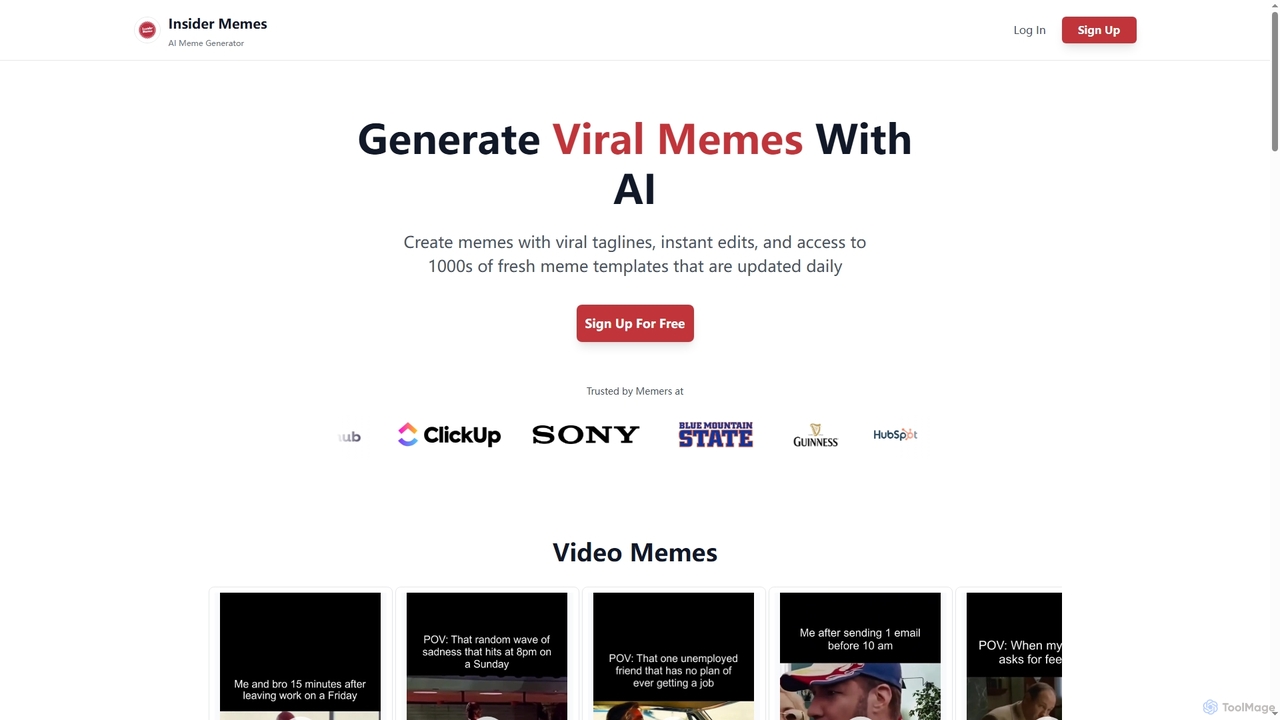
Image & Video use cases

1

Generate Diverse Marketing Ad Creatives

Marketing professionals often need a high volume of varied visual content for A/B testing and multi-platform campaigns. Image & Video AI tools allow them to input product descriptions or campaign themes and instantly generate dozens of unique ad creatives, including different styles, layouts, and models. This significantly reduces design time and costs, enabling faster iteration and optimization of marketing campaigns.

2

Generate Product Marketing Visuals

E-commerce businesses use AI to create diverse product images, lifestyle shots, and ad banners from simple descriptions, saving time and cost on traditional photography and graphic design. This allows for rapid A/B testing of visuals and personalized content for different customer segments, significantly boosting marketing campaign effectiveness and conversion rates.

3

Generate Marketing Campaign Visuals

Marketing specialists can use AI Image & Video tools to quickly generate a wide array of visual content for advertising campaigns. By inputting text descriptions of desired scenes, products, or themes, they can create diverse ad creatives, social media posts, and banner images. This significantly reduces the time and cost associated with traditional graphic design, allowing for rapid A/B testing and personalized content delivery across various platforms.

4

Create Realistic Product Mockups for E-commerce

E-commerce businesses require compelling product visuals without the expense of professional photoshoots for every variation. AI image generation tools enable designers to create realistic mockups of products in various settings, with different colors, textures, or even on diverse models. This accelerates product launch cycles and provides customers with a richer visual experience, enhancing conversion rates.

5

Automate E-commerce Product Visualization

E-commerce businesses can leverage AI Image & Video tools to automate the creation of product visuals. Instead of expensive photoshoots, they can upload a single product image and use AI to generate variations with different backgrounds, lighting conditions, or even models. This enables rapid production of diverse product imagery, helping to showcase items in various contexts and appeal to a broader customer base, ultimately boosting conversion rates and reducing operational costs.

6

Rapid Concept Art & Design Iteration

Game developers and concept artists leverage AI to quickly generate multiple variations of characters, environments, and objects based on textual prompts or rough sketches. This accelerates the ideation phase, allowing artists to explore diverse styles and compositions in minutes, significantly reducing the time spent on initial visual development and fostering greater creativity.

7

Automate Video Content Production for Social Media

Social media managers constantly need fresh, engaging video content to maintain audience interest. Image & Video AI tools can transform text scripts or blog posts into short, dynamic videos with AI-generated voiceovers, visuals, and background music. This automates a significant portion of video production, allowing managers to publish more frequently and maintain a consistent online presence without extensive editing skills.

8

Automated Social Media Content Creation

Social media managers utilize AI to produce a continuous stream of engaging images and short videos for various platforms, adapting styles and themes to maintain audience interest without extensive manual effort. This enables consistent brand presence and frees up creative teams to focus on strategy rather than repetitive content generation, leading to higher engagement rates.

9

Accelerate Game Asset Creation

Game developers and artists can significantly accelerate their workflow by using AI Image & Video tools for asset creation. These tools can generate textures, character concepts, environmental elements, and even simple animations from text prompts or rough sketches. This allows for rapid prototyping, exploration of various art styles, and efficient production of high-quality game assets, freeing up artists to focus on more complex and creative tasks, thereby shortening development cycles.

10

Enhance Video Production and Editing

Video editors and content creators can utilize AI Image & Video tools to enhance their production and editing processes. These tools can automatically generate short video clips from text, upscale low-resolution footage, remove unwanted objects or backgrounds, and even apply complex visual effects with minimal manual effort. This capability streamlines post-production, reduces editing time, and allows for the creation of professional-grade videos even with limited resources, making advanced video editing more accessible.

11

Enhance and Upscale Low-Resolution Archival Footage

Archivists and media professionals often deal with old, low-resolution images or video footage that needs to be modernized for current platforms. AI video and image enhancement tools can intelligently upscale resolution, reduce noise, and sharpen details in historical content. This breathes new life into valuable archives, making them suitable for high-definition displays and preserving cultural heritage with improved clarity.

12

Personalized Video Ad Production

Marketers employ AI video tools to generate personalized video ads at scale, dynamically adjusting elements like product placement, voiceovers, and text overlays for different audience segments. This hyper-personalization significantly increases ad relevance and engagement, leading to higher click-through rates and improved return on ad spend compared to generic campaigns.

13

Create Personalized Educational Content

Educators and trainers can leverage AI Image & Video tools to create highly personalized and engaging learning materials. By inputting specific concepts or scenarios, they can generate custom illustrations, diagrams, or short explanatory videos tailored to different student needs or learning styles. This capability helps to make complex topics more understandable, increases student engagement, and allows for the rapid production of diverse educational resources, enhancing the overall learning experience.

14

Historical Photo & Video Restoration

Archivists and enthusiasts use AI to upscale low-resolution images, colorize black-and-white photos, and stabilize old video footage, bringing historical media back to life with enhanced clarity and detail. This preserves cultural heritage and makes previously inaccessible or degraded visual content viewable and shareable for modern audiences, enriching historical research and public engagement.

15

Design Game Assets and Character Concepts Rapidly

Game developers and concept artists need to quickly iterate on visual ideas for characters, environments, and assets. Image & Video AI tools allow them to input textual descriptions or rough sketches and generate multiple variations of game assets or character concepts in different art styles. This drastically speeds up the pre-production phase, enabling more creative exploration and faster decision-making in game design.

16

Personalize Visuals for Customer Communications

Businesses aiming for hyper-personalization in customer outreach can use AI to tailor visual content. For instance, a real estate agent could generate personalized images of a property with a client's name subtly integrated, or a travel agency could create bespoke destination visuals based on individual preferences. This deepens customer engagement and makes communications feel more relevant and impactful.

17

Architectural Visualization & Interior Design

Architects and interior designers use AI to transform 2D floor plans or basic models into realistic 3D renderings, experimenting with different materials, lighting, and furniture arrangements instantly. This significantly speeds up the design process, allows clients to visualize concepts more effectively, and reduces the need for costly physical mock-ups, leading to faster project approvals and fewer revisions.

18

Streamline Architectural Visualization

Architects and interior designers can streamline their visualization processes using AI Image & Video tools. By uploading basic sketches, 2D plans, or simple 3D models, AI can generate realistic renderings, apply various material textures, and simulate different lighting conditions. This significantly reduces the time and effort required for traditional rendering, allowing designers to quickly iterate on concepts, present multiple design options to clients, and create compelling visual proposals with greater efficiency and realism.

Image & Video FAQ

What are Image & Video AI tools?

Image & Video AI tools are advanced software applications that use artificial intelligence, particularly deep learning, to create, modify, enhance, and analyze visual content. They can generate images from text prompts, upscale resolutions, remove objects, apply artistic styles, and even produce or edit videos automatically. These tools are designed to automate complex visual tasks, making high-quality content creation more accessible and efficient for various users.

What are Image & Video AI tools?

Image & Video AI tools are applications that use artificial intelligence to generate, modify, or enhance visual content. They leverage advanced machine learning models, such as generative adversarial networks (GANs) and diffusion models, to create new images and videos from text prompts, existing media, or other data. These tools are revolutionizing creative workflows by automating complex tasks and enabling new forms of visual expression.

What are AI Image & Video tools?

AI Image & Video tools are software applications that use artificial intelligence, particularly generative AI, to create, modify, or enhance visual content. They can generate new images or videos from text prompts, edit existing media with automated precision, and apply advanced effects. These tools are designed to automate complex visual tasks, making high-quality content creation more accessible and efficient for various users.

How do Image & Video AI tools differ from traditional editing software?

Traditional editing software requires manual input and artistic skill to manipulate pixels and layers. Image & Video AI tools, conversely, use AI to understand context and generate content autonomously or semi-autonomously based on high-level instructions. While traditional tools offer precise control, AI tools excel at rapid generation, style transfer, and complex content creation from minimal input, often complementing traditional workflows rather than replacing them entirely.

How do AI Image & Video tools differ from traditional editing software?

The primary difference lies in automation and generation. Traditional software (e.g., Photoshop, Premiere Pro) requires manual input and skill for every edit and creation. AI tools, however, can generate entirely new content from simple text prompts or automatically perform complex edits like object removal or style transfer with minimal user intervention. They excel at rapid prototyping, generating variations, and automating repetitive tasks, whereas traditional software offers granular control for precise, manual adjustments.

How do Image & Video AI tools differ from traditional editing software?

Traditional editing software relies on manual input and user skill for every adjustment, offering precise control. Image & Video AI tools, however, leverage algorithms to understand context and generate or modify content autonomously based on prompts or learned patterns. While traditional tools require explicit instructions for each step, AI tools can interpret high-level commands (e.g., "generate a futuristic city") and execute complex tasks with minimal human intervention, significantly speeding up the creative process.

What are the main applications of Image & Video AI in business?

In business, Image & Video AI tools are used for diverse applications such as marketing content creation (generating ad creatives, social media visuals), e-commerce (product image enhancement, virtual try-ons), media production (concept art, visual effects pre-visualization), and personalized content delivery. They help businesses scale content production, reduce costs, and create highly engaging visual experiences for their customers, driving innovation and efficiency across various departments.

What are the key functionalities of AI Image & Video tools?

Key functionalities include text-to-image/video generation, where users describe what they want to see, and the AI creates it. Other features involve image and video editing, such as background removal, object replacement, upscaling resolution, and applying artistic styles. Many tools also offer capabilities for generating animations, creating deepfakes (with ethical considerations), and enhancing visual quality through noise reduction and color correction. Some even provide content moderation and analysis.

What are the main capabilities of AI in image and video creation?

The main capabilities include:

  • Generative Art: Creating novel images or videos from text descriptions (text-to-image, text-to-video).
  • Enhancement: Upscaling resolution, de-noising, color correction, and sharpening.
  • Editing Automation: Object removal, background replacement, style transfer, and facial retouching.
  • Video Synthesis: Generating realistic human faces, lip-syncing, or entire video sequences.
  • Content Analysis: Tagging, categorizing, and moderating visual content.
These features empower users to achieve professional results with less effort.

Who can benefit most from using Image & Video AI tools?

A wide range of professionals and enthusiasts can benefit. This includes:

  • Content Creators & Marketers: For generating diverse visuals for campaigns and social media.
  • Graphic Designers: For rapid prototyping, concept art, and automating repetitive tasks.
  • E-commerce Businesses: For creating consistent product imagery and mockups.
  • Filmmakers & Video Editors: For pre-visualization, special effects, and automating editing.
  • Game Developers: For generating game assets and character designs.
Essentially, anyone needing to produce or process visual content efficiently can find value.

What factors should I consider when choosing an Image & Video AI tool?

When selecting an Image & Video AI tool, evaluate its core capabilities (e.g., text-to-image, video generation, editing features), the quality and resolution of its output, and its user interface. Consider the learning curve, integration options with your existing software, and the pricing structure (subscription, pay-per-use). Also, assess the community support, available templates, and the tool's ability to handle specific creative styles or data formats to ensure it meets your project's unique demands.

Who can benefit most from using AI Image & Video tools?

A wide range of professionals and enthusiasts can benefit. Content creators, digital marketers, and social media managers can rapidly produce engaging visuals. Graphic designers and artists can use them for inspiration, rapid prototyping, and automating tedious tasks. Game developers can accelerate asset creation, while e-commerce businesses can generate diverse product imagery. Educators, filmmakers, and even individual hobbyists can leverage these tools to enhance their visual projects and streamline creative workflows.

Can Image & Video AI tools generate realistic human faces or figures?

Yes, many advanced Image & Video AI tools are capable of generating highly realistic human faces and figures. These models are trained on vast datasets of human images and can produce diverse, unique, and often indistinguishable-from-real portraits or full-body figures. However, users should be aware of ethical considerations regarding deepfakes and the potential for bias in generated content, which can sometimes reflect biases present in the training data.

What should I consider when choosing an Image & Video AI tool?

When selecting an Image & Video AI tool, consider several factors:

  • Specific Needs: Do you need image generation, video editing, enhancement, or a combination?
  • Output Quality: Evaluate the realism, resolution, and artistic quality of the generated content.
  • Ease of Use: Look for intuitive interfaces and clear prompting guidelines.
  • Integration: Check if it integrates with your existing creative software or workflows.
  • Pricing & Licensing: Understand the cost structure and usage rights for generated content.
  • Community & Support: A strong community can provide valuable tips and troubleshooting.

What should I consider when choosing an AI Image & Video tool?

When selecting an AI Image & Video tool, prioritize your specific needs: do you need generation, editing, or both? Evaluate the output quality, resolution, and the level of creative control it offers. Consider the ease of use, user interface, and whether it integrates with your existing software. Pricing models (subscription, pay-per-use) and usage limits are also crucial. Finally, check for community support, available tutorials, and the tool's ethical guidelines, especially for generative content.