
ToolMage
Sign in

Best 1 Hr Automation AI tools for Human Resources

Popular Hr Automation AI tools in Human Resources include Wisfr, helping you work more efficiently.

Wisfr
Paid

Wisfr

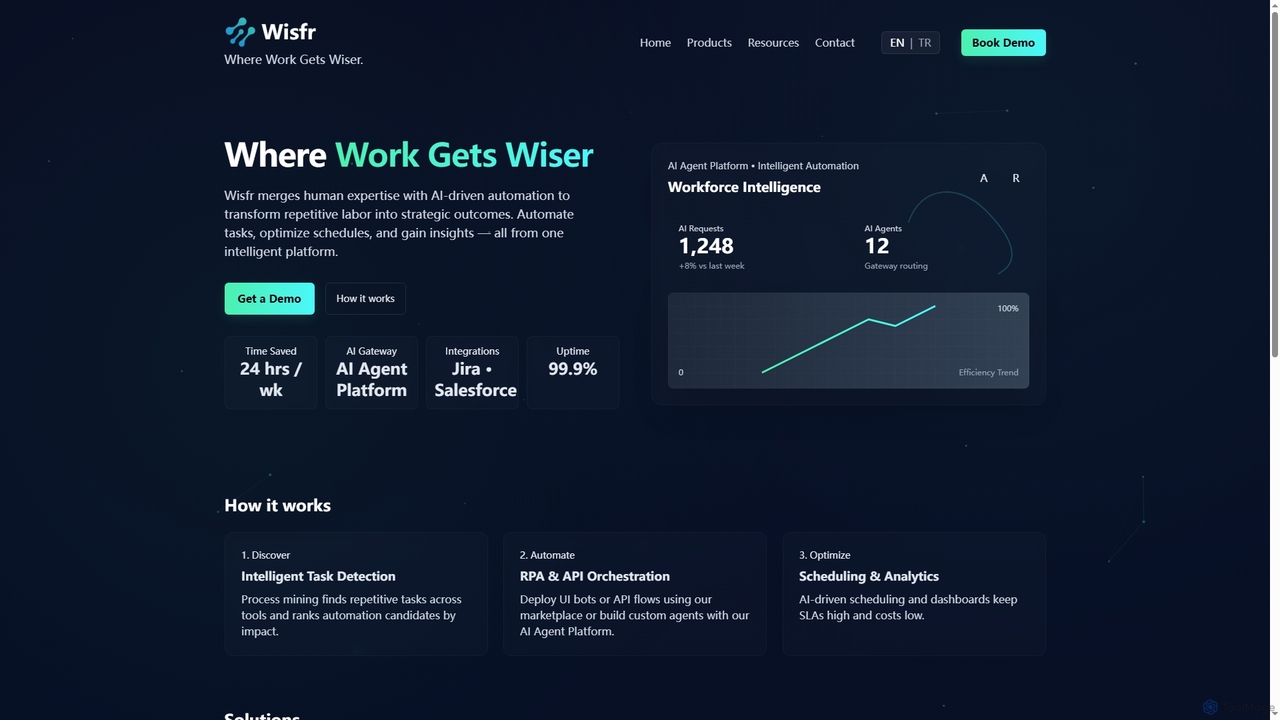
Wisfr is an AI Agent Platform that merges human expertise with AI-driven automation to transform repetitive tasks into strategic outcomes. It helps businesses automate workflows, optimize schedules, and gain actionable insights from a single intelligent platform.

Business Intelligence
Visits 5.7KFavorites 119Likes 119

About Hr Automation

HR Automation tools are AI-powered solutions designed to streamline and automate repetitive tasks across various human resources functions. Leveraging technologies like machine learning and natural language processing, these platforms enhance efficiency, accuracy, and compliance in HR operations. They empower HR teams to focus on strategic initiatives, improve employee experience, and optimize talent management processes.

Core Features

  • Automated Recruitment & Onboarding: Streamlines candidate sourcing, screening, interview scheduling, and new hire paperwork.
  • Intelligent Payroll & Benefits Administration: Automates salary calculations, tax deductions, benefits enrollment, and compliance checks.
  • AI-driven Performance Management: Facilitates goal setting, feedback collection, performance reviews, and talent development tracking.
  • Employee Self-Service Portals: Provides employees with automated access to HR information, leave requests, and personal data updates.
  • HR Data Analytics & Reporting: Generates insights from HR data to inform decision-making on workforce planning and retention.

Applicable Scenarios

Large enterprises with high employee turnover or complex payroll structures use HR automation to manage vast amounts of data and ensure compliance across multiple regions. Startups and SMEs leverage these tools to build scalable HR foundations without extensive manual overhead, focusing on rapid growth. HR departments facing talent shortages utilize automation for efficient candidate screening and engagement.

How to Choose

When selecting HR automation tools, consider the specific HR functions you aim to automate (e.g., recruitment, payroll, performance). Evaluate integration capabilities with existing HRIS or ERP systems for seamless data flow. Assess scalability to accommodate future growth and ensure robust data security and compliance with local regulations. Finally, review user-friendliness for both HR staff and employees.

Hr Automation use cases

1

Automating Candidate Screening and Interview Scheduling

Recruitment teams in fast-growing tech companies use HR automation platforms to automatically screen hundreds of resumes for keyword matches and essential qualifications. The system then uses AI to schedule initial interviews based on recruiter and candidate availability, sending automated reminders. This significantly reduces manual administrative work, allowing recruiters to focus on engaging with qualified candidates and improving time-to-hire by up to 30%.

2

Automating Candidate Screening and Interview Scheduling

Recruitment teams use HR automation platforms to automatically screen thousands of resumes based on predefined criteria, identifying top candidates efficiently. AI-powered scheduling tools then coordinate interviews with candidates and hiring managers, sending automated reminders and managing calendar conflicts, significantly reducing administrative burden and accelerating the hiring process.

3

Streamlining Onboarding Workflows for New Hires

HR departments deploy automation to create personalized onboarding journeys for new employees. This includes automatically sending welcome emails, distributing necessary forms, setting up IT accounts, assigning training modules, and scheduling introductory meetings. This ensures a smooth, consistent, and compliant onboarding experience, making new hires feel valued from day one.

4

Streamlining New Employee Onboarding Processes

For companies with frequent new hires, HR automation tools create personalized onboarding workflows. New employees receive automated welcome emails, access to digital paperwork (contracts, tax forms), and training modules. The system tracks completion, notifies relevant departments (IT for equipment, managers for introductions), ensuring a smooth, compliant, and engaging start for every new team member, reducing manual follow-ups by HR by 50%.

5

Automating Payroll Processing and Compliance

Finance and HR departments in multinational corporations utilize HR automation to manage complex payroll across different countries with varying tax laws and regulations. The system automatically calculates salaries, bonuses, deductions, and taxes, generating payslips and ensuring timely, accurate payments. It also flags potential compliance issues, reducing errors and ensuring adherence to local labor laws, saving countless hours of manual reconciliation.

6

Enhancing Employee Self-Service with AI Chatbots

Employees can access AI-powered chatbots via an HR portal to get instant answers to common questions regarding company policies, benefits, leave requests, or payroll. The chatbot can also guide them through self-service processes like updating personal information or submitting expense reports, reducing the volume of direct inquiries to the HR team.

7

Automating Payroll Processing and Compliance

Finance and HR teams utilize automation software to accurately calculate salaries, bonuses, deductions, and taxes for all employees. The system automatically generates payslips, files tax reports, and ensures compliance with local labor laws and regulations, minimizing errors and saving countless hours of manual data entry and verification each pay cycle.

8

Enhancing Employee Performance Review Cycles

Organizations implement HR automation to standardize and simplify annual or quarterly performance review cycles. Managers and employees use the platform to set goals, track progress, provide continuous feedback, and complete self-assessments. The system automates reminders, aggregates data, and generates reports, making the review process more objective, transparent, and less time-consuming for all parties involved, fostering a culture of continuous development.

9

Managing Employee Leave Requests and Approvals

For any organization, managing employee leave (vacation, sick leave, parental leave) can be time-consuming. HR automation tools allow employees to submit leave requests through a self-service portal. The system automatically checks against company policies, team calendars, and manager availability, routing requests for approval. Once approved, it updates calendars and payroll, reducing administrative burden and ensuring fair, consistent application of leave policies.

10

Optimizing Performance Review Cycles

Managers and HR professionals leverage automation to manage the entire performance review process. This involves automatically sending out performance review forms, tracking goal progress, collecting 360-degree feedback from peers and subordinates, and scheduling review meetings. The system compiles data into comprehensive reports, providing insights for employee development and talent management.

11

Generating HR Analytics and Workforce Insights

HR leaders leverage automation platforms to collect and analyze vast amounts of employee data, including attrition rates, hiring costs, diversity metrics, and performance trends. The tools generate interactive dashboards and reports, providing actionable insights into workforce health, talent gaps, and potential retention risks. This enables data-driven decision-making for strategic workforce planning and improving overall organizational effectiveness.

12

Managing Employee Offboarding and Exit Procedures

When an employee leaves, HR automation tools ensure a smooth and compliant offboarding process. This includes automatically initiating IT account deactivation, coordinating asset returns, processing final payroll, generating exit interview surveys, and updating internal records. This minimizes risks, ensures data security, and maintains a positive employer brand.

Hr Automation FAQ

What is HR Automation?

HR Automation refers to the use of technology, often powered by AI and machine learning, to automate repetitive and administrative tasks within human resources departments. This includes processes like recruitment, onboarding, payroll, performance management, and employee data management. Its primary goal is to enhance efficiency, reduce manual errors, improve compliance, and free up HR professionals for more strategic, human-centric work.

What is HR Automation?

HR Automation refers to the use of technology, particularly artificial intelligence and robotic process automation, to streamline and automate routine and repetitive tasks within human resources. Its primary goal is to enhance efficiency, reduce manual errors, and free up HR professionals for more strategic work. Key areas include recruitment, payroll, onboarding, and performance management.

How does HR Automation differ from traditional HR Software (HRIS)?

While traditional HRIS (Human Resources Information Systems) primarily focus on data storage and basic record-keeping, HR Automation goes further by actively performing tasks and streamlining workflows. HR Automation leverages AI for intelligent decision-making, predictive analytics, and process optimization, whereas HRIS is more about managing static employee data. Automation adds a layer of intelligence and action to the data stored in an HRIS.

How does HR Automation differ from traditional HR Software (HRIS)?

While traditional HRIS (Human Resources Information Systems) primarily store and manage HR data, HR Automation tools actively perform tasks and processes. HR Automation leverages AI and RPA to execute workflows, make data-driven decisions, and interact with employees, whereas HRIS is more of a system of record. Automation adds an intelligent, proactive layer on top of data management.

What are the main benefits of implementing HR Automation?

Implementing HR Automation offers several key benefits: increased operational efficiency by reducing manual tasks, significant cost savings through optimized processes, improved data accuracy and compliance, enhanced employee experience through faster service and personalized interactions, and the ability for HR teams to focus on strategic initiatives rather than administrative burdens.

What are the key benefits of implementing HR Automation tools?

Implementing HR Automation offers several key benefits. It significantly increases operational efficiency by reducing manual data entry and repetitive tasks, leading to cost savings. It improves data accuracy and compliance, minimizing errors and legal risks. Furthermore, it enhances the employee experience through faster service and self-service options, allowing HR teams to focus on strategic initiatives like talent development and employee engagement.

Which HR functions can be effectively automated?

Many HR functions can be effectively automated. These include recruitment (candidate sourcing, screening, scheduling), onboarding (digital paperwork, task assignment), payroll processing (calculations, deductions, tax filing), benefits administration, performance management (feedback collection, goal tracking), leave management, and employee data updates. AI can also assist in generating HR reports and providing basic employee queries.

What types of tasks can HR Automation handle?

HR Automation can handle a wide range of tasks, including automated resume screening and interview scheduling, onboarding paperwork and IT setup, payroll processing and tax filing, benefits administration, performance review reminders and feedback collection, employee self-service queries via chatbots, and generating HR analytics reports. It covers most transactional HR functions.

What should I consider when integrating HR Automation into my existing systems?

When integrating HR Automation, consider its compatibility with your current HRIS, ERP, or other business systems to ensure seamless data exchange. Evaluate the vendor's API capabilities and integration support. Prioritize data security and privacy features, ensuring compliance with regulations like GDPR or CCPA. A phased implementation approach, starting with critical functions, can also help manage the transition effectively.

How do I choose the right HR Automation solution for my business?

To choose the right solution, first assess your specific HR needs and the tasks you want to automate most. Consider the tool's integration capabilities with your existing HRIS or other business systems, its scalability, data security features, and compliance with relevant regulations. Evaluate user-friendliness for both HR staff and employees, and compare vendor support, pricing, and implementation complexity.