ToolMage
Sign in

Best 1 Internal Tools for Human Resources

Popular Internal Tools in Human Resources include Helpx.ai, helping you work more efficiently.

Helpx.ai
Freemium

Helpx.ai

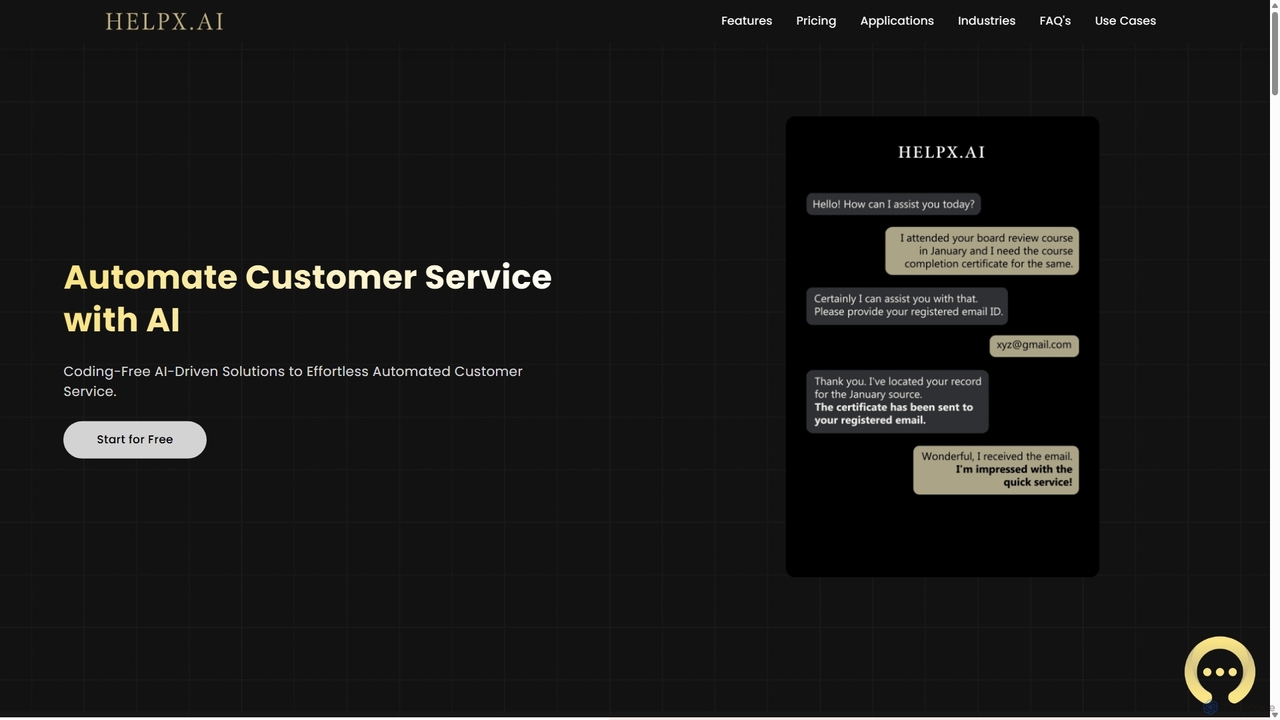
Helpx.ai is an AI-powered platform for building custom chatbots to automate customer support, lead generation, and internal processes. Train your chatbot with your own data, integrate it with databases for real-time answers, and customize its personality to match your brand, all without extensive technical knowledge.

Chatbot
Visits 11.5KFavorites 175Likes 180

About Internal Tools

AI Internal Tools are platforms used to build custom applications, dashboards, and automated workflows for internal business operations without extensive coding. These tools leverage low-code/no-code interfaces, allowing teams like Human Resources to create tailored solutions for their unique processes. They empower non-technical users to connect data sources, automate repetitive tasks, and visualize key metrics, significantly reducing reliance on IT departments. This approach enables rapid development and deployment of solutions for challenges like employee onboarding, performance tracking, and resource management.

Core Features

  • Low-Code/No-Code App Builder: Visually design and build custom applications with drag-and-drop components.
  • Workflow Automation: Create automated, multi-step processes for approvals, notifications, and data entry.
  • Data Integration: Connect to various databases, APIs, and third-party services (like HRIS or CRMs).
  • Interactive Dashboards: Build real-time, dynamic dashboards to monitor and analyze business data.
  • Access Control: Manage user permissions and roles to ensure data security and privacy.

Use Cases

Primarily used by operations, IT, and business departments like HR and finance. For instance, an HR team can build a custom employee onboarding portal that integrates with IT and payroll systems. A finance team could create a tool for budget approval workflows, or an operations team might develop an internal inventory management app.

How to Choose

When selecting an AI Internal Tool, consider the following: First, evaluate its integration capabilities with your existing systems (e.g., Slack, Google Workspace, specific HRIS). Second, assess the balance between ease of use (no-code) and flexibility (low-code) based on your team's technical skills. Third, scrutinize the security and compliance features, especially when handling sensitive employee data. Finally, consider the pricing model and its scalability as your usage grows.

Internal Tools use cases

1

Automate Employee Onboarding Workflow

An HR specialist is tasked with streamlining the complex onboarding process for new hires. Using an internal tool builder, they design a visual workflow that triggers automatically when a candidate accepts an offer. The workflow assigns tasks sequentially: IT receives a request to provision hardware, the hiring manager gets a notification to schedule introductory meetings, and the new hire receives welcome materials and initial paperwork. This automated system provides a consistent experience, reduces manual follow-up by over 80%, and ensures all necessary steps are completed on time without HR intervention.

2

Automating New Employee Onboarding

An HR manager at a rapidly growing company is tasked with onboarding 15 new hires simultaneously. Instead of manually sending emails, scheduling meetings, and answering repetitive questions, they use an AI internal tool. They create an automated workflow that triggers upon a new hire's start date. The tool automatically sends welcome messages in Slack, assigns initial tasks like setting up accounts, provides links to essential documents, and deploys a chatbot to answer common questions about benefits and company policies. This reduces the HR manager's manual workload by over 70% and provides a consistent, engaging experience for every new employee.

3

Providing Instant IT Support and Troubleshooting

An IT support team is overwhelmed with common requests like password resets and VPN connection issues. They implement an AI internal tool integrated with their IT service management (ITSM) system. Now, when an employee reports an issue in a dedicated support channel, the AI chatbot first attempts to resolve it by providing step-by-step guides from the knowledge base. If the issue persists, the AI gathers diagnostic information (like device type and error messages) and automatically creates a prioritized ticket in the ITSM system, assigning it to the right specialist. This approach resolves 40% of tickets without human intervention and ensures specialists receive well-documented requests.

4

Create a Centralized HR Analytics Dashboard

An HR analyst needs to consolidate data from multiple sources—the HRIS, payroll software, and quarterly engagement surveys—to track key metrics. Using an internal tool, they build a custom dashboard without writing any SQL. They connect the different data sources and use a drag-and-drop interface to create charts for headcount trends, turnover rates by department, and compensation distribution. The dashboard updates in real-time, providing leadership with a single, reliable source of truth for strategic workforce planning and eliminating hours of manual data compilation in spreadsheets each month.

5

Centralizing Company Knowledge for Easy Access

An operations manager notices that critical information is scattered across Google Drive, Confluence, and various Slack channels, making it hard for employees to find answers. They use an AI internal tool to create a unified knowledge hub. The tool ingests and indexes content from all these sources. Now, an employee can simply ask a question like, 'What is our Q3 marketing budget?' in the company's portal. The AI searches across all connected platforms and provides a direct answer with a link to the source document, saving employees hours of searching and ensuring they work with the most current information.

6

Build a Custom Leave Request and Approval App

A department manager finds the company-wide leave system too cumbersome for their team's specific needs. Using a no-code internal tool, they build a simple application in under an hour. Team members can submit leave requests through a clean form, and the manager receives an instant notification on Slack for approval. Once approved, the leave dates are automatically added to a shared team calendar. This custom app simplifies the process, improves visibility of team availability, and is perfectly tailored to the team's workflow without requiring any IT support or budget.

7

Develop an Internal Knowledge Base with AI Search

An operations team struggles with employees constantly asking the same questions about company policies. They use an internal tool to build a centralized knowledge base. They upload all policy documents, FAQs, and procedural guides. The tool's built-in AI automatically indexes the content, allowing employees to ask questions in natural language (e.g., "what is our remote work policy?") and receive direct, accurate answers instead of just a list of links. This self-service portal reduces repetitive inquiries to the operations team by 60% and empowers employees to find information instantly.

8

Streamlining Leave and Absence Requests

A manager is frustrated with the manual process of approving leave requests, which involves checking spreadsheets and multiple calendars. The company deploys an AI internal tool for absence management. An employee submits a vacation request via a simple command in Microsoft Teams. The AI instantly checks their available leave balance from the HRIS, cross-references the team calendar for potential conflicts, and sends the request to the manager with all the context. The manager can approve or deny it with a single click directly within Teams. The system then automatically updates the HRIS and all relevant calendars, eliminating manual data entry and reducing approval times from days to minutes.

9

Streamline Performance Review Data Collection

An HR manager needs a better way to collect 360-degree feedback for annual performance reviews. The existing process involves messy spreadsheets and manual email reminders. Using a low-code internal tool, they build a custom application where managers, peers, and direct reports can submit feedback through structured forms. The tool automatically sends reminders to non-respondents and aggregates all feedback into a single, consolidated view for the HR manager and the employee's supervisor. This system ensures a 95% completion rate and saves dozens of administrative hours per review cycle.

10

Conducting Employee Pulse Surveys

The HR department wants to gather regular feedback on employee morale without causing survey fatigue. They use an AI internal tool to conduct short, automated 'pulse surveys'. Every Friday, the tool sends a single, engaging question to employees via Slack, such as 'How would you rate your work-life balance this week?'. The AI collects anonymous responses and analyzes the sentiment and keywords over time. It generates a real-time dashboard for HR, highlighting trends and potential areas of concern, such as a decline in morale in a specific department. This allows HR to proactively address issues before they escalate, fostering a more positive work culture.

11

Manage IT Asset and Software License Requests

An IT administrator is overwhelmed by asset requests coming through email and chat. They build an internal tool to serve as a self-service portal for employees. Through a simple form, employees can request new hardware (like monitors or keyboards) or software licenses. The request is automatically routed to their manager for budget approval. Once approved, it creates a ticket in the IT team's project management system (e.g., Jira). This centralizes all requests, provides clear status tracking for employees, and reduces the administrator's manual data entry and follow-up time by 70%.

12

Automating Expense Report Submissions

A sales team frequently travels and finds the process of submitting expense reports tedious. The finance department implements an AI internal tool to simplify this. A salesperson takes a photo of a receipt with their phone. The AI tool automatically extracts key information like the vendor, date, and amount using OCR technology. The employee then simply forwards the receipt image to a dedicated email address or chatbot. The tool compiles the data, categorizes the expense according to company policy, and creates a draft report. At the end of the month, the salesperson just needs to review the pre-filled report and submit it for approval, saving hours of manual data entry.

Internal Tools FAQ

What are AI Internal Tools?

AI Internal Tools are software platforms designed to automate and streamline a company's internal processes and knowledge management. They act as a central hub for employees to get instant answers, complete tasks like submitting leave requests, and access company information. Unlike traditional software, they use AI, particularly Natural Language Processing (NLP), to understand and respond to employee requests in a conversational way, often through chatbots in platforms like Slack or Microsoft Teams.

What are AI Internal Tools?

AI Internal Tools are software platforms that enable users, often without deep technical skills, to build custom applications, automate workflows, and create data dashboards for internal company use. They are distinct because they use low-code or no-code visual interfaces, allowing departments like HR or Operations to solve their own specific problems quickly. The 'AI' component often adds capabilities like natural language processing for search, data analysis, or intelligent automation within the custom-built applications.

How do AI Internal Tools differ from a standard HRIS?

A Human Resource Information System (HRIS) is primarily a system of record; it stores core employee data like payroll, job titles, and personal information. In contrast, an AI Internal Tool is a system of engagement. It interacts with employees to solve problems and automate tasks. While an HRIS holds the data, the AI Internal Tool uses that data (by integrating with the HRIS) to answer questions like 'How many vacation days do I have left?' or to process a leave request, providing a user-friendly front-end for employees.

How do I choose the right Internal Tool builder?

Choosing the right tool depends on several factors. Consider the following:

  • Technical Skill: Does your team prefer a no-code (drag-and-drop) or a low-code (some scripting required for customization) platform?
  • Integrations: List your critical systems (e.g., HRIS, Slack, Google Sheets, databases) and ensure the tool has robust, pre-built connectors for them.
  • Use Case Complexity: For simple forms and workflows, a basic tool may suffice. For complex applications with custom logic and data manipulation, you'll need a more powerful platform.
  • Security and Compliance: Especially for HR data, verify that the platform offers features like role-based access control, audit logs, and compliance with standards like GDPR or SOC 2.
What are the key benefits of implementing an AI Internal Tool?

The primary benefits of using an AI Internal Tool include:

  • Increased Efficiency: Automates repetitive HR and IT tasks, freeing up staff to focus on more strategic work.
  • Improved Employee Experience: Provides employees with instant, 24/7 access to information and support, reducing frustration and wait times.
  • Enhanced Consistency: Ensures all employees receive the same, accurate information regarding company policies and procedures.
  • Scalable Support: Allows companies to support a growing workforce without a proportional increase in HR or IT support staff.
What's the difference between an Internal Tool and a dedicated HRIS?

An HRIS (Human Resources Information System) is a specialized, off-the-shelf software designed for core HR functions like payroll, benefits administration, and compliance. An Internal Tool is a flexible, general-purpose platform used to *build* custom applications. While an HRIS provides a standardized solution, an Internal Tool allows an HR team to create tailored solutions for unique needs not covered by the HRIS, such as a custom onboarding tracker, a specific type of feedback form, or a dashboard that combines HR data with data from other departments. They often complement each other, with the internal tool integrating with the HRIS to extend its functionality.

Are AI Internal Tools difficult to set up and maintain?

Many modern AI Internal Tools are designed with a no-code or low-code approach, making them accessible to non-technical users like HR and operations managers. Setup typically involves connecting to existing data sources (like Google Drive or an HRIS) and using a visual interface to build workflows. While initial setup requires some planning, day-to-day maintenance is often minimal, as the AI learns and improves over time. However, the complexity can vary depending on the scale of integrations and customization required.

Who typically uses AI Internal Tools within a company?

While IT departments can use them for rapid development, the primary users are often non-technical or semi-technical employees known as 'citizen developers'. These are individuals within business departments like Human Resources, Operations, Finance, and Marketing who understand their own processes deeply. They use these platforms to build solutions for their immediate problems without having to wait in a long queue for the central IT team. This empowers departments to be more agile and self-sufficient in improving their own workflows.

Can Internal Tools handle sensitive employee data securely?

Yes, enterprise-grade internal tool platforms are built with security as a top priority, which is critical for HR applications. Reputable providers offer robust security features to protect sensitive data. Key features to look for include role-based access control (RBAC) to limit who can see or edit data, data encryption both in transit and at rest, detailed audit logs to track activity, and compliance with international standards like GDPR, SOC 2, and HIPAA. It is crucial to verify a platform's security credentials before using it for confidential information.

How to choose the right AI Internal Tool?

When selecting an AI Internal Tool, consider these key factors:

  • Integration Capabilities: Ensure it connects seamlessly with your core systems like HRIS, communication platforms (Slack, Teams), and document repositories (Google Drive, SharePoint).
  • Ease of Use: Look for a tool with an intuitive, no-code interface for building workflows and managing content, so non-technical teams can own it.
  • NLP and AI Quality: Evaluate how well the tool's AI can understand natural language, handle complex queries, and learn from interactions.
  • Security and Compliance: Verify that the tool meets industry-standard security protocols and complies with data privacy regulations relevant to your region (e.g., GDPR, CCPA).