ToolMage
Sign in

Best 1 System Administration AI tools for It Management

Popular System Administration AI tools in It Management include VPS Commander, helping you work more efficiently.

VPS Commander
Paid

VPS Commander

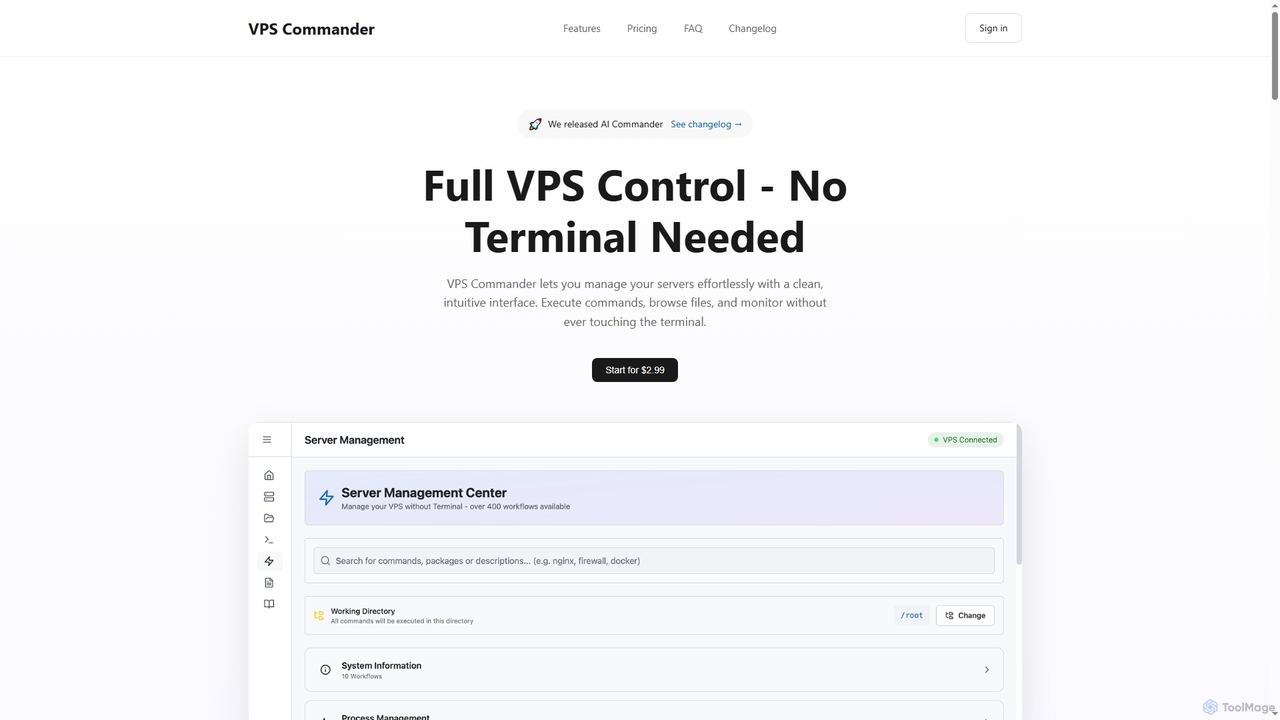
VPS Commander simplifies complex server management, transforming intricate terminal commands into intuitive clicks. It offers a modern interface for managing workflows, files, and processes, empowering anyone to control their Virtual Private Servers without needing command-line expertise.

Cloud Management
Visits 4.3KFavorites 117Likes 104

About System Administration

AI System Administration tools are a class of software that leverages artificial intelligence and machine learning to automate the management, monitoring, and optimization of IT infrastructure. These tools analyze vast amounts of data from servers, networks, and applications to predict issues, identify root causes, and perform automated remediation. Their primary value lies in enhancing system reliability, improving security posture, and significantly reducing the manual workload for IT operations teams. By moving from reactive to proactive management, they help prevent downtime and streamline complex operational tasks.

Core Features

  • Predictive Monitoring & Anomaly Detection: Uses machine learning to forecast potential system failures and identify unusual patterns that deviate from normal operational behavior.
  • Automated Root Cause Analysis (RCA): Correlates logs, metrics, and event data from multiple sources to automatically pinpoint the origin of a problem, drastically reducing investigation time.
  • Intelligent Task Automation: Automates complex workflows like patching, configuration updates, and resource scaling based on real-time data and predictive analytics.
  • Self-Healing Capabilities: Automatically executes remediation scripts or actions to resolve detected issues without human intervention, such as restarting services or reallocating resources.

Use Cases

These tools are primarily used by System Administrators, DevOps Engineers, Site Reliability Engineers (SREs), and IT Operations teams. They are particularly valuable in complex environments like large data centers, multi-cloud infrastructures, and microservices-based application architectures where manual oversight is impractical. Common applications include ensuring high availability for critical services and automating security compliance checks.

How to Choose

When selecting an AI System Administration tool, consider its integration capabilities with your existing technology stack (e.g., cloud providers, container orchestration platforms). Evaluate the scope of its automation, from simple alerting to fully autonomous remediation. Also, assess the tool's learning curve, the transparency of its AI models, and its pricing structure, which is often based on the number of nodes or data volume.

Featured tool rankings

System Administration use cases

1

Proactive Server Failure Prediction

A Site Reliability Engineer (SRE) team at a financial services company uses an AI system administration tool to monitor hundreds of production servers. The tool's machine learning model analyzes real-time metrics like CPU load, memory usage, and disk I/O. It identifies a subtle degradation pattern on a critical database server and predicts a high probability of hardware failure within the next 48 hours. This proactive alert allows the team to schedule a maintenance window, migrate services, and replace the faulty hardware with zero downtime, preventing a major outage that could have impacted thousands of transactions.

2

Automated Root Cause Analysis for Application Slowdown

An e-commerce platform experiences intermittent slowdowns during peak shopping hours. The DevOps team uses an AI administration tool that ingests logs, traces, and metrics from across their microservices architecture. When a slowdown occurs, the tool automatically correlates a spike in database query latency with a newly deployed code change in the inventory service. It presents a clear report identifying the specific problematic query as the root cause. This reduces the Mean Time to Resolution (MTTR) from hours of manual log sifting to under 15 minutes, allowing for a rapid rollback and improved customer experience.

3

Intelligent Cloud Resource Scaling

A media streaming service uses an AI system administration tool to manage its cloud infrastructure on AWS. Instead of relying on simple CPU threshold rules for autoscaling, the tool analyzes historical viewing patterns and real-time trends. It predicts a surge in traffic for a major live sports event and begins scaling up web servers and CDN capacity 30 minutes in advance. During the event, it dynamically adjusts resources to maintain optimal performance. After the event, it automatically scales down the infrastructure to minimize costs, resulting in a 25% reduction in cloud spend compared to traditional autoscaling methods.

4

Automated Security Patch Management

An IT administrator for a healthcare organization is responsible for maintaining compliance and security across hundreds of servers. They use an AI system administration tool that continuously scans the environment for vulnerabilities. The tool prioritizes required patches based on severity and potential impact on critical systems. The administrator configures a policy that allows the AI to automatically test and deploy low-risk patches during off-peak hours. For high-risk patches, the tool creates a ticket with a detailed impact analysis, allowing the administrator to make an informed decision, ensuring systems are secured promptly while minimizing service disruption.

5

Self-Healing Infrastructure for E-commerce

During a flash sale, an e-commerce site's payment gateway service becomes unresponsive due to a memory leak. A traditional monitoring system would simply alert the on-call engineer. However, the AI system administration tool detects the anomaly, identifies the specific service instance causing the issue, and automatically triggers a pre-approved 'self-healing' workflow. This workflow gracefully drains traffic from the faulty instance, restarts the service, and verifies its health before reintroducing it to the load balancer pool. The entire incident is resolved in under 90 seconds, with no human intervention and minimal impact on customer transactions.

6

Network Traffic Anomaly Detection

A network administrator for a large enterprise uses an AI-powered tool to monitor network traffic. The tool establishes a baseline of normal traffic patterns across the corporate network. One afternoon, it detects a significant and unusual flow of outbound data from a server in the finance department to an unknown external IP address. This pattern matches the signature of a data exfiltration attack. The AI immediately alerts the security team and automatically applies a firewall rule to block the suspicious traffic, preventing a potential data breach before it can cause significant damage.

System Administration FAQ

What are AI System Administration tools?

AI System Administration tools are advanced software platforms that use artificial intelligence and machine learning to automate and enhance the management of IT infrastructure. Unlike traditional tools that rely on predefined rules, these tools learn from system data to predict failures, automate complex problem resolution, and optimize performance proactively. Their core purpose is to increase system reliability, improve security, and reduce manual intervention from IT professionals.

How do AI tools differ from traditional system monitoring scripts?

The key difference lies in their approach: proactive vs. reactive.

  • Traditional Scripts: Are reactive and rule-based. They trigger an alert only when a predefined threshold (e.g., CPU > 90%) is crossed. They cannot identify novel problems or predict future issues.
  • AI Tools: Are proactive and data-driven. They learn what 'normal' behavior looks like and can detect subtle anomalies that precede a major failure. They can also correlate data from multiple sources to find the root cause, something a simple script cannot do.
In essence, scripts tell you when something is already broken, while AI tools aim to tell you that something is about to break and why.

What are the key benefits of using AI in system administration?

Using AI in system administration offers several significant benefits that directly impact business operations and efficiency. Key advantages include:

  • Reduced Downtime: Proactive issue detection and automated remediation prevent outages before they affect users.
  • Faster Problem Resolution: Automated root cause analysis drastically cuts down the Mean Time to Resolution (MTTR).
  • Improved Security: AI can detect anomalous behavior indicative of security threats that might be missed by traditional systems.
  • Increased Efficiency: Automating routine and complex tasks frees up skilled IT personnel to focus on strategic initiatives rather than firefighting.

How to choose the right AI System Administration tool?

Selecting the right tool depends on your specific needs and environment. Consider these key factors:

  • Integration Capabilities: Ensure the tool integrates seamlessly with your existing infrastructure, including cloud providers (AWS, Azure, GCP), container platforms (Kubernetes, Docker), and monitoring systems.
  • Scope of Automation: Determine the level of automation you require. Do you need predictive alerting, automated root cause analysis, or fully autonomous self-healing capabilities?
  • Data Support: Check if the tool can ingest and analyze the types of data you have, such as logs, metrics, traces, and network data.
  • Ease of Use and Transparency: Evaluate the tool's user interface and how easily your team can understand its AI-driven recommendations. A 'black box' AI can be difficult to trust and manage.

Who should use AI System Administration tools?

These tools are most beneficial for organizations managing complex, large-scale, or mission-critical IT environments. The primary users are technical professionals responsible for infrastructure health and performance, including:

  • System Administrators who manage servers and operating systems.
  • DevOps and SRE Teams responsible for the reliability and performance of applications in production.
  • IT Operations (ITOps) Teams overseeing the entire IT infrastructure of an organization.
  • Network Administrators focused on network performance and security.
Any organization looking to improve operational efficiency, reduce downtime, and adopt a more proactive approach to IT management can benefit from these tools.