ToolMage
Sign in

Best 1 Ai Editing AI tools for Photography

Popular Ai Editing AI tools in Photography include DatePhotos, helping you work more efficiently.

DatePhotos
Paid

DatePhotos

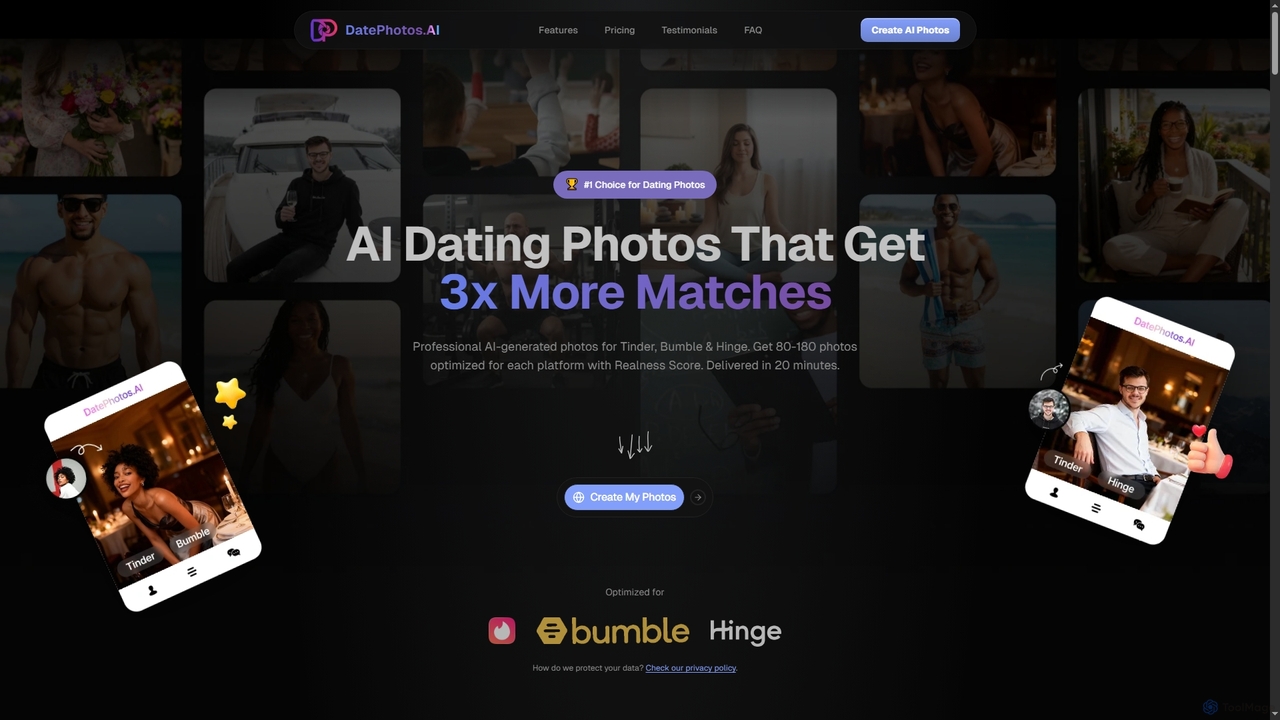
DatePhotos is an AI-powered tool that generates professional-quality dating profile photos, optimized for platforms like Tinder, Bumble, and Hinge. It helps users get 3x more matches by transforming selfies into diverse, naturally enhanced profile pictures in minutes.

Dating Photos
Visits 22.3KFavorites 119Likes 117

About Ai Editing

AI Editing tools are a category of software that leverages artificial intelligence to automate and enhance various aspects of image and video manipulation. These AI-powered tools go beyond traditional editing by intelligently understanding content, enabling advanced capabilities like intelligent object removal, style transfer, and automatic color correction. They significantly streamline workflows for photographers, graphic designers, and content creators, offering unprecedented efficiency and creative possibilities in the realm of digital media.

Core Features

  • Intelligent Object Removal: Automatically identifies and removes unwanted elements from images or videos, seamlessly filling the background.
  • AI-powered Upscaling & Enhancement: Improves resolution, sharpens details, and enhances overall quality of low-resolution media without pixelation.
  • Automatic Color Grading & Correction: Analyzes visual content to apply optimal color adjustments, ensuring consistent and professional aesthetics.
  • Generative Fill & Expansion: Intelligently extends image boundaries or fills selected areas with contextually relevant content, expanding creative horizons.
  • Style Transfer: Applies artistic styles from one image to another, transforming visuals with unique aesthetic effects.

Use Cases

AI Editing tools are indispensable for professionals and enthusiasts alike. Photographers use them for rapid retouching and background changes, while graphic designers leverage AI for quick asset creation and style experimentation. Social media managers can efficiently generate diverse content variations, and e-commerce businesses automate product image optimization, ensuring high-quality visuals across platforms.

How to Choose

When selecting an AI Editing tool, consider the specific AI capabilities you need, such as advanced object manipulation or generative features. Evaluate its ease of use and integration with your existing creative suite. Assess the supported file formats, output quality, and pricing model, including subscription tiers or one-time purchases. Finally, check for community support and regular updates to ensure long-term viability and access to new features.

Ai Editing use cases

1

Automating Product Photo Background Removal

E-commerce businesses and product photographers frequently need clean product images with consistent backgrounds. AI Editing tools can automatically detect and remove backgrounds from hundreds of product photos in minutes, replacing them with white, transparent, or custom backdrops. This drastically reduces manual editing time, ensures brand consistency, and accelerates product listing processes, allowing for quicker market entry.

2

Enhancing Low-Light or Old Photographs

Photographers and archivists often deal with images taken in poor lighting conditions or old, degraded photos. AI Editing tools can intelligently enhance details, reduce noise, correct colors, and even upscale resolution in such challenging images. This restores clarity and vibrancy to previously unusable photos, making them suitable for print, digital display, or historical preservation without extensive manual effort.

3

Generating Creative Variations for Marketing Campaigns

Marketing teams and content creators constantly require fresh visual content for advertisements, social media, and websites. AI Editing tools, particularly those with generative fill or style transfer capabilities, can take an existing image and generate numerous creative variations. This allows for rapid A/B testing, personalized ad creation, and a continuous supply of diverse visual assets, significantly boosting campaign effectiveness and reducing design costs.

4

Streamlining Portrait Retouching and Enhancement

Portrait photographers and beauty editors spend considerable time on skin retouching, blemish removal, and facial feature enhancement. AI Editing tools offer automated solutions for these tasks, intelligently smoothing skin, whitening teeth, and even adjusting facial expressions while maintaining naturalness. This accelerates the post-production process, allowing photographers to deliver high-quality portraits faster and handle larger volumes of work.

5

Intelligent Object Removal and Scene Reconstruction

For architectural photographers, real estate agents, or anyone needing to clean up a scene, unwanted objects can be a major issue. AI Editing tools can precisely identify and remove distractions like power lines, litter, or people from images. More impressively, they can intelligently reconstruct the background, making the removal seamless and creating a pristine, professional-looking visual without needing to reshoot.

6

Transforming Video Footage with AI-powered Effects

Video editors and content creators can use AI Editing tools to apply advanced effects and corrections to video footage. This includes automatically stabilizing shaky footage, upscaling low-resolution clips to 4K, applying consistent color grades across multiple shots, or even generating slow-motion effects. These capabilities elevate the production quality of videos, making professional-grade enhancements accessible and efficient for various projects, from vlogs to corporate presentations.

Ai Editing FAQ

What are AI Editing tools?

AI Editing tools are software applications that utilize artificial intelligence algorithms to perform and assist with various image and video manipulation tasks. Unlike traditional editing software that relies solely on manual input, AI Editing tools can intelligently analyze content, automate complex processes like object removal, color correction, and generative fill, significantly enhancing efficiency and creative possibilities for digital media professionals and enthusiasts.

How do AI Editing tools differ from traditional photo editing software?

The primary difference lies in automation and intelligence. Traditional photo editing software (like Photoshop) requires manual selection and precise adjustments by the user. AI Editing tools, however, leverage machine learning to understand image content, predict user intent, and execute complex edits with minimal input. For example, AI can automatically remove backgrounds, enhance details, or suggest optimal color grades, tasks that are highly time-consuming and skill-dependent in traditional software. While traditional tools offer granular control, AI tools prioritize speed, automation, and accessibility for advanced effects.

What specific tasks can AI Editing tools automate?

AI Editing tools can automate a wide range of tasks, including:

  • Background Removal: Automatically isolating subjects from their backgrounds.
  • Object Removal: Intelligently deleting unwanted elements and reconstructing the scene.
  • Image Upscaling: Enhancing resolution and detail without quality loss.
  • Color Correction & Grading: Automatically adjusting colors for optimal balance and mood.
  • Retouching: Smoothing skin, removing blemishes, and enhancing features.
  • Generative Fill: Expanding images or filling areas with AI-generated content.
  • Style Transfer: Applying artistic styles from one image to another.
These automations save significant time and effort for creators.

Who benefits most from using AI Editing tools?

A wide range of users benefits from AI Editing tools. Professional photographers can accelerate post-production workflows, especially for large batches of images. Graphic designers and marketers can quickly generate diverse visual assets and experiment with creative concepts. E-commerce businesses can streamline product image optimization. Content creators, social media managers, and even casual users can achieve professional-looking results with less technical skill, making advanced editing more accessible to everyone.

How do I choose the right AI Editing tool for my needs?

To choose the right AI Editing tool, first identify your primary editing needs: do you focus on photo retouching, video enhancement, or generative art? Evaluate the specific AI features offered, such as advanced object manipulation, upscaling, or style transfer, and ensure they align with your requirements. Consider the tool's ease of use, its integration capabilities with your existing software, and the supported file formats. Finally, compare pricing models, review user feedback, and check for the frequency of updates and community support to ensure a robust and evolving solution.