ToolMage
Sign in

Best 1 Image Restoration AI tools for Photography

Popular Image Restoration AI tools in Photography include Colorfix, helping you work more efficiently.

Colorfix
Freemium

Colorfix

Colorfix is an AI-powered web application designed to breathe new life into old, damaged, or faded photographs. It offers advanced photo restoration, intelligent colorization of black and white images, and the unique ability to transform static pictures into dynamic, musical videos, helping users revive and preserve their most cherished memories.

Video Generation
Visits 5.7KFavorites 170Likes 160

About Image Restoration

Image Restoration tools are AI-powered solutions designed to repair and enhance damaged, degraded, or imperfect photographs. These tools leverage advanced algorithms, often based on deep learning, to intelligently identify and correct flaws like scratches, noise, blur, and color fading. They provide a powerful way to revive cherished memories and improve the quality of digital assets, making complex restoration tasks accessible to a wider audience.

Core Features

  • Scratch & Dust Removal: Automatically detects and eliminates physical imperfections like scratches, dust spots, and tears from images.
  • Noise Reduction: Intelligently smooths out digital noise and graininess, especially prevalent in low-light or older digital photos, without losing detail.
  • Color Correction & Restoration: Recovers faded colors, corrects color shifts, and can even colorize black and white photos, bringing vibrancy back to old images.
  • Sharpening & Deblurring: Enhances image clarity and detail by correcting slight blurs and sharpening soft edges, improving overall visual crispness.
  • Face Enhancement: Specifically targets and improves facial features in old or low-quality photos, often restoring detail and clarity to eyes, skin, and hair.

Use Cases

Image Restoration tools are invaluable for professional photographers, archivists, genealogists, and individuals looking to preserve personal history. They are used in digital archiving projects, for enhancing historical documents, and by photo studios offering restoration services. These tools also serve content creators needing to improve the quality of legacy visual assets for modern platforms.

How to Choose

When selecting an Image Restoration tool, consider the specific types of damage you need to address (e.g., scratches, blur, color fade). Evaluate the tool's AI model accuracy in preserving original details versus introducing artifacts. Look for user-friendly interfaces, batch processing capabilities for efficiency, and integration options with existing photo editing workflows. Finally, assess pricing models and the quality of output previews.

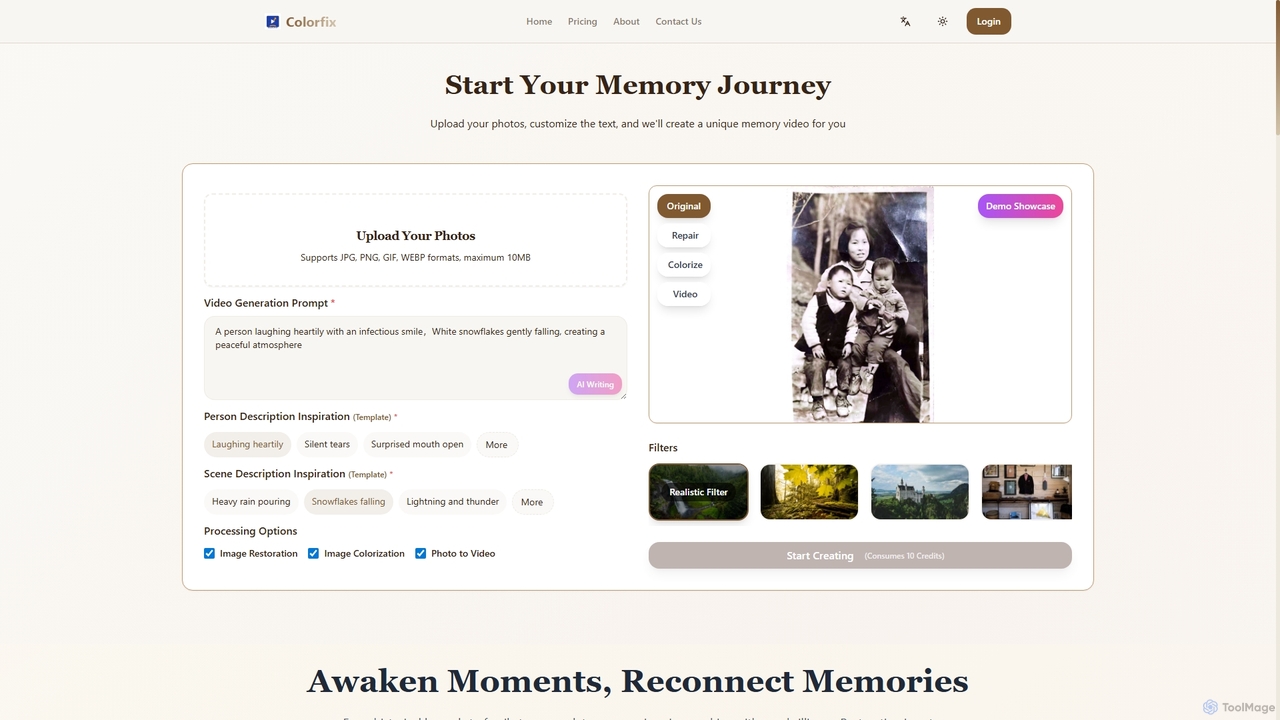
Image Restoration use cases

1

Restoring Faded Family Photos

Individuals or genealogists can upload old, faded family photographs to an AI image restoration tool. The AI automatically corrects color shifts, enhances contrast, and removes age-related discoloration, bringing back the original vibrancy and clarity of cherished historical moments for digital archiving or sharing.

2

Restoring Cherished Family Photos

Individuals can use AI image restoration tools to repair faded, scratched, or torn old family photographs, bringing back vibrant memories for future generations. This involves uploading the damaged photo, applying automated repair functions, and downloading a high-quality, restored digital version for sharing or printing.

3

Enhancing E-commerce Product Images

E-commerce businesses can utilize these tools to sharpen slightly blurry product photos, remove minor imperfections, or upscale low-resolution images to meet platform requirements. This ensures product listings appear professional and appealing, directly impacting customer engagement and sales.

4

Repairing Scratched Archival Images

Museum curators or archivists utilize image restoration AI to repair physically damaged historical photographs or documents. The tool intelligently identifies and removes scratches, tears, and dust marks from scanned images, preserving the visual integrity of invaluable artifacts for research and public display without manual, time-consuming retouching.

5

Digitizing & Preserving Archival Documents

Museums, libraries, and historical societies employ image restoration AI to repair and enhance scanned historical documents, maps, and photographs. This process helps in preserving fragile originals, making them more legible and accessible for research and public display without further physical handling.

6

Enhancing Low-Light Event Photography

Event photographers often encounter challenging low-light conditions resulting in noisy or grainy images. AI restoration tools can be used post-shoot to significantly reduce digital noise and enhance sharpness, ensuring professional-quality photos for clients even when shooting conditions were suboptimal.

7

Colorizing Black and White Historical Photos

Historians, content creators, or enthusiasts can use AI image restoration to colorize black and white historical photographs. The AI intelligently infers and applies realistic colors to monochrome images, adding a new dimension to historical visuals and making them more engaging for modern audiences and educational purposes.

8

Improving User-Generated Content for Marketing

Marketing teams can leverage AI restoration to clean up and enhance user-submitted photos or videos for campaigns. This ensures that even amateur-shot content maintains a high visual standard, aligning with brand aesthetics and improving overall campaign effectiveness.

9

Improving Product Photos for E-commerce

E-commerce businesses or product photographers can leverage image restoration AI to refine product images. This includes removing minor imperfections, sharpening details, and correcting slight blurs that might occur during shooting, ensuring high-quality, professional-looking product listings that attract more customers.

10

Professional Photography Post-Processing

Professional photographers use these tools to efficiently correct minor imperfections like lens blur, digital noise from high ISO shots, or color inconsistencies in large batches of photos. This streamlines their post-production workflow, allowing them to deliver polished images faster.

11

Genealogy and Historical Research

Genealogists and researchers use image restoration to clarify old, faded, or damaged photographs of ancestors or historical figures. By enhancing facial features and details, these tools aid in identification and provide clearer visual context for historical narratives.

12

Deblurring and Sharpening Old Digital Photos

Individuals with large collections of older digital photos, often taken with lower-resolution cameras, can use restoration tools to deblur and sharpen them. The AI enhances overall image clarity, making previously soft or slightly out-of-focus pictures more presentable and enjoyable for viewing or printing.

Image Restoration FAQ

What are AI Image Restoration tools?

AI Image Restoration tools are software applications that use artificial intelligence, particularly deep learning algorithms, to automatically repair and improve the quality of damaged or degraded images. They can fix issues like scratches, blur, noise, color fading, and low resolution, effectively bringing old or imperfect photos back to life.

What are AI Image Restoration tools?

AI Image Restoration tools are software applications that use artificial intelligence, particularly deep learning algorithms, to automatically detect and repair various forms of damage or imperfections in digital images. They aim to restore images to their original or an improved state by correcting issues like scratches, blur, noise, and color degradation.

How do AI Image Restoration tools work?

These tools typically work by training deep neural networks on vast datasets of damaged and pristine image pairs. The AI learns to identify patterns of damage (e.g., scratches, blur, noise) and then intelligently reconstructs the missing or corrupted information, often by predicting what the original pixels should have looked like. This process is far more sophisticated than traditional filters.

How do AI Image Restoration tools work?

These tools typically work by training neural networks on vast datasets of both damaged and pristine images. The AI learns to identify common types of damage (e.g., scratches, noise patterns) and then intelligently reconstructs the missing or corrupted information, often by predicting what the original, undamaged pixels should look like.

What's the difference between Image Restoration and Image Editing?

Image Restoration specifically focuses on repairing existing damage and restoring an image to its original or improved state, often fixing inherent flaws. Image Editing, while it can include some repair, primarily involves modifying an image for creative purposes, such as cropping, adjusting brightness, adding filters, or compositing elements. Restoration is about fixing, editing is about altering.

What types of damage can AI Image Restoration fix?

AI Image Restoration tools can fix a wide range of damage, including physical imperfections like scratches, tears, and dust spots; digital issues such as noise, pixelation, and compression artifacts; optical problems like motion blur and out-of-focus areas; and age-related degradation like fading, discoloration, and sepia tones (often with colorization features).

Can AI Image Restoration tools colorize black and white photos?

Yes, many advanced AI Image Restoration tools include a colorization feature. They use deep learning models trained on millions of color images to intelligently infer and apply realistic colors to monochrome photographs, transforming them into vibrant, full-color images based on learned patterns and contexts.

How do I choose the best AI Image Restoration tool for my needs?

To choose the best tool, consider the specific types of image damage you frequently encounter and the quality of restoration required. Look for features like batch processing, support for various file formats, and user-friendliness. Evaluate the AI's performance on sample images, read reviews, and compare pricing models, including free trials, to find a balance between cost and effectiveness.

What is the difference between Image Restoration and Image Enhancement?

Image Restoration focuses on repairing existing damage or degradation to bring an image back to its original or intended state, such as removing scratches or de-blurring. Image Enhancement, on the other hand, aims to improve an image's aesthetic appeal or visual impact beyond its original state, often involving adjustments to brightness, contrast, saturation, or artistic filters, without necessarily fixing damage.

How do I choose the best AI Image Restoration tool for my needs?

To choose the best tool, first identify the specific types of damage you need to fix. Look for tools with strong performance in those areas (e.g., deblurring, scratch removal). Consider the user interface, ease of use, batch processing capabilities, and output quality. Also, compare pricing models and check if the tool offers features like face enhancement or colorization if those are important to you.