ToolMage
Sign in

Best 1 Profile Picture Tools for Social Media

Popular Profile Picture Tools in Social Media include FluxAvatarMaker, helping you work more efficiently.

FluxAvatarMaker
Free

FluxAvatarMaker

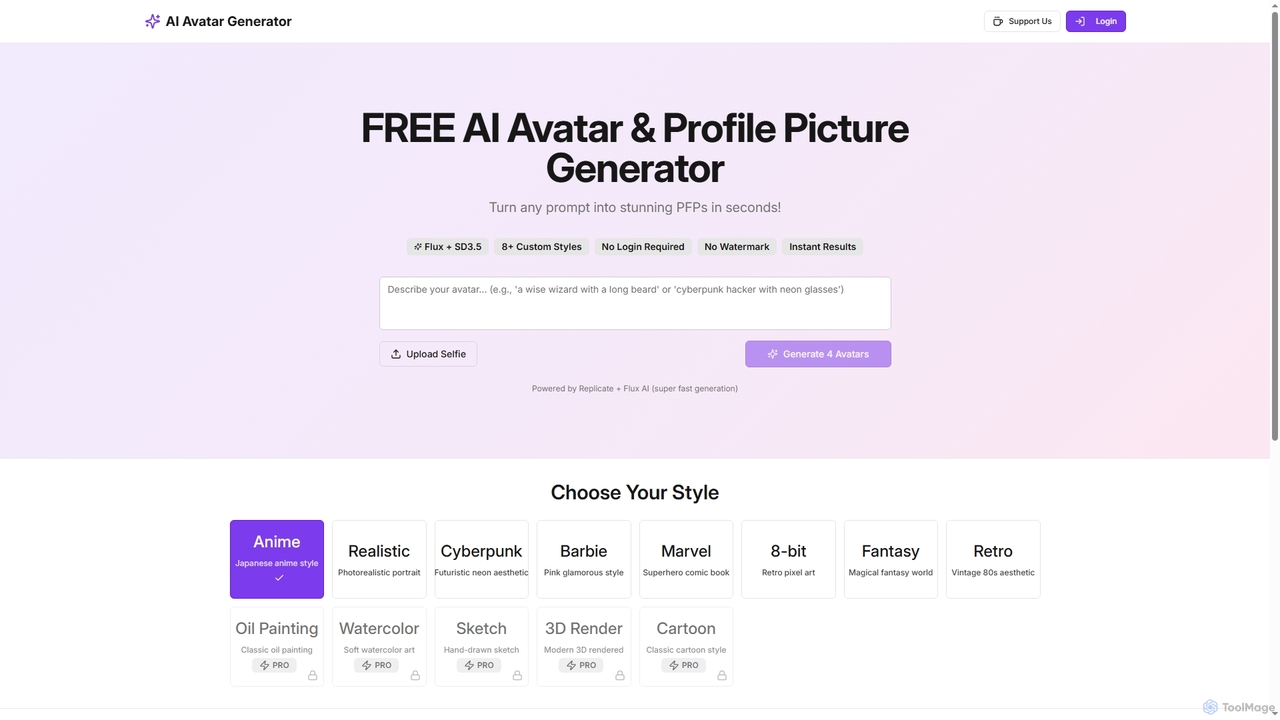
FluxAvatarMaker is a free AI avatar and profile picture generator that transforms any prompt into stunning PFPs in seconds. It offers over 8 custom styles, requires no login, and produces instant, watermark-free results, generating 4 unique avatars per session.

Generative Art
Visits 5.9KFavorites 155Likes 142

About Profile Picture Tools

Profile Picture Tools are AI-powered applications designed to create, enhance, and customize digital avatars and profile photos. Leveraging advanced AI algorithms, these tools can generate unique images, remove backgrounds, apply artistic styles, and refine facial features. They are invaluable for individuals and professionals looking to establish a distinct online presence across social media, professional networks, and gaming platforms, fitting seamlessly into the broader Social Media category by focusing on visual identity.

Core Features

  • AI Avatar Generation: Create unique, stylized, or realistic avatars from text prompts or existing photos.
  • Background Removal & Replacement: Instantly remove original backgrounds and replace them with solid colors, gradients, or custom scenes.
  • Facial Enhancement & Retouching: Automatically improve skin texture, adjust lighting, and refine facial features for a polished look.
  • Style Transfer & Filters: Apply artistic filters, cartoon styles, or specific aesthetic themes to profile pictures.
  • Batch Processing: Generate or modify multiple profile pictures simultaneously, maintaining consistency across a series.

Applicable Scenarios

These tools are widely used by social media influencers to maintain a consistent brand image, by job seekers for professional LinkedIn headshots, and by gamers to create unique, stylized avatars for their online personas. Content creators leverage them for cohesive visual branding across platforms, while individuals use them to personalize dating app profiles or online community identities.

How to Choose

When selecting a profile picture tool, consider the variety of AI styles and customization options available, ensuring they match your desired aesthetic. Evaluate the output quality, especially resolution and detail, for different platforms. Look for ease of use and intuitive interfaces, as well as features like background removal and facial enhancement. Finally, assess pricing models and privacy policies regarding your uploaded images.

Profile Picture Tools use cases

1

Creating Professional LinkedIn Headshots

Job seekers and professionals can utilize Profile Picture Tools to generate polished, consistent headshots for their LinkedIn profiles. By uploading a casual photo, the AI can remove distracting backgrounds, adjust lighting, and apply a professional aesthetic, ensuring a credible and appealing first impression without the need for a professional photographer.

2

Generating Unique Gaming Avatars

Gamers and streamers can leverage AI Profile Picture Tools to create distinctive and stylized avatars for their gaming profiles, Twitch channels, or Discord servers. These tools allow users to input descriptions or upload base images, then generate avatars in various artistic styles, from cyberpunk to fantasy, helping them stand out in online communities.

3

Branding Social Media Profiles Consistently

Social media managers and content creators can use these tools to maintain a consistent visual brand across multiple platforms. By applying specific filters, color palettes, or artistic styles to all team members' profile pictures, they ensure a cohesive and professional brand identity, reinforcing recognition and trust among their audience.

4

Personalizing Dating App Photos

Individuals seeking to enhance their dating app profiles can use AI Profile Picture Tools to create more engaging and attractive photos. These tools can subtly retouch images, improve lighting, or even generate stylized versions that highlight personality, helping users make a stronger impression and increase their chances of matching.

5

Designing Team Member Avatars for Internal Platforms

Companies and organizations can use Profile Picture Tools to generate uniform, professional-looking avatars for team directories, internal communication platforms, or virtual meeting tools. This ensures a consistent visual identity across the organization, fostering a sense of unity and professionalism, especially in remote or hybrid work environments.

6

Stylizing Profile Pictures for Online Communities

Users participating in forums, Discord servers, or niche online communities often want to express their individuality through unique profile pictures. Profile Picture Tools enable them to apply artistic filters, cartoonize their photos, or generate abstract designs that align with the community's theme or their personal brand, fostering a stronger sense of belonging.

Profile Picture Tools FAQ

What are AI Profile Picture Tools?

AI Profile Picture Tools are specialized software applications that use artificial intelligence to create, enhance, and customize digital profile photos and avatars. They typically feature capabilities like AI-driven generation of unique images, automatic background removal, facial retouching, and the application of various artistic styles. These tools help users quickly achieve a desired visual identity for social media, professional networks, and gaming platforms.

How do AI Profile Picture Tools work?

AI Profile Picture Tools typically work by employing various AI models, such as Generative Adversarial Networks (GANs) or diffusion models, to generate new images or modify existing ones. For generation, users might provide text prompts or reference images, which the AI then uses to create unique avatars. For enhancement, algorithms analyze facial features and backgrounds to apply retouches, remove imperfections, adjust lighting, or swap backgrounds, often using computer vision techniques to identify key elements.

What features should I look for in a Profile Picture Tool?

When choosing a Profile Picture Tool, prioritize features that align with your needs. Look for robust AI avatar generation capabilities with diverse style options (realistic, artistic, cartoon). Essential features include accurate background removal, advanced facial enhancement (e.g., skin smoothing, lighting correction), and customization tools for colors, accessories, and expressions. Batch processing for multiple images and high-resolution output options are also valuable for efficiency and quality.

Can Profile Picture Tools generate realistic images?

Yes, many advanced AI Profile Picture Tools are capable of generating highly realistic images. Utilizing sophisticated AI models, they can create avatars that closely resemble real people or enhance existing photos to look more natural and professional. However, the degree of realism can vary significantly between tools, with some focusing more on stylized or artistic outputs. Users should check examples and reviews to ensure the tool meets their realism expectations.

How do Profile Picture Tools differ from general AI Image Editors?

While both categories use AI for image manipulation, Profile Picture Tools are highly specialized. General AI Image Editors offer a broad range of features for any type of image, including complex compositions, object removal, and extensive artistic transformations. Profile Picture Tools, however, focus specifically on optimizing images for profile use, emphasizing features like avatar generation, facial enhancement, background optimization for headshots, and consistent styling across platforms. Their purpose is narrower but deeper in their specific domain.