
ToolMage
Sign in

Best 1 App Builder AI tools for Website

Popular App Builder AI tools in Website include Softr, helping you work more efficiently.

Softr
Freemium

Softr

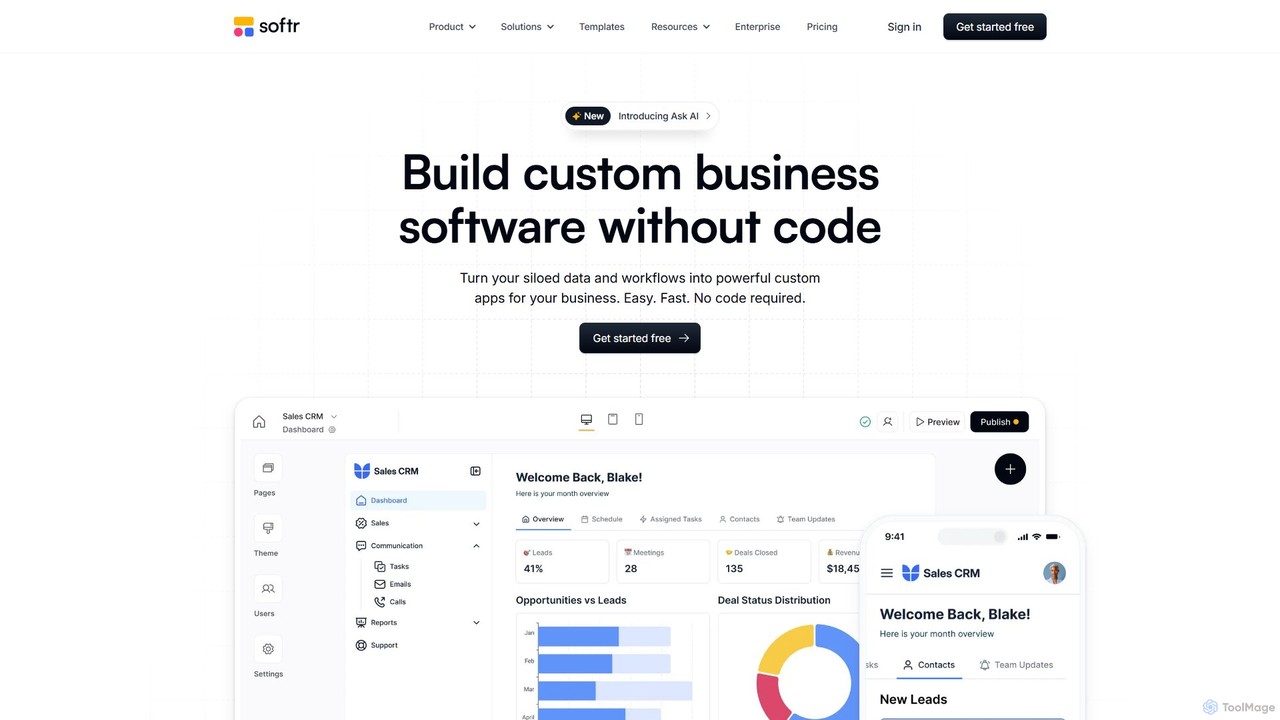
Softr is a leading no-code platform that empowers users to build custom business applications, client portals, and internal tools without writing a single line of code. It transforms existing data from sources like Airtable, Google Sheets, and HubSpot into powerful, interactive web apps. With its new AI-powered builder, you can generate applications even faster, streamlining workflows and boosting productivity.

Internal Tools
Visits 648.7KFavorites 120Likes 119

About App Builder

AI App Builders are platforms that enable users to create functional web and mobile applications with minimal to no coding. These tools leverage AI-powered features and visual, drag-and-drop interfaces to translate ideas into interactive software. They are designed to accelerate the development process, allowing for the creation of everything from simple internal tools to complex customer-facing portals. By automating code generation and simplifying database management, AI App Builders empower non-technical users and developers alike to build and deploy applications rapidly.

Core Features

  • Visual Development Interface: Build user interfaces and logic by dragging and dropping pre-built components and elements.
  • AI-Powered Generation: Use natural language prompts to generate app layouts, user workflows, database schemas, or code snippets.
  • Integrated Database & Backend: Manage application data, user authentication, and server-side logic without complex backend setup.
  • Workflow Automation: Define business logic and automate processes visually, connecting different parts of the application.
  • One-Click Deployment: Publish and host the application on the web or prepare it for submission to app stores with simplified processes.

Use Cases

AI App Builders are widely used by startups to quickly launch a Minimum Viable Product (MVP) and test market fit. Within larger enterprises, business units like HR or Operations use them to create custom internal tools, such as approval dashboards or inventory management systems, without relying on IT departments. Freelancers and small agencies also utilize these platforms to deliver custom web applications for clients more efficiently.

How to Choose

When selecting an AI App Builder, first consider the target platform: do you need a responsive web app, a native mobile app (iOS/Android), or both? Evaluate the platform's scalability and performance capabilities to ensure it can handle your expected user load. Also, examine its integration options (APIs) for connecting with other services you use. Finally, assess the balance between no-code simplicity for rapid building and low-code flexibility for custom functionality.

Featured tool rankings

App Builder use cases

1

Build an Internal Inventory Management Tool

A small retail business owner needs a simple system to track stock levels, manage suppliers, and receive low-stock alerts. Instead of using complex spreadsheets or expensive software, they use an AI app builder. By describing the required features in plain English, the AI generates a basic app structure with a product database, supplier contact forms, and an inventory tracking dashboard. The owner then uses the visual editor to customize the interface and set up automated email alerts for when stock drops below a certain threshold. This custom application is built and deployed in a few days, saving significant time and software subscription costs.

2

Develop a Minimum Viable Product (MVP) for a Startup

An entrepreneur has an idea for a new service-matching mobile app but lacks the technical skills and funding for a full development team. They use a no-code app builder to create an MVP. They design the user registration flow, a profile creation system for service providers, and a simple booking mechanism. The platform's built-in database stores user and provider information. This allows them to launch a functional version of their app in weeks, not months. They can then gather real user feedback, validate their business concept, and present a working prototype to potential investors, all with minimal initial investment.

3

Create a Customer Portal for a Service Business

A marketing agency wants to provide its clients with a secure portal to view project progress, access reports, and communicate with their account manager. Using a low-code app builder, their operations manager builds a web application. It includes a secure login system, a dashboard that pulls project data from their existing project management tool via API, a file repository for reports, and a built-in messaging feature. This portal enhances client experience by providing transparency and a centralized communication hub. It also reduces the administrative workload on account managers, who previously spent hours compiling and emailing updates.

4

Automate a Departmental Approval Workflow

An HR department manages leave requests through emails and spreadsheets, which is inefficient and prone to errors. An HR specialist uses an app builder to create a leave request application. Employees can log in, view their leave balance, and submit requests through a simple form. The application's workflow logic automatically routes the request to the employee's manager for approval. The manager receives an email notification and can approve or deny the request directly within the app. Once a decision is made, the system automatically updates the employee's leave balance and notifies them. This automates the entire process, ensuring consistency and saving hours of manual work each week.

5

Create a Mobile App for a Community Event

An organizer for a local music festival wants a simple mobile app for attendees. The app needs to show the event schedule, a map of the venue, and artist profiles. Using an app builder with pre-built templates for events, the organizer quickly assembles the app. They upload the schedule data from a spreadsheet, pin locations on an interactive map component, and create simple profile pages for each artist. The app builder allows them to publish both an iOS and Android version from the same project. Attendees can download the app to navigate the festival, creating a better experience and reducing the need for printed materials.

6

Build a Custom Data Visualization Dashboard

A marketing team tracks metrics across multiple platforms like Google Analytics, their CRM, and social media ads. A marketing analyst uses a low-code app builder to create a centralized dashboard. They connect the app builder to each data source via their respective APIs. Using visual components like charts, graphs, and tables, the analyst builds a real-time dashboard that displays key performance indicators (KPIs) in one place. They also add filters to allow the team to view data by date range or campaign. This custom dashboard replaces manual report creation, providing the team with instant, actionable insights and saving hours of data compilation work each week.

App Builder FAQ

What is an AI App Builder?

An AI App Builder is a software platform that allows individuals and businesses to create web or mobile applications without writing extensive code. It uses a visual, drag-and-drop interface and is enhanced with Artificial Intelligence features. These AI capabilities can include generating app components from text descriptions, suggesting database structures, or automating complex workflows. The primary goal is to democratize app development, making it faster, more accessible, and less reliant on specialized programming skills.

What's the difference between an App Builder and a Website Builder?

The key difference lies in their primary purpose. A Website Builder is designed to create static or content-focused websites, like blogs, portfolios, or informational business sites. Its main function is to present information. An App Builder, on the other hand, is for creating interactive, data-driven applications. These applications involve user logins, databases, business logic, and complex workflows, allowing users to not just consume content but to perform tasks and interact with data. While some platforms blur the lines, website builders focus on content presentation, whereas app builders focus on functionality and interaction.

How should I choose the right App Builder?

Choosing the right app builder depends on your specific needs. Consider these factors:

  • Platform: Determine if you need a web app, a native mobile app for iOS/Android, or both. Not all builders support all platforms.
  • Complexity & Scalability: Assess the complexity of your app. For simple internal tools, a no-code builder is often sufficient. For complex applications with high user loads, a more powerful low-code platform with better scalability is required.
  • Integrations: List the external tools and services (like CRMs, payment gateways, or other APIs) your app needs to connect with. Check if the builder supports these integrations.
  • Technical Skill: Be realistic about your team's technical abilities. No-code platforms are best for non-technical users, while low-code platforms offer more customization for those with some development knowledge.
Can I build complex applications with an App Builder?

Yes, it is possible to build surprisingly complex and scalable applications with modern app builders, especially low-code platforms. They can handle features like complex business logic, third-party API integrations, user authentication, and large databases. However, there are limitations. For applications requiring highly specialized performance optimization, unique hardware integrations, or cutting-edge graphical processing (like high-end games), traditional coding still offers more control and flexibility. For the vast majority of business applications, internal tools, and customer portals, app builders are a very capable solution.

Who are App Builders best suited for?

App Builders are ideal for a wide range of users. This includes:

  • Entrepreneurs and Startups: To quickly build and launch MVPs (Minimum Viable Products) to test ideas without large upfront investment.
  • Small to Medium-sized Businesses (SMBs): To create custom internal tools (like CRMs, inventory trackers) or customer-facing apps without hiring a development team.
  • 'Citizen Developers' in Large Enterprises: Business users (like project managers or analysts) who can build solutions for their own departments, reducing the burden on IT.
  • Product Managers and Designers: To create functional prototypes to test user flows and gather feedback before committing to full development cycles.