
ToolMage
Sign in

Best 1 Image Editing AI tools for Creative Assistant

Popular Image Editing AI tools in Creative Assistant include Onion AI, helping you work more efficiently.

Onion AI
Freemium

Onion AI

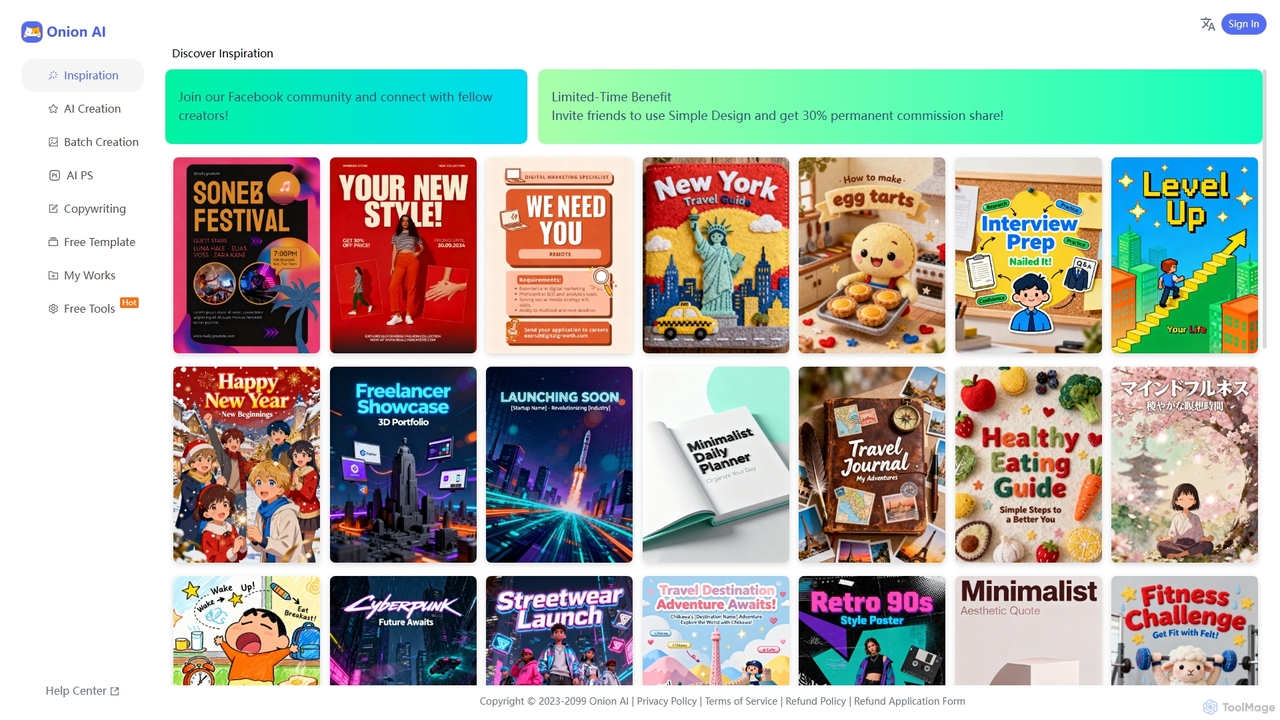
Onion AI is an innovative AI-powered design platform that helps users create high-quality posters and visual content with ease. It offers a vast library of templates, AI-driven creation tools, batch processing, and even copywriting assistance, making professional design accessible for various personal and business needs.

Image Editing
Visits 5KFavorites 136Likes 150

About Image Editing

Image Editing tools are a category of AI-powered applications designed to enhance, modify, and optimize visual content. Leveraging advanced deep learning and computer vision algorithms, these tools automate complex image manipulation tasks. They significantly streamline workflows for creators and businesses, boosting the efficiency and quality of visual content production. From intelligent background removal to sophisticated object retouching, AI image editing offers unprecedented precision and speed.

Core Features

  • Intelligent Background Removal: Automatically detects and removes or replaces image backgrounds with high accuracy.
  • Object Removal & Inpainting: Seamlessly removes unwanted objects or fills in missing parts of an image.
  • Image Upscaling & Enhancement: Increases image resolution and clarity without losing quality, often adding detail.
  • Color Correction & Grading: Automatically adjusts colors, tones, and exposure for optimal visual appeal.
  • Artistic Style Transfer: Applies the stylistic elements of one image to another, creating unique artistic effects.

Use Cases

These tools are indispensable for various professionals and industries. E-commerce businesses use them for batch processing product photos, ensuring consistent backgrounds and optimal presentation. Social media managers leverage AI for quick content beautification and creating engaging visuals. Professional photographers utilize them for intelligent retouching, saving hours on manual adjustments, while graphic designers can rapidly iterate on creative concepts.

How to Choose

When selecting an AI image editing tool, consider its specific AI capabilities, such as the accuracy of background removal or the quality of upscaling, to match your primary needs. Evaluate its ease of use and user interface, as well as its integration capabilities with your existing design software or workflow. Pricing models, output quality, and support for various image formats are also crucial factors to ensure it aligns with your budget and professional requirements.

Featured tool rankings

Image Editing use cases

1

Batch Background Removal for E-commerce Product Photos

E-commerce store owners or marketing teams can use AI image editing tools to automatically remove or replace backgrounds from hundreds of product images. This ensures a clean, consistent look across all product listings, saving significant time compared to manual editing. The process allows for quick adaptation to different platform requirements or seasonal campaigns, enhancing product visibility and conversion rates.

2

Rapid Content Beautification for Social Media

Social media content creators can utilize AI image editing to quickly enhance photos for daily posts. Features like automatic color correction, smart cropping, and one-click filter application allow for consistent branding and visually appealing content without extensive manual adjustments. This accelerates content production, enabling more frequent and engaging interactions with their audience across various platforms.

3

Restoration and Enhancement of Old or Damaged Photos

Individuals or archivists can use AI image editing tools to breathe new life into old, faded, or damaged photographs. AI can automatically repair scratches, remove dust, enhance colors, and even sharpen blurry faces. This capability is invaluable for preserving family memories, digitizing historical archives, and creating high-quality reproductions from deteriorated originals, making them suitable for modern display or printing.

4

Intelligent Retouching for Professional Photography

Professional photographers can leverage AI image editing for intelligent retouching in post-production. This includes automated skin smoothing, blemish removal, and object clean-up, significantly reducing the time spent on repetitive tasks. AI tools maintain a natural look while enhancing details, allowing photographers to focus on creative aspects and deliver high-volume, high-quality images to clients more efficiently.

5

Rapid Iteration of Advertising Creative Assets

Marketing and advertising teams can use AI image editing to quickly generate multiple variations of creative assets for A/B testing or diverse campaign needs. AI can modify elements like product placement, background scenes, or text overlays with minimal effort. This allows for rapid experimentation and optimization of ad visuals, leading to more effective campaigns and better engagement with target audiences.

6

Artistic Style Transfer and Creative Exploration

Artists, designers, and hobbyists can explore new creative avenues by applying artistic styles from famous paintings or unique textures to their own photographs or digital art. AI image editing tools facilitate this style transfer, allowing for instant transformations that would be complex or impossible with traditional methods. This opens up possibilities for generating unique visual content, conceptual art, or personalized digital assets.

Image Editing FAQ

What are AI Image Editing tools?

AI Image Editing tools are software applications that use artificial intelligence, specifically deep learning and computer vision, to automate and enhance various aspects of image manipulation. They can perform tasks like background removal, object retouching, color correction, and image upscaling with high precision and speed. These tools aim to simplify complex editing processes, making professional-grade results accessible to a wider range of users, from casual creators to seasoned professionals.

How do AI Image Editing tools differ from traditional image editing software?

The primary difference lies in automation and intelligence. Traditional software (like Photoshop) relies heavily on manual input and skilled users for precise adjustments. AI tools, conversely, automate many complex tasks using algorithms that understand image content. For example, AI can automatically detect and remove a background in seconds, whereas traditional methods require meticulous manual selection. AI tools often offer faster workflows and can achieve impressive results even for users with limited editing experience, though traditional software still provides unparalleled granular control.

How to choose the right AI Image Editing tool for my needs?

To choose the right AI image editing tool, first identify your primary editing needs: do you mostly need background removal, upscaling, or artistic effects? Evaluate the quality and accuracy of the AI features offered, as these can vary significantly between tools. Consider the user interface and ease of use, especially if you're not a professional editor. Integration with your existing workflow, pricing model (subscription vs. one-time purchase), and the types of image formats supported are also crucial factors. Finally, check for output resolution limits and customer support.

What advanced features can AI Image Editing tools achieve?

AI image editing tools can achieve several advanced features beyond basic adjustments. These include content-aware fill, which intelligently reconstructs areas after object removal; smart upscaling that adds realistic details when enlarging images; and sophisticated style transfer, applying artistic textures from one image to another. Some tools also offer AI-powered face retouching, automatic image composition suggestions, and even the ability to change lighting conditions or weather in a scene, pushing the boundaries of what's possible in image manipulation.

What are the ethical considerations when using AI Image Editing tools?

Using AI image editing tools raises several ethical considerations. Foremost is the potential for creating misleading or fake content, especially with deepfake technology or highly realistic alterations that can deceive viewers. There are also concerns about copyright and intellectual property when AI models are trained on vast datasets of existing art. Users should be mindful of privacy issues, particularly when editing images of individuals without consent, and the potential for bias in AI algorithms that might perpetuate stereotypes or misrepresent certain groups. Transparency about AI-generated or heavily edited content is crucial.