ToolMage
Sign in

Best 1 Design Inspiration AI tools for Creativity

Popular Design Inspiration AI tools in Creativity include CuePrompt, helping you work more efficiently.

CuePrompt

CuePrompt

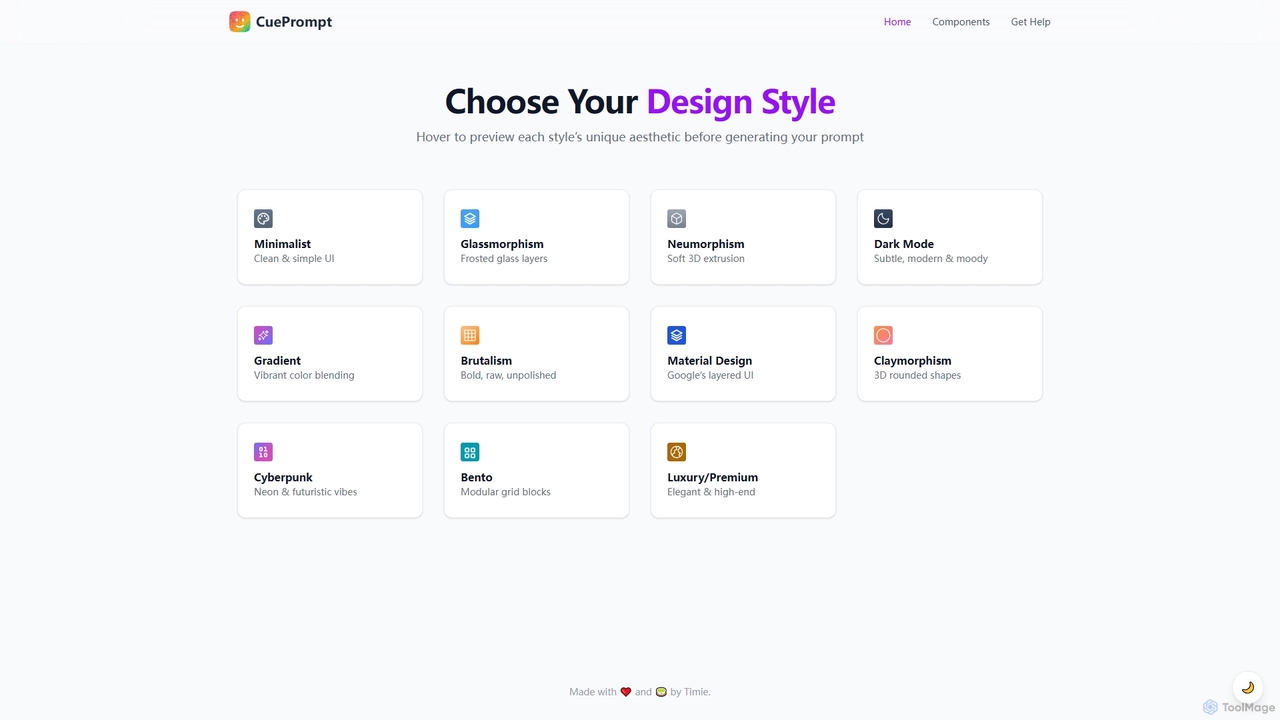
CuePrompt is an intuitive AI-powered tool designed to help designers and creators generate powerful and specific prompts for various UI/UX design styles. It simplifies the process of exploring diverse aesthetics, from Minimalist to Cyberpunk, enabling users to quickly articulate their design vision and kickstart creative projects.

Design Inspiration
Visits 4.9KFavorites 121Likes 130

About Design Inspiration

AI Design Inspiration tools are a class of applications that generate novel visual concepts to overcome creative blocks and accelerate the ideation process. They leverage machine learning models trained on vast datasets of designs to produce unique mood boards, color palettes, layout suggestions, and stylistic variations. These tools are primarily used in the initial brainstorming phase of a creative project, providing a starting point or alternative perspectives for designers, artists, and creators. They help transform abstract ideas into tangible visual directions efficiently.

Core Features

  • Mood Board Generation: Automatically creates visual collections of images, styles, and textures based on text prompts or seed images.
  • Color Palette Creation: Extracts or generates harmonious and context-aware color schemes from an image, keyword, or style description.
  • Layout & Composition Suggestions: Proposes various arrangements for UI/UX elements, web pages, or graphic design projects to explore different visual hierarchies.
  • Style Exploration: Generates variations of a concept in diverse artistic or design styles, from minimalist to abstract.

Use Cases

These tools are invaluable for UI/UX designers exploring app screen layouts, graphic designers creating brand identities, and interior designers visualizing room concepts. They are also used by web designers for brainstorming website structures and by content creators seeking a consistent visual theme for social media campaigns.

How to Choose

When selecting a tool, consider the specificity of its output (e.g., UI kits vs. abstract art), the input types it accepts (text, image, URL), and its integration capabilities with standard design software like Figma or Adobe Creative Suite. Also, evaluate the diversity and quality of the generated ideas to ensure they align with your creative needs.

Design Inspiration use cases

1

Creating Brand Identity Mood Boards

A graphic designer is starting a new branding project for a sustainable tech company. To quickly establish a visual direction, they input keywords like 'eco-friendly,' 'minimalist,' and 'human-centric' into an AI design inspiration tool. The tool generates multiple mood boards, each featuring unique color palettes, typography pairings, and imagery styles. This allows the designer to present several distinct concepts to the client within hours, significantly accelerating the initial approval phase and ensuring the project starts with a strong, shared vision.

2

Exploring UI/UX Layout Concepts

A UI/UX designer is tasked with creating a new dashboard for a data analytics application but is facing a creative block. They use an AI inspiration tool by describing the required components, such as 'main chart,' 'key metrics cards,' and 'date filter.' The AI generates dozens of layout variations, exploring different grid systems, component placements, and visual hierarchies. This process helps the designer break through the block, compare different approaches for data visualization, and select a promising structural foundation for wireframing in less than an hour.

3

Generating Interior Design Schemes

An interior designer is consulting for a client who is unsure about the style for their living room. The designer takes a photo of the empty room and uploads it to an AI tool. They then apply different style prompts like 'Mid-Century Modern,' 'Industrial Loft,' and 'Coastal.' The tool generates realistic visualizations of the room in each style, complete with furniture arrangements, color schemes, and decor suggestions. This provides the client with a clear, visual menu of options, making the decision-making process faster and more collaborative.

4

Brainstorming Website Hero Sections

A web designer is building a new homepage for an e-commerce site and wants to explore innovative hero section layouts. Instead of manually sketching dozens of ideas, they use an AI tool. They input the brand's logo, a product image, and the main headline. The tool generates a variety of hero section designs, experimenting with different call-to-action button placements, typography scales, background styles, and overall compositions. The designer can quickly filter through these concepts, identify promising directions, and move into high-fidelity prototyping with a clear vision.

5

Discovering Unique Color Palettes

A digital artist is working on an illustration and wants to use a color scheme that is both unique and emotionally resonant. They upload a photograph that captures the desired mood—a sunset over a cityscape—to an AI inspiration tool. The tool analyzes the image and extracts not just the dominant colors, but also several alternative palettes: a muted version, a vibrant, high-contrast version, and a triadic color scheme. This provides the artist with a range of professionally curated options, saving significant time on manual color experimentation and theory.

6

Visualizing Social Media Campaign Themes

A marketing manager is planning a new social media campaign for a summer product launch. To ensure visual consistency across all platforms, they use an AI tool to generate a campaign theme. They input the product photos and campaign slogans. The tool produces a comprehensive style guide, including suggestions for photo filters, font styles for text overlays, background patterns, and a consistent color palette. This allows the entire marketing team, including freelance designers, to create on-brand content quickly and maintain a cohesive look and feel throughout the campaign's duration.

Design Inspiration FAQ

What are AI Design Inspiration tools?

AI Design Inspiration tools are specialized applications designed to help creators, designers, and artists overcome creative blocks. Instead of producing a final asset, they generate a wide range of conceptual ideas, such as mood boards, color palettes, UI layouts, and stylistic variations. They act as a creative partner in the brainstorming phase, analyzing inputs like keywords or images to suggest novel visual directions and accelerate the initial stages of the design process.

How do AI Design Inspiration tools differ from AI Image Generators?

The key difference lies in their purpose and output. AI Design Inspiration tools focus on the 'how' and 'what' of design—generating concepts, layouts, color schemes, and structures to guide a human creator. Their output is a starting point for ideation. In contrast, AI Image Generators focus on creating a final, complete visual asset based on a descriptive prompt. An inspiration tool might suggest a layout for a website, while an image generator would create the final banner image for that website.

How to choose the right AI tool for design inspiration?

To choose the right tool, first identify your primary need. Consider the following factors:

  • Output Specificity: Do you need inspiration for UI/UX, branding, color palettes, or more abstract visual art? Choose a tool specialized in your domain.
  • Input Method: Do you prefer to start with text keywords, upload an existing image, or provide a URL for analysis?
  • Level of Control: Look for tools that allow you to refine and iterate on the generated ideas, such as adjusting colors or moving layout elements.
  • Integration: Check if the tool can export assets or styles to your primary design software (e.g., Figma, Sketch, Adobe XD) to streamline your workflow.
Who can benefit from using AI Design Inspiration tools?

A wide range of professionals and hobbyists can benefit. This includes:

  • Graphic Designers: For brainstorming logos, posters, and brand identities.
  • UI/UX Designers: For exploring new app layouts, component styles, and user flows.
  • Web Designers: For generating ideas for website structures and visual themes.
  • Interior Designers: For visualizing different styles and furniture arrangements for a space.
  • Content Creators: For establishing a consistent visual aesthetic for social media or blogs.
  • Artists & Illustrators: For discovering new color palettes and compositional ideas.
What kind of input do these tools typically require?

The input methods vary but generally fall into a few categories. Many tools start with simple text prompts, where you describe the desired style, mood, or elements (e.g., 'a modern logo for a coffee shop'). Others are visually driven, allowing you to upload a reference image, a sketch, or even a screenshot. Some advanced tools can analyze a website URL to generate redesign ideas or extract a brand's existing style to create new, consistent assets. The best tools often combine these methods, allowing for a flexible creative process.