ToolMage
Sign in

Best 1 Community Insights AI tools for Data Analysis

Popular Community Insights AI tools in Data Analysis include Hustle Hunter, helping you work more efficiently.

Hustle Hunter
Freemium

Hustle Hunter

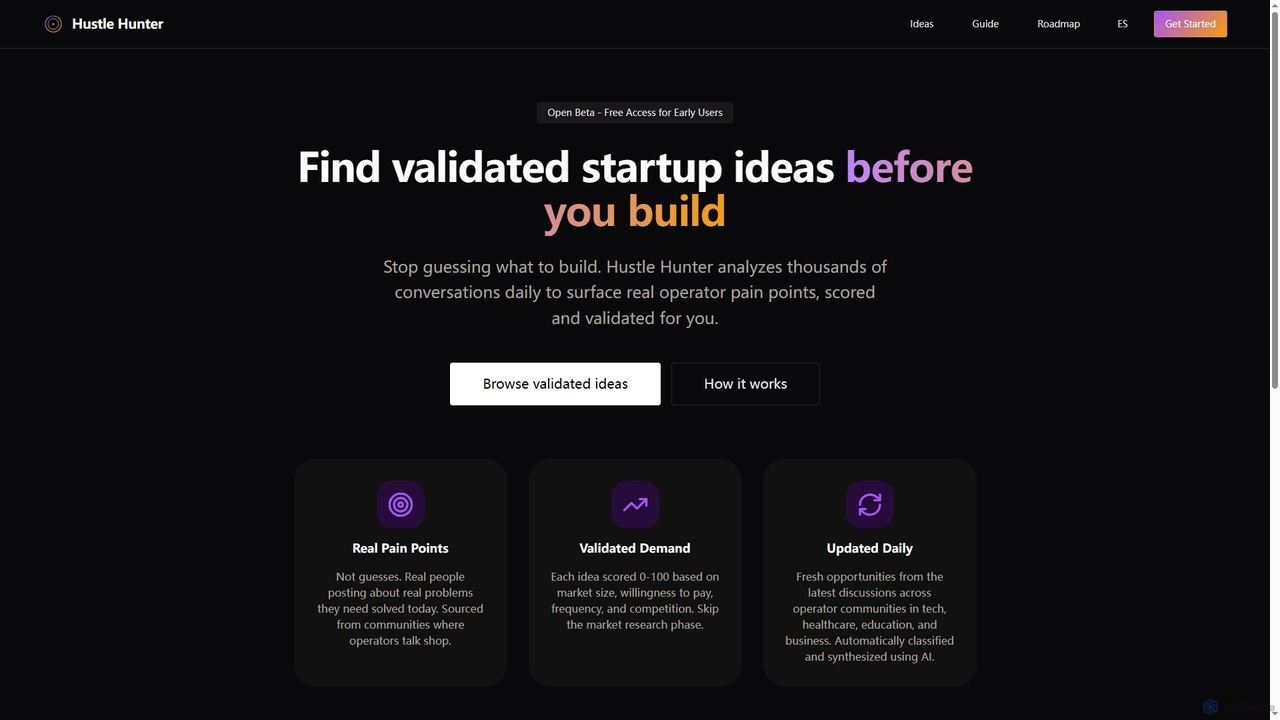
Hustle Hunter is an AI-powered platform designed for solo founders to discover validated startup ideas. It analyzes thousands of online conversations daily to identify real operator pain points, scoring them based on market size, willingness to pay, frequency, and competition, helping entrepreneurs build solutions with confirmed demand.

Startup Ideas
Visits 4.3KFavorites 119Likes 115

About Community Insights

Community Insights tools are AI-powered platforms that specialize in analyzing public discussions, sentiment, and trends across various online communities. Leveraging advanced natural language processing (NLP) and machine learning, these tools extract meaningful patterns from unstructured text data found on social media, forums, review sites, and more. They provide businesses with actionable intelligence to understand customer perception, identify emerging topics, monitor brand reputation, and inform strategic decisions in marketing, product development, and customer service.

Core Features

  • Sentiment Analysis: Automatically gauges the emotional tone (positive, negative, neutral) of community discussions towards specific topics, brands, or products.
  • Topic Modeling: Identifies and categorizes key themes, subjects, and recurring discussions within large volumes of community data.
  • Influencer Identification: Pinpoints influential voices, opinion leaders, and key contributors within target online communities.
  • Trend Detection: Automatically spots emerging discussions, shifts in public interest, and viral content before they become widespread.
  • Demographic Profiling: Infers audience characteristics and segmentation based on their online behavior and expressed interests.

Applicable Scenarios

These tools are invaluable for marketing teams monitoring brand health and campaign performance, product managers gathering user feedback for feature prioritization, and PR professionals managing crisis communications by detecting early warning signs of negative sentiment. They also assist content creators in identifying popular topics and formats that resonate with their target audience.

How to Choose

When selecting a Community Insights tool, consider its data source coverage (e.g., specific social platforms, forums, review sites), the accuracy and depth of its NLP capabilities, and the flexibility for custom keyword and sentiment dictionary configuration. Evaluate the quality of its reporting and visualization features, as well as its integration options with existing CRM or marketing automation systems to ensure seamless workflow.

Featured tool rankings

Community Insights use cases

1

Monitor Brand Reputation and Sentiment

Marketing managers and PR teams utilize Community Insights tools to continuously track public sentiment and discussions surrounding their brand across social media, news sites, and forums. By analyzing mentions and their emotional tone, they can quickly identify potential PR crises, respond to negative feedback, and highlight positive brand mentions, ensuring proactive reputation management and maintaining a positive public image.

2

Gather Product Feedback and Feature Requests

Product development teams leverage Community Insights tools to analyze user reviews, forum discussions, and social media comments for feedback on existing products and ideas for new features. By identifying recurring pain points, popular requests, and emerging use cases, they can prioritize development efforts, refine product roadmaps, and ensure that new releases align closely with user needs and market demands.

3

Identify Market Trends and Competitor Insights

Market researchers and business strategists employ Community Insights tools to detect emerging market trends, shifts in consumer preferences, and public perception of competitors. By analyzing discussions across various platforms, they can gain a competitive edge by understanding what customers value, identifying gaps in the market, and anticipating future industry directions, informing strategic planning and innovation.

4

Inform Content Strategy and Creation

Content creators and marketing teams utilize Community Insights tools to discover popular topics, trending keywords, and content formats that resonate with their target audience. By understanding what communities are actively discussing and engaging with, they can tailor their content strategy to produce more relevant, timely, and engaging material, leading to increased audience engagement and improved content performance.

5

Enhance Customer Service and Support

Customer service and support teams can utilize Community Insights tools to identify common customer pain points, frequently asked questions, and emerging issues discussed in public forums and social media. By proactively addressing these concerns, creating targeted FAQ content, or improving product documentation based on community feedback, businesses can enhance overall customer satisfaction and reduce support ticket volumes.

6

Identify Influencers and Community Leaders

Marketing and PR professionals use Community Insights tools to identify key influencers, brand advocates, and community leaders who are actively discussing relevant topics. By understanding who holds sway within specific online communities, businesses can forge strategic partnerships, amplify their message through credible voices, and build stronger relationships with their target audience, enhancing their outreach and engagement efforts.

Community Insights FAQ

What are Community Insights tools?

Community Insights tools are AI-powered platforms designed to analyze vast amounts of unstructured text data from online communities like social media, forums, and review sites. They go beyond simple data collection to extract meaningful patterns, sentiments, and trends, providing deep understanding of public perception, customer feedback, and market dynamics. These tools are crucial for businesses seeking to understand their audience and market landscape.

How do Community Insights tools differ from general social listening platforms?

While social listening platforms primarily focus on collecting mentions and basic metrics, Community Insights tools delve deeper into the *meaning* and *context* of those mentions. They use advanced AI to perform sentiment analysis, topic modeling, and trend prediction, offering qualitative insights into community dynamics, motivations, and underlying sentiment. This allows for more strategic decision-making beyond just tracking volume.

What are the key benefits of using AI for Community Insights?

AI significantly enhances Community Insights by automating the processing of massive datasets, identifying subtle patterns human analysts might miss, and providing real-time analysis. Key benefits include improved accuracy in sentiment detection, faster identification of emerging trends, deeper understanding of complex discussions through topic modeling, and the ability to scale analysis across numerous platforms and languages, leading to more informed and timely strategic actions.

Which data sources can Community Insights tools analyze?

Community Insights tools are designed to analyze a wide array of online data sources where public discussions occur. This typically includes major social media platforms (e.g., Twitter, Facebook, Instagram, Reddit), online forums, blogs, news comment sections, product review sites (e.g., Amazon, Yelp), and customer support communities. Some advanced tools can also integrate with internal data sources like CRM notes or survey responses for a holistic view.

How to choose the best Community Insights tool for my business?

Choosing the best Community Insights tool involves evaluating several factors. First, assess the specific data sources you need to monitor. Second, consider the depth and accuracy of its AI capabilities, especially for sentiment analysis and topic modeling in your target languages. Third, look at customization options for keywords and alerts. Finally, evaluate its reporting and visualization features for clarity, and check for integration capabilities with your existing marketing or CRM systems to ensure a seamless workflow and maximize value.