
ToolMage
Sign in

Best 1 Api Showcase AI tools for Developer Tools

Popular Api Showcase AI tools in Developer Tools include X to Voice, helping you work more efficiently.

X to Voice
Free

X to Voice

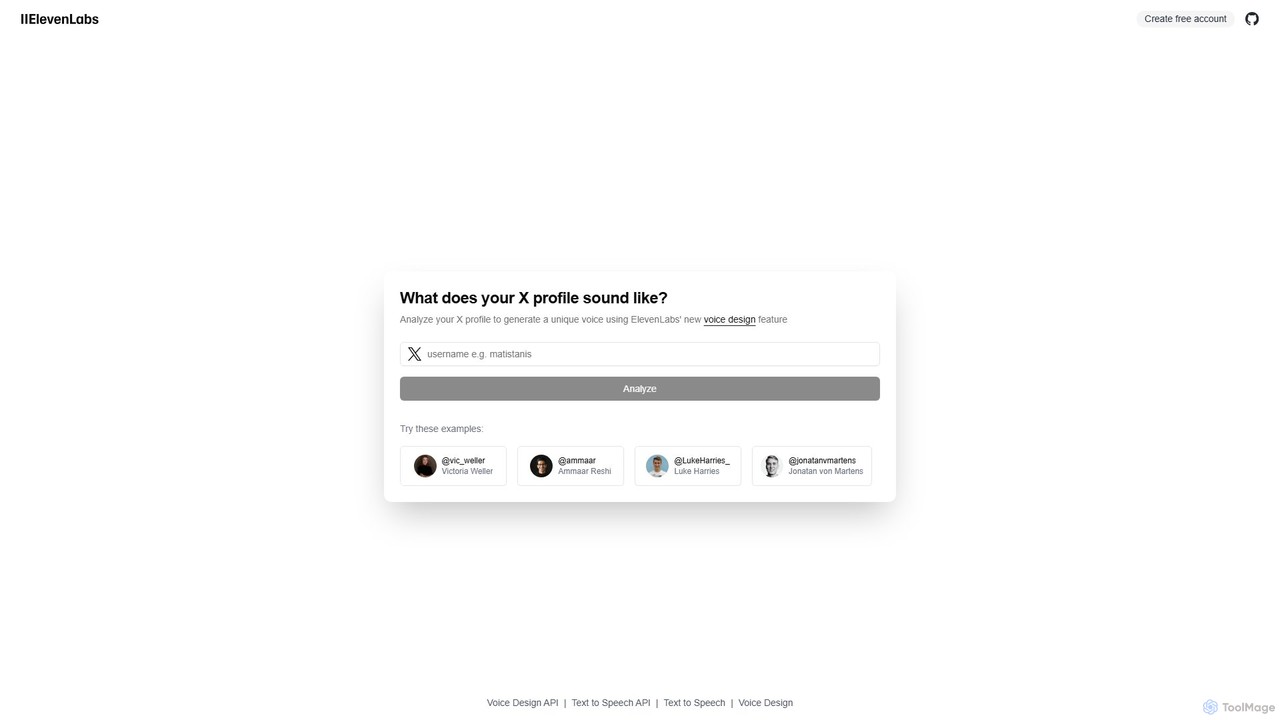
X to Voice is an innovative AI tool by ElevenLabs that analyzes your X (formerly Twitter) profile to generate a unique, synthetic voice. It interprets your online persona to create a detailed voice description, then uses the Voice Design API to produce a voice that audibly represents your digital identity. It's a fun, creative showcase of advanced AI voice synthesis capabilities.

Voice Synthesis
Visits 4.7KFavorites 99Likes 97

About Api Showcase

API Showcase tools are platforms designed to create interactive documentation and live demonstration environments for APIs. They typically parse standard specification files, like OpenAPI or Swagger, to automatically generate a user-friendly web portal. This allows developers to explore endpoints, understand data models, and test API calls directly in their browser, significantly accelerating the integration and adoption process. These tools bridge the gap between technical API specifications and practical, hands-on usage for developers.

Core Features

  • Interactive API Console: Allows users to make live API calls directly from the documentation, with parameters and authentication handled in the UI.
  • Automatic Documentation Generation: Creates human-readable documentation from API specification files (e.g., OpenAPI, AsyncAPI).
  • Code Snippet Generation: Provides ready-to-use code examples for various programming languages (like Python, JavaScript, cURL).
  • Schema and Model Visualization: Clearly displays data structures, request bodies, and response payloads for better understanding.
  • Customization and Branding: Enables companies to apply their own branding and styling to the developer portal for a consistent look.

Use Cases

API Showcase tools are essential for SaaS companies publishing public APIs for third-party developers, large enterprises managing internal microservice catalogs, and open-source projects providing clear usage guides. They serve as the central developer hub for any organization that offers an API, streamlining onboarding for both internal teams and external partners.

How to Choose

When selecting an API Showcase tool, consider its support for your API specification format (e.g., OpenAPI 3.0, 3.1). Evaluate the level of customization available for branding and layout. Assess its hosting options (cloud-based vs. self-hosted) and its ability to integrate with your existing CI/CD pipeline for automated documentation updates. Finally, consider the user experience for both the documentation creators and the developers who will consume it.

Api Showcase use cases

1

Creating a Public API Developer Portal

A SaaS company providing a marketing automation platform needs to enable third-party developers to build integrations. Using an API Showcase tool, they automatically generate an interactive developer portal from their OpenAPI specification. New developers can now visit the portal, read clear documentation for each endpoint, and use the built-in API console to test API calls with their own credentials. This self-service approach significantly reduces the support load on the engineering team and accelerates partner onboarding from weeks to days.

2

Documenting Internal Microservices

A large financial institution has hundreds of internal microservices developed by different teams. To improve internal collaboration and prevent redundant work, they implement an internal API Showcase. Each team is required to publish their API's OpenAPI spec to a central repository. The showcase tool automatically renders these specs into a unified, searchable portal. Now, a developer from the mobile team can easily find, understand, and test the API for the user authentication service, ensuring consistent implementation across all applications.

3

API-First Product Demonstration

A startup is launching an innovative API-first product for data analysis. Instead of building a complex UI for their initial launch, they use an API Showcase tool to create a polished demonstration site. Potential customers and investors can visit the site, learn about the API's capabilities through clear examples, and use the interactive console to run sample queries on a demo dataset. This approach allows the startup to go to market faster and effectively communicate the core value of their technology to a technical audience without a significant front-end development investment.

4

Streamlining Partner Integrations

An e-commerce platform relies on a network of shipping and logistics partners. To streamline the integration process, the platform provides a dedicated partner portal built with an API Showcase tool. This portal contains detailed documentation, use-case tutorials, and an interactive sandbox environment. When a new logistics company joins the network, their developers can immediately start testing the shipping label creation and tracking update APIs without needing direct support, ensuring a faster and more consistent integration experience for all partners.

5

Powering Hackathons and Developer Events

A company hosting a hackathon wants to encourage participants to build applications using its new API. They set up a temporary API Showcase portal specifically for the event. This portal serves as the single source of truth for all participants, providing them with authentication keys, interactive documentation, and code samples. The ability for hackers to quickly understand and experiment with the API in a live environment dramatically increases engagement and the quality of projects submitted during the event.

6

Educational API Sandbox for Training

A coding bootcamp needs to teach students how to interact with RESTful APIs. They use an API Showcase tool to host a simple, custom-built 'social media' API. In the classroom, students can access the showcase, read the documentation for posting a message or retrieving a user profile, and use the interactive console to practice making GET and POST requests. This provides a safe, controlled, and hands-on learning environment that is more effective than simply reading theoretical materials or documentation.

Api Showcase FAQ

What is an API Showcase?

An API Showcase is a tool or platform used to create a user-friendly, interactive portal for an API. Its primary purpose is to make an API easy for developers to discover, understand, and test. It typically generates documentation, code examples, and a live testing console from a standard specification file like OpenAPI, turning a technical contract into a practical, hands-on developer experience.

How does an API Showcase differ from static documentation?

The key difference is interactivity. Static documentation (like a PDF or a Markdown file) describes what an API does. An API Showcase goes a step further by providing a live environment where developers can actually use the API. Key differences include:

  • Live Testing: Showcases have an interactive console to make real API calls, while static docs do not.
  • Automation: Showcases are often generated automatically from code or specification files, ensuring they are always up-to-date.
  • Code Generation: Many showcases can generate client code snippets in various languages, which static docs rarely do.

What key features should I look for in an API Showcase tool?

When choosing an API Showcase tool, prioritize these features:

  • Specification Support: Ensure it supports your API specification format, such as OpenAPI (v2, v3.0, v3.1) or AsyncAPI.
  • Interactivity: A built-in API console or 'Try it out' feature is crucial for hands-on testing.
  • Customization: Look for options to brand the portal with your company's logo, colors, and custom domains.
  • Code Generation: The ability to generate code snippets in popular languages saves developers significant time.
  • Hosting Options: Decide if you need a fully managed cloud solution or a self-hosted option for more control.

Who are the primary users of API Showcase tools?

There are two main groups of users. The first is API Providers (software engineers, technical writers, and product managers) who build and maintain APIs. They use these tools to publish clear, accessible, and interactive documentation for their users. The second group is API Consumers (front-end developers, back-end developers, and third-party integrators) who need to use the API. They use the showcase portal to learn how the API works, test its functionality, and get the code they need to integrate it into their own applications.

Can API Showcase tools be used for private or internal APIs?

Yes, absolutely. Many API Showcase tools are designed for both public and private use. They often provide robust authentication and authorization features, allowing you to restrict access to your developer portal to specific internal teams, partners, or IP ranges. Using a showcase for internal APIs is a common practice in large organizations to improve discoverability and promote reuse of services across different departments, preventing teams from building the same functionality twice.