ToolMage
Sign in

Best 1 Technical Writing AI tools for Developer Tools

Popular Technical Writing AI tools in Developer Tools include Templa8, helping you work more efficiently.

Freemium

Templa8

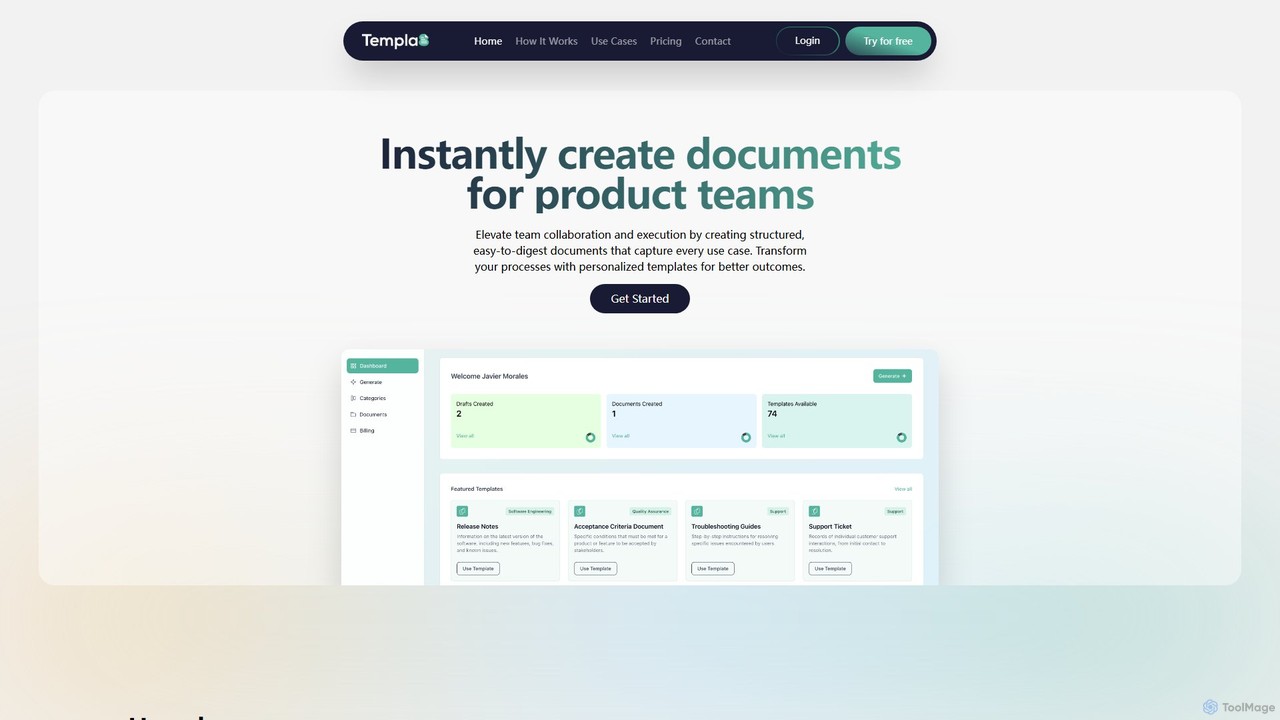
Templa8 is an AI-powered platform designed to streamline document creation and enhance team collaboration. It generates intelligent, structured templates for various professional needs, from technical specs and API docs to project plans and business reports, accelerating workflows and ensuring consistency across all team documentation.

Document Management
Visits 3.3KFavorites 126Likes 111

About Technical Writing

AI Technical Writing tools are specialized applications designed to assist in creating, managing, and optimizing technical documentation. These tools leverage natural language processing (NLP) and machine learning to automate tasks like generating API references, enforcing style consistency, and simplifying complex jargon. Their primary value lies in improving the accuracy, clarity, and maintainability of documents such as user manuals, SDK guides, and internal knowledge bases. By integrating directly with code repositories and development workflows, they help ensure documentation remains synchronized with the software it describes.

Core Features

  • Documentation Generation: Automatically creates structured documents like API references or tutorials from source code comments, specifications (e.g., OpenAPI), or other data sources.
  • Style and Terminology Enforcement: Analyzes text to ensure it adheres to a predefined style guide, maintaining consistent tone and terminology across all documents.
  • Content Simplification: Rewrites complex technical sentences into clearer, more accessible language suitable for a broader audience.
  • Code Snippet Management: Helps generate, validate, and update code examples within documentation to prevent them from becoming outdated.
  • Structural Analysis: Provides feedback on document structure, logical flow, and completeness to enhance readability and user comprehension.

Use Cases

These tools are primarily used by software developers, dedicated technical writers, and product managers within technology companies. Common applications include generating and maintaining API documentation for external developers, creating comprehensive user guides for SaaS products, and building searchable internal knowledge bases to support engineering teams. They are essential in agile environments where software and its documentation must evolve rapidly and in parallel.

How to Choose

When selecting an AI Technical Writing tool, consider its integration capabilities with your existing toolchain, such as Git repositories, CI/CD pipelines, and IDEs. Evaluate its support for the specific programming languages and documentation formats (e.g., Markdown, AsciiDoc) you use. Also, assess the sophistication of its AI features, such as the accuracy of its content generation and the flexibility of its style guide customization. Finally, consider collaboration features and the overall user experience for your team.

Featured tool rankings

Technical Writing use cases

1

Automating API Reference Documentation

A backend developer working on a new microservice needs to provide clear API documentation for the frontend team. Instead of writing it manually, they integrate an AI Technical Writing tool into their CI/CD pipeline. The tool automatically scans their OpenAPI (Swagger) specification file upon every code commit. It then generates a complete, interactive HTML documentation site with endpoint descriptions, parameter details, and request/response examples. This process ensures the documentation is always 100% synchronized with the latest code, saving the developer hours of manual work per week and eliminating discrepancies that could slow down frontend development.

2

Creating Clear Step-by-Step User Guides

A technical writer for a complex SaaS platform is tasked with creating a new user guide for a feature with a steep learning curve. They use an AI technical writing tool to structure the content. By inputting a list of user actions, the tool suggests a logical flow, generates consistent headings, and rewrites jargon-filled developer notes into simple, action-oriented steps. It also flags ambiguous phrases and suggests clearer alternatives, ensuring the final guide is easy for non-technical users to follow. This reduces user support tickets related to the new feature by an estimated 30% and improves the overall user onboarding experience.

3

Maintaining a Consistent Internal Knowledge Base

An engineering team at a fast-growing startup uses a shared knowledge base to document internal processes and system architecture. As the team grows, the documentation becomes inconsistent in tone, terminology, and format. They implement an AI technical writing tool that integrates with their wiki software. The tool provides real-time suggestions to engineers as they write, enforcing the company's style guide. It automatically corrects inconsistent terms (e.g., changing 'user ID', 'User ID', and 'userid' to the official 'UserID') and suggests rephrasing for clarity. This leads to a more professional, searchable, and reliable knowledge base, reducing the time new hires spend searching for information by 40%.

4

Generating SDK Documentation from Code Comments

A mobile development team is releasing a new Software Development Kit (SDK) for third-party developers. To ensure high adoption rates, the SDK needs excellent documentation. The team uses an AI technical writing tool that parses source code comments (like Javadoc or Swift's documentation comments). The tool extracts class descriptions, method parameters, and return values, then structures this information into a professional-looking HTML documentation portal. It also generates navigation and cross-references automatically. This automates over 80% of the documentation effort, allowing the developers to focus on writing high-quality code and comments, knowing the documentation will be generated consistently from them.

5

Localizing Technical Manuals for Global Markets

A hardware manufacturer needs to translate its product installation manuals into five new languages. Before sending the text to human translators, a product documentation manager uses an AI technical writing tool to 'pre-flight' the English source text. The tool identifies culturally specific idioms, overly complex sentences, and ambiguous phrasing that could lead to poor translations. It suggests simplified, globally-neutral alternatives. This pre-editing step improves the quality of the source text, resulting in faster, more accurate, and less expensive translations. The final localized manuals are clearer and lead to fewer customer support calls from international markets.

6

Validating and Updating Code Snippets

A documentation team for a popular open-source library manages hundreds of pages containing code examples. Keeping these snippets up-to-date with each new library version is a major challenge. They deploy an AI technical writing tool that continuously scans their documentation portal. The tool is configured to lint and test each code snippet against the latest version of the library in a sandboxed environment. It automatically flags snippets with deprecated functions or incorrect syntax and, in some cases, suggests the correct updated code. This proactive validation prevents developers from copying broken code, improves the library's reputation, and significantly reduces the manual maintenance burden on the documentation team.

Technical Writing FAQ

What are AI Technical Writing tools?

AI Technical Writing tools are a specialized category of software designed to help create, maintain, and improve technical documentation. Unlike general writing assistants, they focus on the specific needs of developers and technical writers. Key features often include automatically generating API documentation from code, enforcing consistent terminology and style across documents, simplifying complex technical concepts, and validating code snippets. Their main goal is to increase the accuracy, clarity, and efficiency of producing technical content like user guides, SDK manuals, and internal knowledge bases.

How do I choose the right AI tool for technical writing?

Choosing the right tool depends on your specific workflow and needs. Consider the following factors:

  • Integrations: Does the tool integrate with your core systems like Git, Jira, Confluence, or your IDE? Seamless integration is key to adoption.
  • Language & Format Support: Ensure it supports the programming languages your team uses and can output to your required formats (e.g., HTML, PDF, Markdown).
  • Automation Level: Evaluate how much of the process it automates. Does it just check style, or can it generate entire documents from source files like OpenAPI specs?
  • Customization: Can you customize the style guide, terminology rules, and output templates to match your company's branding and standards?
  • Collaboration Features: Look for features that support team collaboration, such as review workflows, commenting, and version control.
What's the difference between AI Technical Writing tools and general AI writing assistants?

The primary difference lies in their specialization and integration. General AI writing assistants (like grammar checkers or content generators) are broad-purpose tools focused on improving prose, generating creative text, or summarizing content. AI Technical Writing tools are highly specialized for documentation workflows. They integrate deeply with developer tools like code repositories and IDEs. Their core strengths are in understanding technical context, such as parsing code comments to generate API docs, ensuring terminological consistency for complex products, and validating the accuracy of code examples—tasks that general-purpose writing tools are not equipped to handle.

Who can benefit from using AI Technical Writing tools?

A wide range of roles can benefit, primarily within technology-focused organizations:

  • Software Developers: To quickly generate and update API documentation directly from their code, reducing the documentation burden and ensuring accuracy.
  • Technical Writers: To automate repetitive tasks, enforce style guides, and focus their efforts on creating high-level narrative content and improving clarity.
  • Product Managers: To ensure that product documentation is clear, consistent, and delivered on time alongside new feature releases.
  • Support Engineers: To access a reliable and up-to-date internal knowledge base, enabling them to resolve customer issues faster.
  • DevOps Engineers: To integrate documentation generation into CI/CD pipelines, ensuring documentation is always part of the release process.
Can these tools completely replace human technical writers?

No, these tools are designed to augment, not replace, human technical writers. While they excel at structured, data-driven tasks like generating API references from specifications or enforcing style rules, they currently lack the ability to understand user empathy, create compelling narrative flows, or develop high-level documentation strategy. The most effective use of these tools is a partnership: AI handles the repetitive, rule-based tasks, freeing up human writers to focus on more strategic work like understanding user needs, structuring complex information logically, and creating tutorials that are genuinely helpful and easy to follow.