ToolMage
Sign in

Best 1 Image Generation AI tools for Fun

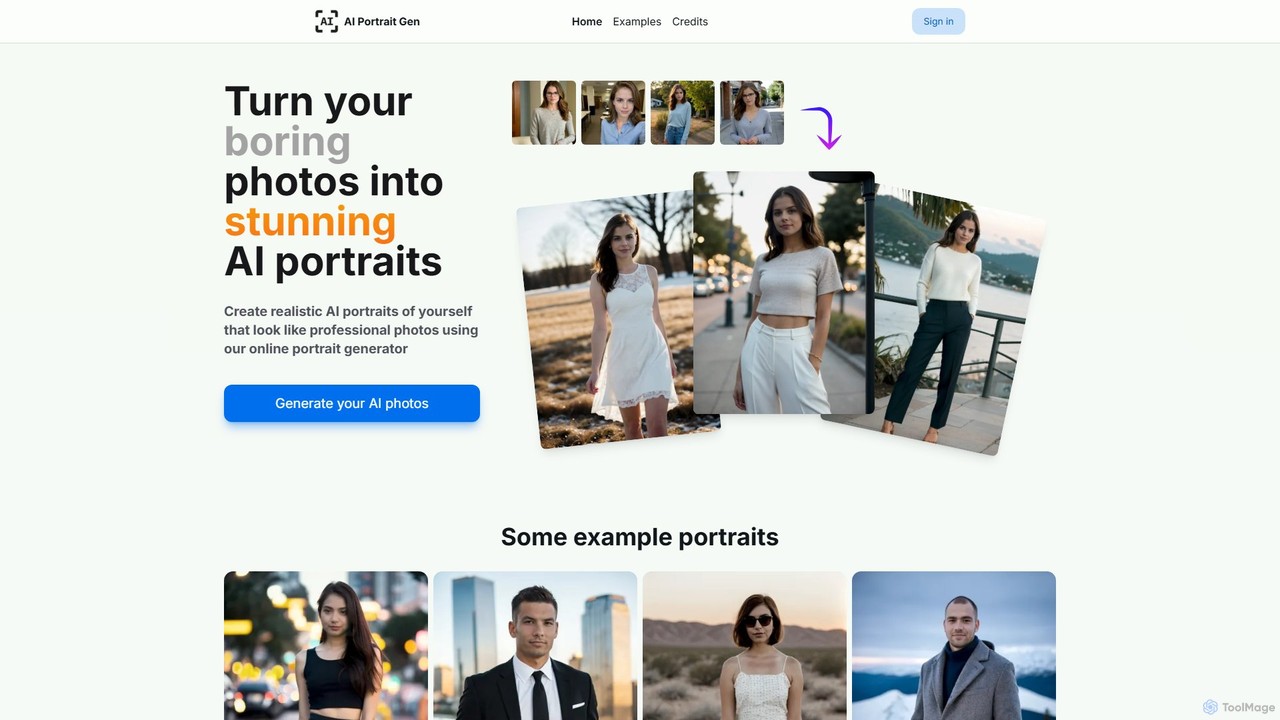
Popular Image Generation AI tools in Fun include aiportraitgen, helping you work more efficiently.

aiportraitgen
Paid

aiportraitgen

aiportraitgen is an online AI tool that transforms your everyday photos into stunning, realistic portraits and professional headshots. Simply upload a few images, choose your desired location, outfit, and style, and receive high-quality, studio-level photos in minutes. It's perfect for upgrading your social media profiles, professional networks like LinkedIn, or just for fun, all without needing any photography or AI expertise.

Image Generation
Visits 6.4KFavorites 125Likes 124

About Image Generation

Image Generation tools are a class of AI that create novel visual content from text descriptions or other inputs. They utilize advanced deep learning models, such as diffusion or GANs, to interpret prompts and synthesize highly detailed and diverse images. These tools are widely used by artists, designers, and marketers to quickly visualize concepts, create unique marketing materials, and generate digital art. Unlike traditional image editors, these generators produce entirely new images from scratch, offering extensive creative possibilities.

Core Features

  • Text-to-Image Generation: Creates images from descriptive text prompts.
  • Style Control: Allows users to specify artistic styles like photorealistic, anime, or oil painting.
  • Image-to-Image Transformation: Modifies an existing image based on a text prompt.
  • Parameter Customization: Provides control over aspect ratio, negative prompts, and generation seeds for fine-tuning results.
  • Inpainting & Outpainting: Edits specific areas within an image or extends its canvas with AI-generated content.

Use Cases

This category is essential for digital artists seeking inspiration, content creators needing blog illustrations, and game developers designing concept art. Marketing teams use them to produce unique visuals for social media campaigns and advertisements, bypassing the need for generic stock photos. It's also a valuable tool for designers creating product mockups and architectural visualizations.

How to Choose

When selecting an Image Generation tool, evaluate the output quality and the range of available artistic styles. Consider the user interface's complexity and the level of control offered through prompting and parameters. Also, review the pricing model (e.g., subscription vs. credit packs) and the terms regarding commercial usage rights for the generated images.

Featured tool rankings

Image Generation use cases

1

Creating Marketing and Social Media Visuals

A marketing manager needs unique, eye-catching images for an ad campaign without the high cost of stock photos. Using an AI Image Generator, they input a prompt like 'photorealistic image of a diverse group of people collaborating in a bright, modern office, vibrant colors.' The tool generates multiple high-resolution, on-brand visual variations in minutes. This process significantly reduces reliance on stock photography and minimizes the budget needed for custom graphic design, allowing for more dynamic and frequent visual content on social media.

2

Concept Art and Character Design for Games

A game designer needs to quickly explore visual ideas for a new character. They use an AI Image Generator with prompts like 'concept art of a futuristic cyborg warrior, cyberpunk style, detailed armor, neon lights.' The AI produces dozens of design variations, allowing the designer to rapidly iterate on different styles, color palettes, and equipment. This accelerates the pre-production phase, provides a rich pool of ideas for human artists to refine, and helps align the creative vision of the team early in the development process.

3

Generating Illustrations for Blogs and Articles

A content creator writing an article about sustainable energy needs a unique header image. Instead of searching through generic stock photos, they use an AI generator with the prompt 'minimalist vector illustration of a city skyline with wind turbines and solar panels, clean energy concept.' Within seconds, the tool provides several custom illustrations that perfectly match the article's theme. This allows the creator to enhance their content with original, relevant visuals, improving reader engagement and maintaining a consistent aesthetic across their blog or website.

4

Product Mockups and E-commerce Photography

An e-commerce store owner wants to showcase their new water bottle in various lifestyle settings without a costly photoshoot. They upload a clean product image and use an AI tool's image-to-image or inpainting feature. They then provide prompts like 'on a wooden table next to a laptop in a cozy cafe' or 'held by a hiker on a mountain summit at sunrise.' The AI seamlessly integrates the product into newly generated, realistic backgrounds. This method creates a diverse set of high-quality product mockups quickly and affordably, boosting the product page's appeal.

5

Architectural and Interior Design Visualization

An interior designer wants to show a client several design options for a living room. Instead of spending days on manual 3D rendering, they use an AI Image Generator. They input a prompt describing the core elements: 'photorealistic interior design of a spacious Scandinavian living room with oak floors, large windows, a grey sofa, and minimalist furniture.' By slightly altering the prompt (e.g., changing 'grey sofa' to 'blue velvet sofa'), they can generate multiple high-quality visualizations in minutes, enabling faster client feedback and decision-making.

6

Personalized Art and Digital Creations

A hobbyist wants to create a unique piece of digital art for their home. Without traditional art skills, they turn to an AI Image Generator. They experiment with creative and abstract prompts, such as 'a surreal oil painting of a whale swimming through a nebula in the style of Van Gogh.' The tool allows them to explore countless artistic styles and concepts, generating one-of-a-kind artworks. They can then print the final image on a canvas, creating personalized decor that reflects their imagination and creativity.

Image Generation FAQ

What is an AI Image Generator?

An AI Image Generator is a tool that uses artificial intelligence, typically deep learning models like diffusion, to create new images from text prompts. Users describe what they want to see, and the AI interprets these descriptions to produce a unique visual representation. These tools can generate a wide range of styles, from photorealistic photos to abstract art, making them valuable for artists, designers, and marketers.

How to choose the right AI Image Generator?

To choose the right tool, consider these factors:

  • Output Quality & Style: Does the tool excel at the specific style you need (e.g., photorealism, anime, vector art)? Review its gallery of examples.
  • Ease of Use: Is the interface intuitive for your skill level? Some tools are simple and prompt-based, while others offer advanced controls.
  • Pricing Model: Compare subscription plans, credit-based systems, or free tiers. Ensure the cost aligns with your expected usage.
  • Usage Rights: Check the terms of service to understand if you can use the generated images for commercial purposes.
What's the difference between an AI Image Generator and an AI Image Editor?

The core difference is creation versus modification. An AI Image Generator creates entirely new images from scratch based on a text prompt. An AI Image Editor, on the other hand, uses AI to modify or enhance an *existing* image. Common editor functions include object removal, background replacement, upscaling resolution, or applying smart filters. A generator makes something from nothing, while an editor improves what's already there.

What key features should I look for in an Image Generation tool?

Look for a combination of creative and control features. Key features include:

  • Text-to-Image: The core function of creating images from text.
  • Style Presets: Pre-configured styles (e.g., 'cinematic', '3D render', 'fantasy art') for quick results.
  • Negative Prompts: The ability to specify what you *don't* want in the image to refine the output.
  • Image-to-Image: Using a starting image to guide the generation process.
  • Inpainting/Outpainting: Tools to selectively edit or expand parts of the generated image.
Who can benefit from using AI Image Generation tools?

A wide range of users can benefit from these tools. Artists and designers use them for inspiration, rapid prototyping, and creating unique digital art. Marketers and content creators leverage them to produce custom visuals for social media, ads, and blogs, reducing costs and saving time. Game developers can quickly generate concept art for characters and environments. Even hobbyists and individuals can use them for creative expression, personal projects, or simply for fun, making visual creation accessible to everyone.