ToolMage
Sign in

Best 1 Paraphrasing Tool for General Writing

Popular Paraphrasing Tool in General Writing include Engram, helping you work more efficiently.

Engram
Freemium

Engram

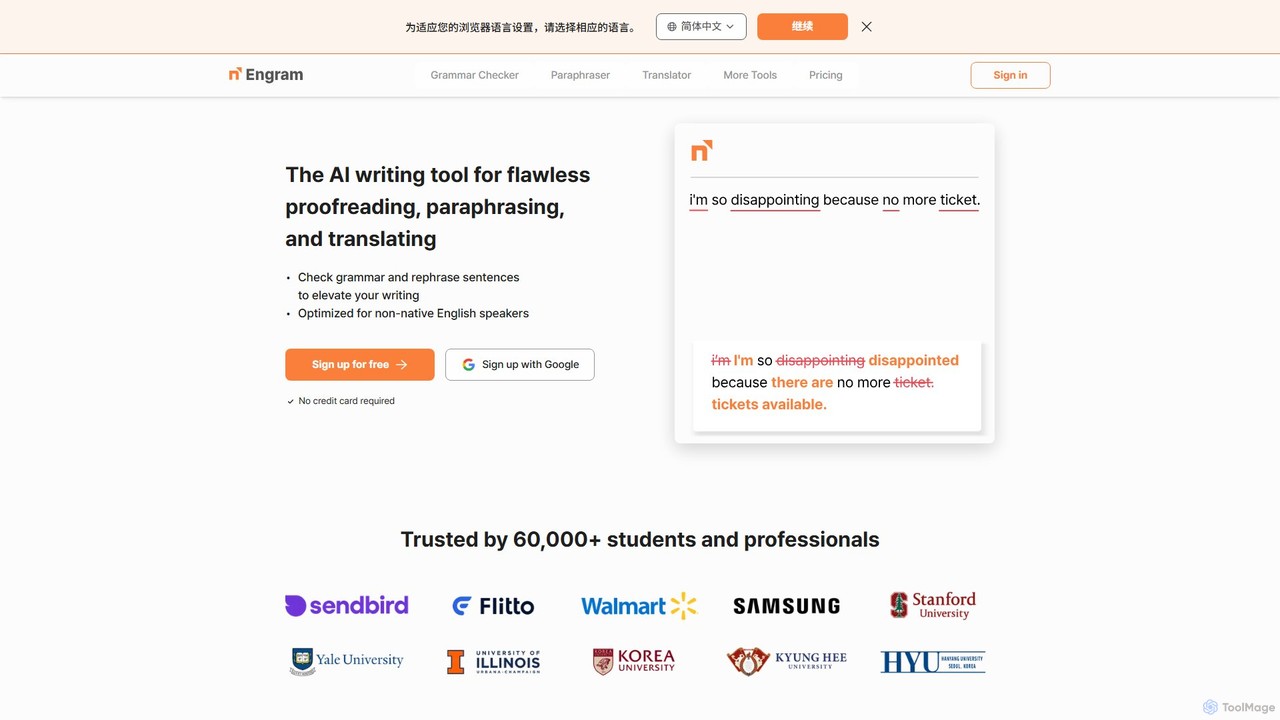
Engram is an AI-powered writing tool specifically designed for non-native English speakers. It offers flawless proofreading, contextual paraphrasing, and accurate translation to help users elevate their writing. Trusted by students and professionals, Engram corrects complex grammar errors and rephrases sentences to sound more natural, making English writing faster and stress-free.

Language Learning
Visits 215.9KFavorites 122Likes 134

About Paraphrasing Tool

Paraphrasing tools are AI-powered applications designed to rewrite sentences or entire passages while preserving the original meaning. These tools utilize advanced natural language processing (NLP) models to understand context, replace words with suitable synonyms, and restructure sentence composition. Their primary value lies in enhancing clarity, avoiding plagiarism, and adapting content for different audiences or tones. This makes them highly useful for students, writers, marketers, and professionals seeking to refine their written communication.

Core Features

  • Synonym & Phrasing Variation: Intelligently suggests alternative words and phrases that fit the context.
  • Sentence Restructuring: Reorganizes sentence structure, such as converting between active and passive voice, to improve flow.
  • Tone Adjustment: Allows users to modify the text's tone to be more formal, casual, professional, or creative.
  • Clarity Enhancement: Simplifies complex or convoluted sentences to make them easier to understand.
  • Plagiarism Reduction: Helps create a unique version of existing text by altering wording and structure.

Use Cases

Paraphrasing tools are widely used in academic settings to properly cite and integrate sources without committing plagiarism. Content creators and marketers use them to repurpose blog posts into social media updates or newsletters. Professionals also leverage these tools to polish important emails, reports, and presentations, ensuring their message is clear and impactful.

How to Choose

When selecting a paraphrasing tool, consider the quality and accuracy of the output, as some may produce awkward phrasing. Evaluate the number of available modes or tones (e.g., formal, simple, creative). Check for integrations like browser extensions or Google Docs add-ons for a seamless workflow. Finally, assess if it supports multiple languages and includes a built-in plagiarism checker for comprehensive writing support.

Paraphrasing Tool use cases

1

Academic Writing and Plagiarism Avoidance

A university student is writing a research paper and needs to incorporate findings from several academic journals. To avoid accidental plagiarism and integrate the information smoothly, the student inputs key sentences from their sources into a paraphrasing tool. The tool rephrases the complex academic language into a clearer, unique sentence structure that maintains the original citation's meaning. This allows the student to confidently build their argument using established research while ensuring their work is original and properly attributed, significantly reducing the risk of academic integrity violations.

2

Content Repurposing for Digital Marketing

A content marketer has written a comprehensive blog post and wants to maximize its reach across different channels. They use a paraphrasing tool to quickly generate multiple unique variations of the post's key takeaways. One version is shortened and simplified for a Twitter thread, another is adapted into a more professional tone for a LinkedIn article, and a third is rephrased for an email newsletter. This process saves hours of manual rewriting and ensures that the core message is delivered effectively and appropriately for each platform's audience, boosting engagement and content ROI.

3

Enhancing Professional Business Communication

An account manager needs to send a critical email to a client to address a project delay. Their initial draft sounds too defensive. Using a paraphrasing tool with a 'professional' or 'diplomatic' tone setting, they rewrite the email. The tool rephrases sentences to be more constructive and solution-oriented, replacing blunt language with more polished, professional phrasing. The final email clearly communicates the situation, outlines the new plan, and reassures the client, all while maintaining a positive and professional relationship, which would have been harder and more time-consuming to achieve manually.

4

Creating SEO Content Variations

An e-commerce SEO specialist needs to write unique product descriptions for 50 similar items without being penalized for duplicate content. They write a detailed master description and then use a paraphrasing tool to generate multiple distinct versions. By slightly altering sentence structures and swapping synonyms, the tool helps create descriptions that are unique enough for search engines but still convey the same key features and benefits to customers. This approach dramatically speeds up the content creation process for large-scale e-commerce sites and helps improve search rankings for individual product pages.

5

Assisting Non-Native English Speakers

A professional whose first language is not English needs to draft an important report for an international audience. While they are fluent, they worry about their phrasing sounding unnatural. They write their ideas and then use a paraphrasing tool to refine the text. The tool helps correct awkward sentence structures and suggests more idiomatic expressions, elevating the quality of the writing to a native-speaker level. This boosts their confidence and ensures their professional expertise is not overshadowed by minor language barriers, allowing for clearer and more effective global communication.

6

Overcoming Writer's Block in Creative Projects

A novelist is stuck on a particular paragraph, feeling that their description lacks impact. They input their sentence into a paraphrasing tool and cycle through its 'creative' or 'fluent' modes. The tool provides five different ways to phrase the same idea, using varied vocabulary and sentence flows. One of these suggestions sparks a new direction, helping the writer break through their creative block. In this scenario, the tool acts not just as a rewriter, but as a brainstorming partner, offering fresh perspectives that can reinvigorate the writing process.

Paraphrasing Tool FAQ

What is an AI Paraphrasing Tool?

An AI paraphrasing tool is a software application that uses artificial intelligence, specifically natural language processing (NLP), to rewrite text. Its main goal is to rephrase sentences or passages while keeping the original meaning intact. Unlike simple synonym replacers, these tools understand context to restructure sentences, adjust the tone (e.g., formal, casual), and improve overall clarity, making them useful for avoiding plagiarism, repurposing content, and enhancing written communication.

How do I choose the right paraphrasing tool?

To choose the right paraphrasing tool, consider these four factors:

  • Output Quality: Test the tool to ensure it produces natural, grammatically correct text that accurately reflects the original meaning.
  • Features and Modes: Look for multiple modes (e.g., 'Formal', 'Creative', 'Simple') and features like tone adjustment or sentence shortening to fit your specific needs.
  • Integrations: Check if it offers browser extensions, Microsoft Word add-ins, or Google Docs integration for a more efficient workflow.
  • Usage Limits and Pricing: Evaluate the free version's limitations (e.g., word count per query) and compare paid plans to find one that matches your usage frequency and budget.
Is using a paraphrasing tool considered plagiarism?

Using a paraphrasing tool can be considered plagiarism if not done ethically. If you simply process someone else's work through the tool and present it as your own without proper citation, it is plagiarism. However, when used responsibly as a writing aid—to help you rephrase your own ideas, understand complex text, or properly integrate and cite sources in your own original work—it is a legitimate tool. Always check your institution's or publication's academic integrity policies. The key is to use it to enhance your own writing, not to claim others' work.

What's the difference between a paraphrasing tool and a grammar checker?

The primary difference lies in their core function. A grammar checker focuses on correctness, identifying and fixing errors in spelling, grammar, punctuation, and syntax. Its goal is to polish existing text. A paraphrasing tool, on the other hand, focuses on transformation. It rewrites the text to change its wording, structure, and sometimes tone, while preserving the original meaning. While some paraphrasing tools include grammar checks, their main purpose is to create a new version of the text, not just correct it.

Can paraphrasing tools work with multiple languages?

Yes, many advanced paraphrasing tools support multiple languages. However, the quality and number of features can vary significantly between languages. Tools are often most powerful and accurate for widely spoken languages like English, Spanish, and Chinese. When choosing a tool for multilingual use, it's important to test its performance in your specific target languages. Check the provider's website for a list of supported languages and be aware that some features, like specific tone adjustments, may not be available for all of them.