
ToolMage
Sign in

Best 1 Video Downloader AI tools for Multimedia

Popular Video Downloader AI tools in Multimedia include DW Free Video Downloader, helping you work more efficiently.

DW Free Video Downloader
Free

DW Free Video Downloader

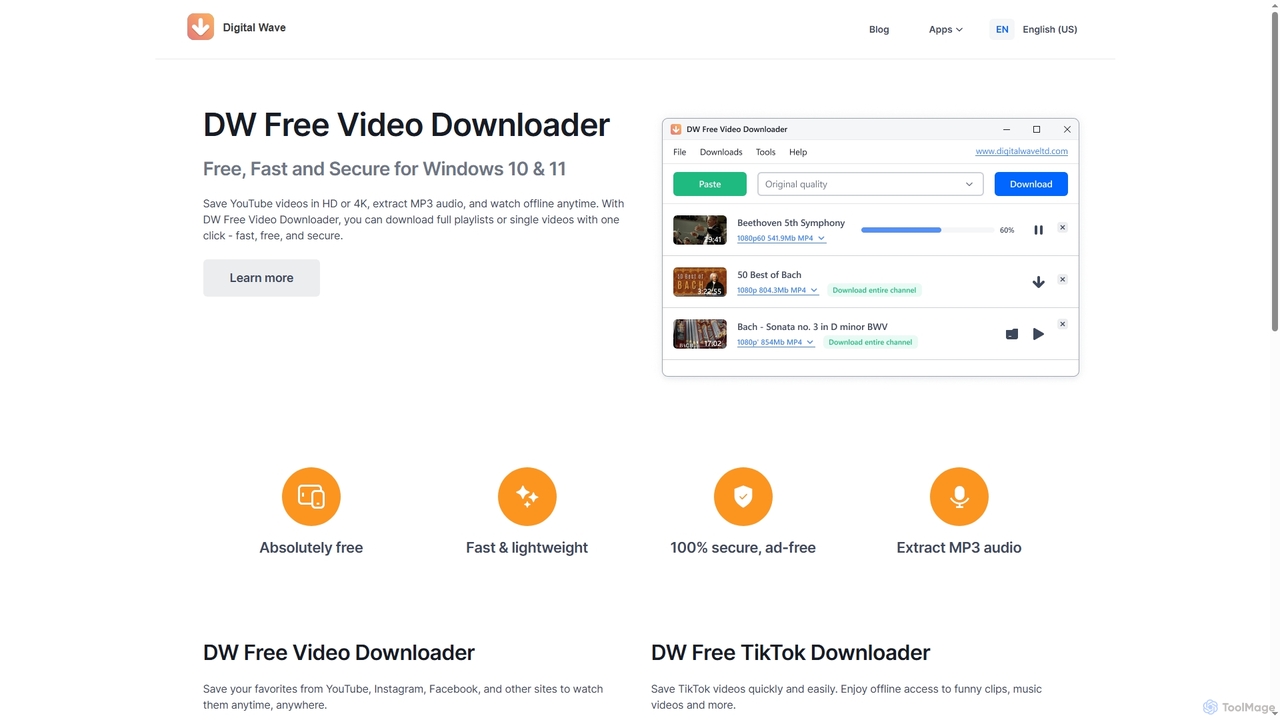
DW Free Video Downloader is a free, fast, and secure desktop application for Windows 10 & 11. It enables users to download videos in HD or 4K from sites like YouTube, Instagram, and Facebook, save entire playlists, and extract MP3 audio for offline access.

Video Downloader
Visits 30.8KFavorites 127Likes 140

About Video Downloader

Video Downloaders are specialized tools designed to extract and save video content from various online platforms directly to a user's device. These tools leverage advanced parsing techniques to identify video streams, enabling users to access their favorite content offline. They provide immense value for archiving, content creation, and ensuring uninterrupted viewing without internet dependency or buffering issues.

Core Features

  • Wide Platform Compatibility: Supports downloading from popular sites like YouTube, Vimeo, Facebook, and many others.
  • Multiple Quality Options: Allows selection of resolutions ranging from standard definition (SD) to high definition (HD), 4K, and even 8K, based on source availability.
  • Batch Downloading: Facilitates saving multiple videos or entire playlists simultaneously, significantly boosting efficiency.
  • Format Conversion: Often includes built-in converters to transform downloaded videos into various formats like MP4, MP3, AVI, or MOV.
  • Subtitle & Audio Extraction: Enables users to download accompanying subtitles or extract audio tracks separately from video files.

Applicable Scenarios

These tools are essential for students and professionals needing offline access to educational content, content creators who require source footage for editing, and individuals who wish to archive personal or public domain videos for long-term storage or future reference.

How to Choose

When selecting a video downloader, prioritize tools with broad platform support for your frequently used sites, diverse output quality and format options, and a user-friendly interface. Evaluate its download speed, reliability, and additional features such as batch downloading or subtitle support to ensure it meets your specific needs.

Video Downloader use cases

1

Offline Learning & Skill Development

Students and lifelong learners download educational lectures, tutorials, and documentaries from platforms like YouTube or Coursera. This allows them to study without an internet connection, revisit complex topics multiple times, and create a personal library of learning resources for focused, distraction-free study sessions.

2

Offline Viewing on the Go

Frequent travelers or commuters can download movies, TV shows, or documentaries from streaming platforms before their journey. This ensures uninterrupted entertainment or educational content access without relying on unstable public Wi-Fi or consuming mobile data, making long trips more enjoyable and productive.

3

Saving Online Tutorials for Offline Learning

Students and lifelong learners can utilize video downloaders to save educational content, such as programming courses or language lessons from platforms like YouTube or Coursera. This allows for uninterrupted study sessions in environments without internet access, during commutes, or when preparing for exams, ensuring consistent access to valuable knowledge.

4

Archiving Personal and Professional Content

Content creators, vloggers, or businesses can use video downloaders to save their own uploaded videos from social media or video-sharing sites as a backup. This safeguards valuable content against accidental deletion or platform changes, ensuring a permanent archive for future use, editing, or re-uploading.

5

Archiving Personal Vlogs and Family Memories

Individuals who create or are featured in vlogs and personal videos across social media platforms can use these tools to download and create a permanent backup of their digital memories. This safeguards precious moments from potential platform changes or content removal, ensuring family events, travel diaries, or personal milestones are preserved for future viewing and sharing.

6

Content Creation & Remixing

Video editors and content creators utilize downloaders to acquire royalty-free stock footage, background music, or specific clips for fair use in their projects. This streamlines the process of gathering source material for vlogs, short films, or social media content, ensuring high-quality assets are readily available for editing.

7

Archiving Important Webinars & Live Streams

Professionals and businesses download critical webinars, online conferences, or internal training sessions. This ensures permanent access to valuable information, allows for easy sharing with team members who missed the live event, and creates a searchable archive for future reference and compliance purposes.

8

Educational Resource Collection

Students and educators can download online lectures, tutorials, or documentaries from educational platforms or YouTube. This allows for repeated viewing without an internet connection, facilitates note-taking, and enables the creation of a personalized offline library for research and study purposes, enhancing learning flexibility.

9

Content Curation for Social Media Managers

Social media managers often need to repurpose or reference trending videos, competitor content, or brand-related clips. Video downloaders enable them to quickly save relevant short-form videos from platforms like TikTok or Instagram. This facilitates offline analysis, mood board creation, or preparing content for internal presentations and strategic planning without relying on live links.

10

Market Research and Competitor Analysis

Marketing professionals can download public advertisements, product reviews, or competitor videos from various platforms. This enables detailed offline analysis of marketing strategies, creative approaches, and audience engagement tactics without needing an active internet connection, aiding in strategic planning and content development.

11

Travel & Commute Entertainment

Individuals download movies, TV shows, or podcasts from streaming platforms before long flights, train rides, or daily commutes. This guarantees uninterrupted entertainment or information access in areas with poor or no internet connectivity, making travel time more enjoyable and productive.

12

Backing Up Important Webinars and Conference Recordings

Professionals attending online webinars, virtual conferences, or internal training sessions can employ video downloaders to secure copies of these important recordings. This ensures they have permanent access to crucial information, presentations, and discussions for future reference, review, or sharing with team members who may have missed the live event, enhancing knowledge retention.

13

Creating Offline Entertainment Libraries for Travel

Travelers or individuals with limited internet access can use video downloaders to build a personal library of movies, TV shows, or documentaries from streaming platforms (where permitted by terms of service for personal use). This provides a reliable source of entertainment during long flights, road trips, or in areas with poor connectivity, ensuring continuous enjoyment.

14

Preserving Personal & Family Memories

Users save personal videos shared on private social media groups or cloud storage services, as well as family events or milestones uploaded by relatives. This acts as a reliable backup, ensuring cherished memories are preserved locally, independent of platform availability or account status.

15

Media Asset Repurposing for Creative Projects

Video editors and graphic designers can download royalty-free stock footage or legally permissible clips for use in their creative projects. This allows for offline editing, integration into new content, and ensures access to specific visual elements without repeated streaming, streamlining the content creation workflow.

16

Analyzing Marketing Campaigns and Competitor Videos

Marketing analysts and business strategists can leverage video downloaders to collect and study advertising campaigns, product reviews, or promotional content from competitors. By downloading these videos, they can conduct detailed offline analysis of messaging, visual elements, and engagement tactics, informing their own campaign development and competitive intelligence efforts.

17

Backup Personal Videos from Cloud Platforms

Individuals can download personal videos shared by friends or family on social media platforms (with proper consent) to preserve cherished memories. This creates a personal digital archive of significant life events, ensuring these moments are accessible even if platform content policies change or accounts become inactive, offering a reliable backup.

18

Accessibility & Language Practice

Language learners download videos with accompanying subtitles to practice listening comprehension and reading. Similarly, individuals with hearing impairments can download content with captions to ensure full accessibility, allowing for a more inclusive and effective learning or viewing experience.

Video Downloader FAQ

What are Video Downloaders?

Video Downloaders are software applications or online services designed to save video content from various internet sources directly to a user's local device. They function by identifying and extracting video streams from websites, allowing users to watch videos offline, archive content, or use them in personal projects, providing flexibility beyond typical streaming limitations.

What are Video Downloaders?

Video Downloaders are software applications or web-based services that allow users to save video content from various online sources, such as YouTube, Vimeo, and social media platforms, directly onto their local devices. Their primary function is to convert and store online video streams for offline viewing, archiving, or other personal uses, often supporting different resolutions and formats.

What are Video Downloaders?

Video Downloaders are software tools or online services designed to extract and save video files from various internet sources, such as YouTube, Vimeo, and social media platforms, onto a user's local device. They typically feature the ability to choose different resolutions and formats, enabling offline viewing and content archiving.

How do I choose the right Video Downloader?

When selecting a video downloader, prioritize tools that offer broad platform compatibility, support for your desired video resolutions (e.g., 1080p, 4K) and formats (e.g., MP4, MKV). Key considerations also include ease of use, batch downloading capabilities, the option to download subtitles, and a clear, user-friendly interface. Always check for regular updates to ensure ongoing compatibility.

How to choose a reliable Video Downloader?

When selecting a video downloader, prioritize tools that offer broad compatibility with your preferred video platforms, support for various output qualities (SD to 4K) and formats (MP4, MP3). Look for a user-friendly interface, fast and stable download speeds, and essential features like batch downloading and subtitle extraction. Reading user reviews can also provide insights into reliability and performance.

How do I choose a reliable Video Downloader?

When selecting a video downloader, prioritize tools that offer broad platform compatibility and support for high-resolution downloads. Look for user-friendly interfaces, robust batch downloading capabilities, and options for format conversion. Crucially, consider the tool's reputation for security and privacy, opting for well-reviewed and frequently updated software to ensure a safe and effective experience.

Is it legal and safe to use Video Downloaders?

The legality of using video downloaders varies by region and the source content's copyright. Downloading copyrighted material without permission is generally illegal. However, downloading public domain videos, your own content, or content with explicit download permissions is typically permissible. From a safety perspective, always use reputable downloaders to avoid malware or privacy risks; free, obscure tools can sometimes bundle unwanted software.

Is it legal to download online videos?

The legality of downloading online videos largely depends on the video's copyright status and your intended use. Downloading copyrighted content without permission for commercial use is generally illegal. However, downloading public domain videos, content with creative commons licenses, or your own uploaded videos for personal, offline viewing is often permissible. Always respect copyright laws and platform terms of service.

Are Video Downloaders legal to use?

The legality of using video downloaders largely depends on the source content's copyright and the platform's terms of service. Downloading copyrighted material without permission is generally illegal. However, downloading public domain videos, your own content, or content with explicit download permissions (e.g., Creative Commons licenses) for personal, non-commercial use is often permissible. Always review the terms of service of the platform and the copyright status of the video.

What features should I look for in a Video Downloader?

Essential features in a video downloader include support for a wide range of video platforms, the ability to select various video qualities and output formats, and batch downloading for efficiency. Look for tools that can extract audio only, download subtitles, and potentially offer a built-in video converter. A clean interface and fast download speeds are also highly desirable.

What platforms do Video Downloaders typically support?

Most popular video downloaders offer extensive support for major video-sharing platforms like YouTube, Vimeo, Dailymotion, and often social media sites such as Facebook, Instagram, and TikTok. Some advanced tools also cater to niche platforms or offer browser extensions for seamless integration, allowing users to capture content from a wider array of online sources.

Why do some Video Downloaders fail or stop working?

Video downloaders can fail or stop working for several reasons. Websites frequently update their streaming protocols or anti-download measures, which can break a downloader's functionality. Other causes include outdated downloader software, internet connection issues, insufficient storage space, or regional restrictions on content. Regular updates of the downloader software are often necessary to maintain compatibility.

How does a Video Downloader differ from a video streaming service?

A video downloader allows you to permanently save video files to your device for offline access, giving you full control over the content. In contrast, a video streaming service provides on-demand access to a vast library of content, but you typically only view it while connected to the internet, and you don't own the file. Streaming offers convenience and breadth, while downloading offers ownership and offline availability.

How do Video Downloaders differ from streaming services?

Video downloaders allow users to permanently save video files to their device for offline access, providing full control over the file. Streaming services, conversely, offer on-demand playback of content over the internet without permanent ownership or local storage. While streaming provides convenience, downloaders offer greater flexibility for offline viewing, archiving, and personal use, distinguishing them within the broader multimedia category.

What's the difference between a Video Downloader and a streaming service?

A video downloader allows you to permanently save video files to your device for offline access, giving you ownership of the file (for personal, legal use). A streaming service, conversely, provides on-demand access to a vast library of content over the internet without downloading, typically requiring a subscription. The key distinction lies in file ownership and offline availability versus temporary, internet-dependent access.