
ToolMage
Sign in

Best 1 Documentation AI tools for Code

Popular Documentation AI tools in Code include GitLoop, helping you work more efficiently.

GitLoop
Freemium

GitLoop

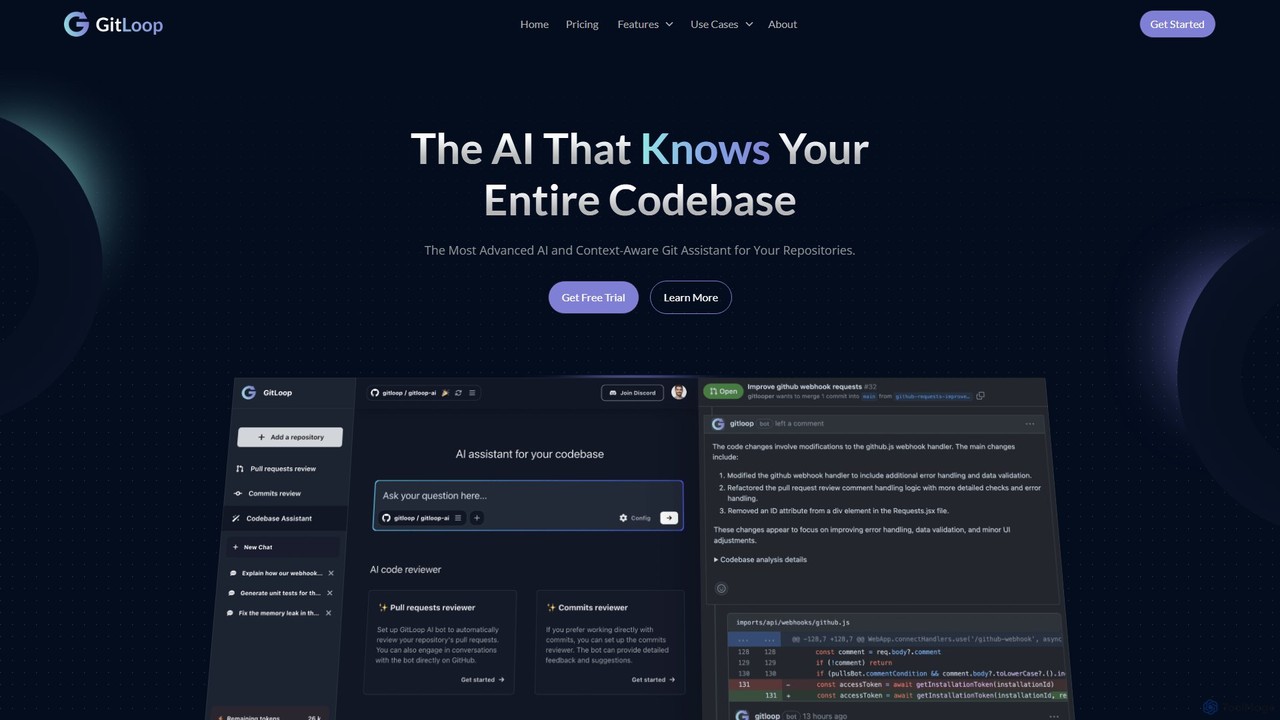
GitLoop is an AI-powered codebase assistant that revolutionizes software development. It allows developers to search codebases with natural language, automates pull request reviews, generates documentation and unit tests, and provides deep code insights, acting like a senior developer on your team.

Code Review
Visits 20.9KFavorites 150Likes 163

About Documentation

AI Documentation tools are AI-powered applications that automate the creation, management, and maintenance of technical documentation. Leveraging natural language processing and code analysis, they generate API references, user manuals, and code comments from various sources. These tools streamline development workflows, improve product clarity, and ensure up-to-date information for developers and end-users, significantly reducing manual effort.

Core Features

  • Automated Content Generation: Generate drafts of API references, user guides, or code comments from source code, specifications, or existing content.
  • Content Structuring & Organization: Automatically categorize, index, and link documentation sections for improved navigability and user experience.
  • Version Control Integration: Sync documentation with code repositories (e.g., Git) to ensure it remains aligned with the latest code changes.
  • Natural Language Processing (NLP): Analyze text for clarity, consistency, and identify areas for improvement or expansion within the documentation.
  • Multi-format Export: Export generated documentation in various formats like Markdown, HTML, PDF, or integrate directly with knowledge base platforms.

Applicable Scenarios

Software development teams use these tools to document APIs, SDKs, and internal codebases. Product teams create comprehensive user manuals and help guides for complex software. Technical writers automate repetitive documentation tasks, focusing on higher-value content creation and refinement.

How to Choose

Consider its compatibility with your existing code repositories and documentation formats (e.g., OpenAPI, Markdown). Evaluate the quality and coherence of AI-generated content and its ability to adapt to your style guides. Look for robust customization options to refine AI-generated drafts and ensure seamless integration with your preferred publishing platforms.

Documentation use cases

1

Automated API Documentation Generation

Developers use AI tools to parse source code (e.g., Python, Java) and automatically generate comprehensive API reference documentation, including function signatures, parameters, return types, and examples. This saves significant manual effort and ensures documentation is always up-to-date with the latest code changes, accelerating API adoption for external and internal users.

2

Code Commenting and Explanation

Software engineers leverage AI Documentation tools to automatically generate inline code comments or provide natural language explanations for complex code blocks. This improves code readability, facilitates onboarding for new team members, and simplifies code maintenance by ensuring critical logic is well-documented without extensive manual writing.

3

User Manual and Help Guide Creation

Product managers and technical writers utilize AI to draft initial versions of user manuals, FAQs, and help guides based on product specifications, feature descriptions, or even UI screenshots. The AI can structure content, suggest explanations, and ensure consistency, drastically reducing the time required to produce comprehensive user-facing documentation.

4

Maintaining Up-to-Date Internal Knowledge Bases

IT departments or large organizations employ AI Documentation tools to continuously scan internal systems, project documents, and communication channels to identify new information and automatically update or expand their internal knowledge bases. This ensures employees always have access to the most current policies, procedures, and technical information, improving operational efficiency.

5

Translating Technical Documentation

Global software companies use AI Documentation tools to automatically translate existing technical documentation (e.g., API docs, user guides) into multiple languages. This enables them to reach a broader international audience quickly and cost-effectively, ensuring consistent information delivery across different linguistic markets without extensive manual translation efforts.

6

Generating Release Notes and Changelogs

Development teams integrate AI Documentation tools into their CI/CD pipelines to automatically compile release notes and changelogs from commit messages, issue tracker updates, and feature descriptions. This automates the process of communicating new features, bug fixes, and improvements to users and stakeholders, ensuring timely and accurate updates.

Documentation FAQ

What are AI Documentation tools?

AI Documentation tools are software applications that use artificial intelligence, primarily natural language processing (NLP) and machine learning, to automate and enhance the process of creating, managing, and maintaining technical documentation. They can generate content, structure information, and ensure consistency across various document types, from API references to user manuals, significantly reducing manual effort.

How do AI Documentation tools work?

These tools typically work by ingesting various data sources such as source code, design specifications, existing text, or even user interactions. AI algorithms then analyze this data to identify patterns, extract key information, and generate documentation drafts. Some tools use NLP for text analysis and generation, while others employ code analysis techniques to understand software structures and automatically comment or describe functions.

What are the main benefits of using AI for documentation?

The primary benefits include significant time savings by automating repetitive writing tasks, improved accuracy and consistency across documents, and ensuring documentation remains up-to-date with rapid code changes. They also help reduce human error, free up technical writers for more complex tasks, and can accelerate product development cycles by providing faster access to clear information.

Who can benefit most from AI Documentation tools?

Software development teams, technical writers, product managers, and IT departments can benefit greatly. Developers can automate API and code documentation, technical writers can accelerate user guide creation, product managers can ensure consistent product information, and IT teams can maintain up-to-date internal knowledge bases. Anyone involved in creating or maintaining technical content can find value.

How do AI Documentation tools differ from traditional documentation generators?

Traditional documentation generators (like Javadoc or Sphinx) primarily extract information directly from code comments or specific markup to format existing content. AI Documentation tools go beyond this by *generating* new content, analyzing context, suggesting improvements, and even translating. They use intelligence to create or enhance documentation, rather than just formatting pre-existing structured data, offering a more proactive and comprehensive approach.