
ToolMage
Sign in

Best 1 Design AI tools for Creative Tools

Popular Design AI tools in Creative Tools include NanoBanana API, helping you work more efficiently.

NanoBanana API
Freemium

NanoBanana API

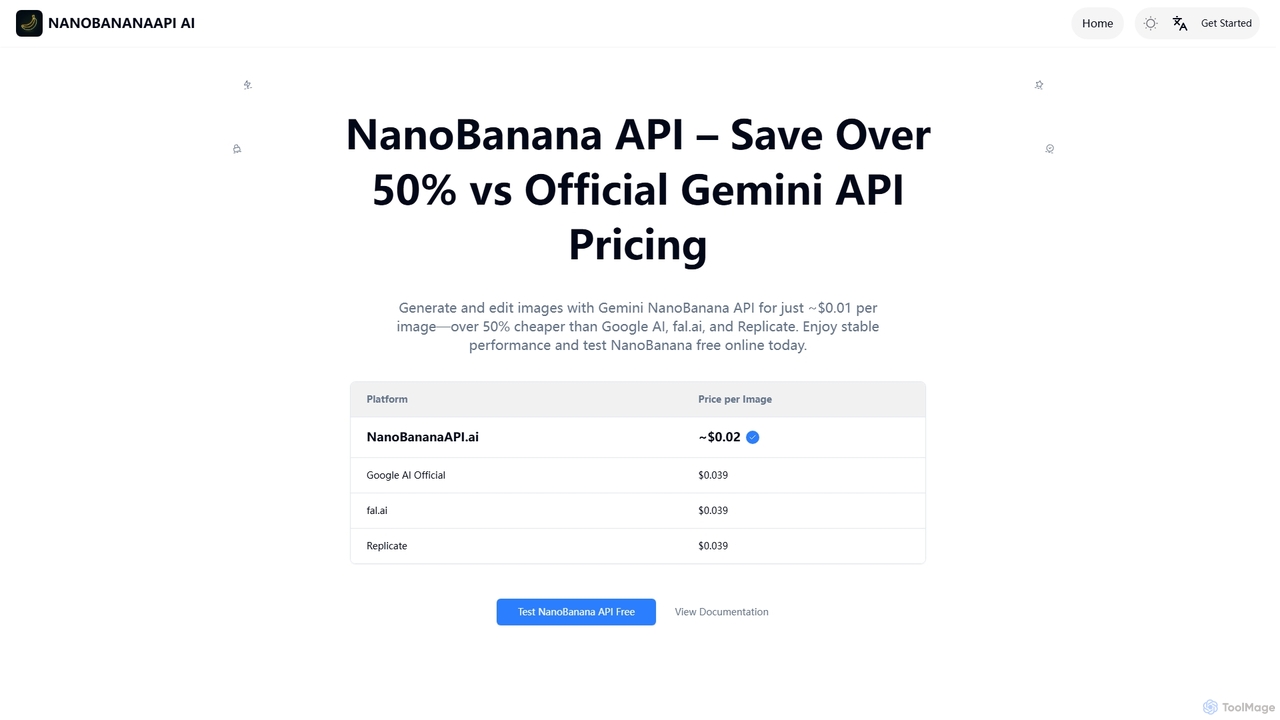
NanoBanana API offers a cost-effective solution for AI image generation and editing, enabling photorealistic outputs, consistent character generation, and complex edits via natural language. It provides over 50% savings compared to official Gemini API pricing, making advanced image manipulation accessible for developers and creators.

Design
Visits 64KFavorites 112Likes 113

About Design

AI Design tools are a category of artificial intelligence applications that automate and enhance various stages of the design process. These tools leverage machine learning algorithms to generate, optimize, and personalize visual content, streamlining workflows for designers and creators. They empower users to produce high-quality graphics, layouts, and visual assets with unprecedented speed and efficiency.

Core Features

  • Automated Content Generation: Create images, illustrations, icons, and patterns from text prompts or basic sketches.
  • Layout and Template Design: Generate diverse design layouts, website mockups, or presentation slides based on content and brand guidelines.
  • Intelligent Image Editing: Perform complex tasks like background removal, object manipulation, and style transfer with AI precision.
  • Brand Guideline Adherence: Ensure visual consistency by automatically applying brand colors, fonts, and logos across designs.
  • Design Optimization & Personalization: Analyze user data to suggest design improvements or create personalized visual experiences.

Use Cases

Graphic designers use these tools to quickly generate design variations; marketing teams create on-brand social media visuals at scale; UI/UX designers rapidly prototype interfaces.

How to Choose

Consider the specific design tasks you need to automate (e.g., image generation vs. layout design), the level of creative control offered, integration with existing design software, and the pricing model. Evaluate the quality of AI-generated output and the ease of customization.

Featured tool rankings

Design use cases

1

Generate Marketing Campaign Visuals

Marketing professionals use AI design tools to quickly produce a wide array of on-brand images, banners, and social media graphics for various campaigns. By inputting text prompts or existing brand assets, they can generate multiple design variations, test different styles, and adapt visuals for diverse platforms, significantly reducing design time and accelerating content deployment.

2

Rapid UI/UX Prototyping

UI/UX designers leverage AI design tools to transform wireframes or textual descriptions into high-fidelity mockups and interactive prototypes. These tools can suggest optimal layouts, color schemes, and component placements based on design principles and user data, enabling faster iteration cycles and more efficient user testing before development begins.

3

Automated Logo and Brand Identity Creation

Startups and small businesses utilize AI logo makers to generate unique and professional brand identities without extensive design expertise. By answering a few questions about their brand, they can receive a variety of logo options, color palettes, and typography suggestions, providing a strong visual foundation for their business.

4

Personalized E-commerce Product Imagery

E-commerce businesses employ AI design tools to create personalized product images for different customer segments or marketing channels. This includes generating lifestyle shots, changing product backgrounds, or adapting image styles to match specific promotions, enhancing visual appeal and potentially increasing conversion rates.

5

Content Creation for Social Media

Social media managers use AI design tools to maintain a consistent and engaging visual presence across platforms. They can quickly generate daily posts, stories, and ad creatives by inputting themes or keywords, ensuring a steady stream of fresh content that aligns with brand aesthetics and audience preferences, saving hours of manual design work.

6

Game Asset and Concept Art Generation

Game developers and concept artists utilize AI design tools to rapidly generate character designs, environmental textures, and prop concepts. By providing descriptive prompts, they can explore numerous visual styles and iterations in minutes, accelerating the ideation phase and providing a rich pool of assets for further refinement by human artists.

Design FAQ

What are AI Design tools?

AI Design tools are software applications that use artificial intelligence, particularly machine learning and deep learning, to assist and automate various aspects of the design process. They can generate visual content, optimize layouts, enhance images, and personalize designs, making creative tasks more efficient and accessible for users of all skill levels.

How do AI Design tools differ from traditional design software?

Traditional design software provides manual control over every element, requiring significant skill and time. AI Design tools, conversely, automate complex tasks, generate content from prompts, and offer intelligent suggestions, significantly speeding up workflows and enabling non-designers to create professional visuals. While traditional tools offer ultimate control, AI tools excel in speed, automation, and accessibility.

What are the main benefits of using AI Design tools?

The primary benefits include increased efficiency through automation of repetitive tasks, accelerated content creation, enhanced creativity by exploring diverse design options, and improved accessibility for individuals without extensive design training. They also help maintain brand consistency and can personalize designs at scale, leading to more impactful visual communication.

Can AI Design tools replace human designers?

No, AI Design tools are powerful assistants, not replacements for human designers. They excel at automating repetitive tasks, generating initial concepts, and optimizing elements, freeing up designers to focus on higher-level strategic thinking, creative direction, and complex problem-solving. Human creativity, empathy, and understanding of nuanced client needs remain irreplaceable.

What should I consider when choosing an AI Design tool?

When selecting an AI Design tool, consider its specific capabilities (e.g., image generation, layout design, video editing), the quality and style of its output, ease of use, integration with your existing design ecosystem, and pricing structure. Also, evaluate the level of customization offered and whether it aligns with your creative control requirements.