ToolMage
Sign in

Best 1 Browser Automation AI tools for Developer Tools

Popular Browser Automation AI tools in Developer Tools include AI Orbis, helping you work more efficiently.

AI Orbis
Free

AI Orbis

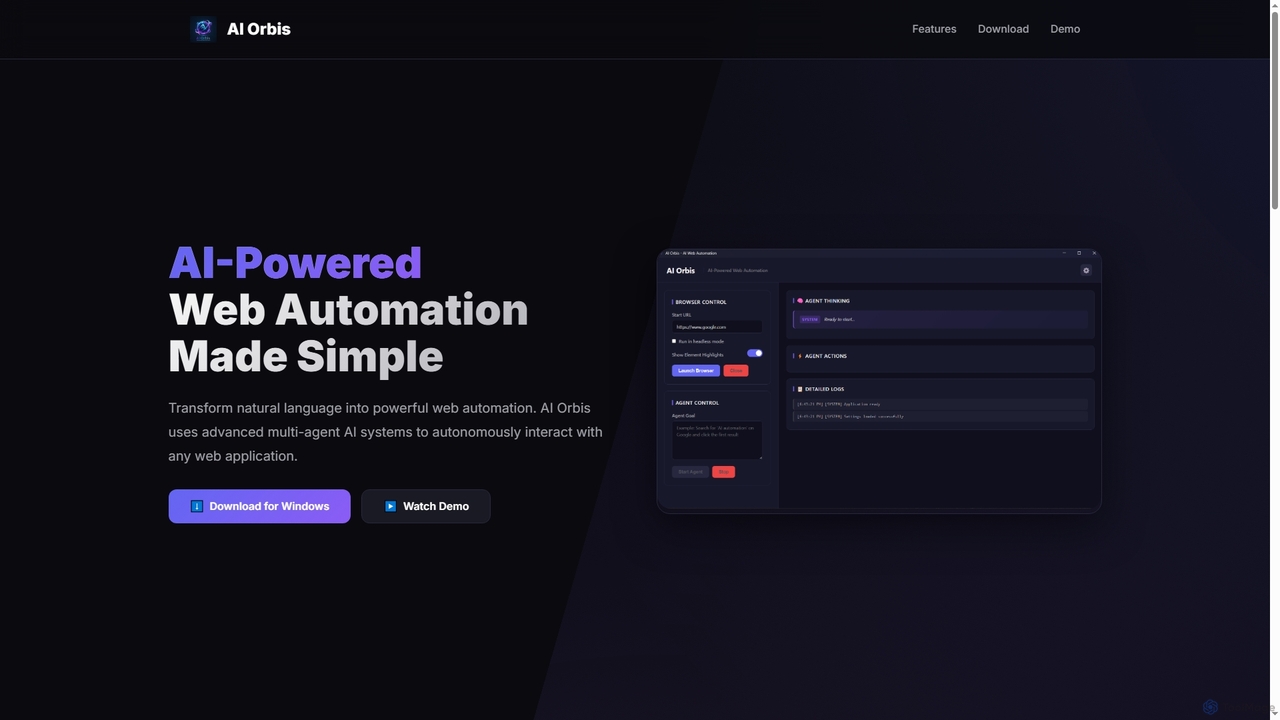
AI Orbis is a free, AI-powered web automation agent that transforms natural language into powerful, autonomous browser actions. It uses advanced multi-agent AI systems to intelligently interact with any web application, simplifying complex online tasks without requiring any coding.

Natural Language Processing
Visits 3.4KFavorites 126Likes 126

About Browser Automation

Browser Automation tools are AI-powered solutions designed to programmatically control web browsers, mimicking human interactions to perform repetitive tasks. These tools leverage advanced scripting and sometimes machine learning to interact with web elements, fill forms, extract data, and navigate websites without manual intervention. As a specialized segment within Developer Tools, they significantly enhance efficiency for web scraping, testing, and data entry, transforming tedious manual processes into streamlined, automated workflows.

Core Features

  • Automated Web Interaction: Simulate clicks, keyboard inputs, form submissions, and navigation across web pages.
  • Data Extraction (Web Scraping): Programmatically collect specific data points from websites, such as product prices, contact information, or news articles.
  • Workflow Orchestration: Define complex sequences of browser actions to execute multi-step processes automatically.
  • Cross-Browser Compatibility: Support automation across various web browsers like Chrome, Firefox, Edge, and Safari.
  • Error Handling & Logging: Implement mechanisms to detect and manage unexpected web page changes or errors during automation, with detailed logs.

Applicable Scenarios

Browser Automation tools are invaluable for developers, data analysts, and marketing professionals. They are used for tasks like monitoring competitor prices on e-commerce sites, automatically generating reports from web dashboards, or performing routine website health checks. These tools excel in environments requiring consistent, high-volume interaction with web interfaces, reducing manual effort and human error.

How to Choose

When selecting a Browser Automation tool, consider its ease of use (code-based vs. no-code/low-code), the range of browsers it supports, its capabilities for handling dynamic web content (JavaScript-heavy sites), and its scalability for large-volume tasks. Evaluate the robustness of its error handling, integration options with other systems, and the community support or documentation available for troubleshooting.

Featured tool rankings

Browser Automation use cases

1

Automated Data Collection for Market Research

Market researchers or business analysts can use browser automation to regularly scrape pricing data, product specifications, and customer reviews from competitor websites. This automates the tedious process of manual data collection, providing up-to-date market intelligence for strategic decision-making and competitive analysis, saving hundreds of hours monthly.

2

Streamlining E-commerce Product Listing Updates

E-commerce managers often need to update product inventory, prices, or descriptions across multiple online platforms. Browser automation tools can log into various vendor portals, navigate to product pages, and automatically update fields based on a central spreadsheet, ensuring consistency and accuracy while drastically reducing manual input errors and time spent.

3

Automated Web Application Testing

Software quality assurance (QA) engineers can leverage browser automation to create and execute automated test suites for web applications. This involves simulating user journeys, filling forms, clicking buttons, and verifying expected outcomes across different browsers and devices, ensuring application stability and functionality before deployment.

4

Personalized Content Aggregation

Content creators or individuals can set up automated scripts to visit specific news sites, blogs, or social media platforms, extract articles or posts based on keywords, and compile them into a personalized daily digest. This saves time spent manually browsing, ensuring they stay informed on relevant topics without information overload.

5

Routine Website Health Monitoring

Web administrators or SEO specialists can deploy browser automation to periodically check for broken links, missing images, or slow-loading pages across a large website. The tool can navigate through key pages, identify issues, and log them, providing proactive insights into website performance and user experience without constant manual checks.

6

Automating Online Form Submissions

Businesses or individuals frequently need to submit repetitive forms online, such as job applications, survey responses, or regulatory filings. Browser automation can pre-fill forms from a data source and submit them automatically, significantly reducing the manual effort and potential for errors associated with high-volume data entry tasks.

Browser Automation FAQ

What are Browser Automation tools?

Browser Automation tools are software solutions that programmatically control web browsers to perform actions like clicking, typing, navigating, and extracting data, mimicking human behavior. They are primarily used to automate repetitive web-based tasks, enhance data collection, and facilitate web application testing, operating without direct human interaction once configured.

How do Browser Automation tools differ from traditional web scraping scripts?

While both can extract data, Browser Automation tools typically control a full browser instance (headless or visible), allowing them to interact with dynamic JavaScript-rendered content and complex user interfaces more effectively. Traditional web scraping scripts often rely on HTTP requests and parsing static HTML, which can be less effective on modern, interactive websites. Automation tools offer a more robust and human-like interaction.

What are the main benefits of using Browser Automation?

The primary benefits include significant time savings by automating repetitive tasks, increased accuracy by eliminating human error in data entry or testing, and enhanced scalability for processing large volumes of web data or performing numerous tests. It also frees up human resources for more complex, strategic work, improving overall operational efficiency.

What should I consider when choosing a Browser Automation tool?

Key considerations include the tool's learning curve (code-based vs. visual builders), its ability to handle complex web interactions (e.g., CAPTCHAs, dynamic content), supported browsers, scalability for your specific needs, and pricing models. Also, evaluate its error handling capabilities, integration options with other software, and the availability of community support or documentation.

Can Browser Automation tools be used for malicious purposes?

Yes, like any powerful technology, browser automation can be misused for unethical or illegal activities such as credential stuffing, spamming, or violating website terms of service by aggressively scraping data. Ethical use requires respecting website policies, rate limits, and legal regulations. Responsible users focus on legitimate tasks like internal data collection, testing, and process automation.