ToolMage
Sign in

Best 1 Ides AI tools for Developer Tools

Popular Ides AI tools in Developer Tools include Znote, helping you work more efficiently.

Znote
Freemium

Znote

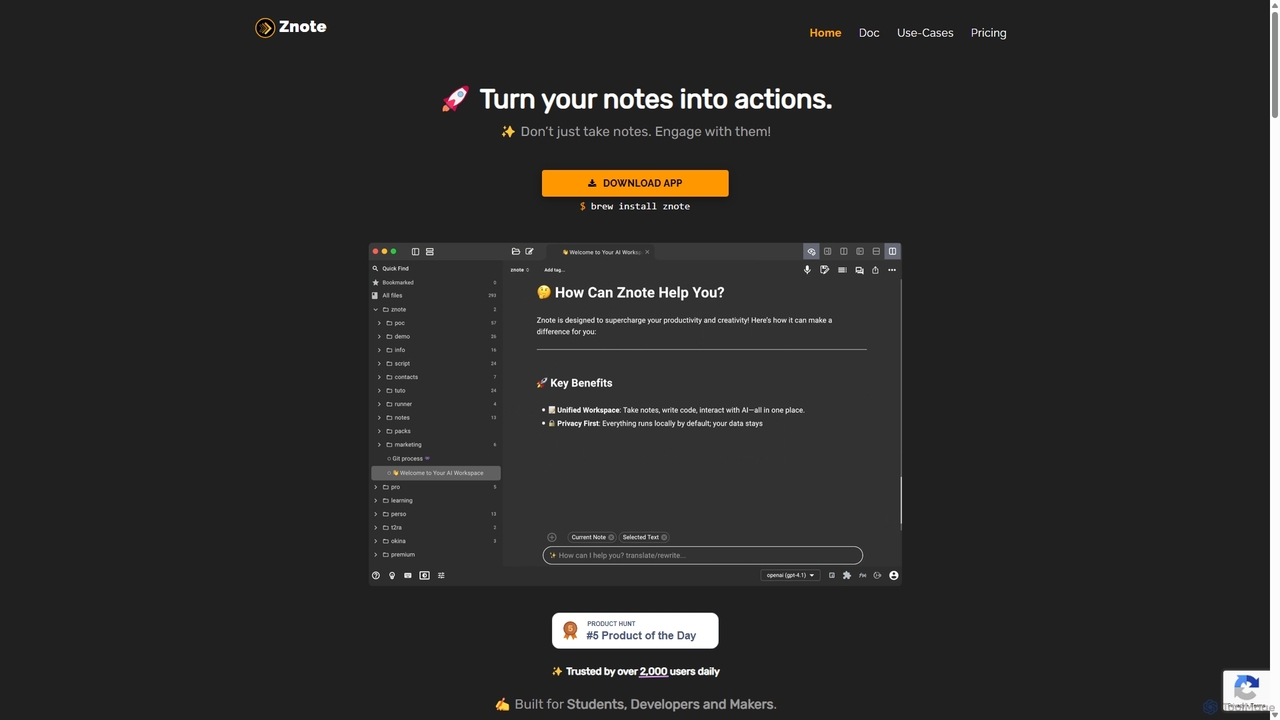
Znote is a powerful note-taking app that turns your notes into interactive, executable documents. It combines a rich Markdown editor with inline code execution (JS, Node.js, Bash), AI assistance, and data integrations, making it a versatile workspace for developers, analysts, and product teams to prototype, document, and automate workflows.

Notebooks
Visits 11.7KFavorites 171Likes 171

About Ides

AI IDEs (Integrated Development Environments) are advanced software development tools enhanced with artificial intelligence. They leverage machine learning models to understand code context, predict developer intent, and automate complex programming tasks. This results in accelerated development cycles, improved code quality, and reduced cognitive load for developers. AI IDEs go beyond traditional syntax highlighting and basic autocompletion by offering capabilities like generating entire code blocks from natural language descriptions.

Core Features

  • AI-Powered Code Completion: Suggests entire functions and code blocks based on the current context, not just single words or methods.
  • Intelligent Debugging & Error Analysis: Automatically identifies potential bugs, suggests fixes, and provides natural language explanations for complex errors.
  • Automated Code Generation: Creates boilerplate code, unit tests, API documentation, and even entire algorithms from simple text prompts.
  • AI-Assisted Code Refactoring: Intelligently analyzes and restructures existing code to improve readability, performance, and maintainability.
  • Natural Language Code Interaction: Allows developers to ask questions about the codebase, get explanations for complex functions, and find relevant code snippets using plain English.

Use Cases

AI IDEs are primarily used by software developers, data scientists, and DevOps engineers across all industries. They are particularly effective in large-scale projects for maintaining code consistency, accelerating the onboarding of new team members, and rapid prototyping of new features. Their ability to automate repetitive tasks makes them valuable for both individual programmers and large enterprise teams.

How to Choose

When selecting an AI IDE or plugin, consider the following: language and framework support to match your tech stack, the depth of its AI features (e.g., generation vs. simple completion), its integration capabilities with your existing workflow (like Git and CI/CD pipelines), and its performance impact on your local machine. Also, evaluate the model's training data and privacy policies, especially for proprietary code.

Ides use cases

1

Accelerate API Development with Code Generation

A backend developer is tasked with creating a new set of RESTful API endpoints for a user management service. Instead of writing each endpoint, data model, and validation logic manually, they use an AI IDE. By providing a natural language prompt like 'Create a POST endpoint for user registration with email, password, and name fields,' the tool generates the complete controller logic, data transfer objects (DTOs), and basic validation rules. This reduces the initial development time by over 60%, allowing the developer to focus on more complex business logic and integration tests.

2

Automate Unit Test Creation for Legacy Code

A software maintenance team is responsible for a large, legacy codebase with low test coverage. Manually writing unit tests for hundreds of existing functions is a daunting task. Using an AI IDE's test generation feature, a developer can simply select a complex function and ask the tool to generate tests. The AI analyzes the function's logic, inputs, and potential edge cases, then produces a comprehensive suite of unit tests using the project's testing framework. This process significantly increases test coverage in a fraction of the time, improving the codebase's stability and making future refactoring safer.

3

Onboard New Developers by Explaining Complex Code

A junior developer joins a team working on a complex financial modeling application. The codebase is vast and contains intricate algorithms they've never seen before. Instead of spending days asking senior developers for explanations, the new hire uses the AI IDE's 'Explain Code' feature. By highlighting a function, they receive a clear, natural language summary of what the code does, its inputs and outputs, and its role within the larger system. This self-service approach empowers them to understand the application architecture faster, reduces interruptions for senior staff, and accelerates their time to first contribution.

4

Refactor Codebase for Improved Performance

A DevOps engineer identifies a performance bottleneck in a critical microservice. The code is functional but inefficient. Using an AI IDE, the engineer highlights the problematic code section and asks for refactoring suggestions focused on performance. The AI analyzes the code and suggests several improvements, such as replacing a nested loop with a more efficient data structure or optimizing database queries. The engineer can review, compare, and apply the suggested changes with a single click. This AI-assisted process transforms a multi-hour optimization task into a matter of minutes, directly improving application response times.

5

Translate a Utility Script to a New Language

A data science team has a collection of useful data processing scripts written in Python, but a new production environment requires them to be in Go for performance reasons. Manually rewriting these scripts would be time-consuming and error-prone. A data scientist uses an AI IDE to perform the translation. They paste the Python code into the editor and ask the AI to convert it to idiomatic Go. The tool handles syntax differences, standard library equivalents, and common patterns, producing a functional Go script. The scientist then only needs to review and test the output, saving days of manual porting effort.

6

Debug Complex Issues with AI-Powered Analysis

A mobile app developer is facing a difficult-to-reproduce crash related to memory management. Traditional debugging methods are proving slow. Using an AI-enhanced debugger, the developer runs the application in a monitored session. When the crash occurs, the AI tool doesn't just provide a stack trace; it analyzes the memory heap, identifies the likely source of the leak, and provides a natural language explanation of the root cause (e.g., 'A circular reference between ObjectA and ObjectB is preventing garbage collection'). It even suggests specific code changes to break the cycle. This transforms debugging from a search for a needle in a haystack to a guided problem-solving process.

Ides FAQ

What are AI IDEs?

AI IDEs (Integrated Development Environments) are advanced programming editors enhanced with artificial intelligence. Unlike traditional IDEs that provide basic features like syntax highlighting and simple code completion, AI IDEs use machine learning models to understand the context of your code. This allows them to offer powerful features such as generating entire functions from natural language, detecting complex bugs before you run the code, and providing intelligent suggestions to refactor and optimize your work. Their primary goal is to augment developer capabilities, accelerate the development lifecycle, and improve overall code quality.

How do AI IDEs differ from traditional IDEs?

The key difference lies in context awareness and automation. Traditional IDEs operate on a syntactic level—they understand the rules of a language. AI IDEs operate on a semantic level—they understand the *intent* behind the code. Here's a breakdown:

  • Code Completion: Traditional IDEs suggest variable or method names. AI IDEs suggest entire blocks of code, completing a whole logical step for you.
  • Error Detection: Traditional IDEs find syntax errors. AI IDEs can find logical errors, potential null pointer exceptions, and security vulnerabilities before the code is even compiled.
  • Code Generation: This is largely absent in traditional IDEs. AI IDEs can generate boilerplate code, unit tests, and even algorithms from a simple text description.
  • Interaction: Interaction with a traditional IDE is through code. With an AI IDE, you can interact using natural language to ask questions or request code modifications.
How do I choose the right AI IDE or plugin?

Choosing the right AI development tool depends on your specific needs and workflow. Consider these factors:

  • Integration vs. Standalone: Do you prefer a plugin for your existing IDE (like VS Code or JetBrains), or a complete, standalone AI-native IDE? Plugins offer familiarity, while standalone IDEs may offer deeper integration of AI features.
  • Language and Framework Support: Ensure the tool is highly proficient in your primary programming languages and frameworks. Some models excel at Python and JavaScript, while others may have better support for languages like Java, C++, or Rust.
  • Feature Set: Are you looking for simple code completion, or do you need advanced features like automated testing, AI-powered debugging, and code refactoring? Evaluate the depth and quality of the features offered.
  • Privacy and Security: If you work with proprietary or sensitive code, carefully review the tool's privacy policy. Determine whether your code is sent to the cloud for processing and how it is stored and used.
Can AI IDEs write perfect code automatically?

No, AI IDEs are powerful assistants, not replacements for developers. While they can generate impressive and often correct code, the output should always be reviewed, tested, and understood by a human developer. The AI may not fully grasp the broader business context, specific edge cases, or long-term architectural goals. It can also occasionally produce code that is subtly incorrect or inefficient. The best approach is to use AI IDEs as a productivity multiplier: let the AI handle the repetitive, boilerplate tasks, while the developer focuses on system design, complex problem-solving, and ensuring the final code meets all quality and business requirements.

Who benefits most from using AI IDEs?

While almost any developer can benefit, certain groups see a particularly high return on investment:

  • Senior Developers & Architects: They can automate routine coding, freeing up time to focus on high-level system design, architecture, and complex problem-solving. AI helps them prototype ideas faster.
  • Junior Developers & Students: AI IDEs act as a learning companion. The 'explain code' feature helps them understand complex codebases, and code suggestions teach them best practices and common patterns.
  • DevOps & SREs: They can use AI to quickly generate scripts for infrastructure automation (like Terraform or Ansible), write complex database queries, and debug production issues more efficiently.
  • Teams Working on Large Codebases: AI tools help maintain consistency, quickly onboard new members, and make large-scale refactoring less risky and time-consuming.