ToolMage
Sign in

Best 1 Llm Clients AI tools for Developer Tools

Popular Llm Clients AI tools in Developer Tools include RecurseChat, helping you work more efficiently.

RecurseChat
Paid

RecurseChat

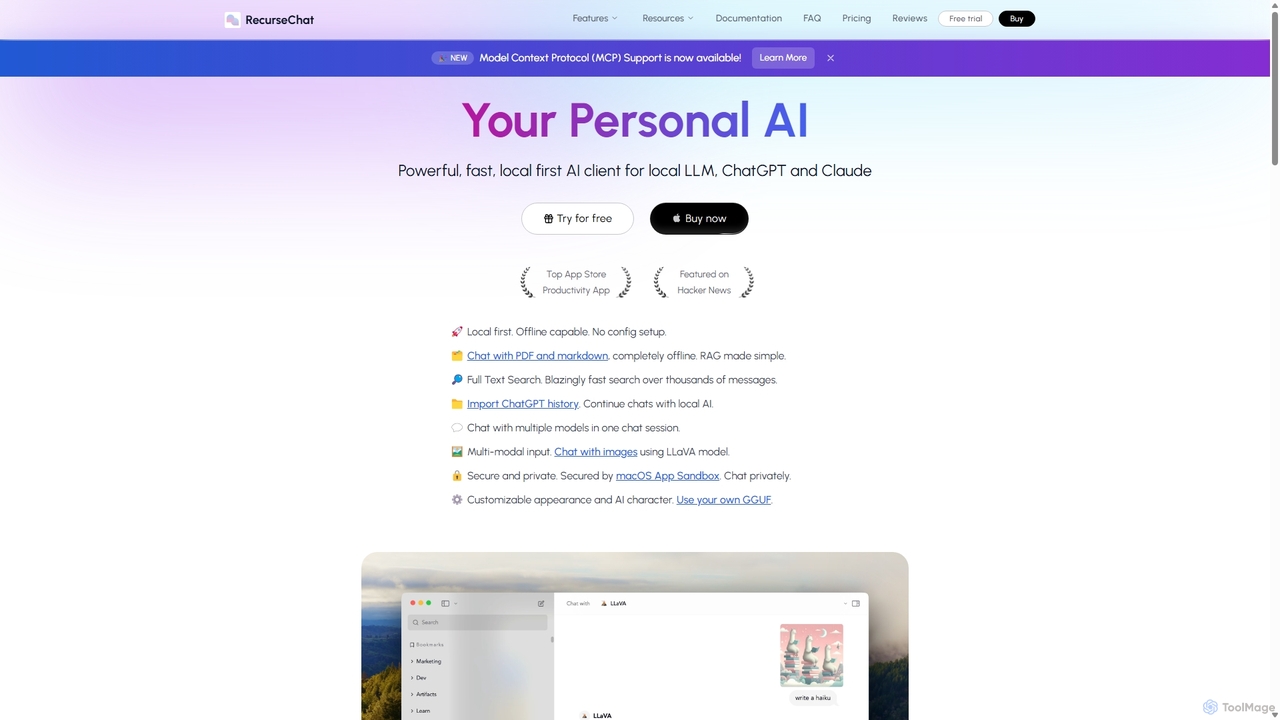
RecurseChat is a powerful, privacy-focused AI client for macOS. It operates local-first, allowing you to chat with local LLMs, ChatGPT, and Claude, even offline. Interact with your PDFs and documents securely on your device using RAG technology. It features multi-modal input, full-text search, and extensive customization without requiring a subscription.

Llm Clients
Visits 7.3KFavorites 135Likes 149

About Llm Clients

LLM Clients are specialized applications that provide a unified graphical interface for interacting with various Large Language Models (LLMs). These tools act as a central hub, abstracting the complexity of API calls and offering advanced features for managing prompts, conversations, and model settings. They are designed for developers, researchers, and power users to efficiently test, compare, and iterate on different LLMs without writing code for each interaction. Unlike direct API usage, LLM Clients enhance productivity with features like conversation history, prompt libraries, and side-by-side model comparisons.

Core Features

  • Multi-Model Support: Connect to and switch between various LLMs from providers like OpenAI, Anthropic, Google, and local models from a single interface.
  • Prompt Management: Create, save, organize, and reuse prompts or prompt templates for consistent and efficient workflows.
  • Conversation History: Store, search, and manage past interactions with different models for easy reference and context continuity.
  • Parameter Control: Visually adjust model parameters such as temperature, top-p, and max tokens to fine-tune AI responses.
  • Local LLM Integration: Support for connecting to locally hosted models (e.g., via Ollama, LM Studio), ensuring data privacy and offline access.

Use Cases

LLM Clients are widely used by developers for rapid prototyping of AI features, by researchers for comparing model behaviors, and by content creators for generating diverse text formats. They are particularly valuable in workflows that require frequent interaction with multiple models or systematic prompt testing, such as prompt engineering and comparative analysis.

How to Choose

When selecting an LLM Client, consider the range of supported models (both cloud and local), platform availability (Windows, macOS, Linux, Web), and the robustness of its prompt management features. Also, evaluate the user interface for workflow efficiency and check its data privacy policies, especially if you plan to use it with sensitive information. For teams, collaboration features may also be a key factor.

Llm Clients use cases

1

Rapid Prototyping for AI Applications

An AI developer needs to choose the best language model for a new chatbot feature. Instead of writing separate integration scripts for each API, they use an LLM client. They send the same test prompt simultaneously to GPT-4, Claude 3, and Llama 3. The client displays the responses side-by-side, allowing the developer to instantly compare response quality, tone, formatting, and latency. This process accelerates the decision-making, reducing development time from hours to minutes and ensuring the optimal model is selected for the user-facing feature.

2

Comparative Content Generation for Marketing

A content marketer is tasked with creating ad copy for a new campaign. Using an LLM client, they create a prompt template with product details and target audience information. They then run this template across three different models known for their creative writing abilities. Within seconds, they have dozens of variations. They can easily review, rate, and select the most compelling options, significantly speeding up the creative brainstorming process and providing a wider range of high-quality copy to A/B test.

3

Academic Research on LLM Behavior

An AI researcher is studying how different models handle logical fallacies in prompts. They use an LLM client to systematically feed a dataset of 100 prompts containing fallacies to five different models, including a locally hosted open-source one. The client's conversation history feature allows them to keep all interactions organized by model and prompt. They can easily export the full logs as structured data (e.g., JSON or CSV) for quantitative analysis in their research software, streamlining the data collection phase of their study.

4

Building a Personal Prompt Library

A prompt engineer uses an LLM client daily to craft and refine prompts for various tasks. They leverage the client's prompt management feature to create a structured library. Prompts for 'code generation' are tagged accordingly, while prompts for 'summarization' are saved in a separate folder. For each prompt, they add notes on which model it performs best with and the optimal temperature setting. This turns the client into a personal knowledge base, allowing them to instantly access and deploy highly effective, pre-tested prompts, boosting their daily productivity.

5

Secure Interaction with Local LLMs

A data scientist at a healthcare company needs to analyze sensitive patient data using an LLM. Due to strict privacy regulations, sending this data to a cloud-based API is not an option. They use an LLM client that supports local models via Ollama. They load a specialized medical LLM onto their local machine and connect to it through the client. This setup allows them to leverage the power of the LLM for data analysis within a secure, air-gapped environment, ensuring full compliance with data privacy standards like HIPAA.

6

Streamlining Technical Documentation Writing

A technical writer is responsible for creating API documentation. They use an LLM client to assist in drafting explanations for complex functions. They maintain separate conversation threads for each API endpoint, allowing them to keep context clear. By feeding code snippets and asking for explanations in plain language, they can generate clear, consistent, and accurate drafts. They then compare outputs from a technical model (like Code Llama) and a general model (like GPT-4) to find the best blend of technical accuracy and readability, improving documentation quality and saving time.

Llm Clients FAQ

What is an LLM Client?

An LLM Client is a desktop or web application that provides a graphical user interface (GUI) for interacting with one or more Large Language Models (LLMs). It acts as a unified dashboard, managing API keys, conversation history, and prompt libraries in one place. This allows users to test, compare, and utilize different AI models without needing to write code or use command-line tools for every interaction.

How is an LLM Client different from a model's web interface like ChatGPT?

The main difference is scope and versatility. A specific model's web interface (like ChatGPT or Claude) is typically limited to its own family of models. An LLM Client is model-agnostic, designed to connect to many different models from various providers (OpenAI, Google, Anthropic) and even locally hosted models, all within one application. They also tend to offer more advanced features for power users, such as prompt libraries, side-by-side model comparison, and finer control over API parameters.

Who should use an LLM Client?

LLM Clients are ideal for individuals and teams who interact with multiple language models frequently. Key users include:

  • Developers: For rapid prototyping and testing different model APIs.
  • Prompt Engineers: For creating, managing, and testing extensive prompt libraries.
  • Researchers: For systematically comparing the outputs and behaviors of various models.
  • Content Creators: For generating diverse content by leveraging the unique strengths of different models.
  • Power Users: Anyone who wants a more efficient and organized workflow than juggling multiple browser tabs.
Do I still need API keys to use an LLM Client?

Yes, for most cloud-based models. The LLM Client is an interface that simplifies making requests to the model providers' servers. You will typically need to obtain your own API keys from services like OpenAI, Anthropic, or Google AI and enter them into the client's settings. The client then uses your keys to authenticate your requests. However, for interacting with locally hosted models (e.g., via Ollama), you generally do not need an API key.

What are the key features to look for in an LLM Client?

When choosing an LLM Client, consider these essential features:

  • Broad Model Support: It should support the cloud-based models you use most, as well as offer integration with local models via tools like Ollama for privacy and offline use.
  • Platform Availability: Ensure it runs on your operating system (Windows, macOS, Linux) or is available as a reliable web application.
  • Prompt Management: Look for robust features to create, save, tag, and search for prompts and prompt templates.
  • Intuitive UI: The interface should allow for easy conversation management, side-by-side comparisons, and clear parameter adjustments.
  • Data Privacy: Check the tool's privacy policy. Native support for local LLMs is a strong indicator of a privacy-focused approach.