
ToolMage
Sign in

Best 1 Speech Recognition AI tools for Developer Tools

Popular Speech Recognition AI tools in Developer Tools include Wavify, helping you work more efficiently.

Wavify
Freemium

Wavify

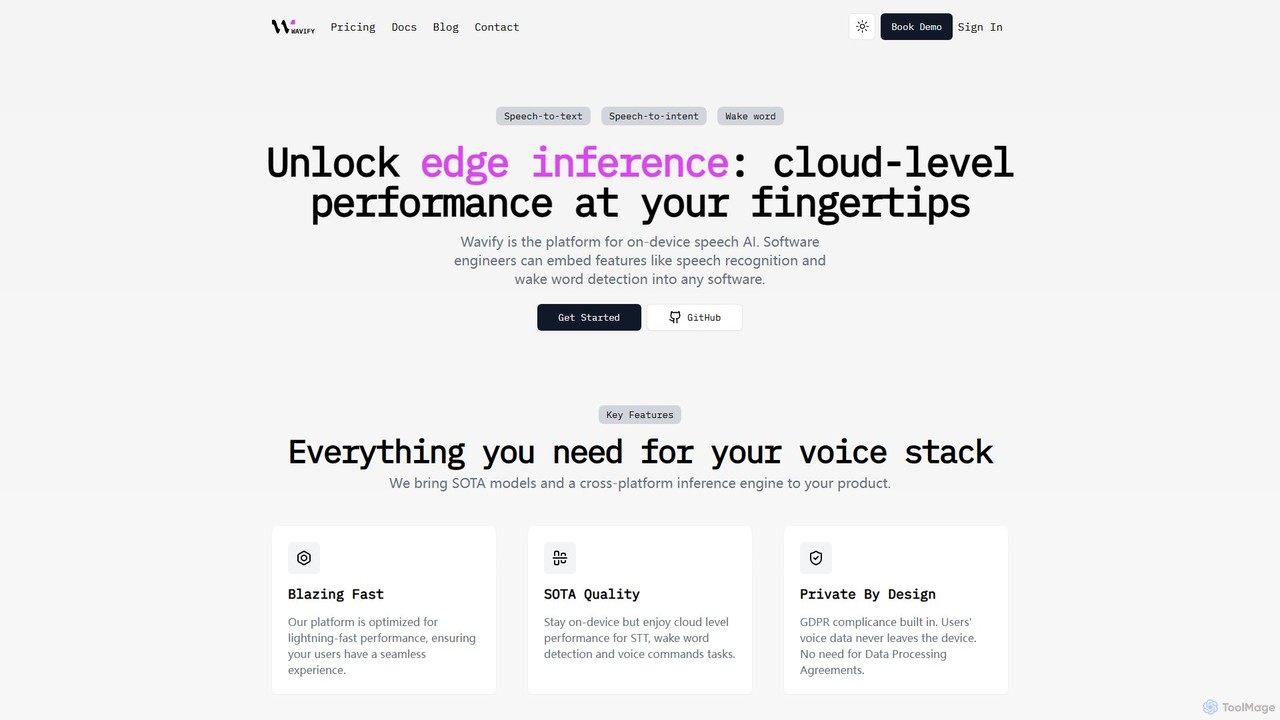
Wavify is a developer-focused platform for on-device speech AI. It provides high-performance, private, and cross-platform SDKs for integrating features like speech-to-text, wake word detection, and speech-to-intent into any application. It ensures cloud-level accuracy while processing all data locally on the user's device, guaranteeing privacy and offline functionality.

Edge Computing
Visits 6.4KFavorites 105Likes 120

About Speech Recognition

Speech Recognition tools are AI-powered systems that convert spoken language into written text. Leveraging advanced deep learning models, these tools accurately transcribe audio inputs from various sources. They serve as a crucial interface, enabling machines to understand and process human voice commands and conversations, significantly enhancing user interaction and data processing in applications.

Core Features

  • Real-time Transcription: Converts spoken audio into text instantly, suitable for live captioning or voice assistants.
  • Batch Audio Processing: Transcribes large volumes of pre-recorded audio files efficiently.
  • Speaker Diarization: Identifies and separates different speakers in a multi-participant audio recording.
  • Language Support: Offers transcription capabilities across a wide range of languages and dialects.
  • Custom Vocabulary: Allows users to add specific terms, names, or jargon to improve accuracy for specialized domains.

Use Cases

Speech Recognition is vital for developers building voice-enabled applications, customer service platforms, and accessibility tools. It's used in creating interactive voice response (IVR) systems, transcribing meeting recordings for documentation, and powering voice search functionalities in mobile apps.

How to Choose

When selecting a Speech Recognition tool, consider transcription accuracy, especially for accents and noisy environments. Evaluate its real-time processing capabilities, supported languages, and options for custom vocabulary. Also, assess API integration ease, scalability, and pricing models based on usage volume.

Speech Recognition use cases

1

Building Voice Assistants and Chatbots

Developers integrate speech recognition APIs into applications to enable voice commands for smart home devices, mobile apps, or virtual assistants. This allows users to interact naturally with technology, for example, by asking a smart speaker to play music or controlling app functions hands-free, enhancing user experience and accessibility.

2

Automating Call Center Transcriptions

Businesses use speech recognition to automatically transcribe customer service calls, enabling sentiment analysis, keyword extraction, and agent performance monitoring. This automation provides valuable insights into customer interactions, helps identify common issues, and supports agent training and quality assurance without manual listening.

3

Generating Meeting Minutes and Summaries

Professionals utilize speech recognition to transcribe live or recorded meetings, creating accurate text summaries and action items. This significantly reduces the time spent on manual note-taking, ensures comprehensive documentation of discussions, and allows participants to focus on the conversation rather than writing, improving productivity.

4

Enhancing Accessibility Features

Software developers embed speech recognition into applications to provide voice typing for users with disabilities, or to generate real-time captions for live video streams. This makes digital content and interfaces more inclusive and accessible, allowing a wider audience to engage with information and services effectively.

5

Powering Voice Search in Applications

E-commerce platforms and content providers implement speech recognition to allow users to search for products or content using their voice. This offers a faster and more intuitive search experience than traditional text input, especially on mobile devices, leading to improved user engagement and conversion rates.

6

Transcribing Media Content for Subtitles

Media companies and content creators employ speech recognition to automatically generate subtitles and captions for videos, podcasts, and broadcasts. This not only improves content discoverability through SEO but also makes the content accessible to a wider audience, including those with hearing impairments or non-native speakers.

Speech Recognition FAQ

What are Speech Recognition tools?

Speech Recognition tools are AI-powered systems that convert spoken words into written text. They are fundamental for enabling machines to understand human speech, offering features like real-time transcription, speaker diarization, and custom vocabulary support. These tools are crucial for voice-controlled interfaces, audio data processing, and enhancing accessibility across various applications.

How do Speech Recognition tools work?

Speech Recognition tools typically work by analyzing audio input, breaking it down into phonemes, and then using acoustic and language models to match these sounds to words and phrases. Deep learning neural networks are often employed to improve accuracy, especially in handling different accents, speaking styles, and background noise, continuously learning from vast datasets.

What is the difference between Speech Recognition and Natural Language Processing (NLP)?

Speech Recognition focuses on converting spoken audio into text. Natural Language Processing (NLP), on the other hand, takes that text (or any text) and processes it to understand its meaning, extract information, or generate responses. Speech Recognition is the "ears" of an AI system, transcribing what is said, while NLP is the "brain" that comprehends the language and its context.

What factors affect the accuracy of Speech Recognition?

Several factors influence accuracy, including audio quality (background noise, microphone quality), speaker's accent and speaking speed, vocabulary complexity, and the specific language model used. Tools with custom vocabulary features can significantly improve accuracy for specialized terms, while robust models are better at handling diverse speaking conditions.

Who benefits most from using Speech Recognition tools?

Developers benefit by integrating voice capabilities into their applications, creating innovative user experiences. Businesses use them for automating customer service, transcribing meetings, and analyzing call data for insights. Individuals with accessibility needs find them invaluable for voice typing and real-time captioning. Content creators also use them for generating subtitles and improving content reach.