ToolMage
Sign in

Best 1 Task Scheduling AI tools for Developer Tools

Popular Task Scheduling AI tools in Developer Tools include cronbuilder, helping you work more efficiently.

cronbuilder
Free

cronbuilder

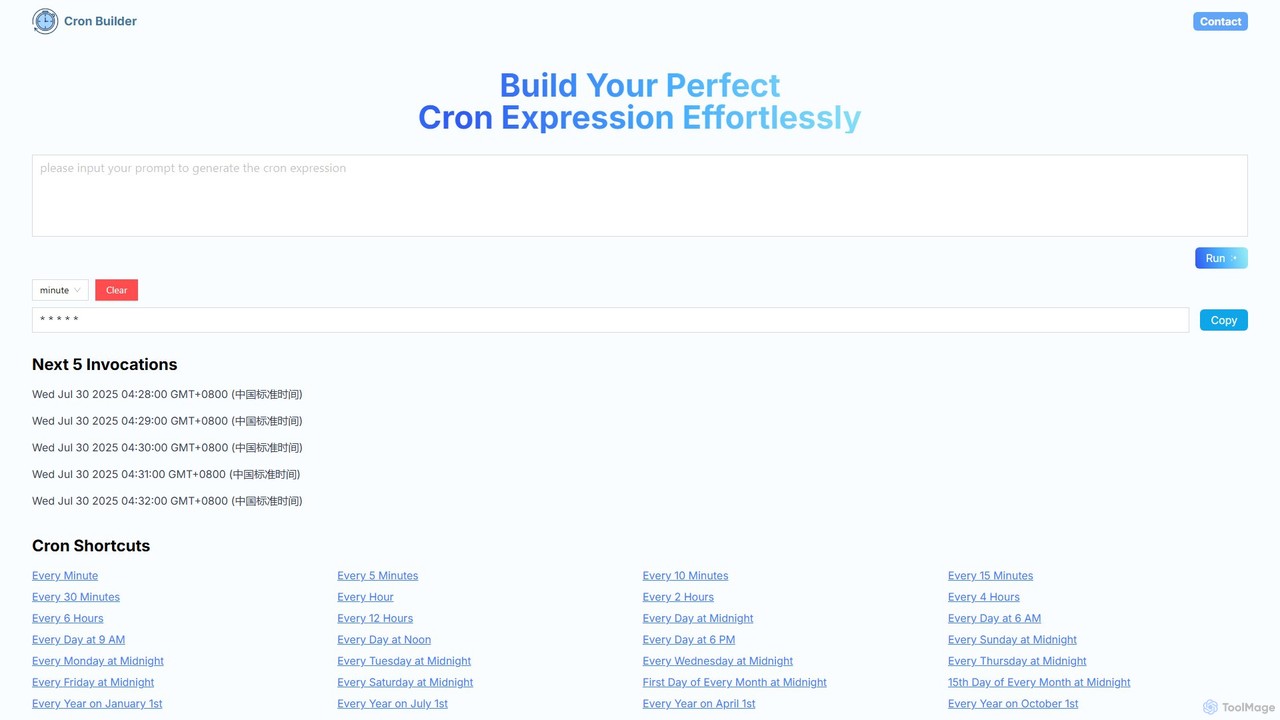
cronbuilder is an AI-powered tool that simplifies the creation of cron expressions. Simply describe your desired schedule in natural language, and the AI will instantly generate the correct cron syntax. It includes real-time validation by showing upcoming execution times and offers a vast library of presets for common tasks, making it ideal for developers, sysadmins, and DevOps engineers.

Task Scheduling
Visits 6.4KFavorites 106Likes 117

About Task Scheduling

Task Scheduling tools are essential developer platforms designed to automate the execution of code, scripts, and processes at specified times or triggered by events. Many modern solutions integrate AI to optimize resource allocation, predict potential failures, and adapt schedules dynamically. These tools are crucial for maintaining operational efficiency, automating data pipelines, and streamlining complex development and MLOps workflows. By intelligently managing task sequences and retries, they significantly reduce manual intervention and potential errors.

Core Features

  • Automated Execution: Automatically run scripts, jobs, or workflows based on time, events, or data changes.
  • Dependency Management: Define and manage complex task dependencies, ensuring tasks run in the correct order.
  • Error Handling & Retries: Implement robust mechanisms for detecting failures, logging errors, and automatically retrying failed tasks.
  • Monitoring & Alerting: Provide real-time visibility into task status, performance, and send notifications on completion or failure.
  • Scalability & Resource Optimization: Dynamically allocate resources and scale execution environments to handle varying workloads efficiently.

Applicable Scenarios

Task scheduling is vital for data engineers automating ETL pipelines, MLOps teams scheduling AI model retraining, and DevOps engineers orchestrating CI/CD workflows. It ensures timely data processing, continuous model improvement, and reliable software delivery across various environments.

How to Choose

When selecting a Task Scheduling tool, consider its integration capabilities with your existing tech stack (e.g., cloud platforms, databases, version control). Evaluate its scalability for handling increasing workloads and concurrent tasks, and the robustness of its monitoring and alerting features. Also, assess the ease of defining and managing workflows, whether through a code-based or GUI-based approach, to match your team's preferences and technical expertise.

Task Scheduling use cases

1

Automating Daily Data ETL Pipelines

Data engineers use task scheduling tools to define and automate complex Extract, Transform, Load (ETL) processes. This ensures that raw data from various sources is regularly cleaned, transformed, and loaded into data warehouses or lakes, providing up-to-date information for business intelligence and analytics. The scheduler manages dependencies between stages, retries failed steps, and alerts the team to any anomalies, guaranteeing data readiness without manual oversight.

2

Scheduling AI Model Retraining & Deployment

MLOps teams leverage task scheduling to automate the periodic retraining of machine learning models with new data. This includes scheduling data ingestion, feature engineering, model training, validation, and subsequent deployment of the updated model to production. The scheduler ensures that models remain accurate and performant over time, automatically handling the entire lifecycle from data refresh to model serving, minimizing downtime and manual intervention.

3

Orchestrating CI/CD Workflows

DevOps engineers utilize task scheduling to orchestrate continuous integration and continuous deployment (CI/CD) pipelines. This involves automating code compilation, running unit and integration tests, building container images, and deploying applications to various environments (staging, production). The scheduler ensures that code changes are validated and deployed efficiently and reliably, accelerating software delivery cycles and reducing human error in complex deployment processes.

4

Automating Cloud Resource Provisioning

Cloud administrators and developers use task scheduling to automate the provisioning and de-provisioning of cloud resources. This can include spinning up virtual machines for batch processing, scaling databases based on load, or shutting down non-essential resources during off-peak hours to optimize costs. The scheduler ensures that infrastructure scales dynamically with demand and adheres to cost-saving policies, improving resource utilization and operational efficiency.

5

Generating Scheduled Business Reports

Business analysts and data scientists employ task scheduling to automate the generation and distribution of daily, weekly, or monthly business reports. This involves scheduling queries against databases, processing data, generating visualizations, and then automatically sending the reports via email or uploading them to a shared drive. The scheduler ensures timely delivery of critical business insights, freeing up analysts from repetitive manual report generation tasks.

6

Managing Distributed System Maintenance Tasks

System administrators and SREs use task scheduling to manage routine maintenance tasks across large, distributed systems. This includes scheduling database backups, log rotation, security patch deployments, and system health checks. The scheduler ensures that these critical operations are performed consistently and reliably across all nodes, minimizing service disruptions and maintaining system integrity without requiring constant manual oversight.

Task Scheduling FAQ

What are Task Scheduling tools?

Task Scheduling tools are software solutions designed to automate the execution of computational tasks, scripts, or workflows at predefined times or in response to specific events. They are crucial for managing complex, interdependent processes in development, data engineering, and MLOps. Key features often include dependency management, robust error handling, and real-time monitoring to ensure reliable and efficient automation of operations.

How do Task Scheduling tools differ from simple cron jobs?

While cron jobs provide basic time-based scheduling on a single machine, Task Scheduling tools offer advanced capabilities for distributed environments. They typically include features like dependency management, retry logic, robust error handling, centralized monitoring, resource allocation, and scalability across multiple servers or cloud instances. This makes them suitable for complex, production-grade workflows that cron cannot effectively manage, especially in modern cloud-native architectures.

What are the key benefits of using AI-powered Task Scheduling?

AI-powered Task Scheduling enhances traditional scheduling by introducing intelligent optimization and predictive capabilities. Benefits include dynamic resource allocation based on predicted load, proactive identification of potential bottlenecks or failures, and adaptive scheduling that adjusts to real-time system conditions. This leads to improved efficiency, reduced operational costs, and higher reliability for complex automated workflows, making systems more resilient and self-optimizing.

Who typically uses Task Scheduling tools?

Task Scheduling tools are primarily used by developers, data engineers, MLOps engineers, DevOps teams, and system administrators. They are essential for anyone needing to automate repetitive or time-sensitive computational tasks, orchestrate complex data pipelines, manage machine learning model lifecycles, or automate infrastructure operations in cloud-native and distributed environments. These roles benefit from increased efficiency, reliability, and reduced manual effort.

What should I consider when choosing a Task Scheduling tool?

When selecting a Task Scheduling tool, consider its integration capabilities with your existing tech stack (e.g., cloud providers, databases, CI/CD tools). Evaluate its scalability for handling future growth, its robustness in error handling and retry mechanisms, and the comprehensiveness of its monitoring and alerting features. Also, assess the ease of defining and managing workflows, whether through a GUI or code-based approach, to match your team's preferences and technical expertise.