ToolMage
Sign in

Best 1 Feature Management AI tools for Development

Popular Feature Management AI tools in Development include Bucket, helping you work more efficiently.

Bucket
Freemium

Bucket

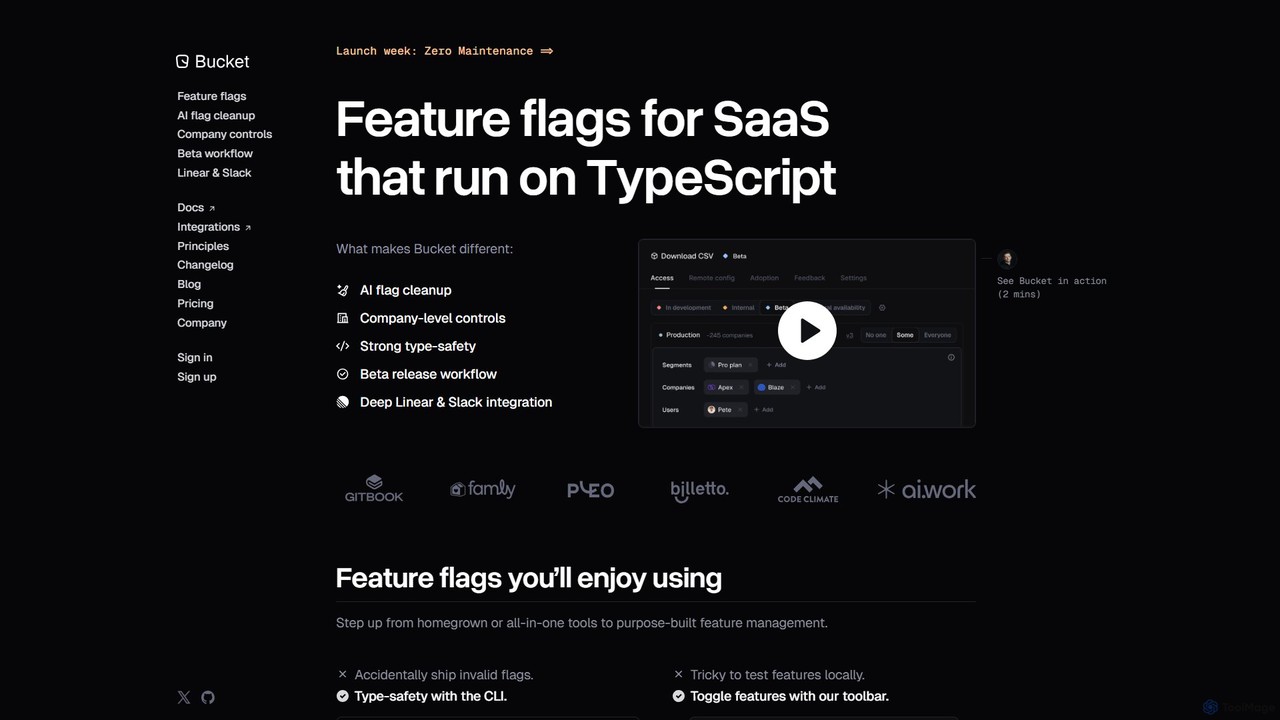
Bucket is an AI-powered feature flagging platform for SaaS companies, built on TypeScript. It streamlines feature management with AI-driven cleanup of stale flags, company-level controls, and deep integrations with developer tools like Linear and Slack. It enables safe testing in production, manages beta releases, and gathers user feedback efficiently, enhancing the developer experience and accelerating the shipping process.

Feature Management
Visits 3.4KFavorites 128Likes 120

About Feature Management

Feature Management tools are a class of intelligent solutions designed to control the lifecycle and delivery of software features. These tools enable developers and product teams to decouple code deployment from feature release, allowing for dynamic control over which features are visible to specific user segments. By leveraging techniques like feature flags and remote configuration, they facilitate safe experimentation, phased rollouts, and instant kill switches, significantly reducing deployment risks and accelerating product iteration.

Core Features

  • Feature Flags/Toggles: Dynamically enable or disable features for specific users or groups without redeploying code.
  • A/B Testing & Experimentation: Run controlled experiments to compare different feature versions and gather data-driven insights.
  • Phased Rollouts: Gradually release new features to a small percentage of users before a full launch.
  • Kill Switches: Instantly turn off problematic features in production to prevent widespread issues.
  • User Segmentation: Target features to specific user demographics, subscription tiers, or behavioral groups.

Applicable Scenarios

Feature Management is essential for agile development teams, product managers, and DevOps engineers aiming for continuous delivery and rapid iteration. It's used in scenarios requiring controlled feature releases, personalized user experiences, and data-driven product decisions across web, mobile, and backend applications.

How to Choose

When selecting a Feature Management tool, consider its integration capabilities with your existing CI/CD pipelines and development stack. Evaluate its support for advanced user segmentation, A/B testing, and analytics. Look for robust security features, scalability, and an intuitive interface that simplifies feature flag management and experimentation setup.

Featured tool rankings

Feature Management use cases

1

Gradual Feature Rollout for New Functionality

A product team wants to launch a major new feature but minimize risk. Using a Feature Management tool, they deploy the code to production but initially enable the feature only for internal employees. After successful internal testing, they gradually roll it out to 5% of beta users, then 20%, and finally to all users, monitoring performance and feedback at each stage. This controlled release prevents widespread issues and allows for quick adjustments.

2

A/B Testing UI/UX Variations

An e-commerce company wants to optimize its checkout flow. They use Feature Management to create two different versions of the checkout button (e.g., color, text) and expose them to different user segments. The tool tracks conversion rates for each variation, allowing the product team to identify which design performs better based on real user data, leading to improved user experience and sales.

3

Emergency Kill Switch for Critical Bugs

During a peak traffic period, a critical bug is discovered in a newly released payment gateway integration. Instead of rushing a hotfix or rolling back the entire deployment, the operations team uses the Feature Management tool's kill switch to instantly disable the problematic payment option. This prevents further customer impact while developers work on a permanent solution, maintaining system stability.

4

Personalizing User Experiences by Subscription Tier

A SaaS platform offers different features based on subscription plans (Free, Pro, Enterprise). With Feature Management, the platform can dynamically enable or disable specific functionalities for users based on their current subscription tier. This ensures that users only see and access features relevant to their plan, simplifying the user interface and facilitating upsell opportunities without code changes for each tier.

5

Decoupling Deployment from Release in CI/CD

A DevOps team practices continuous integration and continuous delivery (CI/CD). They use Feature Management to deploy new code to production multiple times a day, even if features are not yet ready for release. Feature flags keep these features hidden until product managers decide to activate them. This allows developers to merge code frequently, reducing integration issues and enabling faster, more flexible release cycles.

6

Targeted Beta Testing for Specific User Segments

A mobile app developer wants to gather feedback on an experimental feature from a specific group of power users or users in a particular region. Feature Management tools allow them to target this new feature only to those predefined user segments. This ensures that feedback is collected from the most relevant audience, enabling focused iteration and preventing the feature from impacting the general user base prematurely.

Feature Management FAQ

What is Feature Management?

Feature Management is a software development practice and a set of tools that allow teams to control the visibility and behavior of features in an application without deploying new code. It primarily uses feature flags (or feature toggles) to dynamically enable, disable, or modify features for different users or environments, facilitating controlled releases, A/B testing, and personalized experiences.

How does Feature Management differ from traditional software release cycles?

Traditional release cycles often couple code deployment with feature release, meaning a new feature is live as soon as its code is deployed. Feature Management decouples these. Code can be deployed continuously, but features remain hidden behind flags until activated. This allows for faster, less risky deployments, instant rollbacks of problematic features, and more flexible release strategies like phased rollouts and A/B tests, which are difficult with traditional methods.

What are the main benefits of using Feature Management tools?

The main benefits include reduced deployment risk by enabling gradual rollouts and instant kill switches for problematic features. It accelerates product iteration through safe experimentation and A/B testing, allowing data-driven decisions. Feature Management also enhances user experience by enabling personalized features and targeted releases, and it streamlines development workflows by decoupling code deployment from feature activation.

What are feature flags and how are they used in Feature Management?

Feature flags (also known as feature toggles) are conditional statements in code that allow developers to turn specific features on or off without changing the underlying code or redeploying the application. In Feature Management, these flags are managed centrally through a dashboard, enabling product managers to control feature visibility for different user segments, conduct experiments, or perform emergency shutdowns, all in real-time.

How does Feature Management integrate with CI/CD and DevOps practices?

Feature Management is a cornerstone of modern CI/CD (Continuous Integration/Continuous Delivery) and DevOps. It allows teams to continuously integrate and deploy code to production, even if features are incomplete or not ready for public release. Feature flags keep these features dark until activated, enabling "trunk-based development" and reducing merge conflicts. This integration facilitates faster, more frequent, and less risky deployments, aligning perfectly with the principles of continuous delivery and operational excellence.