ToolMage
Sign in

Best 4 Virtual Try On AI tools for E Commerce

Popular Virtual Try On AI tools in E Commerce include dressmycrib, Genlook, Jeeliz, and TryOnHub.AI, helping you work more efficiently.

Genlook
Freemium

Genlook

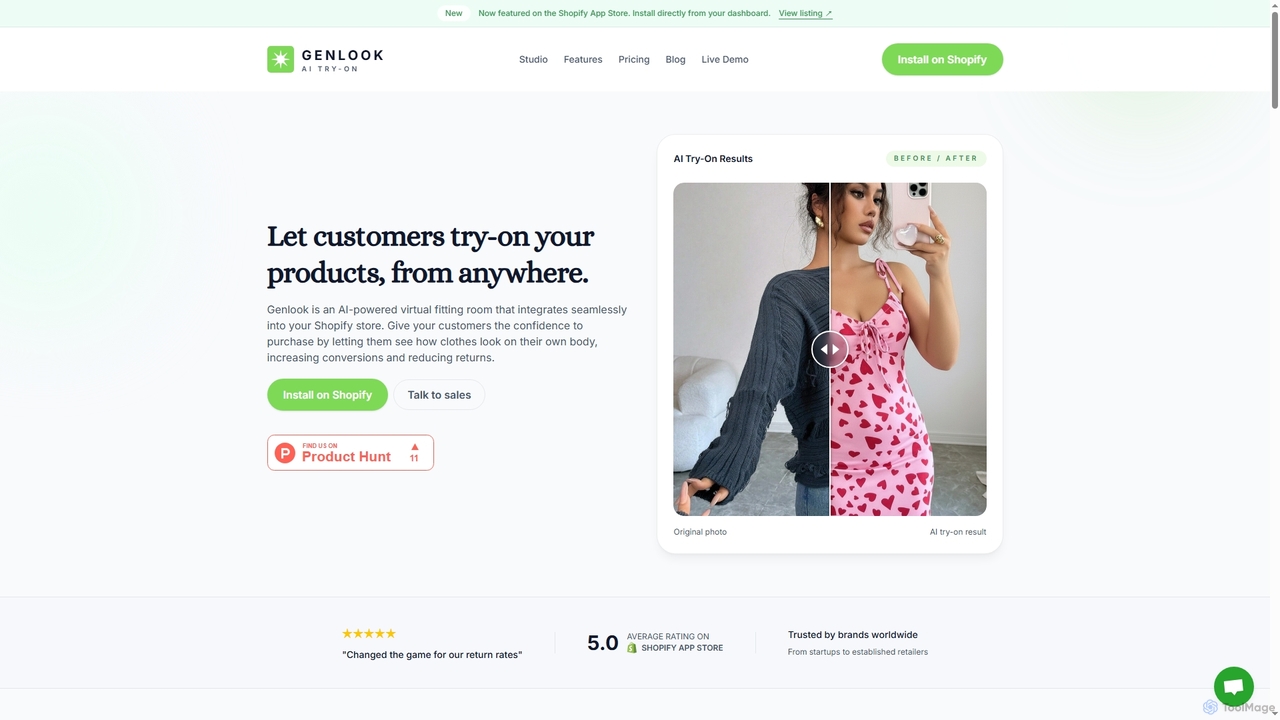
Genlook is an AI-powered virtual try-on solution for Shopify stores. It allows customers to see how clothes look on their own bodies by uploading a photo, which is proven to increase conversions by over 35% and significantly reduce returns.

Virtual Try On
Visits 29.2KFavorites 137Likes 115
dressmycrib
Free

dressmycrib

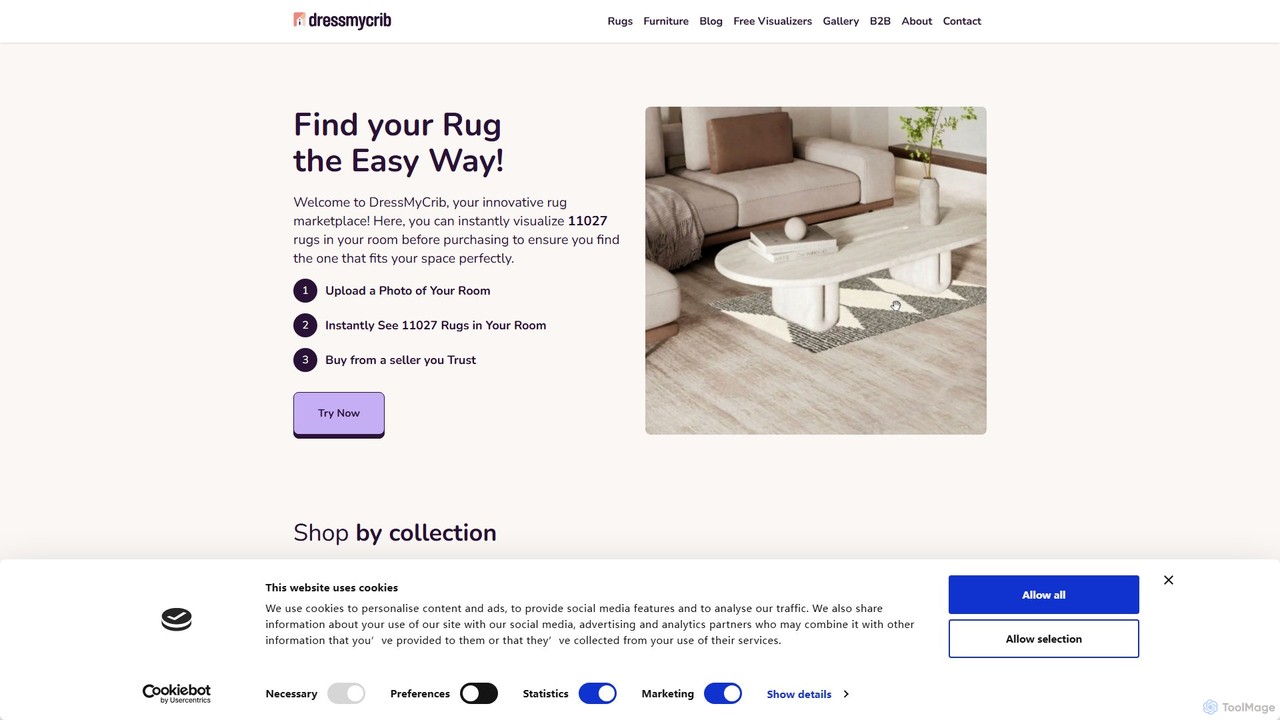
DressMyCrib is an AI-powered interior design tool that specializes in helping you find the perfect rug for your space. Upload a photo of your room and virtually try on hundreds of rugs in real-time, eliminating guesswork and ensuring the perfect match for your home decor.

Interior Design
Visits 71.7KFavorites 139Likes 146
TryOnHub.AI
Freemium

TryOnHub.AI

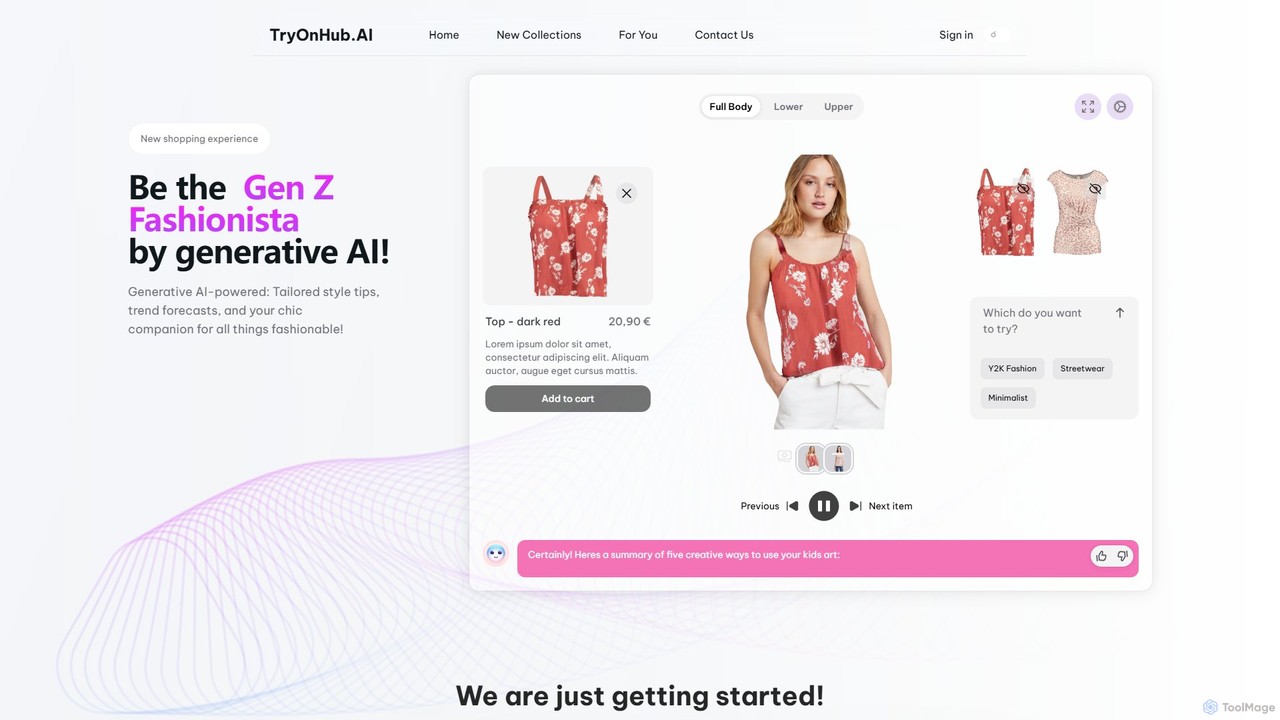
TryOnHub.AI is a generative AI-powered fashion studio that offers a revolutionary virtual try-on experience. Users can upload their photo and a clothing item's image to see how it looks on them instantly. It provides personalized outfit recommendations, style tips, and interactive garment customization, transforming the online shopping journey for both consumers and e-commerce businesses.

Virtual Try On
Visits 5.6KFavorites 138Likes 132
Jeeliz
Paid

Jeeliz

Jeeliz is a generative AI-powered virtual try-on (VTO) solution for eyewear e-commerce. It enables customers to realistically try on glasses via the web on any device. Featuring seamless one-snippet integration, ultra-fast loading, and high-fidelity 3D rendering, it helps brands boost engagement, increase conversions, and reduce returns.

Webar
Visits 6.7KFavorites 129Likes 132

About Virtual Try On

Virtual Try-On tools are a specialized category of e-commerce AI that allows customers to digitally overlay products onto their own image or a live video feed. These tools leverage augmented reality (AR) and computer vision to accurately map items like clothing, glasses, or makeup onto a user's body or face. This creates an interactive and personalized shopping experience, helping customers make more confident purchasing decisions and significantly reducing return rates. The technology bridges the gap between online browsing and the in-store fitting room experience.

Core Features

  • Real-time AR Overlay: Uses a device's camera to superimpose products onto the user's live video feed for a dynamic try-on session.
  • Photo-Based Try-On: Allows users to upload a static photo and see how different products look on them.
  • AI Size & Fit Recommendation: Analyzes user-provided measurements or body scans from a photo to suggest the most appropriate product size.
  • 3D Product Visualization: Renders high-fidelity 3D models of products, allowing users to view them from multiple angles as if they were wearing them.
  • Appearance Customization: Enables users to instantly change product colors, patterns, or styles during the virtual try-on.

Use Cases

Virtual Try-On tools are primarily adopted by the e-commerce sector, especially in industries like fashion apparel, eyewear, cosmetics, and jewelry. Online retailers and direct-to-consumer brands use this technology to enhance their product pages, increase user engagement, and provide a 'try before you buy' experience. It is also valuable for marketing campaigns, allowing for interactive social media filters and ads.

How to Choose

When selecting a Virtual Try-On tool, first consider its compatibility with your product type (e.g., clothing requires body tracking, makeup needs facial mapping). Evaluate the ease of integration with your e-commerce platform, such as Shopify, Magento, or WooCommerce. Assess the realism and accuracy of the AR rendering, as a poor experience can deter customers. Finally, review the pricing model and the level of technical support provided.

Virtual Try On use cases

1

Virtual Eyewear Fitting for Online Stores

An online eyewear retailer wants to reduce returns and help customers choose frames confidently. Using a Virtual Try-On tool, they integrate a real-time AR feature into their product pages. A customer visiting the site can click a 'Try On' button, which activates their device's camera. The tool then accurately overlays different eyeglass frames onto their face. The customer can turn their head to see the frames from various angles, check the fit on their nose bridge, and even take a snapshot to share with friends. This interactive experience mimics the in-store process, leading to higher purchase confidence and a 30% reduction in returns related to style and fit.

2

AR Makeup Testing for Beauty Brands

A cosmetics company launches a new line of lipsticks and wants to drive online sales. They implement a Virtual Try-On solution on their website and mobile app. Potential buyers can use their phone's front-facing camera to see how different lipstick shades look on them in real-time. The AI accurately detects their lip shape and applies the color with realistic texture and finish (matte, gloss, etc.). Users can switch between dozens of shades in seconds without any mess. This not only increases engagement but also boosts conversion rates, as customers can find their perfect shade from the comfort of their home, overcoming a major barrier to buying makeup online.

3

AI Sizing Recommendations for Fashion E-commerce

A direct-to-consumer apparel brand struggles with high return rates due to sizing issues. They integrate a Virtual Try-On tool that focuses on fit. Customers are prompted to upload a full-body photo and enter their height. The AI analyzes the photo to estimate key body measurements and compares them to the garment's specifications. It then displays the clothing on a personalized 3D avatar and recommends the optimal size (e.g., 'Size M is recommended for a slim fit'). This process gives customers a clear visual of how the item will fit their specific body shape, drastically reducing size-related uncertainty and lowering return rates by over 25%.

4

Virtual Try-On for Jewelry and Watches

A luxury watch brand aims to replicate its high-touch in-store experience online. They use a Virtual Try-On tool that leverages AR wrist-tracking technology. A customer can point their phone's camera at their wrist, and the tool overlays a photorealistic 3D model of a watch onto it. The watch stays anchored to the wrist as the user moves, allowing them to see how it looks from all angles and assess its size relative to their arm. This provides a tangible sense of the product's scale and style, which is crucial for high-value items, helping to bridge the confidence gap and encourage online purchases of luxury goods.

5

Placing Virtual Furniture in a Room with AR

An online furniture store uses a Virtual Try-On application to help customers visualize products in their own space. A user interested in a new sofa can select the product on the website and activate the AR view. Using their smartphone's camera, they can place a true-to-scale 3D model of the sofa in their living room. They can walk around it, check if it fits in the intended space, and see how its color and texture complement their existing decor. This 'try before you buy' for large items removes major purchasing friction, increases conversion rates, and reduces costly returns of bulky furniture.

6

Interactive Sneaker Customization and Try-On

A footwear brand offers customizable sneakers and wants to provide a dynamic preview experience. They deploy a web-based tool that combines a 3D configurator with a Virtual Try-On feature. First, a customer designs their unique sneaker by choosing colors for the laces, sole, and upper panels. Once satisfied, they can click the 'AR Try-On' button. The tool uses their phone's camera to detect their feet and overlays the custom-designed sneaker. This allows them to see their own creation on their feet before committing to the purchase, increasing engagement and the perceived value of the customized product.

Virtual Try On FAQ

What is Virtual Try-On technology?

Virtual Try-On (VTO) technology is a type of augmented reality (AR) and artificial intelligence (AI) solution used primarily in e-commerce. It allows online shoppers to visualize how products like clothing, eyewear, makeup, or accessories will look on them before making a purchase. This is achieved by overlaying a digital, 3D model of the product onto the user's live image from a camera or a static photo they upload. The core purpose is to replicate the in-store fitting room experience online, thereby increasing buyer confidence, boosting conversion rates, and reducing product returns.

How to choose the right Virtual Try-On tool for an e-commerce store?

Choosing the right Virtual Try-On tool involves evaluating several key factors:

  • Product Compatibility: Ensure the tool is designed for your specific product category. A solution for makeup requires precise facial feature tracking, while one for apparel needs accurate body measurement and draping simulation.
  • Integration and Platform Support: Check if the tool easily integrates with your e-commerce platform (e.g., Shopify, Magento, BigCommerce) via an app, plugin, or API.
  • Accuracy and Realism: The quality of the AR overlay is crucial. A realistic and accurate try-on experience builds trust, while a poor one can deter customers. Request a demo to assess its performance.
  • User Experience (UX): The tool should be fast, intuitive, and work seamlessly on both desktop and mobile devices, as many shoppers use their phones.
  • Cost and Scalability: Understand the pricing model (e.g., subscription-based, per-use) and ensure it aligns with your budget and can scale as your business grows.
What is the difference between Virtual Try-On and a 3D product viewer?

The key difference lies in personalization and context. A 3D product viewer allows a user to see a 3D model of a product in isolation. They can rotate it, zoom in, and examine details, but it is not shown in relation to them. In contrast, a Virtual Try-On tool uses AR to overlay that 3D product model onto the user's own body, face, or environment. It answers the question, 'How will this look on me?' rather than just 'What does this product look like?'. VTO provides a personalized, contextual experience that is more effective at helping customers make a purchase decision.

What are the main benefits of using Virtual Try-On for an online business?

Implementing Virtual Try-On technology offers several significant benefits for online businesses, especially in retail. The primary advantages include:

  • Increased Conversion Rates: By allowing customers to visualize products on themselves, VTO reduces purchase uncertainty and hesitation, leading to more completed sales.
  • Reduced Return Rates: A major reason for returns is poor fit or style mismatch. VTO helps customers make more accurate choices, which directly lowers the number of returned items and associated costs.
  • Enhanced Customer Engagement: The interactive and novel nature of VTO keeps users on the site longer, creating a more memorable and enjoyable shopping experience.
  • Competitive Advantage: Offering an innovative feature like VTO can differentiate a brand from competitors, positioning it as modern and customer-focused.
Is Virtual Try-On technology difficult or expensive to implement?

The difficulty and cost of implementing Virtual Try-On technology have decreased significantly over time. While building a custom solution from scratch can be complex and expensive, most businesses now use third-party SaaS (Software as a Service) providers. These providers offer solutions that are much easier to integrate, often through simple plugins for popular e-commerce platforms or SDKs (Software Development Kits) for custom websites and apps. Pricing models are typically subscription-based, making the technology accessible to a wide range of businesses, from small boutiques to large enterprises. The main requirements are high-quality 3D models of your products and the subscription fee for the VTO service.