ToolMage
Sign in

Best 1 Technical Documentation AI tools for Education

Popular Technical Documentation AI tools in Education include Chat with MUI, helping you work more efficiently.

Chat with MUI
Free

Chat with MUI

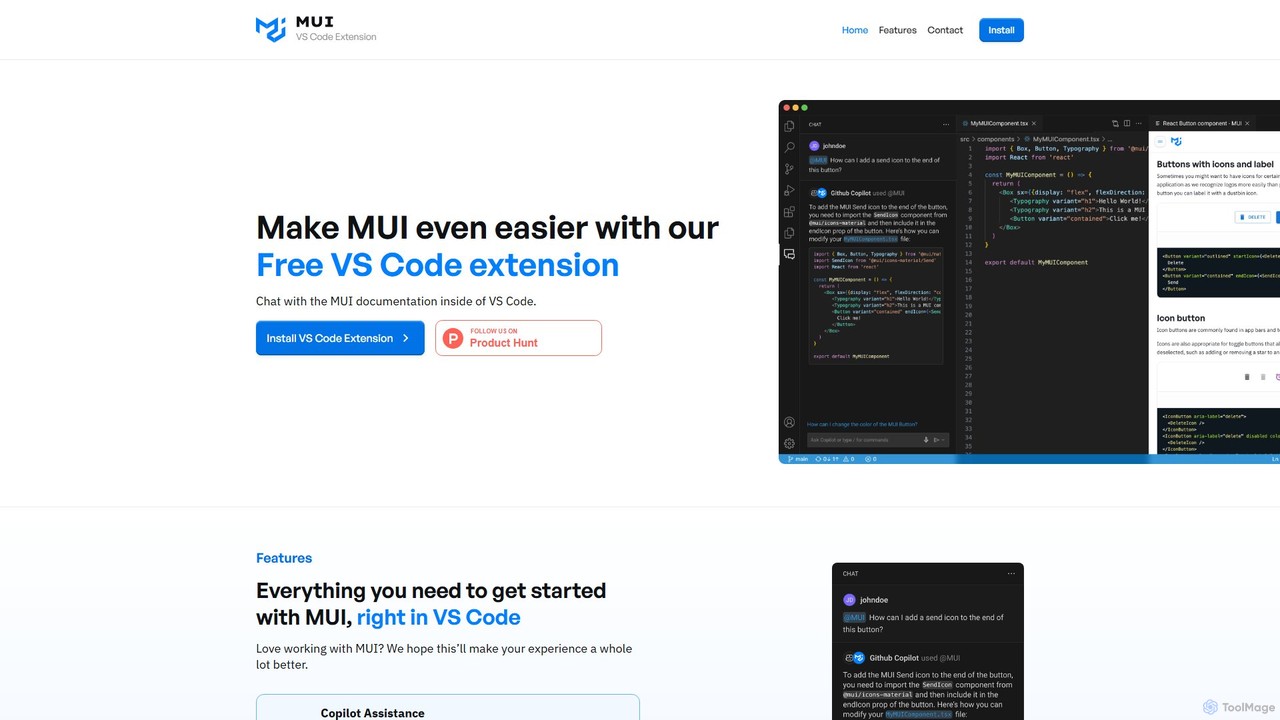
A free VS Code extension that allows developers to chat with the official MUI documentation directly within their editor. It integrates with GitHub Copilot to provide instant, AI-powered answers, streamlining the development workflow for React and MUI users.

Code Assistant
Visits 3.6KFavorites 131Likes 126

About Technical Documentation

AI Technical Documentation tools are specialized applications that automate the creation, management, and updating of software guides, API references, and user manuals. These tools leverage Natural Language Processing (NLP) and code analysis to transform complex source code, specifications, and comments into clear, structured, and human-readable content. Their primary value lies in significantly reducing the manual effort required for documentation, ensuring accuracy by syncing with code repositories, and accelerating developer onboarding and product adoption. As a key component of the educational ecosystem for software, they bridge the gap between complex technology and user understanding.

Core Features

  • Automated Content Generation: Creates documentation drafts, code explanations, and summaries directly from source code or API specification files like OpenAPI.
  • Version Synchronization: Integrates with version control systems (e.g., Git) to automatically update documentation when the corresponding code changes.
  • Interactive API Reference: Generates interactive portals where developers can test API endpoints directly from the documentation.
  • Consistency and Style Enforcement: Analyzes content to ensure consistent terminology, tone, and formatting across the entire knowledge base.
  • Multi-format Publishing: Exports documentation into various formats such as HTML websites, PDFs, or Markdown files for different distribution channels.

Applicable Scenarios

These tools are essential for software companies, SaaS providers, and any organization developing APIs or complex products. They are used by technical writers to streamline their workflow, by developers to auto-generate documentation for their code, and by product managers to ensure user guides are always up-to-date. Common applications include building public developer portals, internal engineering knowledge bases, and comprehensive user help centers.

Selection Criteria

When choosing an AI Technical Documentation tool, consider its support for your specific programming languages and frameworks. Evaluate its integration capabilities with your existing toolchain, particularly version control systems like GitHub or GitLab and CI/CD pipelines. Assess the quality and customizability of the output formats, and consider the collaboration features if multiple team members will be contributing to the documentation.

Featured tool rankings

Technical Documentation use cases

1

Automating API Reference Generation

A backend developer at a FinTech startup is tasked with publishing a new REST API for external partners. Instead of manually writing descriptions for hundreds of endpoints and parameters, they use an AI documentation tool. The tool connects to their GitHub repository, parses the OpenAPI specification file, and automatically generates a complete, interactive API reference website. This reduces the documentation time from weeks to a few hours, ensures the reference is always in sync with the code, and provides partners with a professional portal to test API calls immediately.

2

Creating an Internal Engineering Knowledge Base

A DevOps team manages dozens of internal microservices and deployment scripts. To prevent knowledge silos, they use an AI documentation tool to create a centralized knowledge base. The tool scans their private code repositories, extracts comments and function signatures from Python and Go code, and organizes the information into a searchable website. New engineers can now quickly understand the architecture and internal tools without constantly interrupting senior staff. The documentation stays current automatically as the tool syncs with every code commit.

3

Generating User Manuals for a SaaS Product

A technical writer for a SaaS company needs to create a comprehensive user manual for a new product feature. They use an AI tool that can generate step-by-step guides based on high-level outlines. The writer provides a list of tasks, and the AI generates detailed instructional text, including standard phrases and formatting. The tool also helps maintain a consistent tone of voice across all help articles. This allows the writer to focus on creating helpful screenshots and diagrams, increasing their productivity by over 50% and ensuring a faster time-to-market for the documentation.

4

Synchronizing SDK Documentation with Code Releases

A mobile development team maintains SDKs for both iOS (Swift) and Android (Kotlin). Keeping the documentation aligned with frequent updates is a major challenge. They integrate an AI documentation tool into their CI/CD pipeline. Whenever a developer merges a pull request, the tool automatically scans the code changes, updates the relevant documentation sections, and deploys the new version to their developer portal. This ensures that the SDK documentation is never out of date, reducing support tickets from developers using their SDKs and improving the overall developer experience.

5

Translating Technical Guides for Global Markets

A software company is expanding into Japanese and German markets. Their existing English documentation is extensive. Instead of hiring a large team of translators, they use an AI documentation platform with built-in translation features. The AI translates the content while preserving code snippets and formatting. It also maintains a translation memory to ensure technical terms like 'API Key' or 'Authentication' are translated consistently across all documents. This approach reduces translation costs by 70% and allows them to launch localized help centers simultaneously with the product launch in new regions.

6

Improving Onboarding with Interactive Tutorials

A product manager for a complex data analytics platform notices high user drop-off during the initial setup phase. To improve onboarding, they use an AI documentation tool to create interactive tutorials. The tool generates step-by-step walkthroughs that guide new users directly within the product's UI. It can also generate code snippets in multiple languages (Python, R, SQL) that users can copy and run. This hands-on approach helps users achieve their first success moment faster, significantly improving user retention and reducing the burden on the customer support team.

Technical Documentation FAQ

What are AI Technical Documentation tools?

AI Technical Documentation tools are software applications designed to automate and streamline the process of creating and maintaining technical documents. Unlike standard word processors, they use AI, particularly Natural Language Processing (NLP) and code analysis, to generate content directly from source code, API specifications (like OpenAPI), or other structured data. Key features often include automatic synchronization with code repositories, interactive API explorers, and consistency checkers. They are primarily used to produce developer guides, user manuals, and internal knowledge bases with higher accuracy and less manual effort.

How to choose the right AI tool for technical documentation?

Choosing the right tool depends on your specific needs. Consider the following factors:

  • Language & Framework Support: Ensure the tool supports the programming languages (e.g., Python, Java, JavaScript) and frameworks used in your projects.
  • Integration Capabilities: Check for seamless integration with your existing workflow, especially with version control systems like GitHub or GitLab, and CI/CD pipelines.
  • Output Customization: Evaluate how much control you have over the appearance and structure of the final documentation. Can you apply your own branding and templates?
  • Content Sources: Determine if the tool can generate documentation from your required sources, such as code comments, OpenAPI/Swagger files, or Markdown documents.
  • Collaboration Features: If you work in a team, look for features like user roles, review workflows, and comment threads to facilitate collaboration.
What's the difference between AI documentation tools and standard text editors?

The primary difference lies in automation and context-awareness. Standard text editors like Microsoft Word or Google Docs are general-purpose writing tools that require all content to be created manually. AI Technical Documentation tools are specialized platforms that understand the context of software development. They can automatically generate content from code, enforce consistency, integrate with developer tools like Git, and publish interactive websites. While you can write documentation in a text editor, AI tools are designed to manage the entire documentation lifecycle, keeping it accurate and synchronized with the product itself, which is a task text editors cannot perform.

Who benefits most from using AI Technical Documentation tools?

Various roles benefit, but primarily those involved in software development and product education:

  • Technical Writers: They can automate repetitive tasks like formatting and generating basic content, allowing them to focus on creating high-level tutorials, conceptual guides, and improving clarity.
  • Software Developers: They can quickly generate documentation for their APIs and code without leaving their development environment, ensuring documentation is created as part of the coding process, not as an afterthought.
  • Product Managers: They can ensure that user-facing documentation is always accurate and up-to-date with the latest product features, improving user satisfaction and adoption.
  • DevOps Engineers: They can easily document internal systems, scripts, and infrastructure, creating a reliable knowledge base that improves team efficiency and onboarding.
How do these tools ensure the accuracy of generated documentation?

Accuracy is maintained through a 'single source of truth' approach. These tools don't invent information; they extract and structure it from reliable sources. The primary methods include:

  • Direct Code Analysis: They parse the source code itself, including function names, parameters, return types, and inline comments (like Javadoc or docstrings), to generate descriptions.
  • API Specification Files: For APIs, they use formal specifications like OpenAPI (Swagger) or AsyncAPI as the definitive source for endpoints, request/response models, and authentication methods.
  • Version Control Integration: By syncing with Git repositories, they ensure that any changes to the code or API specs are automatically reflected in the documentation, preventing it from becoming outdated. This direct link to the source code is what makes them significantly more reliable than manually maintained documents.