
ToolMage
Sign in

Best 111 Accounting AI tools for Finance

Popular Accounting AI tools in Finance include Intuit, SAP, CoCounsel, Workday, TaxPilot.ai, Nanonets, ANNA Money, LiveFlow, Beam AI, and Pilot, helping you work more efficiently.

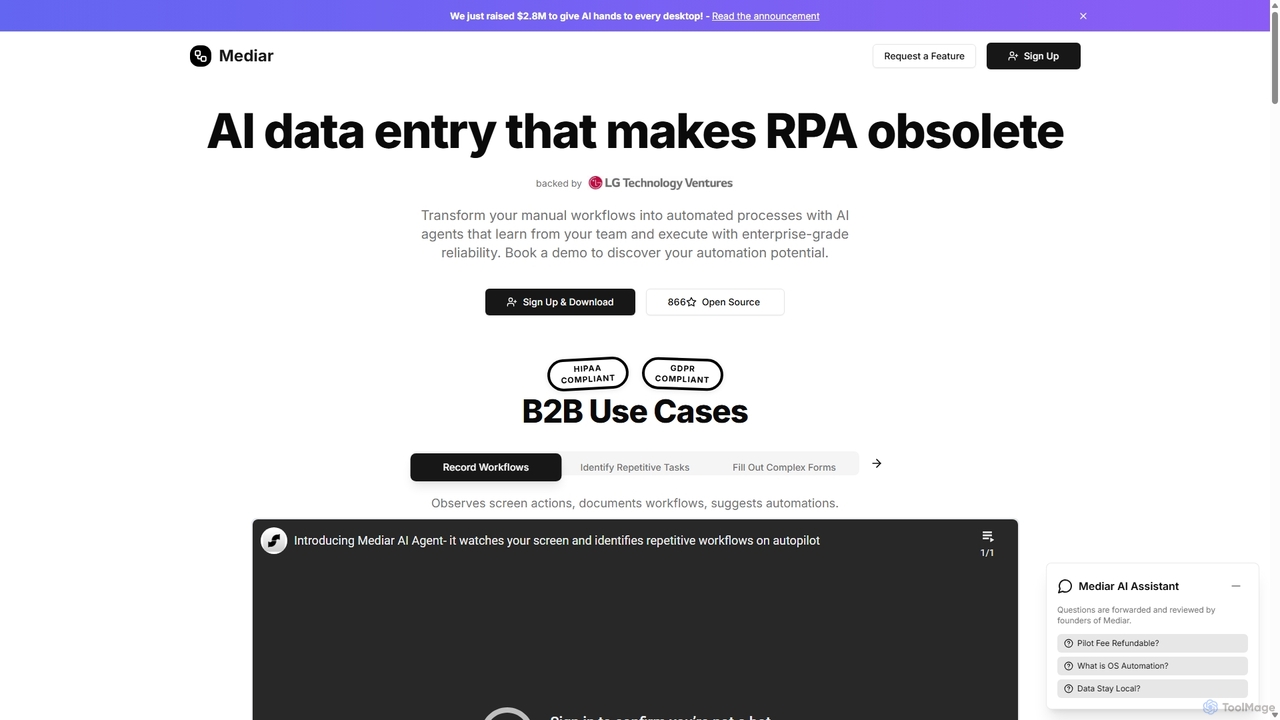
Mediar
Paid

Mediar

Mediar is an AI-native automation platform designed to replace traditional RPA and manual data entry. It employs AI agents that learn directly from your team's screen actions to automate complex, repetitive workflows across any desktop application. Mediar offers enterprise-grade reliability, rapid 24-48 hour deployment, and significant cost savings by turning manual processes into self-healing, intelligent automations.

Data Entry
Visits 9.6KFavorites 163Likes 159

About Accounting

AI Accounting tools are a specialized category of financial software that automates and enhances traditional accounting tasks like bookkeeping, invoicing, and reporting. By leveraging machine learning (ML) and optical character recognition (OCR), these platforms automatically extract and categorize data from receipts, invoices, and bank statements. This automation significantly reduces manual data entry, minimizes human error, and provides businesses with real-time financial insights for better decision-making. Unlike standard accounting software, AI-powered tools can often detect anomalies, forecast cash flow, and streamline compliance processes with greater intelligence.

Core Features

  • Automated Data Entry & Categorization: Automatically captures data from financial documents and intelligently assigns transactions to the correct accounts.
  • Intelligent Invoice & Expense Management: Manages the entire lifecycle of invoices and employee expenses, from creation and approval to payment and reconciliation.
  • Real-time Financial Reporting: Generates dynamic and customizable financial statements, including profit & loss, balance sheets, and cash flow statements.
  • Fraud & Anomaly Detection: Uses ML algorithms to identify unusual spending patterns, duplicate invoices, or potential fraudulent activities.
  • Smart Reconciliation: Automatically matches bank transactions with recorded entries, highlighting discrepancies for quick resolution.

Applicable Scenarios

These tools are widely used by small and medium-sized businesses (SMBs) to manage their day-to-day finances without a dedicated accounting team. Accounting firms and bookkeepers leverage them to serve more clients efficiently by automating routine tasks. Corporate finance departments also use them to streamline their accounts payable (AP) and accounts receivable (AR) workflows, accelerating the monthly closing process.

Selection Criteria

When choosing an AI Accounting tool, consider its integration capabilities with your existing systems, such as banking, payroll, and e-commerce platforms. Evaluate the tool's scalability to ensure it can handle your growing transaction volume. Assess the specificity of its features—does it support multi-currency, project accounting, or industry-specific compliance? Finally, prioritize robust security protocols and data privacy compliance to protect sensitive financial information.

Featured tool rankings

Accounting use cases

1

Automate Invoice Processing for a Small Business

A small business owner is overwhelmed with manually entering data from dozens of supplier invoices each week into their accounting software. This process is time-consuming and prone to errors. By implementing an AI Accounting tool, they can simply forward PDF invoices or upload scans. The tool's OCR technology automatically extracts key information like vendor name, invoice number, date, and line items, then creates a draft bill for approval. This reduces the time spent on data entry by over 90%, eliminates costly mistakes, and ensures vendors are paid on time.

2

Streamline Expense Report Management

A company's finance team spends days each month manually reviewing employee expense reports, cross-checking receipts, and ensuring compliance with company policy. Using an AI Accounting tool, employees can snap photos of receipts with their phones. The AI instantly digitizes the receipt, categorizes the expense, and flags any submissions that are out of policy (e.g., over budget, missing information). This automates the entire workflow, leading to faster reimbursements for employees and freeing up the finance team to focus on more strategic financial analysis.

3

Generate Real-time Cash Flow Forecasts

A startup founder needs a clear, forward-looking view of their company's cash position to manage runway and make informed spending decisions. Manually updating spreadsheets is inefficient and often outdated. An AI Accounting tool connects directly to the company's bank accounts and accounting data. It analyzes historical payment patterns and current receivables/payables to generate dynamic, multi-scenario cash flow projections. This provides an accurate, real-time dashboard for strategic planning, helping to prevent unexpected cash shortages.

4

Enhance Audit Preparedness and Compliance

An accounting firm is preparing a client's financial records for an annual audit. The process involves manually verifying thousands of transactions to ensure accuracy and create a clear audit trail. An AI tool can automate this preparation. It performs continuous reconciliation of accounts, identifies missing documentation or unusual entries that could be audit risks, and organizes all financial data into a structured, audit-ready format. This significantly reduces pre-audit preparation time and increases the auditor's confidence in the financial statements.

5

Automate Bank Reconciliation for E-commerce

An online store owner struggles to reconcile thousands of individual sales from their e-commerce platform (like Shopify) with the lump-sum payouts deposited into their bank account. This manual matching process is a major bottleneck for closing the books each month. An AI Accounting tool with direct e-commerce integration automatically fetches sales data, matches it to bank deposits, and accounts for transaction fees. It turns a complex, multi-day task into a fully automated process, providing an accurate and timely view of profitability.

6

Simplify Tax Preparation for Freelancers

A freelance consultant needs to track business expenses throughout the year to prepare for quarterly estimated tax payments and their annual tax filing. Manually sorting personal and business transactions is tedious. By connecting their bank accounts to an AI Accounting tool, the system automatically identifies and categorizes business-related expenses, such as software subscriptions, travel, and office supplies. It generates reports that clearly show deductible expenses, simplifying the tax preparation process and helping to maximize potential tax savings.

Accounting FAQ

What are AI Accounting tools?

AI Accounting tools are software applications that use artificial intelligence, primarily machine learning, to automate and streamline financial record-keeping tasks. They go beyond simple data storage by actively interpreting financial data. Key features include automatic data extraction from invoices, intelligent categorization of transactions, and automated bank reconciliation. They are designed to reduce manual labor, minimize human error, and provide real-time financial insights for businesses and accountants.

How do I choose the right AI Accounting tool?

Choosing the right tool depends on your specific needs. Consider these four key factors:

  • Business Scale: A freelancer's needs differ from a growing business. Select a tool that matches your transaction volume and complexity.
  • Integrations: Ensure the tool connects seamlessly with your bank, payroll system, e-commerce platform, and other essential software.
  • Core Features: Identify your primary pain point. Do you need robust invoicing, expense management, project accounting, or multi-currency support?
  • Security: Since you are handling sensitive financial data, verify that the provider has strong encryption and data protection policies.

What is the difference between AI and traditional accounting software?

The primary difference is the level of automation and intelligence. Traditional accounting software often acts as a digital ledger, requiring significant manual data entry and rule-based categorization. AI Accounting software automates these processes. For example, instead of you creating a rule for a vendor, an AI tool learns to categorize transactions from that vendor based on past behavior. AI tools also offer predictive capabilities, like cash flow forecasting and anomaly detection, which are typically absent in traditional systems.

What are the main benefits of using AI in accounting?

The main benefits of integrating AI into accounting workflows are significantly improved efficiency and accuracy. By automating repetitive tasks like data entry and reconciliation, AI frees up valuable time for financial professionals to focus on strategic analysis. It reduces the risk of human error, leading to more reliable financial statements. Furthermore, AI provides real-time data processing, offering up-to-date insights for better decision-making and enhanced fraud detection capabilities by identifying unusual patterns that a human might miss.

Who can benefit from using AI Accounting tools?

A wide range of users can benefit from AI Accounting tools. Small business owners can manage their finances with greater ease and accuracy, even without a deep accounting background. Accountants and bookkeeping firms can automate client work, allowing them to handle a larger client base and offer more advisory services. Corporate finance departments can accelerate their monthly closing procedures and improve internal controls. Finally, freelancers and self-employed individuals can simplify their expense tracking and tax preparation.