ToolMage
Sign in

Best 1 3D Graphics AI tools for Image

Popular 3D Graphics AI tools in Image include Items.Design, helping you work more efficiently.

Items.Design
Freemium

Items.Design

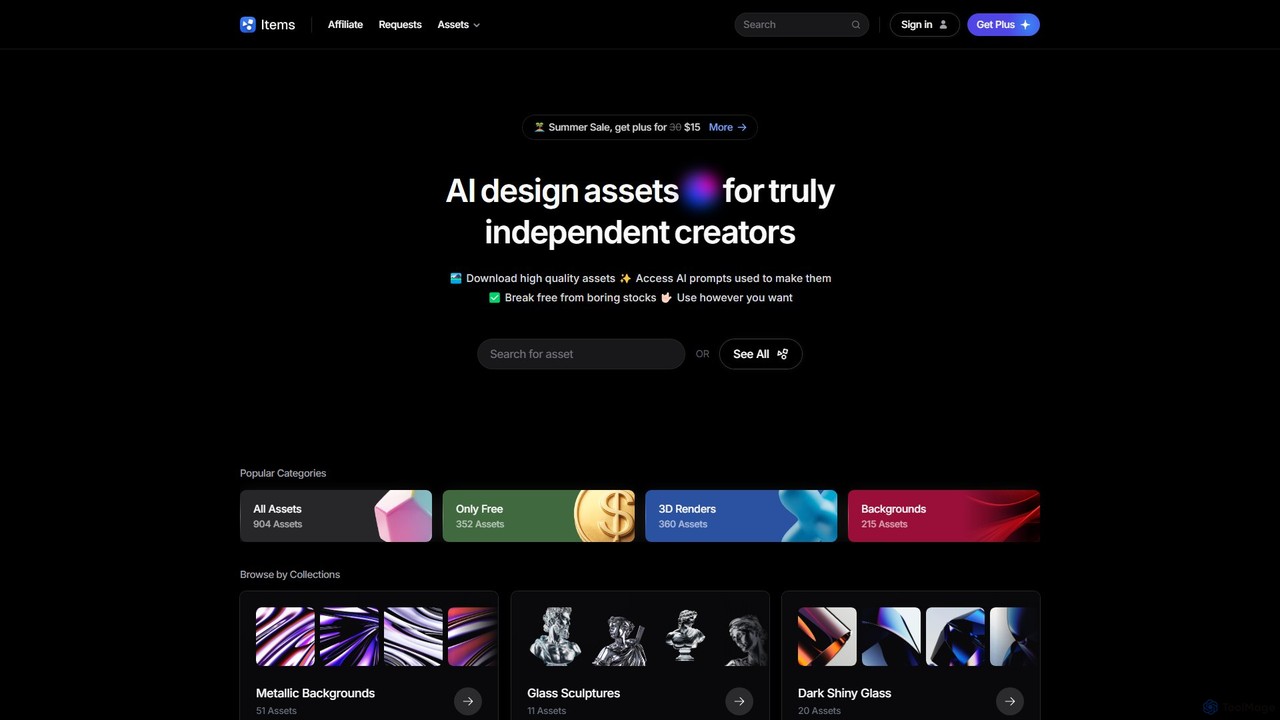
Items.Design is a curated library of high-quality, AI-generated design assets for independent creators. It offers a unique alternative to traditional stock photos, providing thousands of assets like 3D renders, backgrounds, and icons. Each asset includes the original AI prompt, empowering users to generate their own variations and maintain creative control.

Asset Library
Visits 3.6KFavorites 135Likes 129

About 3D Graphics

AI 3D Graphics tools are a class of software that leverages artificial intelligence to generate or manipulate three-dimensional models, textures, and scenes. These tools often utilize generative models, such as text-to-3D algorithms or Neural Radiance Fields (NeRF), to create complex 3D assets from simple inputs like text descriptions or 2D images. Their primary value lies in dramatically accelerating the 3D content creation workflow, making it accessible to users without extensive traditional modeling skills. This technology enables rapid prototyping and asset generation for various digital media.

Core Features

  • Text-to-3D Generation: Creates 3D models directly from descriptive text prompts.
  • Image-to-3D Conversion: Generates a 3D mesh and texture from a single 2D photograph or illustration.
  • AI Texture Generation: Produces seamless, high-resolution textures based on text or image inputs.
  • Neural Radiance Fields (NeRF): Constructs detailed, photorealistic 3D scenes from a collection of 2D images.
  • Generative Asset Variation: Automatically produces multiple stylistic or structural variations of a base 3D model.

Applicable Scenarios

These tools are increasingly used in game development for rapid asset prototyping, in e-commerce for creating 3D product visualizations, and in AR/VR for building immersive environments. Architects and product designers also use them for quick concept modeling, while content creators leverage them to produce unique digital assets for animations and virtual productions.

How to Choose

When selecting an AI 3D Graphics tool, consider the input method (text, image, video), the quality and style of the output (photorealistic vs. stylized), and compatibility with standard 3D formats like OBJ, FBX, or glTF. Also evaluate the tool's ease of use, rendering speed, and whether it offers an API for integration into existing workflows. The pricing model, whether subscription-based or pay-per-generation, is another important factor.

Featured tool rankings

3D Graphics use cases

1

Rapid Prototyping of Game Assets

An indie game developer needs to populate a fantasy world with unique props. Instead of spending days manually modeling each item, they use an AI 3D tool. By inputting text prompts like 'glowing ethereal sword' or 'ancient stone altar with moss', they can generate dozens of 3D model variations in minutes. This allows them to quickly test different assets in their game engine, select the best ones, and then refine them using traditional software, drastically cutting down on initial production time.

2

Creating 3D Product Visualizations from Photos

An e-commerce manager wants to offer a 360-degree view of their products without a costly photoshoot. They upload several high-quality photos of a product from different angles to an AI Image-to-3D tool. The tool analyzes the images and generates a textured 3D model. This model can then be embedded on the product page, allowing customers to interactively rotate and inspect the item, which can improve engagement and conversion rates.

3

Generating VR/AR Environments with Text

A developer creating a VR training simulation needs to build a variety of realistic environments quickly. Using a text-to-3D tool, they can describe scenes like 'a modern office interior with large windows and city view' or 'a dense jungle with ancient ruins'. The AI generates a complete 3D scene that can be imported into a VR development platform. This approach allows for the rapid creation of diverse and immersive worlds without needing a large team of 3D artists, making VR/AR development more efficient.

4

AI-Powered Texture Creation for 3D Models

A 3D artist is working on a sci-fi character and needs a unique, complex texture for its armor. Instead of manually painting textures, which is time-consuming, they use an AI texture generator. They input a prompt like 'metallic alien plating with glowing blue circuits and subtle wear'. The AI generates several high-resolution, seamless texture maps (like diffuse, normal, and metallic) that can be directly applied to the 3D model. This process saves hours and provides creative options that might be difficult to conceive manually.

5

Conceptualizing Architectural Designs

An architect wants to quickly visualize a building concept for a client presentation. They use an AI tool to turn a simple 2D sketch or a text description like 'a three-story modern villa with a rooftop garden and glass facade' into a basic 3D model. While not a final blueprint, this AI-generated model serves as a powerful visual aid to communicate the initial design intent. It allows for rapid iteration and feedback collection before committing significant resources to detailed drafting in CAD software.

6

Generating Custom 3D Avatars from a Photo

A user wants to create a personalized avatar for a metaverse platform or game. They upload a single selfie to an AI-powered avatar creator. The AI analyzes facial features from the photo and generates a full-body 3D avatar that resembles the user. The user can then often customize hairstyles, clothing, and accessories. This process democratizes avatar creation, allowing anyone to have a unique digital identity without needing any 3D modeling skills, enhancing personalization in virtual spaces.

3D Graphics FAQ

What are AI 3D Graphics tools?

AI 3D Graphics tools are applications that use artificial intelligence, particularly generative models, to create or modify 3D assets. Instead of manual modeling, users can provide simple inputs like text prompts ('a red sports car') or 2D images to automatically generate 3D models, textures, or entire scenes. These tools are designed to accelerate creative workflows and make 3D content creation more accessible to a broader audience.

How do AI 3D tools differ from traditional 3D software like Blender or Maya?

The primary difference lies in the creation process. Traditional software like Blender or Maya requires manual, step-by-step creation: modeling, sculpting, texturing, and rigging. They offer precise control but have a steep learning curve. AI 3D tools automate the initial asset generation. They are best for rapid prototyping, concepting, and creating base models quickly from simple inputs. Often, assets generated by AI are then imported into traditional software for refinement and integration into a larger project.

What kind of quality can I expect from AI-generated 3D models?

The quality of AI-generated 3D models varies significantly between tools and is rapidly improving. Currently, many tools produce models that are excellent for concept art, prototypes, or as a base mesh for further sculpting. The mesh topology may not always be optimized for animation (e.g., clean quad-based geometry). Textures can range from basic color maps to more complex, photorealistic materials. For high-end production in film or games, models often still require manual cleanup and optimization by a 3D artist.

Who are AI 3D Graphics tools best suited for?

These tools are beneficial for a wide range of users. They are particularly valuable for:

  • Game Developers: For rapid prototyping of assets and environments.
  • Concept Artists: To quickly visualize ideas in 3D.
  • Architects and Designers: For creating initial 3D concepts from sketches.
  • Marketers and E-commerce Managers: To generate 3D product visuals without expensive photoshoots.
  • Hobbyists and Creators: Individuals without deep 3D modeling expertise can bring their ideas to life.
In essence, anyone who needs to create 3D content quickly and efficiently can benefit from these tools.

What should I consider when choosing an AI 3D Graphics tool?

When selecting a tool, consider the following factors:

  • Input Method: Does it work with text, images, or both?
  • Output Format: Can it export to common formats like .obj, .fbx, or .gltf that are compatible with your existing software?
  • Quality and Style: Does the tool's output match your desired aesthetic (e.g., photorealistic, stylized, low-poly)?
  • Ease of Use: How intuitive is the interface? Is it suitable for your skill level?
  • Speed and Cost: How quickly does it generate models, and what is the pricing structure (subscription, pay-per-model, etc.)?
Evaluating these points will help you find the tool that best fits your specific project needs and workflow.