
ToolMage
Sign in

Best 1 Graphic Design AI tools for Image Editing

Popular Graphic Design AI tools in Image Editing include Turbo Play, helping you work more efficiently.

Turbo Play
Freemium

Turbo Play

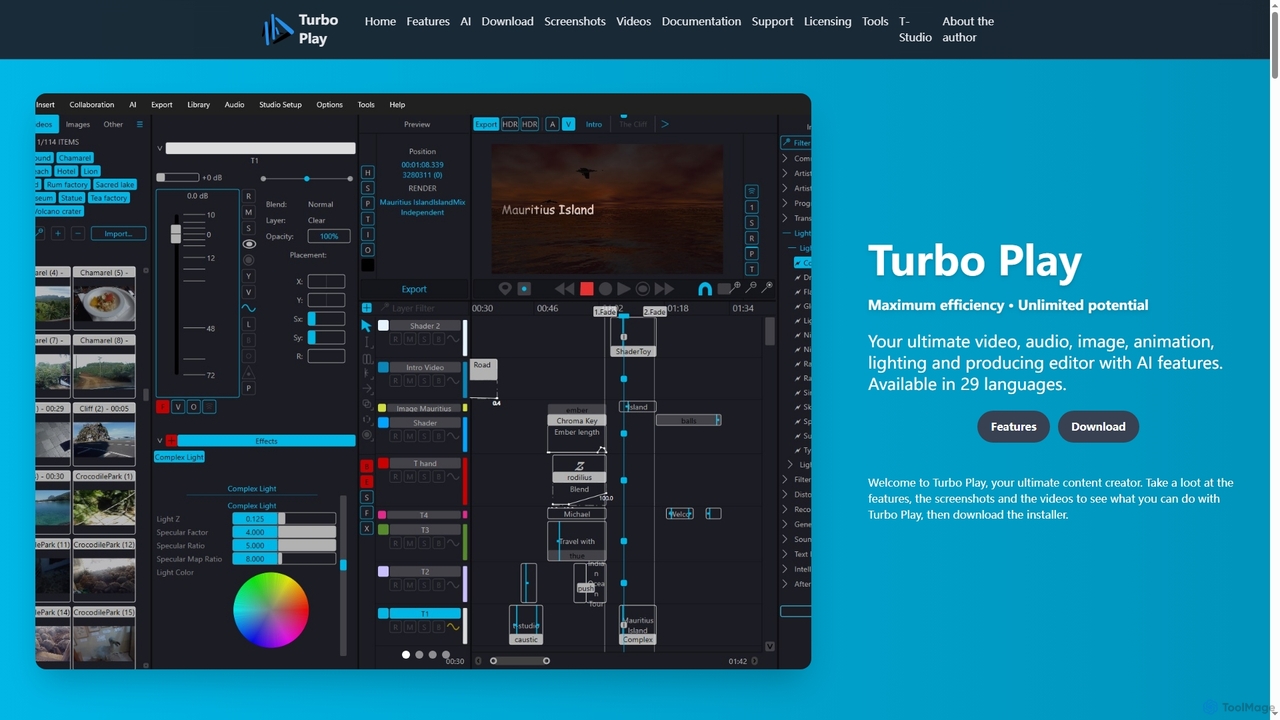
Turbo Play is an all-in-one AI-powered video, audio, image, and animation editor designed for maximum efficiency and unlimited creative potential. It offers a comprehensive suite of tools for content creation, including advanced AI features for background removal, face swapping, speech separation, and text-to-image generation, catering to both casual and professional users across 29 languages.

3D
Visits 5.4KFavorites 135Likes 150

About Graphic Design

AI Graphic Design tools are a specialized category within image editing, leveraging artificial intelligence to automate and enhance the creation of visual content for communication and branding. These tools utilize advanced algorithms to generate designs, suggest layouts, refine typography, and produce various graphic assets, significantly streamlining the design process. They empower both professional designers and individuals without extensive design experience to create high-quality visuals efficiently for marketing, branding, and digital media.

Core Features

  • Automated Layout Generation: AI suggests and arranges design elements for optimal visual balance.
  • Smart Logo & Brand Kit Creation: Generates unique logos and comprehensive brand identity assets based on user input.
  • Social Media Graphic Automation: Quickly produces engaging visuals tailored for various social platforms and formats.
  • AI-Powered Illustration & Iconography: Creates custom illustrations, icons, and visual elements from text prompts or style preferences.
  • Intelligent Color Palette & Typography Suggestions: Recommends harmonious color schemes and suitable font pairings for design projects.

Use Cases

AI graphic design tools are invaluable for marketing teams needing to produce a high volume of campaign visuals, small businesses creating their brand identity from scratch, and content creators looking to quickly generate engaging social media posts. They are also used by web developers for designing UI elements and by educators for creating visually appealing presentation materials.

How to Choose

When selecting an AI graphic design tool, consider its design versatility and the range of styles it can generate, the quality and customization options of its template library, and its integration capabilities with existing design software or marketing platforms. Evaluate the ease of use for your team's skill level, the output formats supported, and the pricing model to ensure it aligns with your budget and project requirements.

Graphic Design use cases

1

Generate Social Media Campaign Visuals

A digital marketing specialist needs to launch a new product campaign across multiple social media platforms daily. Using an AI graphic design tool, they input product details and campaign themes, and the AI generates a series of visually consistent posts, stories, and ad creatives, saving hours of manual design work and ensuring brand consistency.

2

Develop Brand Identity for Startups

A new startup requires a professional logo, color palette, and typography guidelines without hiring a full-time designer. An AI graphic design platform allows them to input their company name, industry, and desired aesthetic, generating multiple logo options and a complete brand kit that can be easily customized and applied across all their marketing materials.

3

Create Engaging Marketing Collateral

A small business owner needs to design flyers, brochures, and banners for an upcoming event or promotion. Instead of starting from scratch, they use an AI graphic design tool to quickly generate professional-looking marketing materials by selecting a template, inputting their text and images, and letting the AI optimize the layout and visual hierarchy, significantly reducing design time.

4

Design Custom Website UI Elements

A web developer is building a new website and needs unique icons, buttons, and background patterns that match the site's aesthetic. They leverage an AI graphic design tool to generate custom UI elements based on specific style parameters, ensuring a cohesive and professional look for the user interface without requiring extensive graphic design skills.

5

Produce Personalized Visuals for Email Marketing

An e-commerce manager wants to send personalized email newsletters with unique product visuals to different customer segments. An AI graphic design tool can quickly adapt existing product images or generate new ones with varied backgrounds, overlays, or text styles, making each email more engaging and relevant to the recipient, potentially increasing click-through rates.

6

Automate Presentation Slide Design

A consultant needs to prepare a visually compelling presentation for a client meeting but has limited time. By inputting key text and data, an AI graphic design tool can automatically suggest layouts, select appropriate imagery, and ensure consistent branding across all slides, transforming raw content into a polished, professional presentation in minutes.

Graphic Design FAQ

What are AI Graphic Design tools?

AI Graphic Design tools are software applications that use intelligence artificial to assist in or automate various aspects of visual content creation. Unlike general image editing tools that focus on modifying existing photos, these tools specialize in generating new designs, layouts, logos, illustrations, and marketing materials from scratch or based on prompts, making design more accessible and efficient.

How do AI graphic design tools work?

AI graphic design tools typically work by employing generative AI models, machine learning algorithms, and natural language processing. Users provide text prompts, select styles, or upload existing assets. The AI then analyzes this input, learns from vast datasets of design principles and images, and generates new visual content, suggests layouts, or refines elements like color palettes and typography to meet the design brief.

What are the main benefits of using AI for graphic design?

The primary benefits include significantly increased speed and efficiency in design workflows, making high-quality design accessible to non-designers, ensuring brand consistency across various assets, and fostering creativity by generating diverse design ideas. AI tools can automate repetitive tasks, allowing designers to focus on more strategic and creative aspects of their work, and reduce costs associated with traditional design processes.

How do AI Graphic Design tools differ from general AI Image Editing tools?

While both fall under the broader "Image Editing" category, AI Graphic Design tools primarily focus on creating new visual content for communication, branding, and marketing purposes, often involving layout, typography, and conceptual design. AI Image Editing tools, on the other hand, are typically geared towards modifying and enhancing existing photographs or raster images, such as retouching, background removal, or color correction. Graphic design tools emphasize generative capabilities for visual communication.

What should I look for when choosing an AI graphic design tool?

When selecting an AI graphic design tool, consider its specific design capabilities (e.g., logo creation, social media graphics, illustrations), the flexibility and customization options it offers, and the quality of its AI-generated output. Evaluate its user interface for ease of use, the range of supported export formats, integration with other design or marketing platforms, and its pricing structure. Also, check for the availability of templates and asset libraries that align with your needs.