ToolMage
Sign in

Best 1 Game Asset AI tools for Image

Popular Game Asset AI tools in Image include PixelVibe, helping you work more efficiently.

PixelVibe
Freemium

PixelVibe

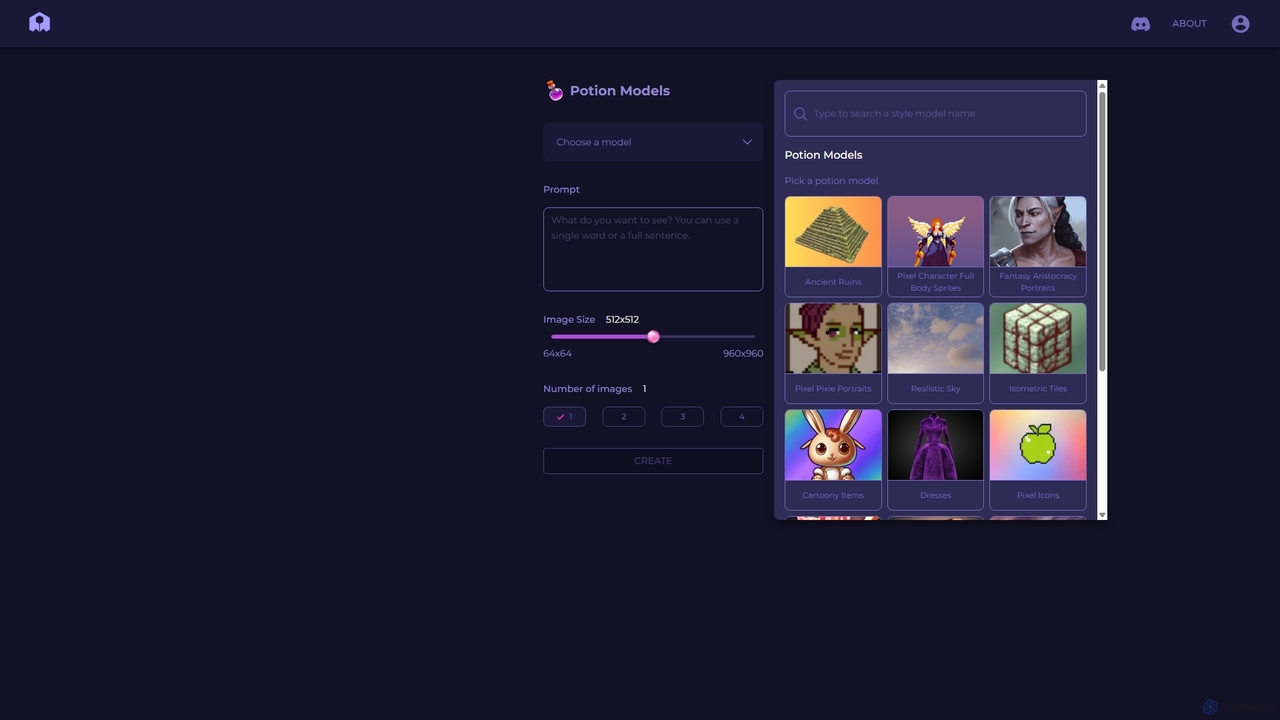
PixelVibe is a specialized AI-powered platform for generating high-quality, style-consistent game assets, pixel art, and illustrations. Using a variety of pre-trained models called 'Potion Models,' it enables game developers, designers, and artists to create unique character sprites, isometric tiles, icons, and environments from simple text prompts, dramatically accelerating the creative workflow.

Generative Art
Visits 5.5KFavorites 131Likes 143

About Game Asset

AI-powered Game Asset tools are specialized applications that leverage artificial intelligence to automate and enhance the creation of visual and auditory components for video games. These tools utilize advanced machine learning models, including generative adversarial networks (GANs) and neural radiance fields (NeRFs), to produce high-quality 2D sprites, 3D models, textures, animations, and sound effects. By streamlining the asset production pipeline, they significantly reduce development time and costs, enabling game developers and artists to rapidly prototype and iterate on game worlds and characters.

Core Features

  • Automated 3D Model Generation: Creates complex 3D models from text descriptions, 2D sketches, or reference images, often with PBR textures.
  • Texture & Material Synthesis: Generates realistic or stylized textures, normal maps, and PBR materials, ensuring visual consistency across assets.
  • 2D Sprite & Concept Art Creation: Produces diverse 2D game assets, character sprites, and environmental elements, accelerating concept design.
  • Animation & Rigging Assistance: Automates character rigging, generates motion sequences, and applies physics-based animations to models.
  • Sound Effect & Music Generation: Synthesizes unique sound effects, ambient audio, and background music tailored to game events and environments.

Use Cases

Game studios and independent developers utilize these AI tools to overcome common production bottlenecks. For instance, a small indie team can generate a vast library of environmental props and textures in a fraction of the time it would take manually. Large studios can use AI to rapidly prototype different art styles or generate variations of existing assets, ensuring a rich and diverse game world without extensive manual labor.

How to Choose

When selecting an AI Game Asset tool, consider its compatibility with your existing game engine (e.g., Unity, Unreal Engine) and 3D software. Evaluate the quality and variety of assets it can generate, its customization options, and the ease of integrating generated content into your workflow. Also, assess the pricing model, community support, and the learning curve associated with the tool's interface and features.

Game Asset use cases

1

Rapid Prototyping of Game Environments

Game designers and level artists can quickly generate diverse environmental assets like trees, rocks, buildings, and ground textures based on simple prompts or concept art. This allows for rapid iteration on level design and visual themes, enabling teams to test different aesthetics and gameplay scenarios without committing extensive manual art resources early in development. It significantly accelerates the initial phase of world-building.

2

Automated Generation of Character Variations

Character artists can use AI to create numerous variations of character models, outfits, and accessories from a base design. By inputting specific parameters or stylistic descriptions, the AI can generate unique character assets, saving countless hours of manual modeling and texturing. This is particularly useful for games requiring a large cast of non-player characters (NPCs) or customizable player avatars.

3

Efficient Texture and Material Creation

3D artists and environment artists can leverage AI to synthesize high-quality PBR (Physically Based Rendering) textures and materials. Instead of hand-painting or scanning, artists can describe desired material properties (e.g., "mossy stone," "rusty metal") or provide reference images, and the AI generates seamless, tileable textures with corresponding normal, roughness, and metallic maps. This ensures visual fidelity and consistency across game assets.

4

Streamlining 2D Sprite Production for Indie Games

Independent game developers often face limited resources for art creation. AI Game Asset tools can generate entire sets of 2D sprites for characters, enemies, items, and UI elements in various poses and animations from simple descriptions. This empowers solo developers or small teams to produce visually rich 2D games without needing extensive pixel art or illustration skills, accelerating development cycles.

5

Generating Dynamic Sound Effects and Background Music

Audio designers can utilize AI to create unique and context-aware sound effects (SFX) and ambient background music. By specifying game events, environments, or emotional tones, the AI can synthesize audio assets that perfectly match the game's atmosphere. This eliminates the need for extensive sound libraries or manual composition for every single audio cue, enhancing immersion and saving production time.

6

Converting 2D Concepts to 3D Models

Concept artists and 3D modelers can use AI to transform 2D concept art or sketches into preliminary 3D models. By feeding a 2D image to the AI, it can interpret depth and form to generate a basic 3D mesh, which can then be refined by artists. This bridges the gap between concept and production, speeding up the initial blocking out phase for complex assets and characters.

Game Asset FAQ

What are AI Game Asset tools?

AI Game Asset tools are software applications that use artificial intelligence, primarily machine learning and generative models, to create, modify, or optimize various components used in video games. These components include 2D sprites, 3D models, textures, animations, sound effects, and music. Their core purpose is to automate repetitive tasks and generate diverse content, significantly accelerating the game development pipeline.

How do AI Game Asset tools differ from traditional game asset creation software?

Traditional software (like Blender, Photoshop, ZBrush) requires artists to manually sculpt, paint, or animate every detail. AI Game Asset tools, while often integrated with traditional software, leverage algorithms to generate assets from high-level prompts, sketches, or existing data. This shifts the artist's role from manual creation to guiding and refining AI-generated content, enabling faster iteration and broader exploration of creative ideas.

What types of game assets can AI tools generate?

AI tools are increasingly versatile. They can generate a wide range of assets, including: Visual Assets: 2D sprites, character models, environmental props (trees, rocks, buildings), textures (PBR, stylized), normal maps, concept art, UI elements. Animation Assets: Character animations, motion capture data processing, rigging. Audio Assets: Sound effects, ambient sounds, background music, voice synthesis. The capabilities are constantly expanding.

How can AI Game Asset tools improve game development efficiency?

These tools boost efficiency by automating time-consuming tasks such as generating variations of models, creating seamless textures, or rigging characters. They enable rapid prototyping, allowing developers to quickly test different art styles or level designs. By reducing the manual workload, artists can focus on higher-level creative decisions and polish, leading to faster development cycles and potentially richer game worlds with fewer resources.

What should I consider when integrating AI Game Asset tools into my workflow?

When integrating AI tools, consider their compatibility with your existing game engine (e.g., Unity, Unreal) and art software. Evaluate the quality and consistency of the generated assets and whether they meet your game's aesthetic and technical requirements. Also, assess the learning curve for your team, the cost of the tool, and how well it integrates into your current asset pipeline for seamless production and iteration.