ToolMage
Sign in

Best 1 Prompt Engineering AI tools for Image

Popular Prompt Engineering AI tools in Image include ImagePrompt, helping you work more efficiently.

ImagePrompt
Freemium

ImagePrompt

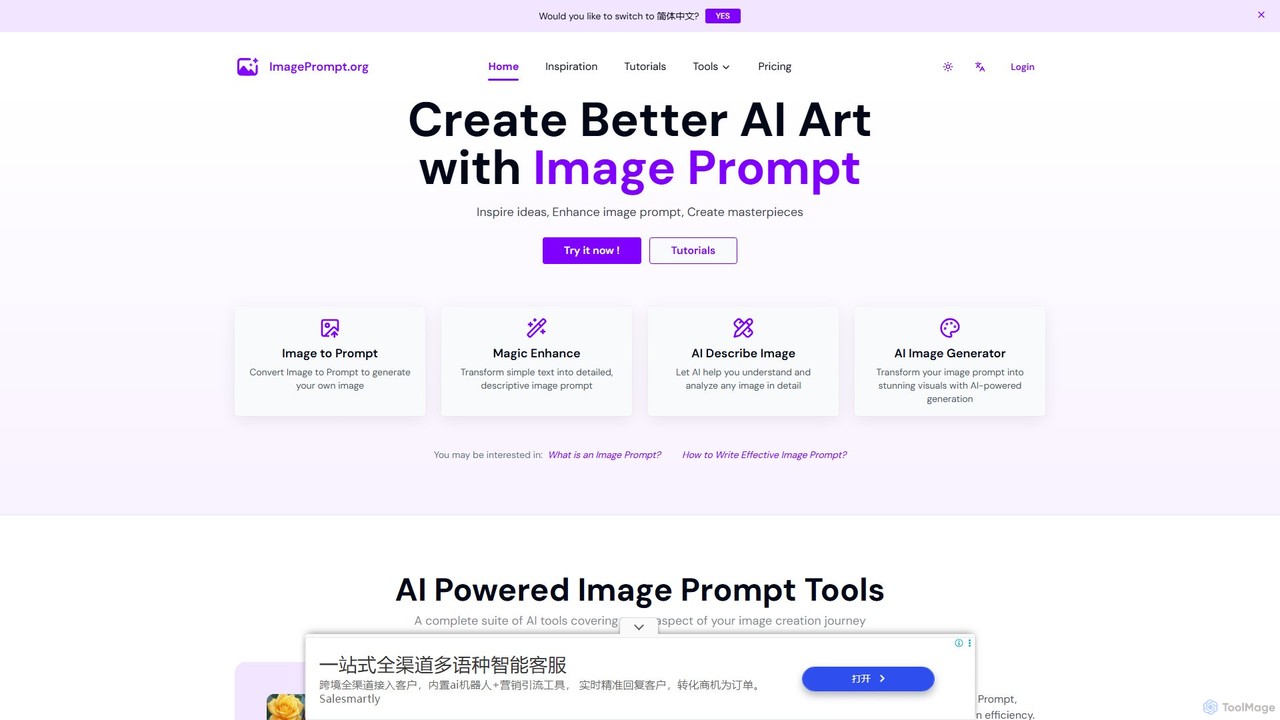
ImagePrompt is a comprehensive suite of AI tools designed to streamline the entire AI art creation process. It helps users generate detailed, optimized prompts from simple ideas or existing images, and then create stunning visuals with its integrated AI image generator. It's built to be accessible for both beginners and experts.

Image Generation
Visits 737.8KFavorites 205Likes 212

About Prompt Engineering

Prompt Engineering tools are specialized AI-powered platforms designed to optimize and refine text prompts for generating high-quality, precise AI images. These tools leverage advanced algorithms to help users craft effective instructions, ensuring AI image generators produce desired visual outputs with greater accuracy and artistic control. They are essential for anyone looking to move beyond basic image generation to achieve specific creative visions, troubleshoot common issues, and unlock the full potential of AI art.

Core Features

  • Prompt Generation & Suggestion: AI-assisted creation of initial prompts or suggestions for enhancing existing ones.
  • Prompt Refinement & Optimization: Tools to add details, adjust weights, rephrase, and structure prompts for better AI interpretation.
  • Negative Prompt Management: Features to define elements or styles to exclude from generated images, improving output quality.
  • Style & Parameter Control: Advanced options to fine-tune artistic styles, aspect ratios, seeds, and other model parameters.
  • Prompt Libraries & Templates: Access to curated collections of effective prompts and customizable templates for various visual styles.

Use Cases

Prompt Engineering is crucial for artists, designers, and marketers who need precise control over AI-generated visuals. It enables the creation of consistent brand imagery, detailed concept art, and photorealistic product mockups. Users can refine prompts to achieve specific lighting, textures, and compositions, ensuring the final image aligns perfectly with their creative brief.

How to Choose

When selecting a Prompt Engineering tool, consider its compatibility with your preferred AI image generators, the depth of its prompt customization options, and the quality of its prompt library. Evaluate features like negative prompt management, parameter tuning capabilities, and the user interface's ease of use for iterative experimentation. Look for tools that offer robust learning resources and community support.

Prompt Engineering use cases

1

Refining Artistic Styles for Concept Art

A concept artist uses Prompt Engineering tools to iterate on visual styles for game characters or environments. By experimenting with keywords like "cyberpunk," "steampunk," "impressionistic," and adjusting style weights, they can quickly generate diverse artistic interpretations from a single base idea, saving hours of manual sketching and rendering.

2

Generating Photorealistic Product Mockups

An e-commerce marketer needs high-quality, photorealistic images of a new product in various settings. They utilize Prompt Engineering to specify details like "studio lighting," "bokeh background," "product on wooden table," and "natural shadows," ensuring the AI generates professional-grade mockups that accurately represent the product without expensive photoshoots.

3

Creating Consistent Character Designs

A comic book artist or animator requires a consistent visual identity for a character across multiple scenes or poses. Prompt Engineering helps them define precise character attributes (e.g., "blue eyes," "red cape," "stoic expression") and maintain these details through various prompts, ensuring visual continuity and brand recognition.

4

Troubleshooting Undesirable Image Elements

A digital artist generates an image with an AI tool but finds an unwanted object or stylistic anomaly. They use negative prompts within a Prompt Engineering tool (e.g., "no blurry background," "no extra limbs," "no distorted faces") to guide the AI away from specific undesirable outcomes, refining the output without starting from scratch.

5

Exploring Diverse Visual Variations

A graphic designer is brainstorming logo ideas and needs a wide range of visual interpretations for a core concept. By using Prompt Engineering to explore variations in color palettes, textures, and artistic movements (e.g., "minimalist," "abstract," "geometric," "organic"), they can quickly generate hundreds of unique design options for client review.

6

Optimizing Prompts for Specific AI Models

A developer or advanced user works with different AI image generation models (e.g., Midjourney, Stable Diffusion, DALL-E) each with unique prompt interpretation. Prompt Engineering tools help them adapt and optimize prompts for each model's nuances, ensuring maximum performance and desired output quality across various platforms.

Prompt Engineering FAQ

What is Prompt Engineering for AI image generation?

Prompt Engineering for AI image generation is the practice of crafting, refining, and optimizing text instructions (prompts) to guide AI models in creating specific and high-quality visual content. It involves understanding how AI interprets language, experimenting with keywords, styles, and parameters, and using techniques like negative prompting to achieve precise artistic or functional outcomes from tools like Midjourney or Stable Diffusion.

How does Prompt Engineering differ from simply typing a prompt into an AI image generator?

Simply typing a prompt is a basic input. Prompt Engineering goes beyond that by systematically refining the prompt for optimal results. It involves iterative testing, using advanced syntax, incorporating negative prompts to exclude unwanted elements, and understanding model-specific parameters. This leads to more consistent, higher-quality, and precisely controlled image outputs compared to a casual, one-off prompt.

What are the key benefits of using Prompt Engineering tools for images?

The main benefits include enhanced creative control, allowing users to achieve highly specific visual outcomes that align with their vision. It significantly reduces the time spent on trial-and-error, improves image quality by minimizing undesirable artifacts, and enables greater consistency across multiple generated images. Prompt Engineering also helps unlock advanced capabilities of AI models, leading to more sophisticated and unique artwork.

Who can benefit from using Prompt Engineering tools for image creation?

A wide range of users can benefit, including digital artists, graphic designers, marketers, content creators, game developers, and researchers. Anyone who regularly uses AI image generators and seeks more control, precision, and efficiency in their creative process will find these tools invaluable. They are particularly useful for professionals needing consistent branding, specific visual styles, or complex scene compositions.

What should I look for when choosing a Prompt Engineering tool for image generation?

When choosing a tool, prioritize its compatibility with your preferred AI image generators and the breadth of its prompt customization features. Look for robust prompt libraries, intuitive interfaces for experimentation, and advanced options like negative prompt management and parameter tuning. Consider the availability of learning resources, community support, and whether it offers features for prompt versioning or A/B testing.