ToolMage
Sign in

Best 1 Ai Builder AI tools for No Code

Popular Ai Builder AI tools in No Code include Amarsia, helping you work more efficiently.

Freemium

Amarsia

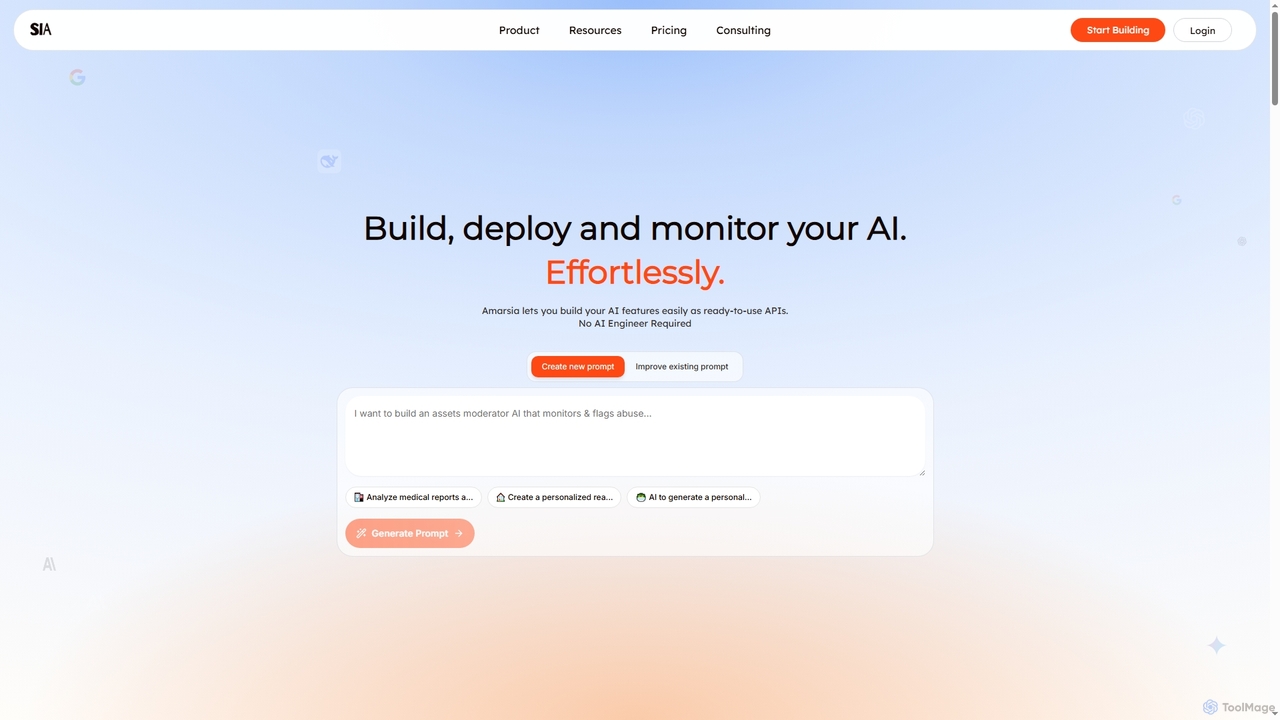
Amarsia is an intuitive platform designed to help teams effortlessly build, deploy, and monitor custom AI features as ready-to-use APIs. It eliminates the need for extensive coding or AI engineering expertise, enabling rapid development of intelligent workflows, knowledge bases, and multimodal AI solutions with built-in version control and performance monitoring.

Workflow Automation
Visits 3.4KFavorites 149Likes 143

About Ai Builder

AI Builders are a specialized category of no-code platforms that empower users to create, train, and deploy custom artificial intelligence models without writing any code. These tools utilize visual, drag-and-drop interfaces and pre-built components to abstract away the complexity of machine learning. They enable business users and citizen developers to build solutions for tasks like prediction, classification, and data extraction. AI Builders bridge the gap between standard business applications and complex data science, making AI development accessible to a wider audience.

Core Features

  • Visual Workflow Designer: Build and configure AI models using a graphical interface with drag-and-drop nodes and logic flows.
  • Pre-built Model Templates: Start with ready-to-use models for common tasks like sentiment analysis, object detection, or lead scoring, and customize them with your own data.
  • Automated Machine Learning (AutoML): The platform automatically handles tasks like feature selection, model training, and hyperparameter tuning to find the best-performing model.
  • Data Integration and Preparation: Connect to various data sources (databases, CRMs, spreadsheets) and use built-in tools to clean and label data for training.
  • One-Click Deployment: Deploy trained models as APIs or integrate them directly into other business applications with minimal effort.

Use Cases

AI Builders are frequently used by business analysts, marketing teams, and operations managers. For example, a marketing team can build a model to predict customer churn based on user behavior data. An operations department can create a workflow to automatically extract information from invoices and receipts, reducing manual data entry. They are ideal for creating custom AI solutions tailored to specific business processes without relying on a dedicated data science team.

How to Choose

When selecting an AI Builder, consider the types of models offered (e.g., prediction, text classification, computer vision) and whether they match your needs. Evaluate its data integration capabilities to ensure it connects with your existing systems. Assess the platform's ease of use and the level of customization it allows for model training. Finally, examine the pricing model, which may be based on the number of models, API calls, or training time, to ensure it aligns with your budget and expected usage.

Featured tool rankings

Ai Builder use cases

1

Automate Customer Support Ticket Routing

A customer support manager, without technical expertise, uses an AI Builder to create a text classification model. They upload historical support tickets and label them by category (e.g., 'Billing', 'Technical Issue', 'Feedback'). The platform's AutoML feature trains a model that understands the content of new incoming tickets. Once deployed, this model automatically categorizes and routes new tickets to the appropriate support team, reducing manual sorting time by over 70% and improving response times.

2

Create a Predictive Lead Scoring Model

A sales operations specialist wants to prioritize leads for the sales team. Using an AI Builder, they connect their CRM data, including lead attributes (company size, industry, source) and historical outcomes (converted or not). They build a prediction model to generate a 'conversion probability' score for each new lead. The sales team can now focus their efforts on high-scoring leads, increasing conversion rates and improving sales efficiency without needing a data scientist.

3

Develop an Invoice Data Extraction Tool

An accounts payable clerk spends hours manually entering data from PDF invoices into an accounting system. Using an AI Builder with object detection or form processing capabilities, they upload a few sample invoices and visually tag the fields they need to extract (e.g., 'Invoice Number', 'Total Amount', 'Due Date'). After a short training period, the AI model can automatically identify and extract this information from any new invoice with a similar format, integrating directly with their accounting software to eliminate manual entry.

4

Build a Social Media Sentiment Analyzer

A brand manager wants to track public perception of a new product launch. They use an AI Builder to create a sentiment analysis model. They connect to their brand's social media mentions via an API and provide a small, labeled dataset of posts (positive, negative, neutral). The platform trains a model to classify the sentiment of new, unseen posts in real-time. This provides the manager with an automated dashboard to monitor brand sentiment, identify potential PR issues, and gauge campaign success without manual analysis.

5

Detect Manufacturing Defects with Computer Vision

A quality control supervisor on a factory floor needs to identify defective products on a conveyor belt. Using a no-code AI Builder, they upload images of both 'good' and 'defective' products. They visually draw bounding boxes around the defects in the sample images. The platform then trains a custom object detection model. Once deployed and connected to a camera over the production line, the system can automatically flag defective items in real-time, improving quality control accuracy and speed.

6

Forecast Product Demand for Inventory Management

An e-commerce manager struggles with stockouts and overstocking. They use an AI Builder to create a time-series forecasting model. They connect historical sales data, along with influencing factors like marketing spend and seasonality, from a spreadsheet. The platform analyzes the data and builds a model that predicts future demand for various products. This allows the manager to optimize inventory levels, reduce holding costs, and ensure popular products are always in stock, all without writing complex statistical algorithms.

Ai Builder FAQ

What is an AI Builder?

An AI Builder is a type of no-code or low-code platform that allows users without data science expertise to create and deploy custom AI models. They provide visual interfaces, pre-built templates, and automated machine learning (AutoML) to simplify the entire process, from data preparation and model training to deployment. Essentially, they make building AI solutions accessible to business users, analysts, and citizen developers.

How is an AI Builder different from a standard No-Code platform?

While both fall under the no-code umbrella, their focus differs. A standard no-code platform is typically for building websites, mobile apps, or business process automations. An AI Builder is specifically designed for the lifecycle of an AI model. Its core features revolve around data connection, model training, evaluation, and deployment, rather than user interface design or general application logic. An AI Builder is a tool to create the 'intelligence' that can then be integrated into an application built with a standard no-code platform.

What kind of AI models can I build with an AI Builder?

AI Builders typically support a range of common business-oriented models. These often include:

  • Prediction: Forecasting numerical values, such as sales revenue or customer lifetime value.
  • Text Classification: Categorizing text, like routing support tickets or analyzing sentiment.
  • Object Detection: Identifying specific items within images, useful for quality control or inventory management.
  • Data Extraction: Pulling structured information from documents like invoices or forms.
  • Recommendation: Suggesting products or content based on user behavior.

The specific models available vary by platform.

Do I need to know how to code to use an AI Builder?

No, the primary purpose of an AI Builder is to eliminate the need for coding. These platforms are designed for users with business or domain expertise rather than programming skills. They use visual, step-by-step workflows and automated processes to handle the technical aspects of model building. While some platforms may offer advanced options for users with technical knowledge, the core functionality is entirely accessible without writing any code.

How to choose the right AI Builder for my business?

Choosing the right AI Builder involves several factors. First, identify your specific use case and ensure the platform offers the right type of model (e.g., prediction, text analysis, computer vision). Second, evaluate its integration capabilities with your existing data sources and applications (like CRMs or databases). Third, consider the user experience and ease of use for your team. Finally, analyze the pricing structure—whether it's based on usage, number of models, or a subscription—to ensure it aligns with your budget and scalability needs.