ToolMage
Sign in

Best 1 Voice Assistant for Speech

Popular Voice Assistant in Speech include Voxa, helping you work more efficiently.

Voxa
Freemium

Voxa

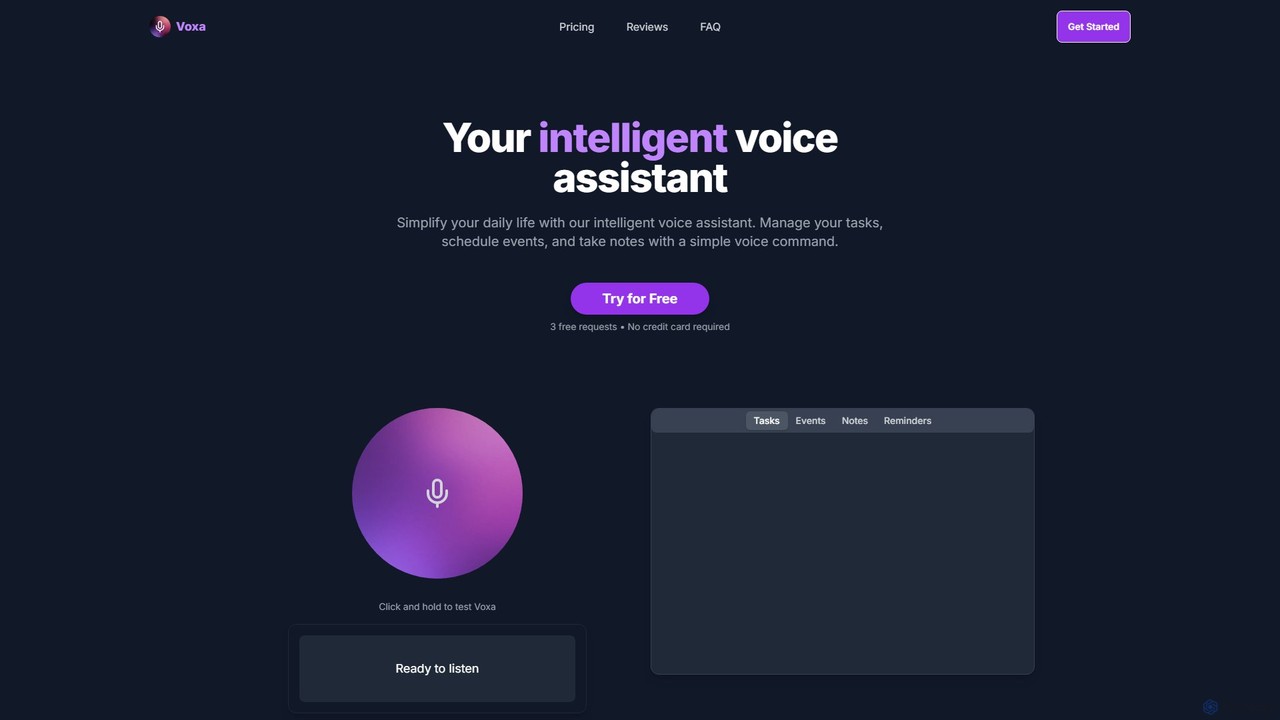
Voxa is an intelligent AI voice assistant designed to boost productivity. It allows you to manage tasks, schedule events, and take notes using simple voice commands. With seamless integration with Google Tasks and Google Calendar, Voxa streamlines your workflow, reduces app switching, and helps you stay organized effortlessly.

Calendar Assistant
Visits 4.8KFavorites 136Likes 105

About Voice Assistant

Voice Assistants are AI-powered software agents designed to understand and respond to human voice commands. They utilize Natural Language Processing (NLP), Speech-to-Text (STT), and Text-to-Speech (TTS) technologies to interpret user intent and provide audible replies. The primary value of a Voice Assistant is to perform tasks, retrieve information, and control devices hands-free, creating a seamless interactive experience. This makes them distinct from basic speech recognition tools by focusing on action and conversation.

Core Features

  • Natural Language Understanding (NLU): Interprets the intent and context behind user queries, not just keywords.
  • Task Execution: Performs actions like setting alarms, sending messages, or controlling smart home devices.
  • Conversational Dialogue: Engages in multi-turn conversations, remembering previous parts of the interaction.
  • Information Retrieval: Accesses and vocalizes information from the internet or connected databases to answer questions.
  • Personalization: Learns user preferences, habits, and voice to provide tailored responses and suggestions.

Use Cases

Voice Assistants are integrated into various platforms. They are commonly found in smart speakers (like Amazon Echo, Google Home), smartphones (Siri, Google Assistant), and modern vehicles for hands-free control. In business, they power interactive voice response (IVR) systems for customer service and provide in-app guidance for users.

How to Choose

When selecting a Voice Assistant tool or platform, consider its integration capabilities with other software and hardware (APIs). Evaluate its accuracy in understanding specific languages, dialects, and accents. For business applications, assess the level of customization available for wake words, voice, and branding. Finally, review the platform's privacy policy and data handling practices.

Featured tool rankings

Voice Assistant use cases

1

Smart Home Automation and Control

Homeowners use voice assistants integrated into smart speakers or hubs to manage their connected devices hands-free. For example, a user can say, 'Set the living room temperature to 22 degrees,' 'Dim the lights by 50%,' or 'Show me the front door camera.' This centralizes control of various systems like lighting, climate, entertainment, and security, making daily routines more convenient and accessible for everyone in the household.

2

Hands-Free Productivity for Professionals

Professionals on the go, such as sales representatives or consultants, use voice assistants on their smartphones or in-car systems to stay productive. They can dictate and send emails, schedule meetings, set reminders for follow-ups, or initiate calls without touching their device. This allows for efficient time management during commutes or when multitasking, ensuring that important tasks are captured and acted upon immediately.

3

Automated Customer Service and Support

Businesses deploy voice assistants as the first point of contact in their customer service channels. A customer calling a support line can interact with an AI assistant to check an order status, pay a bill, or get answers to frequently asked questions. This system can handle a high volume of routine inquiries 24/7, freeing up human agents to focus on more complex issues and reducing customer wait times significantly.

4

In-Vehicle Navigation and Infotainment Control

Drivers use built-in or smartphone-connected voice assistants to operate their vehicle's systems safely. They can ask for directions to a destination, find nearby points of interest, change the radio station, or play a specific song or podcast. This hands-free interaction is critical for safety, as it allows drivers to keep their hands on the wheel and their eyes on the road while still accessing essential navigation and entertainment functions.

5

Accessibility Tool for Users with Disabilities

For individuals with visual impairments or motor disabilities, voice assistants are a transformative technology. Users can navigate their smartphones, compose and listen to messages, browse the web, and control their environment (like smart home devices) entirely through voice. This provides a level of independence and access to digital information that was previously difficult to achieve, making technology more inclusive.

6

Personalized Daily Briefings and Information

Users can start their day with a customized summary delivered by their voice assistant. By saying a simple command like 'Good morning,' the assistant can provide a weather forecast, read top news headlines from preferred sources, review the day's calendar appointments, and give an update on traffic for the morning commute. This consolidates essential daily information into a single, convenient, audible report, streamlining morning routines.

Voice Assistant FAQ

What is a Voice Assistant?

A Voice Assistant is an AI-powered software agent that understands natural human language to perform tasks, answer questions, and control other devices. Unlike basic speech-to-text tools, a voice assistant uses Natural Language Understanding (NLU) to interpret intent and context, allowing for conversational interactions. Key applications include smart home control, hands-free device operation, and automated customer support.

How does a Voice Assistant differ from speech recognition software?

The key difference lies in capability and intent. Speech recognition software (part of the broader Speech category) primarily focuses on one task: converting spoken words into text (Speech-to-Text). A Voice Assistant is a complete application that uses speech recognition as one component. It goes further by:

  • Understanding Intent: Using NLU to grasp what the user wants to do.
  • Executing Actions: Integrating with other apps and devices to perform tasks.
  • Providing Responses: Using Text-to-Speech to reply in a human-like voice.

In short, speech recognition transcribes, while a voice assistant understands and acts.

How do I choose the right Voice Assistant?

Choosing the right voice assistant depends on your specific needs. Consider the following factors:

  • Ecosystem Integration: Does it work well with the devices and platforms you already use (e.g., iOS/Siri, Android/Google Assistant, Amazon/Alexa)?
  • Functionality: Does it support the specific commands and skills you need, such as controlling certain smart home brands or integrating with your work calendar?
  • Language and Accent Support: How accurately does it understand your specific dialect or accent?
  • Privacy Controls: Review the options for managing your voice data and interaction history.
What are the main security and privacy concerns with Voice Assistants?

The primary concerns involve data collection and potential misuse. Voice assistants often need to listen for a 'wake word,' which raises questions about what is being recorded and when. Other concerns include how voice recordings are stored, who has access to them, and how this data is used for advertising or other purposes. Reputable providers offer dashboards to review and delete voice history and provide clear policies on data usage.

Can Voice Assistants be customized for a specific business?

Yes, many voice assistant platforms are designed for business customization. Companies can create custom 'skills' or 'actions' that integrate with their own services. For example, a bank could create a skill allowing customers to check their balance by voice. Customization can also include creating a unique brand voice (a specific TTS voice), a custom wake word, and defining specific conversational flows to handle industry-specific queries for customer service or internal operations.