Ethertext
Ethertext is an AI-powered clipboard assistant for macOS that supercharges your productivity. It allows you to instantly transform, …
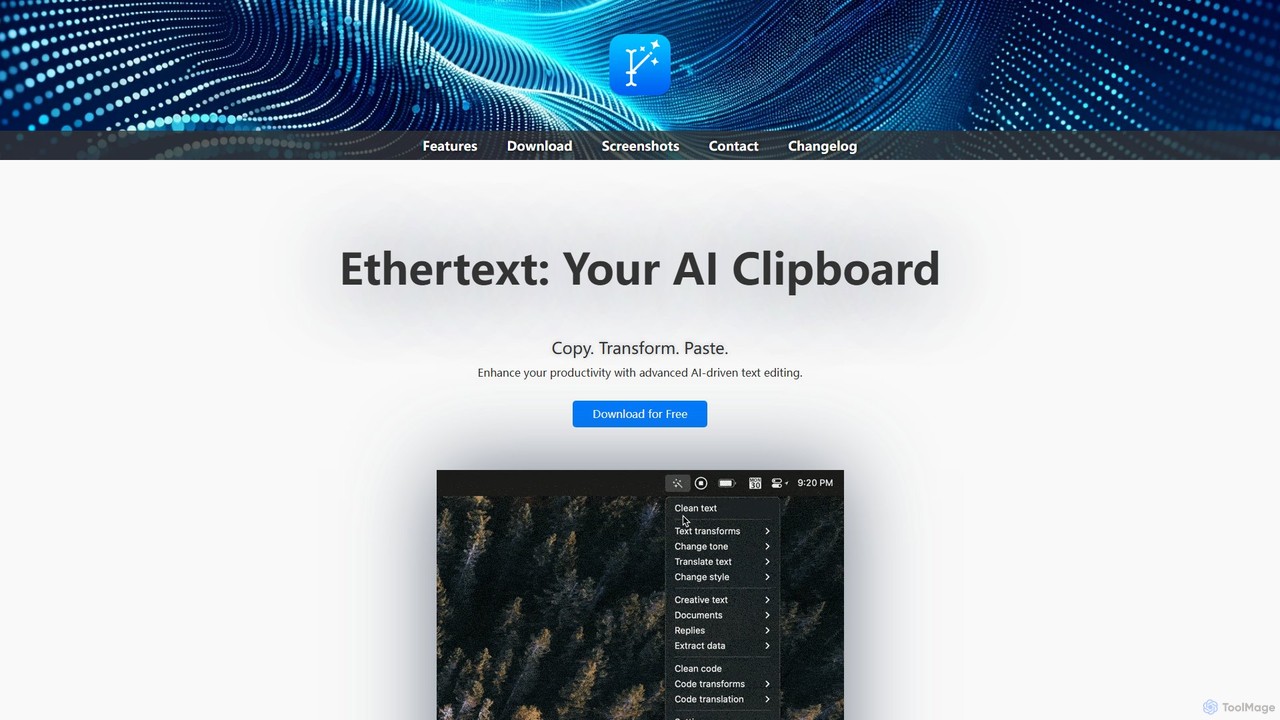
Ethertext is an AI-powered clipboard assistant for macOS that supercharges your productivity. It allows you to instantly transform, edit, and enhance any text you copy. With support for major AI models like OpenAI, Gemini, and Claude, as well as local models via Ollama, it offers powerful text and code manipulation, a smart memory feature, and seamless integration into your daily workflow through keyboard shortcuts.
About Clipboard Manager
A Clipboard Manager is a system utility that expands the basic copy-paste function by creating a searchable history of everything you copy. These tools go beyond the single-item memory of a standard clipboard, allowing you to access text, images, and links copied minutes, hours, or even days ago. Many modern clipboard managers integrate AI to offer features like content summarization, translation, or format conversion directly within the tool. This transforms a simple memory utility into a powerful productivity hub for managing information flow across applications.
Core Features
- Unlimited Clipboard History: Stores an extensive log of copied items, preventing the loss of important information.
- Advanced Search & Filtering: Quickly locate past entries using keywords, content type, or the source application.
- Cross-Device Sync: Access your clipboard history seamlessly across multiple computers and mobile devices.
- Snippet & Template Management: Save and organize frequently used text blocks, such as code snippets or canned email responses, for quick insertion.
- AI-Powered Transformations: Utilize integrated AI to translate, rephrase, summarize, or extract data from copied content without switching apps.
Use Cases
Clipboard managers are invaluable for developers handling numerous code snippets, writers and researchers gathering information from various sources, and customer support agents using standard replies. They are also essential for data entry specialists, social media managers, and anyone who frequently juggles information between different windows and applications, significantly reducing repetitive actions.
How to Choose
When selecting a Clipboard Manager, consider its platform compatibility (macOS, Windows, mobile) and the reliability of its cross-device sync. Evaluate the power of its search function—does it support OCR for images or semantic search? Assess the scope of its AI features and ensure they align with your workflow. Finally, prioritize tools with strong security measures, such as end-to-end encryption, to protect your sensitive copied data.

Clipboard ManagerUse Cases
Accelerate Software Development Workflow
For software developers, managing numerous code snippets, API keys, and terminal commands is a daily task. A clipboard manager allows them to copy multiple pieces of code from a codebase or documentation without overwriting the previous one. Later, they can use the manager's search function to quickly find and paste the exact snippet needed, such as a specific function or configuration variable. This eliminates the need to constantly switch back and forth between files, saving significant time and reducing context-switching fatigue during complex coding sessions.
Streamline Content Research and Writing
Content creators and researchers constantly gather information from websites, PDFs, and other documents. A clipboard manager acts as a research assistant, allowing them to copy quotes, statistics, and URLs sequentially without losing any data. When it's time to write, they can open the clipboard history to view all collected items in one place. Some AI-powered managers can even help by summarizing copied articles or rephrasing sentences to avoid plagiarism, directly transforming raw research into structured content for a blog post or academic paper.
Enhance Customer Support Efficiency
Customer support agents frequently use standardized responses to answer common questions. Instead of searching through a document for the right template, they can store all canned responses as snippets in a clipboard manager. When a customer asks a question, the agent can use a simple shortcut or keyword to instantly paste the correct, pre-written response. This also applies to frequently needed information like user IDs, ticket numbers, or links to help articles. This practice dramatically speeds up response times, ensures consistency in communication, and allows agents to handle more support tickets effectively.
Manage Cross-Device Information Transfer
For users working across multiple devices, such as a desktop computer and a smartphone, transferring information can be cumbersome. A clipboard manager with cross-device sync solves this problem. A user can copy a link, address, or block of text on their computer, and it instantly becomes available to paste on their phone. This is ideal for sending directions from a map application on a PC to a phone for navigation, or for copying a two-factor authentication code from a phone to a desktop login screen. It creates a unified clipboard experience, making devices work together seamlessly.
Automate Data Entry and Form Filling
Data entry professionals and office administrators often need to fill out forms with repetitive information like names, addresses, company details, and phone numbers. A clipboard manager with snippet support allows them to save each piece of information under a short, memorable keyword (e.g., `!addr` for a full address). When filling out a form, they can simply type the keyword, and the full text is automatically inserted. This method is significantly faster and more accurate than manual typing or copying from a separate notes file, reducing errors and streamlining the entire data entry process.
Perform Quick Actions with AI Transformations
A marketer might copy customer feedback from a social media comment. With an AI-powered clipboard manager, they can instantly trigger an action without opening another app. For example, they could use a shortcut to translate the comment if it's in a foreign language, summarize a long review into key points, or even generate a polite draft reply based on the feedback's sentiment. This transforms the clipboard from a passive storage tool into an active command center, allowing users to process and act on information with unprecedented speed and efficiency, directly within their current workflow.