ToolMage
Sign in

Best 1 Ios App for Utilities

Popular Ios App in Utilities include Tweeties, helping you work more efficiently.

Tweeties
Freemium

Tweeties

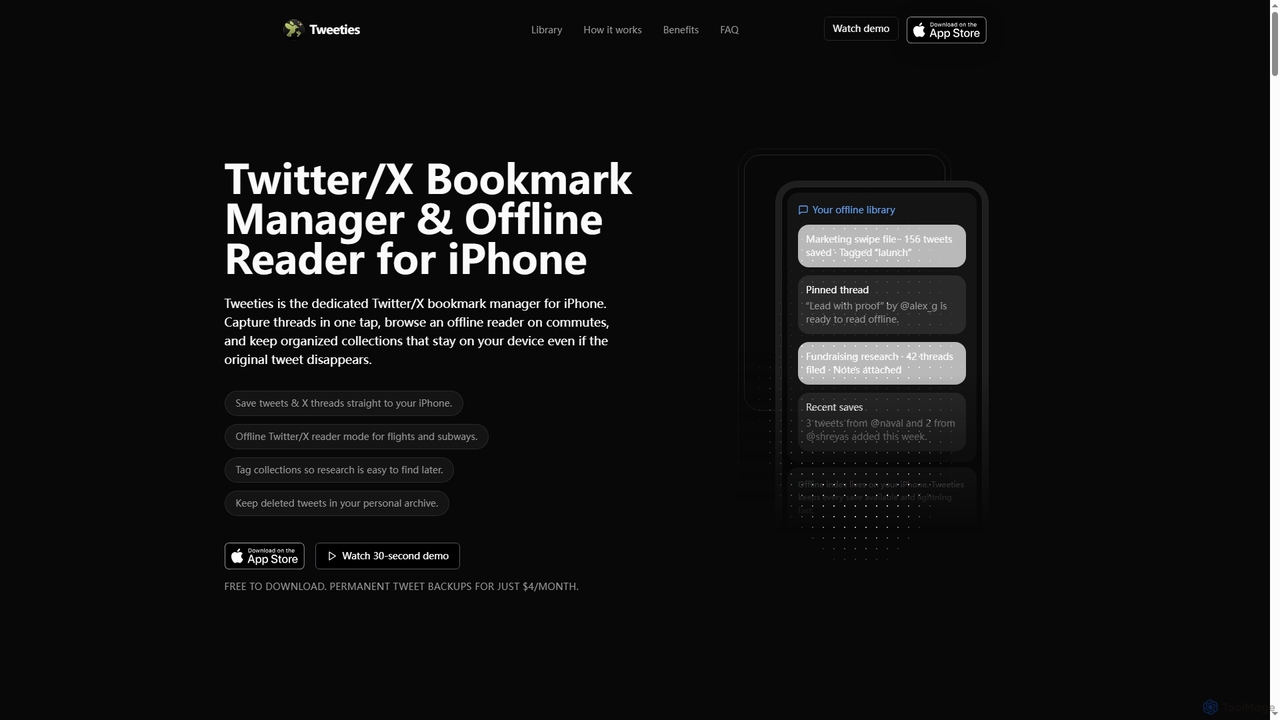
Tweeties is an iOS app designed to be your ultimate Twitter/X bookmark manager and offline reader. It allows iPhone users to save tweets and entire threads, organize them into custom collections with tags and notes, and access them offline. Crucially, it preserves content even if the original tweet is deleted, making it a reliable archive for valuable information.

Offline Reading
Visits 4.2KFavorites 121Likes 111

About Ios App

iOS App AI tools are a specialized category within utilities, leveraging artificial intelligence to enhance the functionality and user experience of applications specifically designed for Apple's iOS ecosystem. These tools integrate advanced AI capabilities like natural language processing, computer vision, and machine learning directly into mobile applications, enabling smart features such as intelligent assistants, real-time content generation, and personalized recommendations. They empower iPhone and iPad users with powerful, on-the-go solutions for productivity, creativity, and daily tasks, offering seamless integration with the iOS platform's unique hardware and software advantages.

Core Features

  • Intelligent Automation: Automate repetitive tasks, schedule reminders, or manage smart home devices directly from your iOS device using AI.
  • Personalized Content & Recommendations: Deliver tailored news feeds, music playlists, shopping suggestions, or learning paths based on user behavior and preferences.
  • Advanced Media Processing: Utilize AI for real-time photo and video editing, object recognition, background removal, or generating unique visual effects within iOS apps.
  • Natural Language Interaction: Enable voice commands, intelligent chatbots, or real-time translation features for intuitive communication and information retrieval.

Use Cases

iOS AI apps are indispensable for mobile professionals, content creators, and everyday users seeking enhanced productivity and convenience. They are used by designers for on-the-go mockups, by marketers for quick social media content generation, and by students for smart note-taking and language learning. Their optimized performance on Apple hardware makes them ideal for tasks requiring significant processing power directly on the device.

How to Choose

When selecting an iOS AI app, consider its specific AI capabilities and how well they align with your needs, such as NLP for writing or computer vision for image tasks. Evaluate its integration with other iOS features and apps, ensuring a smooth workflow. Check for performance optimization on your specific iOS device model and assess the pricing model, including subscription costs or in-app purchases, against the value it provides.

Featured tool rankings

Ios App use cases

1

Generate Social Media Content on the Go

Content creators use AI iOS apps to quickly generate captions, hashtags, and even short video scripts directly on their iPhone, leveraging AI to analyze trends and optimize engagement. This streamlines content creation for immediate posting, allowing marketers and influencers to maintain a consistent online presence without needing a desktop setup.

2

Enhancing Mobile Photography with AI Filters

For amateur and professional photographers using iPhones, AI-powered iOS apps can transform ordinary photos into stunning visuals. Users can apply intelligent filters that adapt to image content, automatically enhance colors, correct lighting, or even remove unwanted objects with a few taps. This allows for professional-grade photo editing directly on the device, saving time and eliminating the need for complex desktop software, making high-quality image creation accessible anywhere.

3

Streamlining Daily Task Management with Smart Assistants

Busy individuals and professionals often struggle with managing a multitude of daily tasks and appointments. iOS AI assistant apps learn user habits and preferences to proactively suggest tasks, optimize schedules, and send intelligent reminders. They can integrate with calendars, email, and messaging apps to provide a holistic view of commitments, helping users stay organized and productive without constant manual input, adapting to changing priorities throughout the day.

4

Real-time Language Translation in Conversations

Travelers or international business professionals utilize iOS AI translation apps to facilitate live, two-way conversations by instantly translating spoken words, breaking down language barriers during meetings or while navigating foreign countries. This provides immediate understanding and fosters smoother communication in diverse linguistic settings.

5

Intelligent Photo Editing and Enhancement

Mobile photographers and casual users employ AI photo apps on their iPad or iPhone to automatically enhance image quality, remove unwanted objects, or apply artistic filters with a single tap, saving significant time on manual adjustments. This allows for professional-looking results directly from a mobile device, ideal for quick sharing.

6

Generating Creative Content for Social Media On-the-Go

Social media managers and content creators frequently need to produce engaging posts quickly. iOS AI apps for content generation allow users to input text prompts or select themes to instantly generate captions, hashtags, or even short video scripts. Some apps can also suggest optimal posting times based on audience engagement data, enabling rapid content creation and scheduling directly from an iPhone or iPad, significantly boosting their mobile workflow efficiency.

7

Personalized Language Learning and Translation

Language learners and international travelers can leverage iOS AI apps for personalized education and real-time communication. These apps use AI to adapt learning paths based on individual progress, provide instant pronunciation feedback, and offer context-aware translations of text or speech. This creates an immersive and highly effective learning environment, allowing users to practice and communicate confidently in new languages anytime, anywhere, directly from their mobile device.

8

Automated Meeting Transcription and Summarization

Business users record meetings on their iOS devices, and AI apps transcribe the audio into text, identify speakers, and generate concise summaries or action items, making it easier to review discussions and follow up. This significantly boosts productivity by automating the note-taking process and ensuring no key details are missed.

9

Personalized Fitness and Wellness Coaching

Individuals use AI-powered fitness apps on their iPhone to track workouts, analyze performance, and receive personalized coaching plans or dietary recommendations based on their goals and progress, adapting in real-time. This offers a highly customized health and wellness experience, promoting better adherence and results without the need for a human coach.

10

Optimizing Fitness and Health Tracking

Individuals focused on health and wellness can utilize iOS AI apps to gain deeper insights into their fitness routines and dietary habits. These apps can analyze workout data from Apple Watch, track calorie intake through image recognition of food, and provide personalized recommendations for exercise and nutrition plans. The AI learns from user activity and goals, offering adaptive guidance to help achieve health objectives more effectively than traditional tracking methods.

11

Smart Document Scanning and Organization

Professionals and students use iOS AI apps to scan physical documents, convert them into editable text (OCR), and automatically categorize or tag them for easy retrieval, transforming their device into a portable scanner and filing system. This digitizes paperwork efficiently, making information searchable and accessible from anywhere.

12

Enhancing Accessibility for Users with Special Needs

iOS AI apps play a crucial role in making technology more accessible. For users with visual impairments, AI can describe images, read screen content aloud with natural voices, or identify objects in real-time using the camera. For those with hearing impairments, AI-powered live captioning can transcribe spoken words into text instantly. These applications leverage advanced AI to bridge gaps, providing greater independence and ease of use for a diverse range of users.

Ios App FAQ

What are iOS AI Apps?

iOS AI Apps are mobile applications specifically designed for Apple's iOS operating system (iPhone, iPad) that integrate artificial intelligence capabilities. They leverage AI technologies like machine learning, natural language processing, and computer vision to offer intelligent features such as personalized recommendations, automated tasks, advanced photo editing, and smart assistants, enhancing user experience and productivity directly on mobile devices.

What are AI iOS Apps?

AI iOS Apps are mobile applications specifically developed for Apple's iOS operating system (iPhone, iPad) that integrate artificial intelligence capabilities. They leverage AI models for tasks like natural language processing, computer vision, and machine learning to offer enhanced functionalities, automation, and personalized experiences directly on your device. These apps aim to make mobile tasks smarter, faster, and more intuitive, fitting into the broader Utilities category by providing intelligent tools.

How do iOS AI Apps differ from general utility apps?

While general utility apps perform specific functions, iOS AI Apps go a step further by incorporating intelligence. They don't just execute commands; they learn, adapt, and make smart decisions. For example, a standard photo editor allows manual adjustments, whereas an AI photo editor can automatically enhance images based on content. They offer predictive capabilities, personalization, and automation driven by AI algorithms, making them more dynamic and intuitive.

How do AI iOS Apps differ from general utility apps?

While both provide practical tools, AI iOS Apps go beyond basic functionality by incorporating intelligence. General utility apps might offer a calculator or a simple photo editor. In contrast, an AI iOS App could be an intelligent calculator that understands natural language queries or a photo editor that automatically suggests enhancements and removes objects using AI, offering a more dynamic and adaptive user experience tailored to the mobile platform.

What are the key benefits of using AI apps on iOS devices?

The primary benefits include enhanced personalization, as AI apps learn user preferences to deliver tailored experiences. They offer significant productivity boosts through intelligent automation and smart assistance, simplifying complex tasks. Furthermore, they unlock advanced creative possibilities, such as AI-powered content generation and sophisticated media editing, all optimized for the performance and security of the iOS ecosystem, providing powerful tools on the go.

What are the key benefits of using AI iOS Apps?

The primary benefits include enhanced productivity through automation (e.g., smart note-taking, automated transcription), improved creativity with AI-powered content generation and editing, personalized experiences (e.g., adaptive fitness plans, smart recommendations), and often, better privacy and offline functionality due to on-device AI processing. They leverage the iOS ecosystem's strengths for seamless integration and optimized performance, making mobile tasks more efficient and intelligent.

Can AI iOS Apps process data offline?

Many AI iOS Apps are designed to perform certain AI tasks directly on the device, utilizing Apple's Neural Engine. This allows for offline processing of data, enhancing privacy and enabling functionality even without an internet connection. However, some advanced AI features, especially those requiring large cloud-based models or real-time data, may still require an internet connection to function fully, so it's important to check individual app specifications.

How to choose the best iOS AI app for my needs?

To choose the best iOS AI app, first identify your specific needs, whether it's for productivity, creativity, or daily assistance. Evaluate the app's core AI features and their effectiveness, checking reviews and demonstrations. Consider its integration with other iOS services and your existing workflow. Finally, assess the app's privacy policy, pricing model (one-time purchase vs. subscription), and user interface for ease of use and overall experience.

Can iOS AI Apps run offline, or do they always require an internet connection?

The ability of iOS AI Apps to run offline depends on their specific functionality and the AI models they use. Many simpler AI tasks, especially those leveraging Apple's on-device machine learning capabilities (like Core ML), can run entirely offline, such as basic image recognition or text processing. However, more complex AI operations, like real-time cloud-based natural language processing or large-scale data analysis, typically require an active internet connection to access remote servers and larger AI models.

What should I consider for data privacy when using AI iOS Apps?

When using AI iOS Apps, prioritize apps that emphasize on-device AI processing, as this keeps your data local and private. Always review the app's privacy policy to understand how your data is collected, used, and stored. Look for apps that offer clear data control options and adhere to Apple's strict privacy guidelines, ensuring your personal information is protected and you maintain control over your digital footprint.