ToolMage
Sign in

Best 1 Browser AI tools for Utilities

Popular Browser AI tools in Utilities include Lion Browser, helping you work more efficiently.

Lion Browser
Paid

Lion Browser

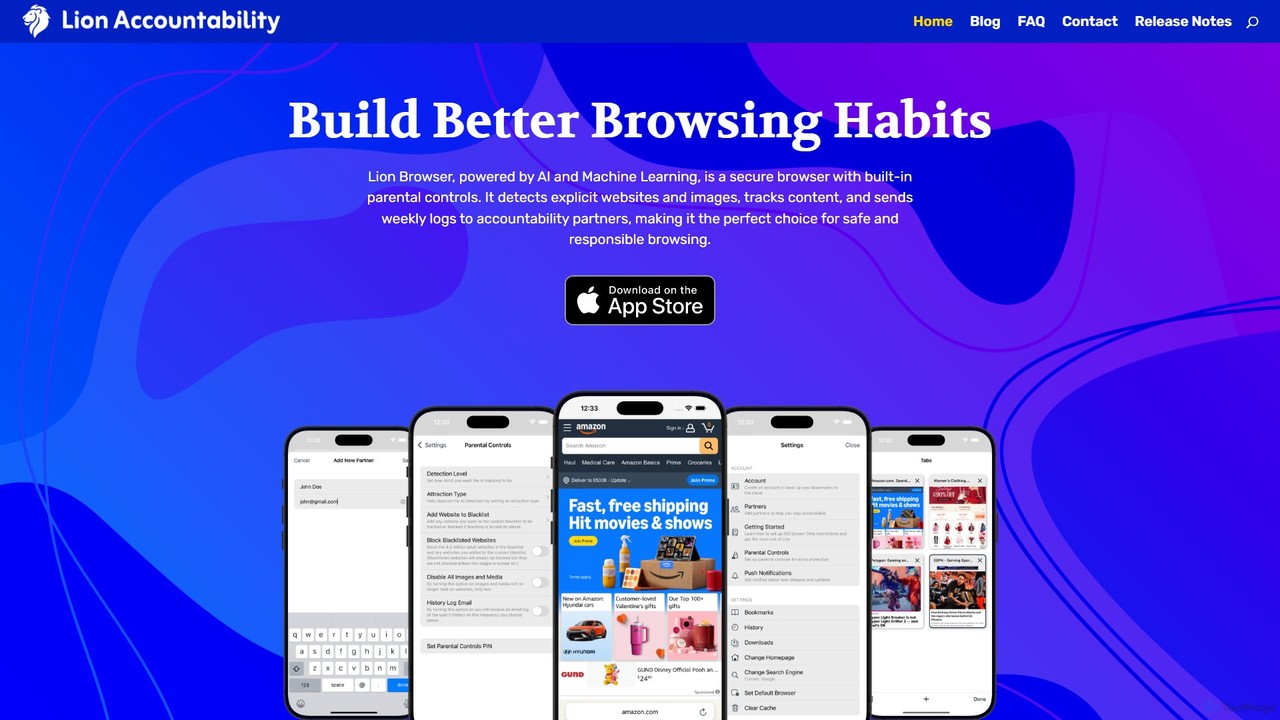
Lion Browser is a secure, AI-powered web browser for iOS designed to build better online habits. It features real-time explicit content detection, robust parental controls, and an accountability system that sends browsing reports to a partner. Focused on privacy and speed, it offers a safe and responsible browsing experience for individuals and families.

Focus
Visits 3.6KFavorites 138Likes 142

About Browser

AI Browsers are web browsers enhanced with artificial intelligence to fundamentally improve information discovery, organization, and productivity. These tools integrate AI directly into the browsing experience, transforming the browser from a passive content viewer into an active work partner. They can understand web page context, summarize complex articles, and automate repetitive tasks. As a specialized type of utility, AI Browsers focus on making web-based workflows more efficient and intelligent.

Core Features

  • AI-Powered Summarization: Instantly generate concise summaries of articles, research papers, or long web pages without leaving the tab.
  • Intelligent Tab & Workspace Management: Automatically group related tabs into organized workspaces for different projects or tasks.
  • Contextual AI Assistant: Access an AI chat or command bar that understands the content of your current page to answer questions or perform actions.
  • Integrated Content Creation: Draft emails, write social media posts, or generate code snippets based on the information on your screen.
  • Proactive Search & Discovery: Receive intelligent suggestions and synthesized answers directly from search results, reducing the need to click through multiple links.

Use Cases

AI Browsers are particularly valuable for knowledge workers, researchers, students, and developers. For instance, a market analyst can use it to quickly synthesize information from dozens of industry reports, while a student can use it to summarize academic papers for a literature review. They streamline any workflow that involves heavy online research and information management.

How to Choose

When selecting an AI Browser, consider the depth of AI integration—is it a simple sidebar or deeply embedded into core functions? Evaluate its performance and resource usage on your system. Also, check its privacy policy regarding data handling and its ability to integrate with other productivity tools you use, such as Notion or Slack.

Featured tool rankings

Browser use cases

1

Accelerate Market Research for Analysts

A financial analyst needs to compile a report on a new technology sector. Instead of manually reading through dozens of articles, reports, and news sites, they use an AI Browser. The browser automatically organizes all related tabs into a dedicated 'Tech Sector Research' workspace. The analyst then uses the built-in AI to generate a summary of all open pages, instantly highlighting key market trends, major companies, and growth forecasts. This reduces research time from hours to minutes, allowing for faster and more data-driven decision-making.

2

Streamline Academic Literature Reviews

A postgraduate student is conducting a literature review for their thesis, involving over 50 academic papers. Using an AI Browser, they can open multiple PDFs and web articles simultaneously. When encountering a dense paper, they use the AI assistant to summarize key sections like 'Methodology' or 'Conclusion'. They can also ask contextual questions such as 'What was the sample size in this study?' directly to the browser. This process helps them quickly identify the most relevant papers and synthesize findings efficiently, saving weeks of manual work.

3

Efficient Content Curation for Social Media

A social media manager is responsible for finding and sharing relevant industry news. They use an AI Browser to monitor several news feeds. When they find an interesting article, they can use the integrated AI to instantly draft a tweet, a LinkedIn post, and a short summary for an internal newsletter. The AI adapts the tone and length for each platform. This allows the manager to curate and share high-quality content across multiple channels in a fraction of the time it would normally take.

4

Automate Data Entry from Web Pages

A sales operations specialist needs to transfer contact information from various company websites into a CRM. This manual task is tedious and prone to errors. With an AI Browser, they can highlight a block of text containing a name, email, and phone number. The AI assistant recognizes the data structure and offers a one-click action to 'Add to CRM'. The browser automatically parses the information and populates the correct fields in the CRM system via an integration, ensuring accuracy and saving significant time on data entry.

5

Quickly Understand and Debug Code Snippets

A developer is troubleshooting a bug and finds a potential solution in a code snippet on a blog. The code is written in an unfamiliar syntax. Instead of opening new tabs to search for documentation, they highlight the code directly in their AI Browser. The AI assistant explains what the code does line-by-line, points out potential issues, and even suggests an optimized version. This contextual code analysis directly within the browser speeds up the debugging process significantly.

6

Personalized Travel and Itinerary Planning

A user is planning a multi-city trip to Europe. They have numerous tabs open for flights, hotels, train schedules, and tourist attractions. Their AI Browser automatically recognizes the theme and groups them into a 'Europe Trip' workspace. The user can then ask the AI, 'Based on my open tabs, create a 7-day itinerary for Paris and Rome.' The browser extracts dates, locations, and booking information to generate a structured draft itinerary, transforming a chaotic set of tabs into an actionable plan.

Browser FAQ

What is an AI Browser?

An AI Browser is a web browser with deeply integrated artificial intelligence features designed to enhance productivity and information management. Unlike standard browsers, they can understand the content on a page, allowing them to perform advanced tasks like summarizing articles, automatically organizing tabs into workspaces, and providing contextual assistance. They act as an intelligent partner for research, content creation, and managing online workflows.

How is an AI Browser different from a standard browser with extensions?

The key difference is the level of integration and synergy. While extensions add specific functions to a standard browser, they often work in isolation. An AI Browser has its core features built-in, allowing them to work together seamlessly. For example, the AI tab manager can communicate with the AI summarizer to provide a synopsis of an entire workspace. This deep, native integration results in a more fluid, powerful, and efficient user experience compared to managing multiple, separate extensions.

What are the key features to look for in an AI Browser?

When choosing an AI Browser, look for these essential features:

  • Contextual Awareness: The ability of the AI to understand the content of your current page to provide relevant help.
  • Summarization and Synthesis: Tools to quickly digest long articles or even summarize multiple sources at once.
  • Intelligent Organization: Features like automatic tab grouping, workspace creation, and smart history search.
  • Cross-Device Sync: The ability to sync not just bookmarks, but also workspaces and AI-generated notes across your devices.
  • Privacy Controls: Clear policies on how your data is used and options to control your privacy settings.
Who can benefit most from using an AI Browser?

While anyone can benefit from a more organized browsing experience, AI Browsers are particularly useful for individuals who handle large amounts of online information. This includes:

  • Researchers and Academics: For quickly reviewing literature and synthesizing data from multiple sources.
  • Students: To assist with research, summarizing study materials, and organizing project resources.
  • Content Creators and Marketers: For curating content, brainstorming ideas, and drafting copy based on web research.
  • Developers and IT Professionals: For understanding code snippets, debugging, and researching technical documentation.
Are AI Browsers secure and private?

Security and privacy models vary between different AI Browsers. Reputable providers prioritize user privacy by processing data locally on your device whenever possible or by anonymizing data sent to the cloud. Many also use AI to enhance security, offering more advanced phishing and malware detection than standard browsers. It is crucial to review the privacy policy of any AI Browser before use to understand how your data is handled and what controls are available to you.